
The Low End Mac Mailbag
Importance of G3 Support in 10.5, Clever USB/FireWire Solution, Upgrade Options, and More
Dan Knight - 2007.05.01
The mail has been pouring in on a lot of topics, especially last week's 30 Top Mac User Mistakes: How Many Are Apple's Fault?. We'll cover that in tomorrow's mailbag. Today we're looking at G3 support and Leopard, a clever, low-cost USB 2.0/FireWire solution, upgrades, and a lot more. - Tip Jar
- Why Apple Should Support G3 Macs in OS X 10.5
- Sabrent USB 2.0/FireWire 400 PCI Card and Internal Hub
- The Better Upgrade Path
- PowerBook Was a Great Name
- Upgrading to an Intel iMac
- Korg & Mac
- Problems Booting an Old Quadra
- Mac Classic Value
Why Apple Should Support G3 Macs in OS X 10.5
Following up on G3 Support in Leopard, Scott Cook writes:
I think Apple will miss out on a whole lot of switchers when they drop support for G3s. Your dual 1 GHz G4 Power Mac probably costs as much as a Mac mini today. All the switchers I've brought in were afraid to invest that much in a computer they were unfamiliar with.
I think dropping G3 support is a bad business decision if Apple wants to keep bringing in new customers.
I'm running Tiger on my 466 MHz G4 Power Mac right now. I also ran it on my modified 1,100 MHz G3 Power Mac. It runs well on both of them. I'm not a huge fan of Tiger.
I'm with you in that I like Panther better. I have Panther [10.3] on my 500 MHz iBook. I always use Panther on servers too. It's the best OS yet. I don't get into widgets much, and I haven't found a use for Spotlight or Automator or any of those other Tiger thingys.
Any version of OS X is far more stable than OS 9 for me. I ran Puma for years and didn't have any trouble with it. I was using Puma [10.1] as soon as the very first applications became available for it. I didn't switch to Panther until one of my applications needed it. I skipped Jaguar [10.2] and saved the hundred bucks.
I had a piece of hardware that required Tiger, so I bought it. I'll try to skip Leopard [10.5] or delay upgrading to it as long as possible.
I think it's fairly obvious that Apple is going out of the computer business anyway. This is a mixed blessing. We probably won't have to pay for a new version of OS X and applications every year from now on, which is real good.
Unfortunately there's no difference between a Mac and a PC anymore, except the Mac can boot into OS X. I don't intend to buy an Intel Mac. I'll stick with my G3 and G4 until they can no longer do what I need them to. I feel for those people who invested thousands of dollars in their G5 (sigh).
Many thanks for your great website and swap list. I read it every day (smile).
Scott
Hi Scott,
One nice thing about Leopard is that Apple is taking its time getting it out the door. When it finally ships in October, Tiger will be 2-1/2 years old. I think we'll all be able to say we got our money's worth from it.
I played a bit with the OS X beta and 10.1, but I didn't start using OS X until 10.2. That's when it really became usable, and 10.3 was better yet. As you note, probably the pinnacle of performance, as Tiger added a lot of feature bloat and programs that aren't easily turned off such as Spotlight and Dashboard (hooray for the free third-party apps that can disable them).
I don't think a lot of people paying less than $200 for a nice used Mac are going to be candidates for Leopard. We're looking at older computers, and they probably come with 10.2 or 10.3 installed, which is the best match for their hardware.
I don't think there's any chance of Apple getting out of the computer business. Since switching to Intel CPUs, unit sales are up 30% year-over-year, and having the ability to run Windows makes it that much easier for potential switchers to try the Mac without losing Windows-only apps they depend on.
There's a lot more to the difference between Macs and PCs than the ability to run OS X (which is regularly being hacked to run on Window hardware). There's the whole design issue - built-in speakers, internal iSight webcams, the iMac and Mac mini form factors. But in the end it is the Mac OS that makes a Mac a Mac.
Dan
Sabrent USB 2.0/FireWire 400 PCI Card and Internal Hub
 Mike
Ball writes:
Mike
Ball writes:
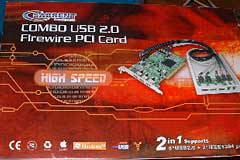
I hope this is not the wrong address to contact you. If it is, I apologize. I just read your article about the Sonnet Allegro USB 2 PCI card and thought you might be interested in something better that absolutely no one seems to know about, let alone write about.
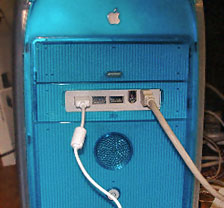
It is the Sabrent Combo USB 2.0 FW 400 Front Bay Hub for Mac and PC. Basically, you replace the Zip Drive in any G3 tower and G4 tower (Yikes!, Mystic, DA). It is a perfect fit, takes only minutes to install, and adds three USB 2.0 and two FW400 ports to the front of your machine - plus three more USB 2 ports via the PCI card for the back of your machine. With six USB 2.0, two USB 1.x ports, plus four FireWire 400 ports, I don't need an external hub. (BTW, the ports are powered too!) I plan on getting another for my newly acquired DP500 Mystic machine to see how it compares to my Daystar G4 600 upgraded Blue & White G3 running 10.4.9, which is in the photo.
 I
have been using this hub in the G4 B&W for about a year with
iPods, Kodak cameras, HP and Epson printers, flash drives, and
external DVD-RW drives with great success. Having the convenience
of ports on the front of my machine has been nothing short of
fabulous. Only a couple of hardware issues that had very easy
workarounds. Some very minor software issues, but again,
simple workarounds.
I
have been using this hub in the G4 B&W for about a year with
iPods, Kodak cameras, HP and Epson printers, flash drives, and
external DVD-RW drives with great success. Having the convenience
of ports on the front of my machine has been nothing short of
fabulous. Only a couple of hardware issues that had very easy
workarounds. Some very minor software issues, but again,
simple workarounds.
Although the box says compatible with OS X and Windows only, I've found it does work in OS 9.2.2 with FW, but USB works only at the USB 1.x speeds. If you'd like more info, I have a report on file if you're interested.
By the way, I spent $26 for this thing online at eCOST, which also included shipping (free ship special). It's nearest equivalent is the SIIG combo card which retails around $80. Quite a savings.
Thanks for your time.
Mike Ball, A+, N+, MCDST
Mac User/Owner since 1984
Thanks for sharing your find, Mike, it sounds like a great solution for any Mac with a Zip drive bay - possibly even the beige G3. It's especially nice that you've found it to work with Mac OS 9.x, as it tends to be the better OS for older Macs.
It's a shame the Classic Mac OS doesn't support USB 2.0 speeds, as the hardware itself is capable of supporting it (if that weren't the case, these PCI cards wouldn't provide USB 2.0 throughput under OS X), something that's been discussed recently on our PCI PowerMacs group.
It's a shame the Sabrent card/hub isn't better known - and too bad I have two SuperDrives in my Mirror Drive Door Power Mac and thus no room to install it.
Dan
The Better Upgrade Path
Hi Dan,
This is kind of related to the articles on keeping old Macs going. While it sometimes seems strange to spend $500 on a processor to put in a computer I spent $100 on, I've actually been pretty satisfied. I'm currently working on a G4 Digital Audio with all kinds of upgrades that cost about as much as my G4 mini, but seems to work better all around. Which leads me to my question.
I'm looking around for another base for an upgrade project, a souped up G4 for a home music studio. Which do you think would give me the biggest benefit. 2 GB RAM with a 100 MHz bus (AGP), or 1.5 GB RAM with a 133 MHz bus (Digital Audio)? I'd like both, but the price jump to a MDD would buy a lot of upgrades. Any thoughts?
Thanks for the site. It's one I usually check every morning.
Cheers,
Steve
Hi Steve,
I know where you're coming from. I love my Mirror Drive Door Power Mac G4/1 GHz dual. It has 1.75 GB of RAM, two USB 2.0 cards, the stock video card, and a 250 GB 7200 rpm Deskstar drive that I'm having some problems with and planning to replace. (I have a 400 GB Deskstar drive, and if that doesn't make things better, I've heard very good things about Western Digital and Seagate drives. After two bad Maxtor drives, I'm going to avoid that brand.)
The low-end philosophy is about having the right tool for the job, and I don't know enough about music software to be able to compare the pros and cons of an AGP Power Mac with 2 GB of RAM to a Digital Audio Power Mac with 1.5 GB. My instinct is to go with the model with the faster CPU and system bus.
Dan
PowerBook Was a Great Name
Joe Leo of PBCentral writes:
Hi Dan,
I liked your story today about Steve Jobs making all the Macs universal [Rebranding: They're All Macs Now].
I don't like how they got rid of the name PowerBook, because it's like they lost something BIG. Like you said, it was a recognized name associated with Apple, never mind that it didn't have the word "Mac" in it.
We associate "4Runner" and "RAV4" and "Camry" with Toyota, but there is not "Toyota" in the name.
Your article does beg one question. Should iMac turn into just the "Mac", suggesting a return to Apple's origins when they just had a computer called the Mac, as you pointed out too.
Hmm. Gives me an idea for a story. Since they're supposedly coming out with the next version of the iMac to reflect the change to Intel, since they kept the form factor of the iMac G5 (well, they did too with the MacBook Pros) when they turned them into Intel-based machines.
What computer do you have? I have a Mac. (You mean iMac? No, I have, a Mac).
Joe Leo, Columnist
PBCentral.com
"Your Mac® Notebook Resource"
[formerly PowerBook Central]
Joe,
I feel your pain. PowerBook was a great brand, and there was absolutely no reason for Steve Jobs to get rid of it except that it wasn't invented on his watch. It took a while, but the MacBook name is finally comfortable.
iMac was Jobs' first new brand after returning to Apple, so I doubt he'll ever rename the iMac. It's a solid, well known brand. Of course, we can call all of our iMacs, iBooks, PowerBooks, Power Macs, and minis Macs if we want to....
Dan
Upgrading to an Intel iMac
I have the 17 in, flatscreen iMac and I want to upgrade to the Intel chip, what do I need and what might the cost be?
Thanks
Shoun A. Hill
Shoun, there's only one solution: Buy an Intel-based iMac. There is no upgrade path from earlier iMacs.
Dan
Korg & Mac
Dan,
Saw the post about the Korg and Mac. For basic audio and MIDI production, GarageBand is a great start. The Swar plug-ins ought to show up in GarageBand as well. If GarageBand is a little too basic (and it is surprising how good it is!), Apple's Logic Express would be a good step up - especially as it GB is really a stripped version of Logic.
Other great music/audio software for the Mac includes:
- Digital Performer (http://www.motu.com)
- Cubase (www.steinberg.net)
- Ardour (Free but needs X11 and Jack installed) - not simple to set up, but very cool (www.ardour.org)
- Pro Tools (www.digidesign.com)
For notation driven work, Finale or Sibelius are great places to start as well.
Hope this helps
Ken Landers
Instructor of Audio Engineering Technology
Belmont University - Curb College of Entertainment and Music
Business
Ken,
Thanks for writing. I've forwarded your email to Sunil Patel.
Dan
Problems Booting an Old Quadra
Joseph Burke writes:
Do Macs use special hard drives? I just pulled a drive out of a 6100/66 that is a Seagate Barracuda ST32171N, but it doesn't have a red Apple sticker on it. I put it in my Quadra, but I get the disk with the flashing question mark. I also can't seem to boot Mac OS 7.6 from CD.
Maybe I'm doing that wrong. How do you boot from CD? Someone told me just to hold down C when booting. I thought that maybe the caddy loading drive wasn't bootable, so I put the drive from a Performa 6230 in it and still no boot.
Joseph,
Macs don't use special hard drives, just run of the mill SCSI drives on old Macs, IDE drives on newer Macs, and SATA drives on Intel Macs.
That said, Apple's drive utilities are only programmed to recognize Apple branded hard drives. We published Format Any Drive for Older Macs with Patched Apple Tools last week which explains how to modify HD SC Tools and Drive Setup to work with non-Apple drives.
The flashing question mark just means that the drive doesn't have a bootable system for the Mac you've put it in. It's possible that the 6100 owner installed a PowerPC-only version of the Mac OS, which can't boot a Quadra (or any other 680x0-based Mac).
You've been correctly advised on booting from CD: Insert the disc, start the computer, and hold down the C key. If it's not booting your Quadra, it's probably not a universal Mac OS 7.6 CD but instead one that only boots PowerPC Macs or perhaps only certain models.
Another possibility: If you're using a CD-R copy of the Mac OS CD, some older CD-ROM drives can't reliably read burned discs.
Hope this helps!
Dan
Joseph Burke responds:
I just thought you might be interested in my latest project. I am playing around with getting Tiger to run on my [Power Mac] 6500.
I found a PCI expansion from a Power Computing machine with three slots that I hope will work in the 6500. The one in the 6500 only comes with two slots. I am hoping that the Sonnet 7200 PCI slot accelerator will also work in the 6500. If it does, it should also get around the memory problem in the 6500 and the 2k DIMMs, because the G3 board comes with its own memory slots supporting up to 384 megs of RAM in addition to motherboard RAM, which should give enough room for Tiger to run in.
I wish I could find a pair of DIMM expanders that fit the slots in the 6500 but haven't had any luck. I found someone on a forum who said in his sig that he had a 6500 with 512 megs, but he doesn't know how it was done. He says he will open it up and see but hasn't gotten back to me yet. I think he is mistaken, but maybe there was some obscure memory upgrade for these machines that has since been forgotten about.
Do you know of any memory upgrades that were around back in the 90s that could bring a 6500 beyond 128 megs?
Joseph,
Good luck with your project. It can be a lot of fun seeing how far you can take an old Mac.
I haven't heard of anyone taking a 6500 beyond 128 MB of RAM. Vendors who specialize in Mac RAM list 128 MB modules that work in the 7200-9600, but nothing larger than 64 MB DIMMs for the 6500.
Dan
Mac Classic Value
Becky Swift says:
Dear Dan,
I don't know if you can help. Someone once told me that I might be able to get a bit of money for old Mac Classics. I have x 2 of these and an old StyleWriter II. A friend needs some money, and I am wondering if it is worth trying to sell these? I live in the UK. If you have an idea that would be great. I checked eBay and looks like they are only going for $10 or so, which isn't really what I had hoped for!
Anyway - I am sure you are very busy, but if you have any thoughts I'd be grateful.
All best,
Becky Swift
Hi Becky,
Thanks for writing. You've got to remember that these are 15 year old computers that run at 8 MHz, support no more than 4 MB of RAM, and don't work with a color monitor. There are no expansion slots. In terms of practicality, they're not good for much more than word processing.
From the collector's viewpoint, earlier compact Macs are much more interesting. The Classic sold very well, but that's part of the problem. There are a lot of them out there, so most collectors already have one or more.
$10 is about right.
Dan
Join us on Facebook, follow us on Twitter or Google+, or subscribe to our RSS news feed
Dan Knight has been publishing Low End Mac since April 1997. Mailbag columns come from email responses to his Mac Musings, Mac Daniel, Online Tech Journal, and other columns on the site.
Today's Links
- Mac of the Day: PowerBook 500 Series, introduced 1994.05.16. 'Blackbird' includes a 25 to 33 MHz 68040 along with smart batteries and grayscale or color displays.
- Support Low End Mac
Recent Content
back to the Low End Mac Mailbag index
About LEM Support Usage Privacy Contact
Follow Low End Mac on Twitter
Join Low End Mac on Facebook
Favorite Sites
MacSurfer
Cult of Mac
Shrine of Apple
MacInTouch
MyAppleMenu
InfoMac
The Mac Observer
Accelerate Your Mac
RetroMacCast
The Vintage Mac Museum
Deal Brothers
DealMac
Mac2Sell
Mac Driver Museum
JAG's House
System 6 Heaven
System 7 Today
the pickle's Low-End Mac FAQ
Affiliates
Amazon.com
The iTunes Store
PC Connection Express
Macgo Blu-ray Player
Parallels Desktop for Mac
eBay

