
Low End Mac Reader Specials
TypeStyler For Mac OS X is Now Shipping! Download The Free Fully Functional 60 Day Tryout at www.typestyler.com
OWC: We Make DIY Upgrading Easy! Maximize your Apple MacBook / MacBook Pro. Up to 8.0GB Memory, up to 1.0TB HD & More. Easy Guide + Free, Detailed Installation Videos. Click here
Don't install Parallels to play poker online! Poker Mac will show you how
to download and install a native Mac poker application such as Full
Tilt Poker Mac.
Laptop Hardware Provided by TechRestore - Overnight Mac & iPod Repairs.
Compare products like desktop computers, apple laptops, apple macs, and LCD Monitors side by side! All the information and reviews to make the best purchasing decision for new mobile phones, sat nav systems, or MP3 players. The Ciao online shopping community makes searching products easy for you.
Classic Restorations
Format Any Drive for Older Macs with Patched Apple Tools
- 2007.04.25
With these patches and tips, you'll never need an unreliable, inconvenient third-party hard disk driver again.
Apple HD SC Setup and Drive Setup are the standard tools that everyone has used to prepare vintage Macintosh hard drives. They're not as glamorous as FWB Hard Disk Toolkit or SoftRAID, but they're dependable day-in and day-out computing companions.
Their biggest limitation is that they are only compatible with a drive that came stock in a Mac.
Since we often upgrade our vintage Macs with more modern hard drives, we've been forced to use third-party hard disk drivers. This is inconvenient (and may even be technically illegal). Also, while many have had good luck with third-party hard disk drivers, they've been a source of heartache for me.
Wouldn't it be great it we could just use the appropriate Apple tool with any hard drive?
With these patches, it is possible - and it works great!
Introducing the Tools
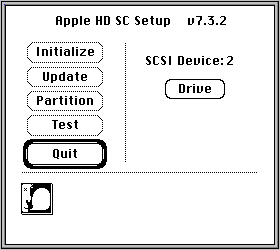
Apple HD SC Setup (named for the first external SCSI hard drive for Macs, Apple's 20-megabyte HD SC) is the venerable old standby. When Macs started coming with internal hard drives, its audience broadened, but its name never changed.
Drive Setup arose with the introduction of the Power Macs in 1994. When the LC 630 shipped a few months later, its IDE hard disk was also to be formatted with Drive Setup. Apple HD SC Setup and Drive Setup coexisted until Mac OS 7.6, which dropped the older program.
Two versions of Drive Setup are of current interest: 1.5 and 1.7.3. There are a few versions of Drive Setup newer than 1.7.3, but they are not available for download, so we won't worry about them. Drive Setup 1.7.3 does a fine enough job all the way up to Mac OS 9.2.2.
Choosing Your Formatter
The best tool to use depends upon your Macintosh situation.
For all Macs running "old" System Software from 6.0.1 through 7.1.1, I recommend Apple HD SC Setup. It is broadly compatible with these older System releases and is the tool they were designed to work with.
When I updated from HD SC Setup to Drive Setup on my SE/30, my hard drive performance doubled!
For 68030 and 68040 Macs (like Mac II and Quadra models) running newer Systems from 7.5 up to 8.1, I recommend using Drive Setup 1.5. Using Drive Setup instead of HD SC Setup can increase speed under System 7.5, and it's required for 7.6, 8.0, and 8.1. When I updated from HD SC Setup to Drive Setup on my SE/30, my hard drive performance doubled!
This version avoids a couple of nasty bugs present on 680x0 Macs in Drive Setup 1.6 and higher. See Joerg Erdei's Drive Setup FAQ for more information on why version 1.5 is the best Drive Setup for 680x0 Macs.
For Power Macs, I recommend Drive Setup 1.7.3 regardless of System software version. This latest downloadable version is compatible back to System 7.1.2 on the NuBus Power Macs and up to 9.2.2 on the last Classic-booting eMacs.
HD SC Setup
HD SC Setup is easy to download and patch. Grab the latest version (7.5.3) of the program from Apple (link at end of article). Next, download this patch. It will unstuff into a simple application that updates your copy of HD SC Setup to work on any drive.
Now you can format any extra hard drives by hooking them up to your Mac or copy the patched version onto your boot disks. Enjoy your newfound freedom to use Apple's HD SC Setup with any SCSI drive!
Drive Setup
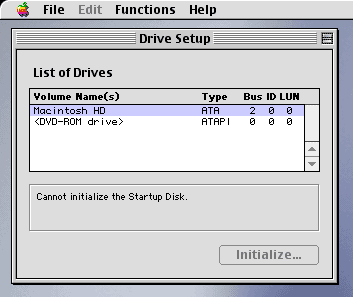
Patching Drive Setup is also a simple two-step process. Choose the appropriate version of Drive Setup and download it (links at end of article). Make sure to grab the right patch, too: version 1.5 or version 1.7.3. Unpack the program and the patch, launch the patcher, and follow the directions.
When you're done, you'll have a new copy of Drive Setup that identifies itself as having been patched. Launch this application or copy it to your boot disks and enjoy genuine Apple drivers on any hard drive!
Driven by Simplicity
As you can see, it's easy to use Apple's hard disk tools with any drive you might have. You'll gain the familiarity of the old standby tools and can forget all the hassles of discontinued, hard-to-find commercial software.
Next time you need to format a hard disk connected to a vintage
Macintosh, consider using HD SC Setup or Drive Setup in their
patched incarnations. I think you'll like the experience.
Download Links
Recent Classic Restorations articles
- Mac OS 8 and 8.1: Maximum Size, Maximum Convenience, 01.29. Mac OS 8 and 8.1 add some useful new features and tools, and it can even be practical on 68030-based Macs.
- System 7: Bigger, Better, More Expandable, and a Bit Slower than System 6, 01.21. The early versions of System 7 provide broader capability for modern tasks than System 6 while still being practical for even the lowliest Macs.
- The Joy of Six: Apple's Fast, Svelte, Reliable, and Still Useful System 6, 01.16. System 6 was small enough to run quickly from an 800K floppy yet powerful enough to support 2 GB partitions, 24-bit video, and the Internet.
- Mac System 7.5.5 can do anything Mac OS 7.6.1 can, 06.04. Yes, it is possible to run Internet Explorer 5.1.7 and SoundJam with System 7.5.5. You just need to have all the updates - and make one modification for SoundJam.
- More in the Classic Restorations index.
Links for the Day
- Mac of the Day: Power Mac 4400, Nov. 1996 - Apple does cheap to compete with clones - and nobody is impressed.
- Group of the Day: Puma List is for anyone using Mac OS X 10.1.
- November 7 in LEM history: 00: PowerBook Lite dreams - Our first Macs - 01: OS 9, OS X, or Linux? - 02: Xserve for the classroom - 03: Panther on slot-loading iMacs - High capacity Lombard/Pismo battery - 05: Clean keyboard residue from laptop screen with ROR - SeaMonkey - 06: Dan Bricklin, inventor of the spreadsheet - Turn any Mac into a gameshow buzzer - 07: The transforming PowerBook 1400 - PowerBook 540 on Compact Flash
Recent Content on Low End Mac
- Quad-Core CPU Makes Sense in MacBook Pro, OS X 10.6 Causing Overheating, Overseas Power, and More, The 'Book Review, 11.06. Also Late 2009 MacBook reviewed, how to add RAM to new MacBook, 18.4in Acer notebook used Intel i7, and SanDisk SSD chosen for Sony VAIO X.
- Dumping Macs for Google Apps, SSD in iMac, Late 2009 iMac Performance Problems, and More, Mac News Review, 11.06. /newsrev/09mnr/1106.html
- WiFi Paranoia, iMac-O-Lantern, Magic Mouse Does Click, Free Clipboard Managers, and More, Charles W. Moore, Miscellaneous Ramblings, 11.05. Also strange time stamps, problem with ColorIt on Intel Mac, and the story behind OS X 10.5.4 install discs.
- IDE Is Dead; Long Live SATA!, Dan Knight, Mac Musings, 11.04. SATA has displaced parallel ATA. While IDE hard drives haven't disappeared, the best deals are in SATA hard drives.
- QuickTime X in Snow Leopard Imports, Trims, and Publishes Video Quickly and Easily, Alan Zisman, Zis Mac, 11.04. The long, slow process of importing video into iMovie to edit it, then render it to another format, is history as QuickTime X does that much more quickly.
- More links in our archive.
Recent Deals
- Best Mac Pro Deals, 11.03. Used 2.66 GHz 4-core, $1,300; 3.0 8-core. $2,299; refurb 2.66 4-core Nehalem, $2,149; 2.93, $2,549; 2.26 8-core, $2,799; 2.93, $4,999.
- Best iPhone Deals, 11.03. New 8 GB iPhone 3G, $$99; refurb 16 GB 3GS, $149; new, $199; 32 GB, $299.
- Best 12" PowerBook G4 Deals, 11.03. Used 867 MHz SperDrive, $348; 1 GHz, $499; 1.33 Combo, $298; SD, $559; 1.5 Combo, $448; SuperDrive, $589.
- Best Power Mac G3 and PCI Video Card Deals, 11.02. Used beige 300 MHz, $25; G4/366, $49; blue & white 350, $80; 400, $90; 450, $105; PCI video cards from $15; shipping additional.
- Best Power Mac G4 and AGP Video Card Deals, 11.02. Used 400 MHz, $50; 733 MHz, $69; 933 MHz, $209; 1.25 GHz dual, $299.
- Best 15" MacBook Pro Deals, 11.02. Used 2.0 GHz, $800; 2.2, $900; 2.4, $1,000; refurb 2.53, $1,449; 2.66, $1,699; 2.8, $1,949; 3.06, $2,169; new 2.53, $1,579; 2.66, $1,799; more.
- Best Mac mini Deals, 10.30. Used 1.33 GHz G4 mini, $379; 1.42, $389; 1.5, $419; 1.83 GHz Core Duo, $350; Core 2, $439; new 2.26 GHz nVidia, $580; 2.53 GHz, $770; Server, $990.
- Best G4 iBook Deals, 10.30. Used 12" 1.07 GHz Combo, $225; 1.33 GHz, $298; 14" 1 GHz, $349; 1.33 GHz, $398; 1.42 GHz SuperDrive, $498.
- Best Classic Mac OS Deals, 10.30. System 6.0.8 floppies, $10; 7.1, $12; 7.5, $20; 7.5 CD, $4; 7.6 $13; 8.1, $11; 8.5, $20; 8.6, $90; 9.0, $20; 9.2.2, $30.
- More deals in our archive.
About LEM | Support | Usage | Privacy | Contacts
Navigation
Used Mac Dealers
Apple History
Video Cards
Email Lists
Favorite Sites
MacSurfer
MacMinute
MacInTouch
MyAppleMenu
InfoMac
Macs Only!
The Mac Observer
Accelerate Your Mac
RetroMacCast
PB Central
MacWindows
The Vintage Mac
Museum
DealMac
DealsOnTheWeb
Mac2Sell
ramseeker
Mac Driver Museum
JAG's House
System
6 Heaven
System 7 Today
the pickle's Low-End
Mac FAQ
Abandonware
Petition
Mac vs. PC Info
Affiliates
The Apple
Store
Mac
Connection
B&H
MacMall
TechRestore
ExperCom
Crucial
Memory
batteries.com
Advertise
MacMinute
MacInTouch
MyAppleMenu
InfoMac
Macs Only!
The Mac Observer
Accelerate Your Mac
RetroMacCast
PB Central
MacWindows
The Vintage Mac
Museum
DealMac
DealsOnTheWeb
Mac2Sell
ramseeker
Mac Driver Museum
JAG's House
System 6 Heaven
System 7 Today
the pickle's Low-End
Mac FAQ
Abandonware
Petition
Mac vs. PC Info
Mac Connection
B&H
MacMall
TechRestore
ExperCom
Crucial Memory
batteries.com
