
In the world of personal computing, you can never have too much speed, too much RAM, too much drive space, or too many USB ports.
My main computer is a 1 GHz dual-processor Mirrored Drive Door Power Mac G4 from 2002. I bought it used a couple years back, and it’s been a very reliable workhorse, replacing a 1.25 GHz eMac from 2004. With two CPUs and a dedicated AGP video card, this is a far faster machine – and I can boot it into Mac OS 9 if I need to.
Upgrades
My first upgrade was replacing the 80 GB hard drive with a 250 GB Maxtor DiamondMax 10. This speedy drive was quite affordable, about $100 at the time, and it served me well for over a year – until just 2-3 months out of warranty. A few months later, the matching Maxtor drive I used for backup experienced the same failure.
Lesson learned. I won’t buy another Maxtor drive. I’ve had great luck with IBM and Hitachi Deskstar drives, so I initially ordered a 250 GB Deskstar drive to replace my Maxtor. But a few months later, that drive was full. Next upgrade: a 400 GB Deskstar drive. That should give me breathing room!
I bought this computer with 768 MB of RAM, and increasing that to 1.75 GB made a real difference in performance. Your experience may be different, but I often run a dozen or more programs at once – including Classic Mode – and I take full advantage of all this memory.
About a year ago, I addressed this Power Mac’s last shortcoming. It has two USB 1.1 ports on the motherboard and no support for the faster USB 2.0 protocol. I picked up an inexpensive 2-port USB 2.0 card because I had some USB 2.0 peripherals. It worked just fine – but two USB 2.0 ports wasn’t enough. Even with hubs, I kept running out of ports.
Worse yet, some USB 2.0 devices want to be plugged into the computer, not into a USB hub.
Sonnet Allegro USB 2.0
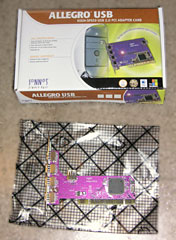 A reader emailed me about his experience with Sonnet’s Allegro USB 2.0 card, which provides four external USB 2.0 ports and one internal one. This sounded great, since I have several USB 2.0 devices that want to be plugged into the computer rather than a hub.
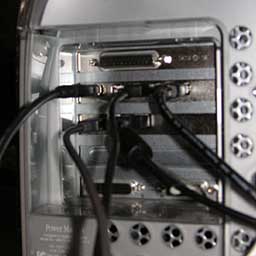
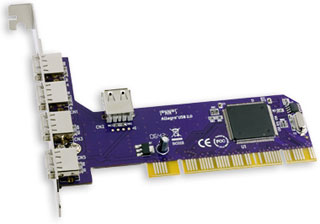 This is one small PCI card, as you can see in the photo (left). It’s only half the height of the card shown on Sonnet’s website, and I was surprised to see such a compact card. If fit very comfortably between my existing USB 2.0 card and my SCSI card (below right).
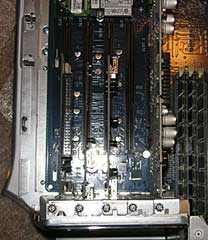
It took next to no time to install the card. I probably spent more time disconnecting cables than putting the card in place – and I definitely spent more time reconnecting wires after the installation.
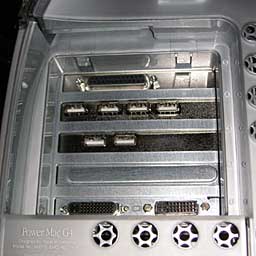 I’m running Mac OS X 10.4 Tiger on my Power Mac, and it immediately recognized the card. I now have two USB 1.1 ports, six external USB 2.0 ports, and two internal USB 2.0 ports. For the life of me, I don’t see any good reason for an internal USB 2.0 port, but if you wanted to hack a card reader or USB 2.0 hub into an empty drive bay, I suppose it would be useful.
Anyhow, I had no trouble using all of the external ports. I use one USB 1.1 port for the receiver of my Logitech Cordless Elite Duo, a keyboard/mouse combo I’ve used and loved for years. The other connects to my Tripp-Lite battery backup – there’s no need for USB 2.0 speed there.
Attached USB 2.0 devices include a film scanner, a card reader, an XLR8 ProView USB that lets me digitize analog video, two printers (a color Magicolor 2430D and a black & white Brother HL-5250DL printer), and two USB 2.0 hubs – one built into my Dell flat panel display and the other built into my computer desk.
These hubs make it easy to connect my flash drive, a USB mouse (when my cordless one needs to recharge), the other iPod dock cable, and my son’s Logitech USB headset (for use with Skype). And I haven’t even connected my Kodak photo printer….
I also have an external Newer Tech miniStack v2 (which I hope to review soon) plugged into one FireWire port and a dock for my iPod photo in the other.
Like I said, you can never have too many USB 2.0 ports.
If you don’t already have USB 2.0 in your Power Mac, this is a great way to add it (you must be running Mac OS X 10.2.8 Jaguar or later to support the maximum 480 Mbps USB 2.0 speed) and probably have ports to spare. If your Power Mac already has USB 2.0 and you need more ports, four more external ports for US$30 is a great way to be prepared for the future.
The Blue & White Power Mac G3 is the oldest Mac supported, and the Allegro USB 2.0 will work as a USB 1.1 card with Mac OS 8.6 through 10.2.7.
Update: Several readers have asked if I have any problems with sleep/wake. I have not noticed sleep/wake problems with either the Allegro or my other USB 2.0 card.
Also, Darren suggested some good uses for an internal USB port. My favorites were adding a USB Bluetooth module or an 802.11 WiFi module internally – clever! With a little work, you could also use it to add a USB port or card reader to the front of your Power Mac. In addition, Francis Gibson suggests using it for the USB dongle for a wireless mouse.
Further update: The Allegro USB 2.0 card also works in PCI-X slots. As of December 2014, it can be purchased from Amazon.com for $43.
Manufacturers and distributors: Interested in having your product reviewed? Please read our review policy.
Keywords: #usb2pcicard
Short link: http://goo.gl/Gx7dgL
searchword: sonnetusb2pcicard
