
Mac News Review
Fix for Sluggish Leopard Dialup, iMac a 3D Gaming Contender, Easter Mail Stationery, and More
This Week's Apple and Desktop Mac News
Compiled by Charles Moore and edited by Dan Knight - 2009.04.09
MacBook, PowerBook, iBook, and other portable computing is covered in The 'Book Review. iPod, iPhone, and Apple TV news is covered in The iNews Review.
All prices are in US dollars unless otherwise noted.
News & Opinion
- Possible Fix for Sluggish Dialup Performance in Leopard
- New High-end HP Machine Design Superior to Apple
Reviews
Products
Software
- ZoHo Writer Easy and Free Online Word Processor
- Free Mail Stationery Templates for Easter
- Easter Mail Stationery Pack for Mail
Desktop Mac Deals
News & Opinion
Possible Fix for Sluggish Dialup Performance in Leopard
An anonymous contributor to Mac OS X Hints says:
"I recently upgraded from Tiger 10.4.11 to Leopard 10.5.6. Everything seemed fine, except for a drastic slowdown in my dial-up internet access via the internal modem. Oddly Safari and Firefox ran fine, but my Mail and FTP/Telnet were crawling under the new OS.
"The solution that worked for me was to uncheck the 'Use TCP header compression' setting...."
Link: Possible Fix for Sluggish Performance on Dial-up in Leopard
New High-end HP Machine Design Superior to Apple
CNET's Peter Glaskowsky reports:
"Last week, I attended a press event in Los Angeles hosted by Hewlett-Packard's workstation business unit. Hewlett-Packard was preparing for this week's announcement of three new Z-series workstation models: the Z400, Z600, and Z800....
"The workstations are very nice, especially the Z600 and Z800: high-quality dual-processor systems based on Intel's newest Xeon 5500-series processors with specific adaptations to distinguish them from ordinary PCs. Even the Z400, though based on a more basic PC-like design, uses a single Xeon processor and provides two 16-lane PCI Express Gen2 slots....
"BMW Designworks actually assisted with the industrial design of the new HP workstations. They're handsome machines, but not exactly pretty - certainly not in the way Apple's Mac Pro is.
"More importantly, however, the HP-BMW design is functionally superior. In about the same case size as the Mac Pro, HP's Z800 has room for more RAM, more expansion cards, and more disk drives. BMW also worked handles into the design, and they work better than Apple's...."
Link: Sizing Up New High-end Machines from HP, Apple
Reviews
2009 Mac Pro 'a Significant Step Forward'
Register Hardware's Stephen Dean reports:
"It's expensive, but the Mac Pro's price is justified by the raw power of the Xeon processor.
"The recent updates to Apple s iMac and Mac Mini desktop systems rather suggested that the company was treading water. Both machines sported new graphics chips and faster system buses, but their processor speeds had barely changed and there was a steady trend towards higher prices that suggested Apple was planning to weather the recession by padding its profit margins as much as possible.
"The profit margin on the new Mac Pro can't be that bad either, but Apple's early adoption of Intel s latest quad-core, 64-bit Nehalem Xeon 5500 processor does represent a significant step forward for a machine that s only had one other upgrade since its launch back in 2006 . . . uniquely in the Mac range, the Mac Pro also has three PCI Express slots that can be used to upgrade the system - two PCIe x16 and one PCIe x4 - as well as three additional 3.5in drive bays for adding extra storage....
"We have to admit that we were rather impressed that the machine didn t crash when we accidentally opened up the wrong drive bay and pulled out the hard disk by mistake. We just slotted the disk back into place and the machine seemed to carry on without a hiccup."
Editor's note: That's actualy an old trick with Macs. I recall also being rather impressed when one of my kids who was running an old Mac LC 520 at the time yanked the hard drive out when the machine was running and connected to the Internet without bothering to even log off, performed the task the har drives was needed for elsewhere, then returned and stuffed the drive back into its bay, with nary a hiccup from the forgiving LC. cm
Link: Apple Mac Pro
3D Gaming on the 2009 iMac: Nobody Is Laughing Any More
Bare Feats' rob-ART morgan reports:
"Though we have the iMac with the CTO Radeon HD 4850 on order, we decided to post some 3D Game results for the iMac 3.06GHz with GeForce 130 GT to appease the restless natives.
"We wanted to compare it to older iMacs as well as certain Mac Pro combos. Because of that, we ran a mix of old and new games at both 1920x1200 and 1280x800. Here's what we have so far...
"Remember when the iMac was laughable as a game platform? Nobody is laughing any more...."
Link: 3D Games on iMac 'Early 2009'
Products & Services
IDriveforMac: 2 GB Free Automatic Online Backup
PR: IDrive for Mac is a user-friendly, secure and reliable application that performs automated online backup of your files and folders.
The application safeguards your critical data. The graphical interface is coupled with powerful scheduling and logging features.
Features of IDrive for Mac
- Incremental backups - only modified portions of the files are backed up for improved efficiency
- Data compression during transmission
- Enhanced security with 128-bit SSL encryption
- Network or Mapped Drive backup support
- Automatic backup of critical data including the Desktop, Downloads, Documents, Music, Movies and Pictures folders
- Snapshots allow you to retain changed data history over a period of time
- iDrive for Mac Finder Plug-in also available - integrates with Mac OS X, making access to your IDrive account on Mac as easy as opening a Finder window. Just drag-n-drop the files/folders that you need to backup or restore. While IDrive for Mac application is optimized for best performance, for a quick look and easy drag-n-drop, the Finder Plug-in is a useful tool.
- Provision to regulate the Internet bandwidth usage with the Bandwidth Throttle feature
- Provision to perform interactive backups/restores or schedule backups for a future date and time
- Backup data from multiple computers to a single account
- Bring data in your online account to be in sync with your Mac
- Restore data from Mac OS X to the Windows platform with ease
- iDrive for Mac-Windows Restore Plug-in makes data restore from Mac OS X to the Windows platform easy. The key features include quick search to easily locate backed up files, Snapshots for historical view of data and logs for details on the restore operations.
System Requirements
- Mac OS X 10.4 Tiger or later
- 500 MHz G3 processor or better
- 256 MB RAM
Get 2 GB of backup space absolutely free without any catch. Store your photos, media files, or other important documents. Best suited for individuals and families.
Option to upgrade to the IDrive Pro version depending on your requirements.
Ideal for small and medium businesses or individuals with very large backup needs. For a small fee, this service gives you 150 GB of storage space for your backups.
- 2 GB Free, iDrive Pro for Personal Use Storage Space
- 150 GB - Monthly Rate - $4.95/ Yearly Rate - $49.50
System requirements: Mac OS X 10.4 or later.
System Support: PPC/Intel
Link: IDrive for Mac
nova media Unveils New 3G USB Modem iCON 225
PR: nova media has unveiled iCON 225, a sleek and afforable 3G USB modem for Macintosh computers. The iCON 225 supports fast HSDPA connections with up to 7.2 Mbit/s download speeds as well as quad-band EDGE and GPRS.
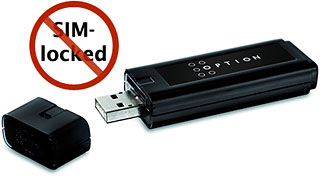 "The iCON 225 is a relieable and afforable 3G modem for the Mac
community, which is not SIM locked or otherwise bound to a certain
provider or network." states Jan Fuellemann, PR spokesperson at nova
media. "The iCON 225 supports the fast HSDPA protocol in all 2100 MHz
networks, which are common in Europe and Asia. In most other countries,
EDGE and GPRS are supported which offer speeds up to 220 Kbit/s in
downloading data and up to 120 Kbit/s in uploading data."
"The iCON 225 is a relieable and afforable 3G modem for the Mac
community, which is not SIM locked or otherwise bound to a certain
provider or network." states Jan Fuellemann, PR spokesperson at nova
media. "The iCON 225 supports the fast HSDPA protocol in all 2100 MHz
networks, which are common in Europe and Asia. In most other countries,
EDGE and GPRS are supported which offer speeds up to 220 Kbit/s in
downloading data and up to 120 Kbit/s in uploading data."
The iCON 225 includes the internet connect wizard launch2net for Mac OS X. This software offers a one-click connection to the Internet without the need to enter cryptic configuration details. launch2net already includes connection settings for most mobile network providers worldwide and offers a comprehensive connection statistic.
Pricing and Availability: The iCON 225 is available today from nova media for Euro 117,- (plus sales tax if applicable) and requires Mac OS X 10.4.11, 10.5.2 or higher. A lanyard and an USB extension cord comes with the modem.
Link: iCON 225
Software
ZoHo Writer Easy and Free Online Word Processor
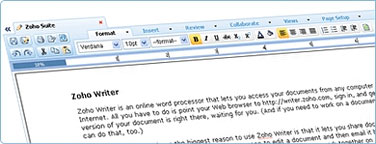 PR: ZoHo is a richly
featured online word processor that can be used for free (and ad-free)
by individuals and up to 10 users in a business.
PR: ZoHo is a richly
featured online word processor that can be used for free (and ad-free)
by individuals and up to 10 users in a business.
ZoHo Features:
- New Tabbed Toolbar
- Elegant toolbar with menu items neatly grouped in context-based tabs.
- zhtb.jpg
- Easy availability of all the toolbar features from a drop-down menu too.
- Sharing & Collaboration Easily share your documents online, with friends on an individual basis and in group. Collaborate on them in real time.
- Offline Support Access and edit existing documents even without an internet connection. Offline document edits will be synchronized when you are online.
- Post to Blog A nice way of sharing documents with the whole world. Make use of Zoho Writer's feature rich WYSIWYG editor for publishing your documents to blog.
- Import / Export Documents Upload documents from your desktop, Google Docs or anywhere on the Web. Download and save them to your computer too.
- Page View Editing Experience the joy of writing documents in a real paper like environment. Edit them the way you wish to see in print.
- Template Library Build your document by picking up from a collection of readymade templates from our template library. View Template Library.
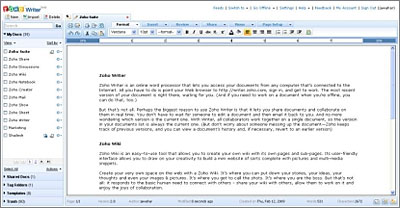 More features:
- Quick Create Create documents on the fly without having to sign up or login. You can export them in different formats too.
- MS Office Plugin Work on your online documents in Microsoft Word and save them directly to your Zoho Writer account.
- Quick Read Plugin Open Microsoft Office & Open Office documents available on the web and save them directly to your Zoho Writer account.
- Zoho API An easy way of integrating Zoho services into third-party applications, portals or websites.
New MenuTab for Quicker Actions
Zoho Writer introduces MenuTab - a refreshing, elegant and intuitive toolbar with menu items neatly grouped in context based tabs. The simplified toolbar makes the end-users task that much easier in creating and formatting documents. Users also have the flexibility of navigating around any of the tab features with a single click of a mouse.
The menu items in the toolbar are arranged under different tabs based on the actions they perform. The tabs are:
 1. Format Tab
Create documents on the fly using our WYSIWYG friendly editor and format the text contents as you like it with the options available under "Format Tab".
You can:
- Choose from the list of font faces (Verdana, Arial, Times New Roman etc) and apply varied font sizes too.
- Create headings for document titles and paragraphs.
- Make your text bold, italic, strike through and underline.
- Add subscripts(X2) and superscripts(X2) to your document content.
- Highlight text using colors, fonts and styles.
- Align text as Left, Right, Center and Justified.
- Format text with bullets, numbering, indents
Alternatively, you can also make use of the following shortcut keys.
2. MenuTab - Dropdown Menu in the Tab
Each tab in the toolbar comes with a drop down arrow that lists the features in the form of pull-down menu. Browse through the features and apply them to your document at the same time, using the pull-down menu, without having to navigate away from the existing highlighted tab.
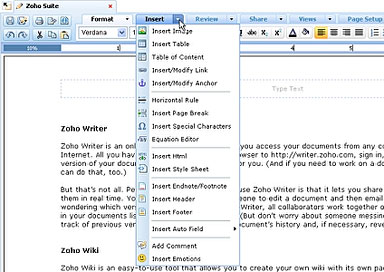
3. Insert Tab
The insert tab, as the names suggests, provides for a list of tools that helps in creating a polished document. You can add images, tables, link to a web page, use cool smileys and do much more. Here's a comprehensive list of menu items in the "Insert" tab:
- Insert/Modify Image - Spice up your document by adding pictures/graphics.
- Table - Add tables with specified rows and columns. Modify them according to your liking using "Table Properties" option.
- Table of Contents - Create a table of contents based on the heading levels and insert them in any section of the document.
- Links/Anchors - Link text to external sites or other pages within your document. Add anchors to navigate to a particular section of your document.
- Horizontal Rule - Insert a horizontal line between sections of your document and make it easily readable.
- Page Break - Define the length of your pages. User the page break option to manually insert page breaks anywhere in your documents.
- Special Characters - Add symbols and form equations out of them, using insert special characters button.
- Equation Editor - This comes very handy for writing mathematical stuff. Students, scientists, engineers can use the equation editor for writing scientific documents involving lots of equations.
- Insert HTML - Add HTML code snippets
ZoHo Writer is free (and ad-free) for individual users and up to 10 users in a business.
Link: ZoHo Writer
Free Mail Stationery Templates for Easter
PR: iPresentee, the developer of add-ons for Apple's iWork and iLife applications, releases free Easter Mail Stationery templates to be used with Apple's Mail software. New Mail Stationery package includes ten templates. Easter fills us with hope, joy and warmth. It is a time to get together with friends, family and loved ones and celebrate this joyful time. Reach out to your dear ones on this Easter using free Mail Stationery templates from iPresentee.
Creating an email with Easter Mail Stationery templates is exactly the same as creating an email using the ordinary Mail Stationery templates. Messages created with Easter Mail Stationery can be read by popular webmail services and email programs on both Mac computers and PCs. New Mail Stationery templates comes with an installer to make sure the templates end up in the right place and would be displayed in Apple Mail New Message Stationery menu automatically.
Minimum Requirements:
- Mac OS X 10.5 with bundled Mail application
- 15 MB Hard Drive space
Easter Mail Stationery templates are offered free of charge and requires any Macintosh computer running Mac OS X 10.5 with bundled Mail application. Free Mail Stationery templates for Easter holiday are available for download at the iPresentee's website. Samples and more information about Mail Stationery templates are available immediately at the iPresentee's website.
Link: Easter Mail Stationery
Easter Mail Stationery Pack for Mail
PR: Easter-themed stationary for Mail.app. This pack includes 3 original Easter themes for Mail.
On aMac Island you can download many themes for your Apple software like Mail. Download the new aMac Island Easter Mail Stationery pack. This pack includes 3 originals easter themes for mail.
System requirements: Mac OS X 10.5 or later.
System Support: PPC/Intel
Free
Link: Easter Stationery Pack for Mail
Desktop Mac Deals
Low End Mac updates the following price trackers monthly:
- Mac mini deals
- Intel iMac deals
- Mac Pro deals
- Power Mac G5 deals
- iMac G5 deals
- Power Mac G4 deals
- iMac G4 deals
- eMac deals
- Power Mac G3 deals
- iMac G3 deals
For deals on current and discontinued 'Books, see our 13" MacBook and MacBook Pro, MacBook Air, 13" MacBook Pro, 15" MacBook Pro, 17" MacBook Pro, 12" PowerBook G4, 15" PowerBook G4, 17" PowerBook G4, titanium PowerBook G4, iBook G4, PowerBook G3, and iBook G3 deals.
We also track iPad, iPhone, iPod touch, iPod classic, iPod nano, and iPod shuffle deals.
Join us on Facebook, follow us on Twitter or Google+, or subscribe to our RSS news feed
Links for the Day
- Mac of the Day: PowerBook 1400, introduced 1996.10.01. Considered by many the best pre-G3 PowerBook with a small footprint and great keyboard.
- Support Low End Mac
Recent Content
Go to the Mac News Review index.
About LEM Support Usage Privacy Contact
Follow Low End Mac on Twitter
Join Low End Mac on Facebook
Favorite Sites
MacSurfer
Cult of Mac
Shrine of Apple
MacInTouch
MyAppleMenu
InfoMac
The Mac Observer
Accelerate Your Mac
RetroMacCast
The Vintage Mac Museum
Deal Brothers
DealMac
Mac2Sell
Mac Driver Museum
JAG's House
System 6 Heaven
System 7 Today
the pickle's Low-End Mac FAQ
Affiliates
Amazon.com
The iTunes Store
PC Connection Express
Macgo Blu-ray Player
Parallels Desktop for Mac
eBay

