
Mac News Review
Apple's Record Customer Satisfaction, Consequences of Bad RAM, iMac Carry Case, and More
This Week's Apple and Desktop Mac News
Compiled by Charles Moore and edited by Dan Knight - 2008.08.22
PowerBook, iBook, MacBook, and other portable computing is covered in The 'Book Review. iPod, iPhone, and Apple TV news is covered in The iNews Review.
All prices are in US dollars unless otherwise noted.
News & Opinion
- Apple Achieves Record Level of Customer Satisfaction
- MobileMe Users Get Another 60 Days Free Service
- Are Macs More Expensive? Let's Do the Math
- Apple Enterprise Sending Thousands of Macs into Hotels, Cruise Ships
- Consequences of Bad RAM
- Spice Up Your Apple Pro Apps with a Splash of Aqua
- Intel Releases 'SuperSpeed' USB 3.0 Controller Interface Spec
- Details of Upcoming Intel Products (2008 through 2012) Leaked
Products
Software
- LeopardAssist 2.0 Helps Install Leopard on Some Unsupported Macs
- SyncMate 1.4 Synchs Macs with Pocket PC
Desktop Mac Deals
News & Opinion
Apple Achieves Record Level of Customer Satisfaction
Apple users are an extraordinarily happy lot. The American Customer Satisfaction Index (ACSI) is a national economic indicator of customer evaluations of the quality of products and services available to household consumers in the United States, and Apple just aced its latest survey by a record margin.
The ACSI second quarter report, released from the University of Michigan's National Quality Research Center says that
"the personal computer industry suffered a second consecutive drop in satisfaction, falling 1% to 74 and losing all gains made since 2005. However, Apple is bucking industry trend curve by posting its largest gain ever to 85, a new all-time high for the industry. The 8% leap puts 10 points between Apple and its nearest rival, one of the largest gaps between first and second in any industry measured by ACSI. As Apple's satisfaction improves, so too have its sales, market share, net income, and stock price."
Link: ACSI
MobileMe Users Get Another 60 Days Free Service
Apple has announced another free extension for MobileMe users - an additional 60 days gratis. In an email to MobileMe subscribers Apple explains:
"We have already made many improvements to MobileMe, but we still have many more to make. To recognize our users' patience, we are giving every MobileMe subscriber as of today a free 60 day extension. This is in addition to the one month extension most subscribers have already received. We are working very hard to make MobileMe a great service we can all be proud of. We know that MobileMe's launch has not been our finest hour, and we truly appreciate your patience as we turn this around."
In a new Apple Knowledge Base article on the topic, they elucidate further:
"The transition from .Mac to MobileMe was rockier than we had hoped. While we are making a lot of improvements, the MobileMe service is still not up to our standards. We are extending subscriptions 60-days free of charge to express appreciation for our members' patience as we continue to improve the service.
"You are eligible if you are a MobileMe member whose account was active as of August 19, 2008 at 0:00 Pacific Daylight Time.
"If you were in your free trial period on August 19 at 0:00 Pacific Daylight Time, your free trial will be extended an additional 60 days."
Are Macs More Expensive? Let's Do the Math
Technologizer's Harry McCracken says:
"It's of those eternal questions of the computing world that never seems to get answered definitively: Does the 'Mac Tax' really exist? Some folks are positive that Macs are overpriced compared to Windows computers; others deny it steadfastly. Almost nobody, however, bothers to do the math in any serious detail.
"So that's what I'm going to do. And since Apple manufactures multiple models, I'm going to do it one computer at a time, starting with the MacBook, the company's consumer notebook...
"Round one: The MacBook takes on Dell, HP, and Sony and does just fine."
Link: Are Macs More Expensive? Let's Do the Math Once and For All
Apple Enterprise Sending Thousands of Macs into Hotels, Cruise Ships
AppleInsider's Prince McLean reports:
"Apple's Enterprise Sales Group has been quietly installing thousands of iMacs, Mac minis, Mac Pros, and Xserves in hotels and cruise ships in a new push to bring the media rich experience of Apple's retail stores to the hospitality industry, where hoteliers are seeking to deliver personalized, unique experiences that will impress guests and bring them back for more."
Link: Apple Enterprise Sending Thousands of Macs into Hotels, Cruise Ships
Consequences of Bad RAM
Mac OS X Hints contributor John Wolff reports:
"I recently purchased a used G5 Power Mac (2 x 1.8 GHz with 2 GB RAM) with System 10.4.11 installed on the 160 GB HD. It was bought to replace a Quicksilver which had been upgraded to run OS X 10.5.4 so I naturally wanted to upgrade this machine to 10.5.4.
"Upon running the Install DVD using the Archive & Install option, I got an error message stating that 'The BaseSystem package was not compatible with this machine and to contact the software supplier.' At this stage I did not suspect a RAM problem so proceeded to install 10.5.1 on the same HD using another G5 of the same specs. It loaded OK so I moved the disk back to the 'new' G5 and tried to run the Migration Assistant to recover the data files we needed.
"The Migration Assistant stalled and, in the process, probably corrupted the bookkeeping file that I most wanted to access....
"Finally, I started to suspect a hardware fault, so I found my copy of TechTool DeLuxe on an AppleCare CD. I ran it and discovered that the RAM test failed....
"My experience is thus a salutary warning to all purchasers of a used Mac. I just wish the error message that I first received had been a bit more wide ranging and less directed at a possible software issue."
Link: Consequences of Bad RAM
Spice Up Your Apple Pro Apps with a Splash of Aqua
The Register's Dave Jewell reports:
"Apple's 'Professional' range of applications such as Final Cut Studio, Aperture or Logic Express have a completely different look to the standard Aqua color scheme. This comes courtesy of a private framework called ProKit.framework, intended to make Apple's professional software stand out from the crowd.
"And stand out it does. Personally, I'm not a huge fan. The relentlessly grey color scheme is drab and I find the default font small and fiddly. From a visual perspective, I hate the cramped little dialogs that appear in Aperture, such as at the Preferences dialog.
"With that in mind, I'm going to show you how to use the ProKit library to customize your applications...."
Link: Spice Up Your Apple Applications - Splash of Aqua
Intel Releases 'SuperSpeed' USB 3.0 Controller Interface Spec
Register Hardware's Tony Smith reports:
"Intel has provided chipset makers with a draft specification for a USB 3.0 eXtensible Host Controller Interface (XHCI), making good a promise it made a couple of months ago.
"According to the chip giant, the XCHI will allow chipset makers to develop hardware that can communicate with USB 3.0 system software in a standardised, consistent way.
"You might have thought that was the job of the chipset makers, but Intel's taken on the task itself to ensure, it hopes, the rapid roll-out of USB 3.0 - aka SuperSpeed USB. To that end, it's making the draft spec available under a licence that requires no royalties to be paid."
Link: Intel Releases USB 3.0 Controller Interface Spec
Details of Upcoming Intel Products (2008 through 2012) Leaked
DailyTech's Jason Mick reports:
"Intel is continuing to follow its 'tick tock' strategy, with die shrinks coming in 2009 and 2011. New architectures, according to Intel, will be coming in 2008 with Nehalem, in 2010 with Sandy Bridge, and in 2012 with Haswell.
"Real time raytracing may finally be introduced with Intel's Larrabee. Intel demoed an impressive raytraced version of Quake IV recently. Intel has lots of excitement in store in the next four years"
Link: Details of Upcoming Intel Products from 2008 through 2012 Leaked Ahead of IDF
Products
Reinda Announces iMac Carry Case
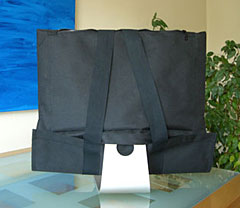
PR: Reinda, a German-based company, has announced a line of "iMac Carry-on Pockets" for transporting 20 and 24-inch iMacs. They have a black design made out of "hard-wearing fabric" that offers protection when moving around. These pockets are produced in Eumuenster and wear the sign " made in Germany".
iMac Carry-on Pockets are designed to be light, waterproof and well-padded. A shoulder strap enables you to carry the iMac on your shoulder. According to the folks at Reinda, you can insert and secure your iMac in about 15 seconds with the Carry-On Pocket.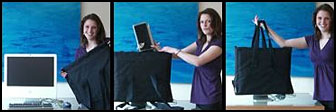 Reinda is also planning a line of pockets for the MacBook,
MacBook Pro and iPod.
Reinda is also planning a line of pockets for the MacBook,
MacBook Pro and iPod.
After 1 year development and various prototypes, the pocket develops the concept of the iMac as a portable that can pack up and unpack in a few seconds to be carried in all weather between work and home.
 Features:
- the computer does not have to be unpacked to set up
- the iMac foot stands always on the table while unpacking
- all necessary parts such as keyboard, cable and CD/DVDs have sufficient space in the side pockets.
- practical clutter organization
- the display is very well protected by the extra thick and soft upholstery
- very light weight
- packs up in 20 seconds
- unpack and attach with cables in 25 seconds
Link: iMac Carry-On Pockets
OWC Announces New Mercury Elite-AL Pro Dual-Drive to 2 TB
PR: Other World Computing (OWC) has announced the new OWC Mercury Elite-AL Pro USB 2.0 Dual-Drive Storage Solution with a built-in USB 2.0 powered hub and new expanded storage capacity to 2 TB. The Mercury Elite-AL Pro USB 2.0 Dual-Drive is a low-cost, Plug 'N Play hard drive storage solution for any Mac or PC, with capacities from 500 GB - 2 TB, priced at $169.99-$439.99.
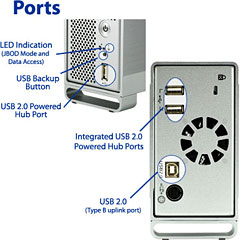
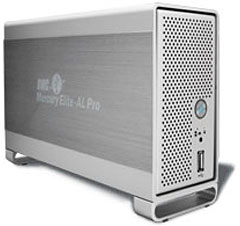 The Mercury Elite-AL Pro USB 2.0 Dual-Drive offers the best USB
2.0 storage performance possible with data transfer rates of over 60 MB
per second. With its additional two powered USB 2.0 ports on the rear
of the unit and one easy-access USB 2.0 port directly on the front,
there's no need for an additional separate hub. The drive is geared to
users that need more storage and an easy place to connect devices, like
pen drives, bus powered portable hard drives, and any USB 2.0 device.
The Mercury Elite-AL Pro USB 2.0 Dual-Drive is beautifully designed in
a sleek, protective aluminum package that complements any user's
computer system.
The Mercury Elite-AL Pro USB 2.0 Dual-Drive offers the best USB
2.0 storage performance possible with data transfer rates of over 60 MB
per second. With its additional two powered USB 2.0 ports on the rear
of the unit and one easy-access USB 2.0 port directly on the front,
there's no need for an additional separate hub. The drive is geared to
users that need more storage and an easy place to connect devices, like
pen drives, bus powered portable hard drives, and any USB 2.0 device.
The Mercury Elite-AL Pro USB 2.0 Dual-Drive is beautifully designed in
a sleek, protective aluminum package that complements any user's
computer system.
 The Mercury Elite-AL Pro USB 2.0 Dual-Drive
is part of the OWC Mercury Elite-AL Pro line, winner of numerous awards
and accolades, including Macworld Magazine's "4 out of 5 Mice Rating."
Jeffy Milstead, Macworld Magazine, said, "Its quiet operation, good
performance, and software bundle will make it a welcome addition to
your desktop." Mercury Elite-AL Pro storage drives have also earned a
"5 out 5 Rating" from Scott Vanderford, Club Overclockers, who
commented, "The Mercury Elite-AL Pro is a superior product of ultra
high quality and I'm proud to award it the Club Overclocker 'Seal of
Approval'!" In addition, Mercury Elite-AL drive solutions have received
raves from Macenstein (9 out of 10 rating), The Online Photographer
"Mercury Elite drive will give Photoshop a real kick in the pants," and
The Mac Observer, 4 out of 5 Rating "Great."
The Mercury Elite-AL Pro USB 2.0 Dual-Drive
is part of the OWC Mercury Elite-AL Pro line, winner of numerous awards
and accolades, including Macworld Magazine's "4 out of 5 Mice Rating."
Jeffy Milstead, Macworld Magazine, said, "Its quiet operation, good
performance, and software bundle will make it a welcome addition to
your desktop." Mercury Elite-AL Pro storage drives have also earned a
"5 out 5 Rating" from Scott Vanderford, Club Overclockers, who
commented, "The Mercury Elite-AL Pro is a superior product of ultra
high quality and I'm proud to award it the Club Overclocker 'Seal of
Approval'!" In addition, Mercury Elite-AL drive solutions have received
raves from Macenstein (9 out of 10 rating), The Online Photographer
"Mercury Elite drive will give Photoshop a real kick in the pants," and
The Mac Observer, 4 out of 5 Rating "Great."
Pricing for new Mercury Elite-AL Pro USB 2.0 Dual-Drive:
- 500 GB w/32 MB Data Buffer, 7200 rpm - $169.99
- 640 GB w/32 MB Data Buffer, 7200 rpm - $189.99
- 1.0 TB(1000 GB) w/32 MB Data Buffer, 7200 rpm - $209.99
- 1.5 TB(1500 GB) w/64 MB Data Buffer, 7200 rpm - $319.99
- 2.0 TB(2000 GB) w/64 MB Data Buffer, 5400 rpm - $419.99
- 2.0 TB(2000 GB) w/64 MB Data Buffer, 7200 rpm - $439.99
Mercury Elite-AL Pro USB 2.0 Dual-Drive Features:
- Powered USB 2.0 Hub: 2 ports on the rear of the unit, 1 port for easy accessibility on the front of the unit make it the ideal device for both regularly connected and quick-connect USB 2.0 peripherals.
- Style: Quality aluminum enclosure designed to complement any user's system. A blue activity LED behind the front grille shows when the drive is being accessed.
- High Performance: Employs high-performance USB 2.0 bridge design combined with today's fastest and most reliable hard drive mechanisms for the best USB 2.0 performance and data reliability.
- High Reliability: Topnotch design and high-quality components ensure it's built to last.
- Compact Shock Resistant Design: Sleek, protective aluminum package.
- Warranty: Includes two year warranty.
- Super Quiet Operation.
- Cables: All cables are included.
The Mercury Elite-AL Pro USB 2.0 Dual-Drive comes complete with utility and backup software, including Intech Hard Disk SpeedTools Utilities™ for Mac OS 8.6-X, ProSoft Engineering Data Backup III for Mac OS v10.2.8 or later and NovaStor NovaBACKUP for Windows 2000 or later. The drive also includes a USB 2.0 connecting cable, for Plug 'N Play right out of the box. The Mercury Elite-AL Pro USB 2.0 Dual-Drive is compatible with all Apple OS Versions 8.5 through 9.2.x; Apple OS X 10.0.3 and higher (including OS X "Leopard" 10.5.x), Microsoft Windows ME, 2000, XP, Vista, and any OS or device with USB interface support.
Link: Mercury Elite-AL Pro USB 2.0 Dual-Drive
Software
LeopardAssist 2.0 Helps Install Leopard on Some Unsupported Macs
PR: LeopardAssist is a simple tool to install Leopard on older, unsupported Power Macs.
LeopardAssist originated from Low End Mac in Dylan McDermond's December 6th 2007 post "Faking Out the Leopard Installer with Open Firmware". The simple techniques he used in that article became the basis for the structure we were about to use.
 LeopardAssist does just what
was posted in his article. Using a temporary Open Firmware "trick", it
changes the reported CPU speed to 867 MHz and starts the installer from
CD.
LeopardAssist does just what
was posted in his article. Using a temporary Open Firmware "trick", it
changes the reported CPU speed to 867 MHz and starts the installer from
CD.
The application writes a script into your computers Parameter RAM (PRAM) changing the CPU entry in the device tree to 867 MHz. On restart, Open Firmware loads as normal with the 867 MHz script in place, switches to CD or DVD and boots from it, where the Leopard installer takes over.
This simple trick means you don't have to modify your DVD to install Leopard. Finally, when installation is done or when installation is ready to reboot, you simply flash the PRAM back to restore the original CPU speed and restore booting from the hard disk.
That's all there is to it!
No modified Leopard DVDs, no hardware hacks or tweaks, just a one-time run application. (Much like XPostFacto)
Version 2.0 overhauls the codebase at the request of testers worldwide. It attempts to improve support across all systems, including ones previously known unsupported or problematic. This version also attempts sports a completely rewritten user interface.
New in version 2.0:
- Eliminated Boot File, data is written directly to PRAM
- Major Bug Fixes
- New User Interface
- Tested on second generation PowerPCs (eMac G4)
System requirements: Mac OS X 10.3.9 or later (10.4.11 is recommended).
System Support: PPC
Free
Link: LeopardAssist
SyncMate 1.4 Synchs Macs with Pocket PC
PR: From now on, synchronizing your Mac with Pocket PC is as easy as one, two, three. Still hesitate? Sync again... Get your Mac a mate with free SyncMate.
SyncMate Free Edition is a perfect solution for information management. It is free and easy-to-use synchronizer for Mac and Pocket PC, that will help you keep all your documents, text messages, contacts, calendar entries and events and other stuff well organized. Simply establish a connection between your Mac and Pocket PC via USB or WiFi and synchronize applications like Address Book, iCal, etc. With SyncMate it is very easy to read SMS directly from your Mac, check detailed device information (battery state, etc.) and visually analyze memory usage.
SyncMate Expert Edition (available for a small fee) grants you even more synchronization possibilities. With Expert Edition it is very handy to synchronize time and share Internet between your Mac and your mobile device, which is very important for all mobile people. Synchronize iTunes and iPhoto to keep all your favorite music and pictures within a click of a button. Manage all text messages not even touching your Pocket PC! Send, receive, create and delete SMS when working at your Mac - that's what SyncMate Expert gives you.
SyncMate Expert provides you with access to all plugins, but is not free, SyncMate, however, is free and has fewer features than SyncMate Expert. Moreover, you have an excellent ability to upgrade your free SyncMate to SyncMate Expert Edition.
With SyncMate you can:
Sync contacts: Keep your contacts up-to-date with our synchronization tool. No matter where you are and what device you are using, your address book will always be with you, filled with all contact details you need.
Sync bookmarks: Dozens of sites visited, tons of needed information found. Don't lose it! Save it! Bookmark it! Managing bookmarks between your computer and Pocket PC has never been easier. SyncMate at your service. (Expert Edition only)
Manage text messages: With SyncMate managing SMS becomes fun! Create them using your keyboard, edit them on the computer, send and receive not even touching your Pocket PC.
Sync iPhoto/ iTunes: Your favorite tunes, pictures, video files - all in your pocket. Share them with friends, bring them home! (Expert Edition only)
Your calendar is always in reach. What when and where - you know that, you've already synched, right?
What's new:
- Added: "Mail" plugin which enables you to sync your mail on Mac with Outlook on mobile device
- Added: "To dos" plugin which synchronizes Tasks in your device and To Dos of iCal on your Mac
- Several interface improvements
Full features list:
- Synchronize Favorites, Contacts, Calendar, Notes in mobile device accordingly with their analogues Bookmarks, Address Book, iCal, Stickies on
Mac OS
- Ability to work with iTunes and iPhoto
- Simple installation of applications to your mobile device
- Synchronize separate folders
- Resize images while copying
- Ability to synchronize time in mobile device with TimeSync plugin
- Easily get device info (type of device, OS, owner's name, memory status (internal memory and flash card), battery state, time, alarms, etc.)
- Examine memory status diagram and its legend
- Track all operations which SyncMate handles by actions log
- Ability to manage Drafts, Sent and Deleted items, Inbox and Outbox SMS
- Build-in converter, which compresses video to MPEG4
- Synchronization via USB cable and WiFi
- Compatibility with Windows Mobile Pocket PC 2005/2006, Windows Mobile Smartphone 2005/2006
Platforms "SyncMate" is compatible with:
- Mac OS X 10.4 and higher
- Mac OS X 10.5
Device compatibility:
- Windows Mobile Pocket 5
- Windows Mobile Smartphone 5
- Windows Mobile 6 Standard
- Windows Mobile 6 Classic
- Windows Mobile 6 Professional
Link: SyncMate
Desktop Mac Deals
Low End Mac updates the following price trackers monthly:
- Mac mini deals
- Intel iMac deals
- Mac Pro deals
- Power Mac G5 deals
- iMac G5 deals
- Power Mac G4 deals
- iMac G4 deals
- eMac deals
- Power Mac G3 deals
- iMac G3 deals
For deals on current and discontinued 'Books, see our 13" MacBook and MacBook Pro, MacBook Air, 13" MacBook Pro, 15" MacBook Pro, 17" MacBook Pro, 12" PowerBook G4, 15" PowerBook G4, 17" PowerBook G4, titanium PowerBook G4, iBook G4, PowerBook G3, and iBook G3 deals.
We also track iPad, iPhone, iPod touch, iPod classic, iPod nano, and iPod shuffle deals.
Join us on Facebook, follow us on Twitter or Google+, or subscribe to our RSS news feed
Links for the Day
- Mac of the Day: PowerBook 500 Series, introduced 1994.05.16. 'Blackbird' includes a 25 to 33 MHz 68040 along with smart batteries and grayscale or color displays.
- Support Low End Mac
Recent Content
Go to the Mac News Review index.
About LEM Support Usage Privacy Contact
Follow Low End Mac on Twitter
Join Low End Mac on Facebook
Favorite Sites
MacSurfer
Cult of Mac
Shrine of Apple
MacInTouch
MyAppleMenu
InfoMac
The Mac Observer
Accelerate Your Mac
RetroMacCast
The Vintage Mac Museum
Deal Brothers
DealMac
Mac2Sell
Mac Driver Museum
JAG's House
System 6 Heaven
System 7 Today
the pickle's Low-End Mac FAQ
Affiliates
Amazon.com
The iTunes Store
PC Connection Express
Macgo Blu-ray Player
Parallels Desktop for Mac
eBay

