
Mac News Review
5 Reasons Macs Are Right for Business, 10.5.3 Improves GeForce 8800 Performance, and More
This Week's Apple and Desktop Mac News
Compiled by Charles Moore and edited by Dan Knight - 2008.06.06
PowerBook, iBook, MacBook, and other portable computing is covered in The 'Book Review. iPod, iPhone, and Apple TV news is covered in The iNews Review.
All prices are in US dollars unless otherwise noted.
News & Opinion
- 5 Reasons Why Macs Are Right for Most Businesses
- 3.06 GHz iMac 'Packs a Wallop'
- OS X 10.5.3 Improves GeForce 8800's Core Image Performance
Products
- Freestyle Convertible Keyboard: First Fully Separating Keyboard for Macs
- MaxConnect SAS/SATA Link for Mac Pro
Software
Desktop Mac Deals
News & Opinion
5 Reasons Why Macs Are Right for Most Businesses
Blogger Will Hinton says:
"I really didn't want to be 'that guy' always writing about how much he loves his new Mac. I wrote last week about why I finally made the switch. But I read an article at CNNMoney.com this week that I just have to respond to. Jonathan Blum wrote 'Why Macs still aren't right for most businesses'. Having worked as an IT professional at one point in my career, I could think of a few likely reasons that someone might suggest not using Macs in business. But I wasn't prepared for the lack of substance in this article.
"'First off, the packaging is seriously overdone: The slogan "Designed by Apple in California" posivitively shouts at you from the box. Like I care.'
"Like it matters! Are you serious? This is the first reason for not using a Mac for a business?
"Having made the decision to switch to Mac for my business, I have given a lot of thought about how businesses use computers. I think that many more companies can and should move to Macs for these five reasons.
- Web-based applications
- Ease of tech support
- Productivity
- Networking
- The Lack of IT Upheaval every 5 years"
Editor's note: the arguments presented in this piece are extremely well-reasoned and compelling. cm
Link: Five Reasons Why Macs Are Right for Most Businesses
3.06 GHz iMac 'Packs a Wallop'
Computerworld's Scot Finnie reports:
"When Apple Inc. recently sent along one of its new iMacs - a sweet 24-inch model with a 2.8 GHz Penryn processor - I agreed to take it home and give it a dose of family testing at the Finnie household. And with three kids aged 3, 6, and 16, that's saying something....
"Were I to buy a new iMac (and the kids insist that's something we have to do) after the review unit goes back, I'd buy exactly the unit Apple sent...."
Link: Review: Apple's Newest 3.06 GHz iMac Packs a Wallop
OS X 10.5.3 Improves GeForce 8800's Core Image Performance
Bare Feats' rob-ART Morgan reports:
"I know how frustrated many of you feel who bought the optional GeForce 8800 GS or GT for your Intel Mac only to find it that it ran Core Image intensive Consumer and Pro Apps slower than the 'base' Radeon 2600 Pro or XT. Good news: the GeForce drivers have been improved with the release of OS X Leopard 10.5.3....
"The bad news? In most cases, the performance only improved enough to become roughly equal that of the 'base' Radeon HD 2600 Pro or XT."
Link: OS X 10.5.3 versus 10.5.2: Has the GeForce 8800's Core Image Performance Improved?
Products
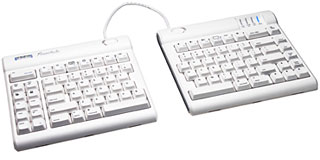
Freestyle Convertible Keyboard: First Fully Separating Keyboard for Macs
 PR: Kinesis Corporation, a leading innovator
of ergonomic computer keyboard and related devices, has announced the
Freestyle Convertible keyboard family for Macintosh. The award-winning
design is the first Macintosh keyboard to completely separate,
providing several configurations in one modular design. The separation
feature is a key element for improving workstation comfort and reducing
injury. Kinesis also added an assortment of productivity-improving
driverless hot keys, a powerful new feature which is unique among
mainstream computer keyboards.
PR: Kinesis Corporation, a leading innovator
of ergonomic computer keyboard and related devices, has announced the
Freestyle Convertible keyboard family for Macintosh. The award-winning
design is the first Macintosh keyboard to completely separate,
providing several configurations in one modular design. The separation
feature is a key element for improving workstation comfort and reducing
injury. Kinesis also added an assortment of productivity-improving
driverless hot keys, a powerful new feature which is unique among
mainstream computer keyboards.
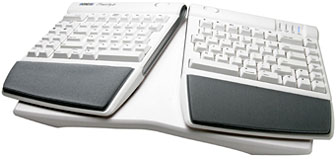
The stylish Freestyle family consists of the Freestyle Solo keyboard and two accessory options. The Freestyle Incline accessory provides simple but powerful adjustability, while the Freestyle VIP accessory enables additional adjustments including complete keyboard separation. Options are offered separately, enabling individuals and organizations to add features at any time.
 Kinesis President and CEO Will Hargreaves, PhD, explained
the importance of bringing this product to the Macintosh market: "We
are very excited to provide the simplicity, comfort and flexibility of
the Freestyle family to the Macintosh market. As consumers spend more
hours at their home and office workstations, they better understand the
importance of advanced keyboard design features in maximizing
productivity, ensuring comfort, and avoiding overuse injuries."
Hargreaves added, "For too long, Macintosh users have not had the
choice of an aesthetic, versatile, Mac-optimized alternative keyboard.
We designed the Freestyle product family to provide a new level of
elegance and comfort to Macintosh users everywhere."
Kinesis President and CEO Will Hargreaves, PhD, explained
the importance of bringing this product to the Macintosh market: "We
are very excited to provide the simplicity, comfort and flexibility of
the Freestyle family to the Macintosh market. As consumers spend more
hours at their home and office workstations, they better understand the
importance of advanced keyboard design features in maximizing
productivity, ensuring comfort, and avoiding overuse injuries."
Hargreaves added, "For too long, Macintosh users have not had the
choice of an aesthetic, versatile, Mac-optimized alternative keyboard.
We designed the Freestyle product family to provide a new level of
elegance and comfort to Macintosh users everywhere."
The heart of the Freestyle family is the Solo keyboard. A familiar compact key layout makes adaptation a breeze, but that's where traditional keyboard design ends. The Freestyle's unique design features include:
- Numerous Comfort Configurations in One Modular Design: the keyboard width easily adjusts to the body size and preferences of each user.
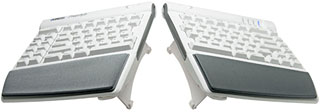
- Two keying modules are connected by the flexible Pivot Tether, which allows infinite adjustment of the front opening angle (splay). Sliding a button to remove the Pivot Tether allows the two modules to completely separate up to 8.5 inches, accommodating a range of shoulder widths (optional model provides 20-inch separation).
- Productivity-Boosting Hot Keys: Unprecedented productivity is achieved with the driverless hot keys, which reduce awkward key combinations and excessive mouse clicking. Ten left-side hot keys include Web Page Forward and Back, Beginning of Line, End of Line, Cut, Undo, Copy, Select All and Paste. Top Row driverless hot keys go well beyond the special function key actions on the new Apple keyboards, providing one-touch keys for Force Quit, Brightness, two Exposé actions, Dashboard, Play Audio and Audio Volume groups, toggle Dock, Eject CD, and Off/Sleep.
- Snap-and-Go Incline Accessory (Freestyle Incline Kit): transforms the Freestyle Solo keyboard into a moderately-tented keyboard providing all of the ergonomic benefits of a Microsoft "natural-style" keyboard but without the long reach for a mouse! A 10-degree lateral slope ("tenting") relaxes your forearm muscles while the fully adjustable (and lockable) front opening angle (splay) keeps your wrists straight and comfortable. The Solo keyboard mounts easily onto the Incline base. Snap-on palm supports with replaceable palm pads are included to ensure that wrists are neutral (straight) and comfortable at all times.
- Sturdy, Advanced Ergonomic Accessory (Freestyle VIP Kit): The VIP kit (V-Lifter and Integrated Palm Supports) provides adjustable tenting, variable splay and/or complete keyboard separation. The VIP accessory clips on in seconds and provides rock-solid support of the keyboard at 10 or 15 degrees of tenting, with or without the pivot tether installed. The integrated, padded palm supports ensure that wrists are always neutral.
Additional features include:
- Low-profile design, which promotes neutral wrist posture.
- Narrow footprint, which allows for closer reach of a mouse.
- Double-wide Escape, Delete, and Backspace keys, which enable faster editing.
- Quiet and tactile key switches with a special low force, which reduces typing effort.
- Plug and play (no special drivers) and fully compatible with OS X 10.4 and newer operating system versions.
 According to Jon Biggs, Kinesis Director of Sales
and Marketing, "Our design objectives in creating the Freestyle
Convertible keyboard family were (1) to provide the widest possible
array of ergonomic features without complex or costly mechanisms, and
(2) to provide a flexible configuration in order to meet a full range
of user needs at the lowest possible cost." Biggs added, "We
accomplished these goals by creating a modular design which allows
users to pick the features they need, and to easily change
configurations as needs change."
According to Jon Biggs, Kinesis Director of Sales
and Marketing, "Our design objectives in creating the Freestyle
Convertible keyboard family were (1) to provide the widest possible
array of ergonomic features without complex or costly mechanisms, and
(2) to provide a flexible configuration in order to meet a full range
of user needs at the lowest possible cost." Biggs added, "We
accomplished these goals by creating a modular design which allows
users to pick the features they need, and to easily change
configurations as needs change."
The Freestyle family was initially introduced to the PC market in 2007. With both PC and Macintosh models now available, corporations which are increasingly using Apple computers can standardize on the Freestyle Convertible keyboard family for both PC and Macintosh. They can benefit by maximizing both comfort and productivity for all their computer users, even when needs and users change. A common key layout eliminates learning curves when employees change assignments or locations. And the IT department is spared the cost and challenge of installing and maintaining the special drivers which are required for other keyboards with advanced key actions.
The Kinesis Freestyle keyboard family is both innovative and effective, as validated by ergonomics professionals attending the recent National Ergonomics Conference. The PC Freestyle model was awarded the "Attendees Choice Award" (Dec 2006) as one of the products most likely to increase productivity and profitability while improving workplace health and safety.
Suggested retail price for the Freestyle Solo keyboard is $99 and $40 for either accessory kit.
Link: Freestyle Adjustable Split Keyboard for Mac
MaxConnect SAS/SATA Link for Mac Pro
PR: MaxUpgrades introduces MaxConnect SAS/ SATA Link, a product designed to connect four internal disk drive bays of the Mac Pro System to a PCI Express SAS or SATA Controller installed in any PCI Express Expansion Slot of the computer.
MaxConnect SAS/ SATA Link offers Mac Pro users highest level of flexibility in data speed and redundancy, users can now integrate fastest internal SAS/SATA storage system for Mac Pro based upon their need and requirement.
MaxConnect SAS/SATA Link has micro form factor of just 0.45" H x 1" W x 2" D inches, it is housed in completely covered machined thermo plastic micro case for maximum protection and reliability.
Mac Pro users can now install SAS/SATA Host Bus Adapter or RAID Controller in any PCI Express Expansion Slot of the Mac Pro System and can be configured as RAID 0,1, 5 , 6 or more for maximum speed and redundancy. Note: ( RAID Level Support Dependent on the type of Controller)
Link: MaxConnect SAS/SATA Link for Mac Pro Systems
Software
xVM VirtualBox: Free Open Source Virtualization Software
PR: Sun xVM VirtualBox software is the world's most popular open source virtualization platform because of its fast performance, ease of use, rich functionality, and modular design.
At a Glance:
- Broad host platform support.
- Huge guest platform support.
- Free and Open Source.
- Open and extensible.
- High performance.
- Rich host-to-guest integration.
- Great hardware and device support.
- High security.
- RDP server for remote access to virtual machines.
Sun is continuing to improve its comprehensive family of xVM Virtualization offerings. VirtualBox 1.6, the high performance, free and open source desktop virtualization software, now includes 2,000 enhancements, improved scalability and web services.
VirtualBox 1.6, the high performance, free and open source desktop virtualization software, now includes 2,000 enhancements, improved scalability and web services.
Features & Benefits
Higher, Wider, Deeper - Sun xVM VirtualBox is available to run on a higher number of host platforms than any other virtualization platform, has wider guest platforms support than any alternative, and a deeply compelling feature set too.
Run multiple operating systems concurrently on the same computer
- Hosts: Windows, Solaris, Linux, Mac OS X.
- Guests: Support for practically any x86 based OS.
Open APIs and Modular Design
- Supports both GUI and rich CLI commands.
- COM/XPCOM interfaces.
- Web services interface.
Sun xVM VirtualBox can easily be built upon to deliver custom solutions or products, or be embedded as a component into systems.
High Performance Sun xVM VirtualBox is highly efficient at delivering high performance virtual machines for its guests.
Guest platforms perform at near-native speeds.
Rich Host/Guest integration The Guest Additions make the experience even faster and more seamless.
- Seamless windows - rather than a whole desktop environment, just the guest application windows can coexist alongside native host applications.
- Shared Folders - easily move documents and files between the host and guest systems.
- Mouse pointer integration - it just works how you'd expect it to.
- Dynamically adjustable screen resolution in the guest.
- Time Synchronization.
- Shared clipboard.
Intuitive and natural blend of multiple platforms and apps resulting in a more efficient workspace.
Great hardware and device support
- Full ACPI (Advanced Configuration and Power Interface) support so, for example, guests can see the power levels of the host.
- VESA Virtual Display Adaptor augmented with custom resolutions.
- NICs supporting NAT or bridged configurations.
- USB 2.0 with filter control to limit which host devices the guest can see.
- Multiscreen resolutions to allow guest displays to span monitors.
- CD/DVD passthrough.
Virtual Machines under Sun xVM VirtualBox are as capable as physical machines.
Remote access to guest virtual machines
- Sun xVM VirtualBox includes an RDP Server integrated into the virtualization platform.
- Boot-level remote access to guests.
Access your virtual machines from anywhere.
Snapshots
Sun xVM VirtualBox can save multiple snapshots of the state of virtual machines.
Easily revert to known "good states".
High Security
- Military-spec architecture.
- No interference between virtual machines (VMs).
- Zero data leakage between VMs.
A secure multi-platformed desktop.
Open Sourced under GPL - Free for Personal Use and Evaluation.
Link: Sun xVM VirtualBox
Totus Copy Hard Drive Rescue Software
PR: Totus Copy is a utility for transferring data off of a failing hard drive. OS X has a number of safety features built into it's copy functions, if it detects an I/O error or a stalled read the transfer will fail.
Totus Copy is a utility for transferring data off of a failing hard drive. OS X has a number of safety features built into it's copy functions, if it detects an I/O error or a stalled read the transfer will fail. OS X also gets file information for all files before it even copies the first one. While these are great functions to prevent further damage to a hard drive it makes it very difficult to transfer data.
Totus Copy will scan a failing hard drive and recover the files from it onto a separate functional hard drive. It does this by using a very gentle nonintrusive scanning method. Unlike other transfer utilities there is no timeout for file copies. If the data is readable Totus Copy will transfer it. Although this will cause more damage to your hard drive it has a high success rate of retrieving data.
Features:
- Ignore invisible files and applications, which increases the chance of recovering your important data.
- Target files of a specific kind, such as music, pictures, or documents.
- Error correcting transfer protocols with no timeout limit.
- Transfer partial files, if 99% of a important document is damage other utilities will fail while Totus Copy will copy that 99%.
- Handles files one by one instead of in large batches that are more likely to fail.
- Target a specific directory to recovery only files that you need.
- Scans directories as needed to minimize failures.
- Recreates bundles and directories as opposed to trying to transfer them.
System Requirements:
- Mac OS X 10.5 (Leopard)
- A failing hard disk that still mounts (Can be used in conjunction with Alsoft's Disk Warriors preview feature)
Link: Totus Copy
Desktop Mac Deals
Low End Mac updates the following price trackers monthly:
- Mac mini deals
- Intel iMac deals
- Mac Pro deals
- Power Mac G5 deals
- iMac G5 deals
- Power Mac G4 deals
- iMac G4 deals
- eMac deals
- Power Mac G3 deals
- iMac G3 deals
For deals on current and discontinued 'Books, see our 13" MacBook and MacBook Pro, MacBook Air, 13" MacBook Pro, 15" MacBook Pro, 17" MacBook Pro, 12" PowerBook G4, 15" PowerBook G4, 17" PowerBook G4, titanium PowerBook G4, iBook G4, PowerBook G3, and iBook G3 deals.
We also track iPad, iPhone, iPod touch, iPod classic, iPod nano, and iPod shuffle deals.
Join us on Facebook, follow us on Twitter or Google+, or subscribe to our RSS news feed
Links for the Day
- Mac of the Day: PowerBook 500 Series, introduced 1994.05.16. 'Blackbird' includes a 25 to 33 MHz 68040 along with smart batteries and grayscale or color displays.
- Support Low End Mac
Recent Content
Go to the Mac News Review index.
About LEM Support Usage Privacy Contact
Follow Low End Mac on Twitter
Join Low End Mac on Facebook
Favorite Sites
MacSurfer
Cult of Mac
Shrine of Apple
MacInTouch
MyAppleMenu
InfoMac
The Mac Observer
Accelerate Your Mac
RetroMacCast
The Vintage Mac Museum
Deal Brothers
DealMac
Mac2Sell
Mac Driver Museum
JAG's House
System 6 Heaven
System 7 Today
the pickle's Low-End Mac FAQ
Affiliates
Amazon.com
The iTunes Store
PC Connection Express
Macgo Blu-ray Player
Parallels Desktop for Mac
eBay

