
Mac News Review
PC Magazine Calls Leopard Best Consumer OS Ever, Looking Back at the Mac Plus, and More
This Week's Apple and Desktop Mac News
Compiled by Charles Moore and edited by Dan Knight - 2008.02.29
PowerBook, iBook, MacBook, and other portable computing is covered in The 'Book Review. iPod, iPhone, and Apple TV news is covered in The iNews Review.
All prices are in US dollars unless otherwise noted.
News & Opinion
- Leopard 'By Far the Best Operating System Ever Written for the Vast Majority of Consumers'
- Looking Back at the Macintosh Plus 22 Years Later
- OS X 10.5 Install Tips for Somewhat Broken Macs
- 1984 Quote Hidden in Apple Keyboard Update
- MetaRAM Quadruples DDR2 DIMM Capacities
Products
Software
- iFreeMem 2.0 Lets You Maximize Free Memory for Better Performance
- DashQuit 3.0 Frees Up RAM by Quitting the Dashboard
- A Free GUI Program for Resizing Disk Partitions
- WindowShade X Updated with Leopard Support
- FruitMenu Customizes the Apple Menu and Contextual Menus
- Application Enhancer Gains Leopard Support
Desktop Mac Deals
News & Opinion
Leopard 'By Far the Best Operating System Ever Written for the Vast Majority of Consumers'
PC Magazine's Edward Mendelson says:
"After three months with Apple's Mac OS X Leopard Version 10.5, I have three main things to say about it. First: Despite minor problems, it's by far the best operating system ever written for the vast majority of consumers, with dozens of new features that have real practical value - like truly automated backups, document and spreadsheet preview images in folders, and notes and to-do lists integrated into the mail program. Propeller-heads with IT know-how will no doubt hold up Linux as the better choice, and Vista has its devotees as well (and will probably have more when SP1 is widely available), but, for the average user, Leopard is the most polished and easiest to use OS I've tested...."
Link: Apple OS X 10.5.2 (Leopard)
Looking Back at the Macintosh Plus 22 Years Later
AppleTell's Adam Fisher-Cox says:
"Every couple of years, I take out my old Macintosh Plus to boot it up and
play with it. It is, quite frankly, amazing how many things are exactly
the same in OS X today as they were in System 6. For instance, I
couldn't find an OS X Finder keyboard shortcut that didn't work in
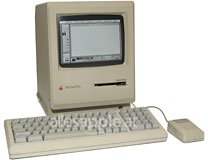 System 6, barring of course, those that pertain to technologies
no available in the mid-80s. I just realized that it is amazing that
this computer is now 22 years old, and still works...."
System 6, barring of course, those that pertain to technologies
no available in the mid-80s. I just realized that it is amazing that
this computer is now 22 years old, and still works...."
Editor's Note: I'll second that. I still have my Mac Plus too, and it still works, and . . . System 6 remains my all-time favorite Mac OS version, at least its user interface. Soooooo simple and clean. If there was a System 6 skin for OS X, I'd use it. cm [For more on Charles Moore's Mac Plus, see The Mac Plus, My First Mac, Turns 20.]
Other Editor's Note: My first Mac was also a Mac Plus, which still worked last summer. It's been upgraded with 4 MB of RAM and a 16 MHz accelerator, and it's very fast under System 6 and a very decent performer with System 7. dk [For more on Dan Knight's Mac Plus, see My Mac Plus.]
Link: Macintosh Plus - 22 Years Later (note: page automatically launches a video with a soundtrack)
OS X 10.5 Install Tips for Somewhat Broken Macs
Max OS X Hints contributor sgasp says:
"I wanted to install Leopard on an iMac G4 800 with a broken DVD player (having read errors on the Leopard DVD) and an empty internal drive. So I faced two issues that I have been able to solve: not having a bootable drive in the machine, and working around a broken DVD player."
Link: 10.5: Install Tips for Older Somewhat Broken Macs
1984 Quote Hidden in Apple Keyboard Update
Wired's Charlie Sorrel reports:
"It looks like Apple's programmers might have a little time on their hands after going all-out to finish the iPhone and OS X 10.5 Leopard. First we saw a speech from ex-president Lincoln in an iPod Touch software update, and now there is a quote from George Orwell's 1984 in a keyboard update."
Link: 1984 Quote Hidden in Apple Keyboard Update
MetaRAM Quadruples DDR2 DIMM Capacities
Ars Technica's Jon Stokes reports:
"Since its launch in January 2006, the only thing that has been publicly known about former AMD CTO Fred Weber's new venture is its name: MetaRAM. Clearly, the stealth-mode company was working on something to do with RAM, but what? As of today, MetaRAM is finally ready to talk about its technology, and it appears to be a pretty solid evolutionary step for the tried-and-true SDRAM DIMM module. In short, MetaRAM's technology enables DIMM capacity increases of two or four times, so that a single DDR2 MetaSDRAM DIMM can hold 4 GB or 8 GB of memory while still being a drop-in replacement for a normal DIMM."
Editor's note: MetaRAM is initially targeting the server market, and its DIMMs appear to be real power misers. No word yet on Mac compatibility. dk
Link: MetaRAM Quadruples DDR2 DIMM Capacities, Launches 8 GB DIMMs
Products
Hello Kitty 'Bling' Wireless Mouse
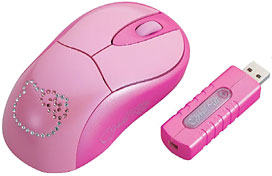 PR: This Hello Kitty wireless remote comes in an
ergonomic design, with three control buttons, and a rubberized scroll
wheel. It has plug and play connectivity and features the latest RF
Wireless technology, as well as a standby mode for power saving.
PR: This Hello Kitty wireless remote comes in an
ergonomic design, with three control buttons, and a rubberized scroll
wheel. It has plug and play connectivity and features the latest RF
Wireless technology, as well as a standby mode for power saving.
The Hello Kitty 'Bling' wireless mouse is available at Toys R Us.
Price: $19.98
Link: Hello Kitty 'Bling' Wireless Mouse
Software
iFreeMem 2.0 Lets You Maximize Free Memory for Better Performance
PR: You will be pleasantly surprised at the amount of free memory you will get after running iFreeMem. Then open more applications at once without any delays.
If you are in the middle of using an application and the system becomes unresponsive for several seconds it could be the memory manager recovering cache memory for your application.
iFreeMem optimise feature is a quick and easy alternative to either a reboot or RAM upgrade to get defragmented free memory.
iFreeMem free's memory from the in-memory cache that accumulates with every file or application read from hard-disk.
The cache is good, but it can become cluttered with files you don't even need cached anymore that take up precious RAM.
Maximum free memory can sometimes be better than half your memory filled with old cached files.
New in version 2.0:
- Support for Mac OS X 10.5
System Requirements
- Mac OS X 10.3.9 (Panther) or
- Mac OS X 10.4.x (Tiger) or
- Mac OS X 10.5.x (Leopard)
£10 Shareware
The download contains a fully working trial version of the software
Link: iFreeMem
DashQuit 3.0 Frees Up RAM by Quitting the Dashboard
PR: DashQuit is a small widget able to free RAM by quitting Dashboard. It displays the amount of RAM used by all your widgets. It allows you to quit Dashboard with a simple click, with or without asking confirmation.
New in version 3.0:
- Dashquit 3.0 is 50% smaller than 2.1
- The timer did not affect performances
- New Design
- Now works on Leopard
- Performance improvements
System requirements: Mac OS X 10.5 or later.
System Support: PPC/Intel
Free
Link: DashQuit
A Free GUI Program for Resizing Disk Partitions
Mac OS X Hints contributor smilinggoat says:
"I installed Leopard on a FireWire drive to test it before upgrading my MacBook Pro's internal Tiger installation. Satisfied with the results, I tried to use Carbon Copy Cloner to copy Leopard to my MacBook Pro's internal drive, only to find the external image was slightly too large for the internal.
"Not wanting to spend $35 on iPartition, I dug around and found the GParted LiveCD. It provides the GParted GUI front-end to parted (a GNU partitioning program) on a live Linux CD. I burned the image in Disk Utility and booted up on it. Once loaded, it provided a screen to select which kernel version to boot up, even providing a MacBook option...."
Link: A Free GUI Solution to Resizing Disk Partitions
WindowShade X Updated with Leopard Support
PR: WindowShade X provides an exciting and useful way of organizing your work on Mac OS X. With this handy tool, you can assign the following actions to the minimize button and a double-click on the window title:
Minimize the window to the Dock, like always;
"Windowshade" the window into a tiny strip to quickly peek below or get it out of the way;
Minimize-In-Place the window so it becomes really small so you can move it out of the way yet still see what is going on;
New in version 4.2b1:
- Added support for Mac OS X 10.5 Leopard v10.5 and later.
- Dropped support for Mac OS X 10.3 Panther.
- Windowshade X now requires Mac OS X 10.4 Tiger v10.4.11 or later.
System requirements: Mac OS X 10.4.11 or later.
System Support: PPC/Intel
$10 shareware
Link: WindowShade X
FruitMenu Customizes the Apple Menu and Contextual Menus
PR: FruitMenu is a haxie that gives you the ability to customize the Apple Menu and contextual menus. Using a visual editor you can edit the contents of the menus to suit your needs and taste.
FruitMenu will also display the contents of the FruitMenu Items folder inside of your Library folder, launch applications and shell scripts from the Apple Menu and contextual menus, to allow easy file navigation and launching.
To make the haxie completely flexible and customizable, you can assign hotkeys to particular menu items.
New in version 3.7b1:
- Added support for Mac OS X 10.5 Leopard v10.5 and later.
- Dropped support for Mac OS X 10.3 Panther.
- FruitMenu now requires Mac OS X 10.4 Tiger v10.4.11 or later.
System requirements: Mac OS X 10.4.11 or later.
System support: PPC/Intel
$10 shareware
Link: FruitMenu
Application Enhancer Gains Leopard Support
PR: Haxie To Enhance Other Applications Via Plug-ins
Application Enhancer (APE) is a system used in our and third-party products that helps them to enhance and redefine various applications behavior running on your system.
Application Enhancer is a combination of a Framework and a system daemon. Application Enhancer performs its task by loading plugins (Application Enhancer modules) containing executable code into the running applications. Once loaded, the APE module performs the needed modifications (such as redefining the minimize window action, or customizing the standard Apple menu) on the launched application memory space, never touching any files on disk, utilizing set of functions defined in the Application Enhancer framework. To help the APE modules to be loaded into newly launched applications, the Application Enhancer daemon (aped) is used.
New in version 2.5b1:
- Added compatibility for Mac OS X 10.5.
- APE now requires Mac OS X 10.4 or later and will not install on older versions of Mac OS X.
- Application Enhancer will now refuse to load any APE module that is not marked as compatible with 10.5 on Mac OS X 10.5.
- Addressed some problems with some unpatchables due to the wonkiness of the x86 ABI (Includes APELite).
- The APE prefpane now shows why some APE modules cannot be loaded.
- Removed all references to the Rosetta workaround as Apple fixed that bug in Mac OS X 10.4.9
System requirements: Mac OS X 10.4 or later.
System Support: PPC/Intel
Free
Link: Application Enhancer
Desktop Mac Deals
Low End Mac updates the following price trackers monthly:
- Mac mini deals
- Intel iMac deals
- Mac Pro deals
- Power Mac G5 deals
- iMac G5 deals
- Power Mac G4 deals
- iMac G4 deals
- eMac deals
- Power Mac G3 deals
- iMac G3 deals
For deals on current and discontinued 'Books, see our 13" MacBook and MacBook Pro, MacBook Air, 13" MacBook Pro, 15" MacBook Pro, 17" MacBook Pro, 12" PowerBook G4, 15" PowerBook G4, 17" PowerBook G4, titanium PowerBook G4, iBook G4, PowerBook G3, and iBook G3 deals.
We also track iPad, iPhone, iPod touch, iPod classic, iPod nano, and iPod shuffle deals.
Join us on Facebook, follow us on Twitter or Google+, or subscribe to our RSS news feed
Links for the Day
- Mac of the Day: Performa 5200, introduced 1995.04. The first PowerPC all-in-one was also one of the worst Macs ever made.
- Support Low End Mac
Recent Content
Go to the Mac News Review index.
About LEM Support Usage Privacy Contact
Follow Low End Mac on Twitter
Join Low End Mac on Facebook
Favorite Sites
MacSurfer
Cult of Mac
Shrine of Apple
MacInTouch
MyAppleMenu
InfoMac
The Mac Observer
Accelerate Your Mac
RetroMacCast
The Vintage Mac Museum
Deal Brothers
DealMac
Mac2Sell
Mac Driver Museum
JAG's House
System 6 Heaven
System 7 Today
the pickle's Low-End Mac FAQ
Affiliates
Amazon.com
The iTunes Store
PC Connection Express
Macgo Blu-ray Player
Parallels Desktop for Mac
eBay

