
Mac News Review
Vista Home Runs on Macs, Apple Legacy Manuals, Upgrading a Mac mini or Mac Pro CPU, and More
This Week's Apple and Desktop Mac News
Compiled by Charles Moore and edited by Dan Knight - 2007.02.16
PowerBook, iBook, MacBook, and other portable computing is covered in The 'Book Review.
All prices are in US dollars unless otherwise noted.
News & Opinion
- Vista Home Does Run on a Mac
- Installing OS X on non-Apple Hardware Legal for Apple Developers
- Apple Legacy Product Manuals
- Step-by-step Tutorial: Upgrading the Mac mini's CPU
- Upgrading the Mac Pro to Quad Core Xeons
- Integrated Graphics Remains Mac mini's Biggest Weakness
- ATI R600 Mysteries Revealed: Overdrive & Vapor Chamber Cooling
- Could Apple Overtake Microsoft?
Products
iPod Accessories
Software
Desktop Mac Deals
News & Opinion
Vista Home Does Run on a Mac
Macworld's Christopher Breen reports:
"If you care about running Windows on a Mac, you've undoubtedly heard that the end user license agreement (EULA) for Windows Vista Home Basic and Home Premium forbids you to use these versions of Microsoft's latest operating system release with virtualization software - software that allows you to run operating systems other than the Mac OS in a windowed environment within the Mac OS. Such virtualization software includes the popular Parallels Desktop for Mac. What the reports on this matter don't reveal is whether this is simply a legal restriction or also a technical one.
"I hoped to have the answer. And then, last night, it came to me in a dream."
"I'm elated because - at least according to my dream - Windows Home Premium does run acceptably under Parallels as does the latest version of Office, despite what the EULA may hint. But I'm disappointed that it doesn't run as well as XP.
"Happily, nothing in the EULA forbids me from running Vista under Boot Camp. As far as Vista and Microsoft are concerned, a Mac running Boot Camp is just another PC."
Link: Running Vista Home on a Mac
Installing OS X on non-Apple Hardware Legal for Apple Developers
profit42.com says:
I wrote this guide because I get around 10 e-mails a week with people asking if it's possible to get a clean OS X only installation. This guide covers every single detail about installing OS X 10.4.8 on a regular Intel/AMD computer....
Read this before reading the guide:
There are only two ways to install OS X 10.4.8 legal on your Windows computer:
- Become an Apple developer
- You can also buy an Intel Mac (I would recommend the Mac Pro!), install Windows XP on it using Apple's Boot Camp and remove OS X completely, so that you have a legally bought osx86 license. This method isn't confirmed and some people say it's illegal because the EULA says that you aren't allowed to install OS X on non-Apple hardware.
This means that for most people it is illegal to install OS X on their computer. If you aren't an Apple developer, leave page site now. This site is in no way liable or responsible for the actions of its visitors.
[Note: Apple's OS X EULA.states:
"This License allows you to install and use one copy of the Apple Software on a single Apple-labeled computer at a time. This License does not allow the Apple Software to exist on more than one computer at a time, and you may not make the Apple Software available over a network where it could be used by multiple computers at the same time. If you use Setup Assistant to transfer software from one Apple-labeled computer to another Apple-labeled computer, please remember that continued use of the original copy of the software may be prohibited once a copy has been transferred to another computer, unless you already have a licensed copy of such software on both computers. You should check the relevant software license agreements for applicable terms and conditions. You may make one copy of the Apple Software (excluding the Boot ROM code) in machine-readable form for backup purposes only; provided that the backup copy must include all copyright or other proprietary notices contained on the original.]
Link: Installing OS X 10.4.8 on a Normal Intel/AMD Computer Illegal Unless You're an Apple Developer
Apple Legacy Product Manuals
A new Apple Knowledge Base article says:
"The links on this page are to manuals for older Apple products. Each link will take you to a Knowledge Base document containing a list of available manuals for that product in PDF format.
"To view these manuals, if you're not using Mac OS X, you would need to install Adobe Acrobat Reader. If you see garbled text, you may need to change your browser's preferences to handle PDF files. Have questions - check out our FAQs."
Link: Apple Legacy Product Manuals
Step-by-step Tutorial: Upgrading the Mac mini's CPU
Hardmac's Lionel reports:
"The Mac mini, as well as the iMac and the Mac Pro, is powered by an exchangeable CPU (socket). During the Apple Expo 2006, we recorded a video showing how to upgrade a Mac mini (CPU, RAM modules and HD). Perhaps because the video is in French, many readers requested an article providing a more step-by-step procedure with closer views and photos."
Link: Upgrading the CPU of a Mac mini Step-by-step Tutorial
Upgrading the Mac Pro to Quad Core Xeons
Hardmac's Lionel reports:
"We just released a step-by-step procedure to replace original Dual Core Xeon CPUs of a Mac Pro 3.0 GHz by Quad Core Xeon X5355 CPUs clocked at 2.66 GHz.
"...OS X perfectly handles doubled number of cores:
"Direct link to the article: http://www.hardmac.com/articles/70/
"A future article will evaluate performance gain obtained by doubling core number."
Link: Upgrading CPUs of a Mac Pro to Quad Core Xeons
Integrated Graphics Remains Mac mini's Biggest Weakness
Arizona Macintosh Users Group's Michael Bean reports:
"In September of 2006, Apple updated the Mac mini line by providing the low end model with a 1.66 GHz Intel Core Duo processor ($599). That improvement moved the entire Intel Mac mini line to a Core Duo processor. This article will examine the performance characteristics of the Intel Mac mini 1.66 GHz and discuss some of the upgrade options that are available for it.
"While the Intel Mac mini 1.66 GHz provides plenty of upgrade options it has one weakness, its graphics chip. The Intel GMA 950 integrated graphics chip provided inside the Intel Mac mini provides slow performance when playing 3D games and there is no upgrade available to address this issue...
"The Intel Mac mini excels in every other aspect of its design...."
Link: A Review of the Apple Mac mini 1.66 GHz Intel Core Duo (Late 2006)
ATI R600 Mysteries Revealed: Overdrive & Vapor Chamber Cooling
The Inquirer's Theo Valich reports:
"ATI's coming R600 launch is causing fevered speculation and engendering widespread confusion.
"Pictures of R600XTX OEM/SI version made the web rounds last weekend, and many readers . . . asked us what's going on with AMD.
"Firstly, the PCB design of these products pictured are identical to the final form factor, and around nine inches long. And there will be a special cooler, designed as a one-off."
"...the R600XTX has a special OEM/SI design mostly for Apple, the retail versions won't come with water cooling, but rather advanced vapour chamber technology, and the board has 8/6-pin config but can be used with two 6-pin ones - in which case you'll lose the Overdrive feature and stay inside a 225W power envelope, just like Nvidia Geforce 8800GTS . We will bring you more details about the connectivity of R600 boards later in the day."
Link: AMD's R600 Mysteries Revealed - Welcome Overdrive, Vapour Chamber Cooler and 12 Inchers
Could Apple Overtake Microsoft?
The Globe and Mail's Mathew Ingram says:
"Not that long ago, anyone suggesting that Apple might some day be as large as - or even larger than - Microsoft would have been laughed out of the room. After all, Apple was a mere pipsqueak in the personal computer market, while Microsoft controlled more than 90 percent of the desktop software business worldwide.
"In 2004, Apple had somewhere around 2 percent of the computer market, and annual revenue of slightly more than $8 billion. Its stock market value was roughly equal to its sales, at about $9 billion or so. Microsoft, by comparison, had revenue of $37 billion, almost five times larger than Apple's, and a market value 30 times higher, at about $275 billion.
"The past few years have shown, however, that the best company - and by far the best investment - has been Apple. Its shares have climbed more than 700 percent to the $83 level, and its sales have soared 150 percent to about $21-billion. Microsoft's sales are now only twice as large (although its stock market value is still substantially larger).
"A financial blog called 10Layers.com caused a stir recently by suggesting that if current trends continue, Apple could actually surpass Microsoft in terms of sales within the next five years, hitting the $65-billion revenue mark (according to one forecast) in 2010 or 2011."
Link: Could Apple Overtake Microsoft?
Products
$20 iKeySlim USB Keyboard for Macs
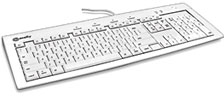
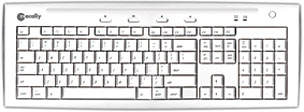 PR: Macally iKeySlim is a stylish & clean white
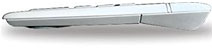
slim keyboard. Enhanced low profile keycaps reduces key stroke
travel distances and eases pressure on your finger tips.
PR: Macally iKeySlim is a stylish & clean white
slim keyboard. Enhanced low profile keycaps reduces key stroke
travel distances and eases pressure on your finger tips.
Features:
- 104 key slim USB keyboard
- Thin keycaps with sensitive and responsive touch
- 2 Built-in USB ports
- CD Eject and volume control buttons
- Ice white finish to match your Mac
- Low profile for easy storage inside a keyboard drawer
 Specifications:
- Dimensions : (L) 18.5", (H) 1", (W) 7
- Maximum Cable Length : 5'
- Net Weight : 2lbs
- 3 year warranty
 System Requirement:
- Mac OS 9.2, Mac OS X v10.2.8 or Mac OS X v10.3.x and above
- Any desktop or notebook computer with an available USB port
MSRP: $19.99
Link: iKeySlim USB Keyboard
miniStack V2 Space Saving FW/USB Hub
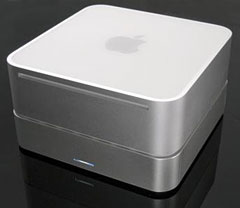 PR:
Expand your storage capacity and port flexibility while decreasing
your desk/cord clutter. The Newer Technology miniStack V2 is the
perfect external drive and bus powered hub companion for any
computer.
PR:
Expand your storage capacity and port flexibility while decreasing
your desk/cord clutter. The Newer Technology miniStack V2 is the
perfect external drive and bus powered hub companion for any
computer.
Housed within the miniStack's compact, sleek, state-of-the-art enclosure is a fast 3.5" drive with up to 750 GB that blows away smaller and slower 2.5" internal drives. Now you can have all the storage space you need for music & video files, graphics & photos, and document backup. Plus, with 2 FireWire and 3 USB 2.0 ports built in, you now can connect devices including scanners, printers, memory card readers, digital cameras, and iPods - all at once!
This terrific storage/connectivity solution is fully portable and works with all Macintosh computers and laptops, as well as virtually any Windows or Linux-based system with USB or FireWire. The easy-to-use, Plug-and-Play miniStack also is perfect for booting your OS on any system with USB2 boot-support.
Whether you're a techie and want to add your own hard drive to one of our 0 GB Kits or want the convenience of a pre-configured solution that comes complete with a leading hard drive utility/performance & backup software bundle valued at $200, NewerTech has a miniStack solution for your specific need.
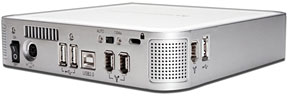 miniStack
V2 Features:
miniStack
V2 Features:
High Performance 3.5" ATA/6 7200 rpm Drive with 8 MB or 16 MB data buffer, Premier top tier Oxford 911+ chipset, smart Power auto-engage ON/OFF, Intelligent Thermal Control, 2 FireWire 400 Ports, 3 USB 2.0 High Speed Ports, Full 2 Year Warranty. Now with NEW Ultra-Quiet Operation!
- NEW! Ultra-Quiet Operation
- Up to 750 GB of bootable, performance disk capacity
- Large 8 MB or 16 MB data cache
- Compact 6.5" x 6.5" x 1.5" size
- Integrated USB 2.0 powered 3-port hub (1 uplink + 3 additional)
- Integrated FireWire powered 2-port hub/repeater (1 uplink + 2 additional)
- Auto-Power on/off automatically with computer
- Intelligent thermal monitoring activates fan only when needed
- Industry standard security slot
- Selectable FireWire or USB2 hard drive interface mode
- Fully bootable via USB or FireWire
- EMC Retrospect Backup Certified
- EMC Retrospect Backup and Intech HD Speedtools included
- NewerTech 2 year warranty
System Requirements: miniStack V2 External Hard Drives Requires: Apple/Mac or PC with available FireWire or USB port
High-Performance 3.5" ATA/6 7200 rpm drive with 8 MB or 16 MB data buffer doesn't just give you more storage, it also provides far better performance than any internal 2.5 ATA hard drive option as well. Use the NewerTech miniStack as your Startup Drive for an instant performance boost!*
Mac Requirements:
FireWire 400 (1394a): Mac OS 9.2 or higher
USB 2.0: Mac OS 10.2 or higher
USB 1.1: Mac OS 9.2 or higher
The miniStackV2
- 0 GB 'Add Your Own HD' $69.00
- NEW! 0 GB 'Add Your Own HD' Hard drive utility/performance & backup software bundle included. A $200 value - $75.00
- 80 GB 7200 rpm 2 MB - $114.99
- 160 GB 7200 rpm 8 MB - $129.99
- 250 GB 7200 rpm 8 MB - $149.99
- 320 GB 7200 rpm 8 MB - $179.99
- 400 GB 7200 rpm 8 MB - $199.99
- 500 GB 7200 rpm 8 MB - $249.99
- 750 GB 7200 rpm 16 MB - $449.00
USB ONLY also available
Link: miniStack V2
Software
Hardware Monitor Updated
PR: Hardware Monitor is an application to read out all accessible hardware sensors in Macintosh computers. Currently more than 100 different Macintosh hardware sensors and more than 200 hard drive temperature sensors are supported. The program can visualize the history graphs of the readings, display measured values in a large variety of fashions, or announce readings by speech output. It can also store and export readings. Depending on what sensors are built into your Macintosh system, the following data can be accessed:
- Temperarature readings at different locations
- Battery data of portable computers
- Voltage sensors
- Current (amperage) sensors
- Fan speed sensors
- Sensors for pulse-width controlled fans
- Power and load sensors
- Ambient light sensors
- User-defined artificial sensors to monitor the operating system
New in version 4.11:
- The menu-bar display will now be highlighted when the menu is open.
- It is now possible to delete the full sensor preferences set of a remotely monitored computer by a single mouse click when that machine has been taken offline and is no longer connected to the local computer.
- Corrects a scaling issue affecting the display of history curves when a long term history display had been zoomed out and the window width resulted in a horizontal time sampling resolution between 1 and 2 minutes per pixel.
- The resize behavior of the remote connection window was optimized.
- Enhanced compatibility of the disk saver feature with Mac OS X Jaguar.
- The internal hard drive sensor of Maxtor MaXLine Pro 500 (7H500F0) drives is now also detected by PPC-based Macintosh systems.
System requirements: Mac OS X 10.2 or later.
System support: PPC/Intel
Price: $10 Shareware
Link: Hardware Monitor
Desktop Mac Deals
Low End Mac updates the following price trackers monthly:
- Mac mini deals
- Intel iMac deals
- Mac Pro deals
- Power Mac G5 deals
- iMac G5 deals
- Power Mac G4 deals
- iMac G4 deals
- eMac deals
- Power Mac G3 deals
- iMac G3 deals
For deals on current and discontinued 'Books, see our 13" MacBook and MacBook Pro, MacBook Air, 13" MacBook Pro, 15" MacBook Pro, 17" MacBook Pro, 12" PowerBook G4, 15" PowerBook G4, 17" PowerBook G4, titanium PowerBook G4, iBook G4, PowerBook G3, and iBook G3 deals.
We also track iPad, iPhone, iPod touch, iPod classic, iPod nano, and iPod shuffle deals.
Join us on Facebook, follow us on Twitter or Google+, or subscribe to our RSS news feed
Links for the Day
- Mac of the Day: PowerBook 500 Series, introduced 1994.05.16. 'Blackbird' includes a 25 to 33 MHz 68040 along with smart batteries and grayscale or color displays.
- Support Low End Mac
Recent Content
About LEM Support Usage Privacy Contact
Follow Low End Mac on Twitter
Join Low End Mac on Facebook
Favorite Sites
MacSurfer
Cult of Mac
Shrine of Apple
MacInTouch
MyAppleMenu
InfoMac
The Mac Observer
Accelerate Your Mac
RetroMacCast
The Vintage Mac Museum
Deal Brothers
DealMac
Mac2Sell
Mac Driver Museum
JAG's House
System 6 Heaven
System 7 Today
the pickle's Low-End Mac FAQ
Affiliates
Amazon.com
The iTunes Store
PC Connection Express
Macgo Blu-ray Player
Parallels Desktop for Mac
eBay

