
Mac News Review
World's Fastest Mac, 'notMac' Challenge, Intel Mac Bug with Target Disk Mode, and More
This Week's Apple and Desktop Mac News
Compiled by Charles Moore and edited by Dan Knight - 2006.12.15
PowerBook, iBook, MacBook, and other portable computing is covered in The 'Book Review.
All prices are in US dollars unless otherwise noted.
News & Opinion
- Amazing Speed from an Old Power Mac
- The Fastest Mac in the World Runs OS 9
- notMac Challenge Seeks Free .mac Replacement
- 'Name the Worm, Win a Bug!'
Apple Updates
Products
- miniStack V2 - Up to 750 GB Plus USB 2.0/FireWire Hub
- PROGear-G5 28-in-1 Card Reader Matches Power Mac G5, Mac Pro
iPod Accessories
Desktop Mac Deals
News & Opinion
Amazing Speed from an Old Power Mac
John Martellaro writing on Mac Observer says:
"MyMac published a blog by the legendary John Farr on Friday [link below] about his experience with an old [Power] Macintosh 8600 pulled out of storage. In Finder operations, it felt far snappier than his new MacBook....
"Mr. Farr described pulling the 8600 out of a storage shed where the temperature had reached -13F. He let it warm up, and after it booted perfectly, he was amazed at its speed in the GUI. "And it was so ridiculously fast. I mean, I could sell tickets or something. ('See? See?? Want to close a window? WHAM! Hit the pull down menu? WHAM!')'"
Editor's note: Yes, I still boot my Pismo and iBook into OS 9 from time to time, and I'm always blown away by how responsive the Finder is. Ditto for my Umax SuperMac S900 tower. cm
Link: Amazing Speed from a Macintosh 8600
The Fastest Mac in the World Runs OS 9
Applelinks' former Senior News Editor John H Farr writes on MyMac.com:
"My poor client . . . you have to picture this: she has a brand new MacBook, but she's been designing and printing all the labels for her line of herbal products on an ancient Performa [6500] using ClarisWorks. Urk! Obviously this is okay, even if it has me rolling my eyes, so long as the old Mac works. She also just hired a new assistant, and she wants to keep the assistant out of her office space, and she doesn't want to let the assistant use the MacBook. This means she'd like the assistant to take over label-making duty on the (ugh) Performa. And of course, when we last looked in on this scene, I couldn't even get the Performa to boot.
"Aarghh.
"Well, my first brilliant idea was to just sell her my old Power Mac 8600 and toss the Performa. What a perfect solution! But first I had to go extract the 8600 and one of three monitors sitting in the storage unit, gather up all my old SCSI gear and OS 9 software, set the whole mess up on the dining room table, and erase all my personal data. Whew. (Pant, pant...) "
Link: The Fastest Mac in the World, Part II
notMac Challenge Seeks Free .mac Replacement
The new notMac Challenge site says:
"Introducing the notMac Challenge to create a free replacement to dotMac's client-based services that's easy enough for a first-time Mac user to install and so fully and transparently integrated that a long-time dotMac user wouldn't notice the difference.
"Current prize value: $3590
"Contribute to the prize and help provide incentive for someone to solve this problem.
"Since Apple decided to start charging for dotMac, I've spent $495 to keep some useful files remotely accessible on my iDisk and sync my bookmarks, address book and calendar between computers. While I find these features incredibly useful and convenient, I have no need for any of dotMac's web-based services, and as a result, I don't think I've been getting a good value from Apple. I know that workarounds exist that allow one to take advantage of dotMac's services without a dotMac account, but they require a level of technical proficiency that I just don't have. I've no doubt there are a lot of people like me.
"The goal of the notMac Challenge is to create the incentive for someone to make an alternative dotMac solution available for the general public. Since this is something that could benefit a large number of people in the Mac community, I figure what better way to create that incentive than to invite anyone interested to contribute to the reward.
"To make the stakes even richer, I'll match every contribution up to a total of $10,000. So, if you contribute $100, I'll double it for a total of $200. Hopefully, in a short amount of time, the prize pool will be large enough to encourage someone out there to liberate the less technically literate of us from the obligation to pay Apple $99 a year."
Note: If this is legit (I have no way to verify), it will be great! cm
Link: notMac Challenge
'Name the Worm, Win a Bug!'
PR: ThriftMac, in conjunction with XtraLean Software, is offering a free copy of ShutterBug to the person who comes up with the best name for the ThriftMac mascot. Contest entrants will also receive a coupon for $10 off ShutterBug just for participating (regular price is $39.95). The contest will run from December 8 through December 31, 2006 and the winner will be announced a week thereafter. Participants can submit their entry via a form at the ThriftMac website. To submit an entry and for contest details, visit ThriftMac.
ThriftMac is a website devoted to cool freeware offering a collection of the "cream of the crop" in free applications for Mac OS X. The ThriftMac mascot is a friendly green worm that resides at the bottom of the ThriftMac website, inviting visitors to download the freeware of their choice from the great collection of free apps available at the site. This worm needs a name and is looking to choose from the submissions sent in by contest participants. Contest entries are being accepted until December 31, 2006. The winner will be decided by a panel of judges consisting of ThriftMac and XtraLean staff.
ShutterBug is an easy to use, powerful website creation tool for Mac OS X that lets you create all different types of websites, from elegant online galleries and slideshows to full-featured websites. It offers WYSIWYG tools for quick and easy content building and for creating stylish website designs. ShutterBug comes packed with more than two-dozen themes and offers 80 more themes available from shutterbugland.com for free download by registered ShutterBugs.
Apple Updates
Intel-based Macs May Become Unresponsive in Target Disk Mode
A new Apple Knowledge Base article says:
"Some Intel-based Macs can become unresponsive while being used as a host in FireWire target disk mode. This may occur if the second computer is left connected for over 24 consecutive hours to the Intel-based target Mac.
"Products affected
"Solution
"To avoid this behavior, unmount the host computer and restart it with a new target disk mode session every 24 hours."
Link: Intel-based Mac May Become Unresponsive in Target Disk Mode
Products
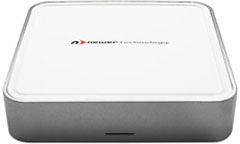
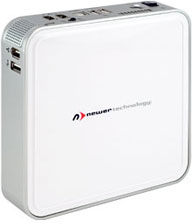
miniStack V2 - Up to 750 GB Plus USB 2.0/FireWire Hub
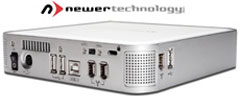 PR:
Expand your storage capacity and port flexibility while decreasing
your desk/cord clutter. The Newer Technology miniStack V2 is the
perfect external drive and bus powered hub companion for any
computer.
PR:
Expand your storage capacity and port flexibility while decreasing
your desk/cord clutter. The Newer Technology miniStack V2 is the
perfect external drive and bus powered hub companion for any
computer.
Housed within the miniStack's compact, sleek, state-of-the-art enclosure is a fast 3.5" drive with up to 750 GB that blows away smaller and slower 2.5" internal drives. Now you can have all the storage space you need for music & video files, graphics & photos, and document backup. Plus, with 2 FireWire and 3 USB 2.0 ports built in, you now can connect devices including scanners, printers, memory card readers, digital cameras, and iPods - all at once!
 This
terrific storage/connectivity solution is fully portable and works
with all Macintosh computers and laptops, as well as virtually any
Windows or Linux-based system with USB or FireWire. The
easy-to-use, Plug-and-Play miniStack also is perfect for booting
your OS on any system with USB 2.0 boot-support.
This
terrific storage/connectivity solution is fully portable and works
with all Macintosh computers and laptops, as well as virtually any
Windows or Linux-based system with USB or FireWire. The
easy-to-use, Plug-and-Play miniStack also is perfect for booting
your OS on any system with USB 2.0 boot-support.
Whether you're a techie and want to add your own hard drive to one of our 0 GB Kits or want the convenience of a preconfigured solution that comes complete with a leading hard drive utility/performance & backup software bundle valued at $200, NewerTech has a miniStack solution for your specific need.
miniStack V2 Features:
 High
Performance 3.5" ATA/6 7200 rpm Drive with 2 MB, 8 MB, or 16 MB
data buffer, Premier Top Tier Oxford 911+ Chipset, Smart Power
Auto-engage ON/OFF, Intelligent Thermal Control, 3 Additional
FireWire Ports, 4 Added USB 2.0 High Speed Ports, Full 2 Year
Warranty.
High
Performance 3.5" ATA/6 7200 rpm Drive with 2 MB, 8 MB, or 16 MB
data buffer, Premier Top Tier Oxford 911+ Chipset, Smart Power
Auto-engage ON/OFF, Intelligent Thermal Control, 3 Additional
FireWire Ports, 4 Added USB 2.0 High Speed Ports, Full 2 Year
Warranty.
Features:
- NEW! Ultra-Quiet Operation
- Up to 750 GB of bootable, performance disk capacity
- Large 8 MB or 16 MB data cache
- Compact 6.5" x 6.5" x 1.5" size
- Integrated USB 2.0 powered 3-port hub (1 uplink + 3 additional)
- Integrated FireWire powered 2-port hub/repeater (1 uplink + 2 additional)
- Auto-Power on/off automatically with computer
- Intelligent thermal monitoring activates fan only when needed
- Industry standard security slot
- Selectable FireWire or USB 2.0 hard drive interface mode
- Fully bootable via USB or FireWire
- EMC Retrospect Backup Certified
- EMC Retrospect Backup and Intech HD SpeedTools included
- NewerTech 2 year warranty
System Requirements
- Apple/Mac or PC with available FireWire or USB port
Mac Requirements:
- FireWire 400 (1394a): Mac OS 9.2 or higher
- USB 2.0: Mac OS 10.2 or higher
- USB 1.1: Mac OS 9.2 or higher
Windows Requirements
- FireWire 400 (1394a): Windows 98SE/ME/2000/XP
- USB 2.0: Windows ME/2000/XP
- USB 1.1: Windows ME/2000/XP
The miniStack V2
- 0 GB 'Add Your Own HD' $79.99
- 80 GB 7200 rpm 2 MB $ $114.99
- 160 GB 7200 rpm 8 MB $129.99
- 250 GB 7200 rpm 8 MB $149.99
- 320 GB 7200 rpm 8 MB $179.99
- 400 GB 7200 rpm 8 MB $239.99
- 500 GB 7200 rpm 8 MB $259
- 750 GB 7200 rpm 16 MB $495
USB only also available.
- miniStack V2
- NewerTech miniStack: A Great Drive Even if You Don't Own a Mac mini, Dan Knight, 2006.02.08. Review of original version of miniStack
PROGear-G5 28-in-1 Card Reader Matches Power Mac G5, Mac Pro
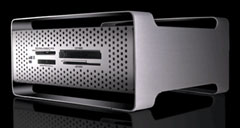 PR: Now you can transfer or download data from your
flash memory card to your computer with the PROGear-G5.
PR: Now you can transfer or download data from your
flash memory card to your computer with the PROGear-G5.
Features:
- Stylish design to compliment your Power Mac G5 or Mac Pro computer
- Hi-speed USB 2.0 data transferring between flash media cards for Mac/PC, notebooks, digital cameras, PDAs, and MP3 players
- External use via USB 2.0 cable
- 4 card slots allow you to access 28 media formats
- Pin-protected Compact Flash slot
- No adapters required for mini-SD, RS-MMC and MS-Duo
- Compatible with the latest Secure Digital High Capacity (SDHC) memory cards
- Custom Icons for each media slot. (Windows)
Supported Media Cards:
- CompactFlash Type-I
- CompactFlash Type-II
- CompactFlash Ultra Speed (133x)
- Microdrive
- SmartMedia
- Magicstor
- MultiMediaCard
- MultiMediaCard Mobile
- MultiMediaCard High Speed v4.0
- xD-Picture Card*
- xD-Picture Card* Type M
- xD-Picture Card* Type H
- Secure Digital (true 4-bit)
- miniSecure Digital
- MicroSD (*SD Adapter Required)
- Secure Digital v1.1 (133x)
- RS-MultiMediaCard
- RS-MultiMediaCard High Speed v4.0
- Memory Stick
- Memory Stick PRO Duo
- Memory Stick Duo
- Memory Stick Select
- Memory Stick Rom
- Memory Stick PRO (true 4-bit)
- Memory Stick MagicGate
- Memory Stick Duo MagicGate
- Memory Stick PRO MagicGate
- Memory Stick High Speed (133x)
Specifications:
- Dimension (W x H x D): 5.27" x 2.52" x 4.92" (134mm x 64mm x 125mm)
- Power Requirements: 5V DC +/- 5% (USB powered)
- Transfer rate:
- Up to 480 Mb/sec via USB 2.0
- Up to 12 Mb/sec via USB 1.1
System Requirement:
- Mac OS X and later
- Windows 2000/XP
- USB 2.0 port
Link: PROGear-G5 28-in-1 Professional Card Reader
iPod Accessories
Ear3 Personal Hearing Threat Detector
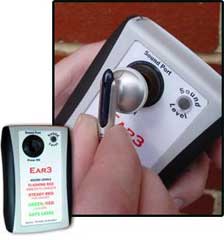 PR: Ear3 is a miniature, personal hearing
threat detector that can immediately signal the user when a sound
source exceeds safe listening levels. Ear3 can be used with iPods,
MP3 players, boom boxes, stereo systems, automobile audio systems,
rock concerts, discos, orchestras and other sound sources. When
used properly, Ear3 can dramatically reduce opportunities for sound
induced hearing trauma. Ear3 is approximately the size of an iPod
and does not require any electrical connections to the sound source
for its operation.
PR: Ear3 is a miniature, personal hearing
threat detector that can immediately signal the user when a sound
source exceeds safe listening levels. Ear3 can be used with iPods,
MP3 players, boom boxes, stereo systems, automobile audio systems,
rock concerts, discos, orchestras and other sound sources. When
used properly, Ear3 can dramatically reduce opportunities for sound
induced hearing trauma. Ear3 is approximately the size of an iPod
and does not require any electrical connections to the sound source
for its operation.
Ear3 uses calibrated electronics to measure sound pressure levels and signal those levels to the user in four easy to understand steps. When sound pressures are between 70 to 84 decibels (dBA), a green light illuminates. At 85 decibels the light flashes red/green, indicating entry to the danger zone for hearing damage. At 90 decibels a steady red indicator light comes on indicating high danger to hearing. At 100 decibels and above, the red indicator light flashes rapidly on/off, indicating extreme danger to hearing. Ear3 adds an important element of reality and a protective option to a person's sound level choices.
Ear3 also provides a sound chamber that approximates the size of the human ear canal in order to increase accurate assessment of sound pressures at the eardrum when ear buds are being used. This feature models the volume of the ear canal and takes into account sound pressure increases introduced by resonance characteristics of the canal. By incorporating resonance factors into Ear3's design, users receive an improved estimate of sound pressure levels actually being presented to the ears. For example, a given sound pressure measured from ear buds in a free sound field can be 10 to 15 decibels lower than the same sound pressure delivered directly into an ear canal.
With iPods, for example, Ear3 can monitor sound levels at the ear buds and can be used to adjust these signals to safe levels. iPod users can rapidly and easily adjust output for safe listening levels. There is no need to guess at sound levels being presented to the ears. Ear3 provides factual information that can guide listening levels selected by users of music players.
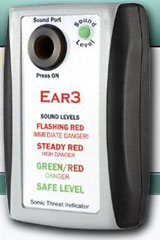 Protect your family from loud music such as MP3
Players and Concerts
Protect your family from loud music such as MP3
Players and Concerts
The iPod's new Volume Limit function (accessed via the Settings menu) now provides the user with an opportunity to read the output level of the iPod with Ear3 and then set the Volume limit to a specific safe level. The iPod will remember the setting and will use it in future playbacks. Parents can set the Volume Limit and can then lock the settings so children cannot operate the unit beyond safe levels.
In sound fields, such as those broadcast from in-home stereo systems or automobile stereos, Ear3 can be used to read the strength of sounds and to guide adjustments to safe levels. Regular use of Ear3 will reduce the probability of hearing loss from loud sound sources. In addition, users are likely to remember the volume settings they use and will then guide their future settings based on this information.
In noisy environments where the user cannot directly control sound output, such as rock concerts, discos or other locations, Ear3 can remind the user to protect his/her hearing. Small, foam earplugs can attenuate loud sounds and limit the risk of hearing damage.
Ear3 was developed at the Hollins Communications Research Institute in Roanoke, Virginia, a nonprofit organization that has developed innovative approaches to the behavioral treatment of stuttering and a new, advanced executive hearing assistance program. The Institute can be reached by email: admin@stuttering.org.
Speak to a real person about Ear3 - call 540-265-5663
Price $49.95
Link: Ear3 Personal Hearing Threat Detector
Desktop Mac Deals
Low End Mac updates the following price trackers monthly:
- Mac mini deals
- Intel iMac deals
- Mac Pro deals
- Power Mac G5 deals
- iMac G5 deals
- Power Mac G4 deals
- iMac G4 deals
- eMac deals
- Power Mac G3 deals
- iMac G3 deals
For deals on current and discontinued 'Books, see our 13" MacBook and MacBook Pro, MacBook Air, 13" MacBook Pro, 15" MacBook Pro, 17" MacBook Pro, 12" PowerBook G4, 15" PowerBook G4, 17" PowerBook G4, titanium PowerBook G4, iBook G4, PowerBook G3, and iBook G3 deals.
We also track iPad, iPhone, iPod touch, iPod classic, iPod nano, and iPod shuffle deals.
Join us on Facebook, follow us on Twitter or Google+, or subscribe to our RSS news feed
Links for the Day
- Mac of the Day: Power Mac G5 (Early 2005), (2005.04.27. At 2.7 GHz, the fastest G5 CPU Apple ever used, also 16x SuperDrive and it shipped with OS X 10.4 Tiger.)
- Support Low End Mac
Recent Content
About LEM Support Usage Privacy Contact
Follow Low End Mac on Twitter
Join Low End Mac on Facebook
Favorite Sites
MacSurfer
Cult of Mac
Shrine of Apple
MacInTouch
MyAppleMenu
InfoMac
The Mac Observer
Accelerate Your Mac
RetroMacCast
The Vintage Mac Museum
Deal Brothers
DealMac
Mac2Sell
Mac Driver Museum
JAG's House
System 6 Heaven
System 7 Today
the pickle's Low-End Mac FAQ
Affiliates
Amazon.com
The iTunes Store
PC Connection Express
Macgo Blu-ray Player
Parallels Desktop for Mac
eBay

