
Charles Moore's Mailbag
Contour RollerMouse Station a Great Alternative to Traditional Mouse
Charles Moore - 2004.06.07 - Tip Jar
Rollerbars are one of the more esoteric computer pointing devices, consisting essentially of a round, rubber coated bar situated between the computer keyboard and the user, who manipulates the screen cursor through a combination of rolling the bar on its axis and sliding it sideways in its housing.
The operation is a lot more intuitive than it sounds, and the theory behind it is that roller bars reduce physical stress, especially on the elbows and shoulders, by eliminating the reaching necessary when using any movable mouse - conventional or ergonomic.
Contour Design's RollerMouse rollerbar station was developed in Sweden and is designed to be used with standard computer keyboards that have a rectangular form factor and a straight edge on the user side.
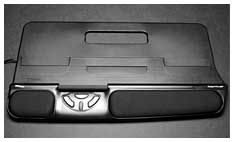
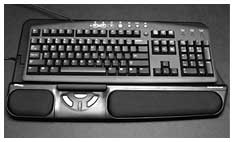
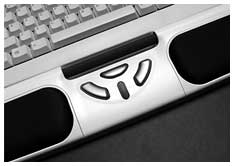
The RollerMouse's rollerbar is contained in a full-width housing that incorporates a console of click buttons and a scroll wheel flanked by padded wrist rests. An apron extends from the control housing for the keyboard to rest on.
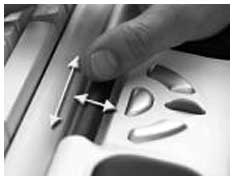 The RollerMouse controls the cursor
without the need to grip or reach for a mouse, and requires minimal
space. Button controls are centrally located beneath the space bar. The
RollerMouse is also a solution for workspaces where there is no room
for a conventional mouse.
The RollerMouse controls the cursor
without the need to grip or reach for a mouse, and requires minimal
space. Button controls are centrally located beneath the space bar. The
RollerMouse is also a solution for workspaces where there is no room
for a conventional mouse.
The rollerbar can be manipulated using either hand and whatever combination of thumb, fingers, or palm control is most comfortable. This facility for spreading mousing stress between both hands and various digits is a key element in reducing the overall stress on the user's body.
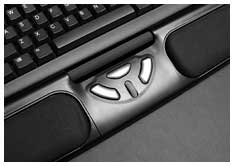
Clicking may also be executed in several ways, either with the three buttons and clickable scroll wheel or by pressing down on the rollerbar itself, which is clickable as well. Button assignments are programmable, with defaults as follows:
- Clickable rollerbar: primary or left button
- Left click button: primary or left button
- Middle click button: preprogrammed for double click
- Right click button: secondary or right button (i.e.: activates contextual menus)
- Scroll wheel button: auxiliary or middle button
The default configuration requires no add-on driver software for Mac OS X 10.1 or later.
The Classic Mac OS does not have built-in support for scroll wheels, but you can download free driver software from Contour Design's website to add scroll support with the rollerbar to Mac OS 8.6 through 9.2.2.
RollerMouse also may be used in enhanced mode, which allows the controls to simulate a five-button mouse. This requires add-on driver software for all operating systems and will probably be mainly of interest to PC users, who are more accustomed to multi-button mice.
Most Mac users should find the default settings more than adequate.
My first impression upon hooking the RollerMouse up to my PowerBook along with a Macally iceKey keyboard was that this thing has a really nice feel to it - and it was quite intuitive. I encountered no learning curve to speak of.
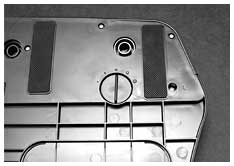 The rollerbar's action is
silky-smooth and nearly effortless. The buttons, with the exception of
the scroll wheel button (I assume that it's intentionally stiffer) have
a light touch and a short travel, which is what I prefer. An adjuster
dial on bottom of the RollerMouse (left) allows you to adjust the
tension of the rollerbar click force.
The rollerbar's action is
silky-smooth and nearly effortless. The buttons, with the exception of
the scroll wheel button (I assume that it's intentionally stiffer) have
a light touch and a short travel, which is what I prefer. An adjuster
dial on bottom of the RollerMouse (left) allows you to adjust the
tension of the rollerbar click force.
The RollerMouse facilitates easy two-handed mousing, which helps spread mousing stress on your body.
The only dissonant aspect of roller mousing that I discovered was running out of lateral rollerbar travel before I reached the edge of the screen when mousing slowly, making it necessary to double-pump. However, that's been addressed, too.
Due to varying monitor sizes, the cursor sometimes hits an invisible wall. Moving the bar will activate a switch that moves the cursor in the direction you desire. This is similar to picking up a mouse and placing it in the center of your workable area. End detection can be set to slow or fast mode through a DIP switch.
In general, I would say that roller mousing works great, and no one should be worried about adapting to it.
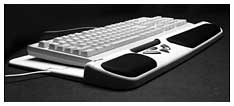 I've found that the RollerMouse works best
with thin-profile keyboards like the iceKey, which give you a clear
shot over the roller. It will work with thicker keyboards as well, but
you may stub your fingers on the 'board when rolling.
I've found that the RollerMouse works best
with thin-profile keyboards like the iceKey, which give you a clear
shot over the roller. It will work with thicker keyboards as well, but
you may stub your fingers on the 'board when rolling.
Users Love the RollerMouse
A 2002 ergonomics study at a major pharmaceutical company to test the effects of the RollerMouse Station on typing-intensive jobs found that wrist pain was reduced in 70% of study participants using the RollerMouse and right hand pain was reduced 50%. The RollerMouse also scored very high as an alternative to other computer input devices, saving time and increasing productivity over conventional mice.
Other measured responses of this study included comfort level, accuracy, overall ease of operation, effort required, pain reported by region, and pain associated with the devices. The group using the RollerMouse responded the most positively and had significant reduction in pain in the shoulder, wrist, hand, and forearm regions. Participants reported less pain after using the RollerMouse for just two weeks.
An eight month study released last year looked at the impact of the RollerMouse in Verizon call centers. It revealed a dramatic improvement in lowering ergonomic risk exposure, user discomfort, and motion savings in keyboard and mouse-intensive tasks. One study finding indicated an reduction in elbow discomfort alone by 58%.
The pilot study, conducted by Humantech, the largest occupational ergonomics consulting firm, hypothesized that RollerMouse reduced ergonomic risk exposure for the right hand/wrist, elbow, and shoulder when compared to a conventional mouse.
Fifty-one customer service representatives from Verizon's southern California offices participated in the study and were asked to replace their current input device with the RollerMouse station. The control group used their original keyboard and input device that included any of the following: a straight keyboard, wave keyboard, touch pad keyboard, and standard mouse.
The study group used the RollerMouse station in place of their current input device. Prior to the installation of RollerMouse, the study group reported discomfort in the upper extremities (i.e., hands, wrists, elbows and shoulders). After the study trial, participants discomfort dropped by 24% and elbow discomfort alone was diminished by 58% for the study group.
Woody Dwyer, CPE, managing consultant for Humantech noted, "93% of the study participants did not want to return to their original workstation set up after the study and many noted an immediate reduction in discomfort in the shoulders, elbows and hands/wrists."
You can read a complete copy of the study on Contour's website.
Another Humantech Project, the "Pilot Study: Performance, Risk, and Discomfort Effects of the RollerMouse station," found that users were able to achieve faster data entry using the RollerMouse, averaging almost 5% increased productivity.
Similar findings were established earlier in the year when Contour Design conducted a study of the RollerMouse Station in the one thousand-seat call center of a major U.S. pharmaceutical company. That study discovered a 47% reduction in reported operator pain when using the RollerMouse Station.
RollerMouse Value
The downside of the RollerMouse is its price - it lists at US$189.99, quite a bit more than you have to pop for a good conventional ergonomic mouse such as Contour's Perfit (US$109.95) or the even more radical Quill (US$99.95). However, if the RollerMouse will facilitate greater comfort and productivity at your computer, it could pay for itself pretty quickly.
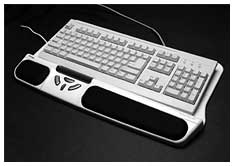 If you suffer from mousing pain or would
prefer not to develop it in the first place, the RollerMouse is worth
considering.
If you suffer from mousing pain or would
prefer not to develop it in the first place, the RollerMouse is worth
considering.
Contour makes that consideration easier with a 30 day free trial offer and 30 day return policy. Computer users from any major industry, education, or government institution are invited to obtain a 30 day free trial of the RollerMouse. When the trial period is over, you judge whether the product is working out well for you or your employee. It is completely your decision to keep and pay for the product or return it to Contour.
If you are not with a large organization, the next best thing to a free trial is Contour's 30 day return policy. If you return the products within thirty days, they will credit you the cost of the product. If you have paid by credit card, your account will be credited back 100% for the product. Just like the free trial, you are only asked to return any product you decide not to keep within thirty days from the date you received your order. (Offer valid in the continental USA only.)
Key Features
- Revolutionary rollerbar provides single finger point and click functionality.
- Adjustable click force on rollerbar (five levels of tension) using simple knob under RollerMouse. (Rollerbar click function can be disabled using DIP switch if user prefers using buttons.)
- Smooth sliding steel rollerbar coated with soft rubber for excellent feel and cursor control.
- Long Lasting: optical sensor reads bar movement using the latest technology, nothing to wear out
- Three user definable buttons and a scroll wheel
- Buttons configurable for click, double-click and drag-lock via DIP switches. No driver required.
- PC and Mac compatible (USB device with PS/2 adapter included)
- Secondary PS/2 port for connecting one additional input device (unfortunately, there is no extra USB port, a significant omission for Mac users)
- Soft but firm Lycra wrist rest support. Removable for easy cleaning.
- 20-7/8" wide x 11-3/8" deep x 1-1/4" high (all measurements from maximum locations)
- Two years warranty
- Available in beige or black
System Requirements
- Macintosh with available USB port only - no ADB support
- PC with available USB or PS/2 port - serial ports not supported
- Recommended for use with 101 key "straight" style keyboards
- Supported by virtually all operating systems with USB or PS/2 support. (Some operating systems require driver to enable scroll wheel support. Drivers are available)
You can view the RollerMouse Swedish Success Story Video online.
Join us on Facebook, follow us on Twitter or Google+, or subscribe to our RSS news feed
Charles Moore has been a freelance journalist since 1987 and began writing for Mac websites in May 1998. His The Road Warrior column was a regular feature on MacOpinion, he is news editor at Applelinks.com and a columnist at MacPrices.net. If you find his articles helpful, please consider making a donation to his tip jar.
Links for the Day
- Mac of the Day: Performa 6360, introduced 1996.10.01. A new motherboard turned the Road Apple x200 into a winner.
- Support Low End Mac
Recent Content
About LEM Support Usage Privacy Contact
Follow Low End Mac on Twitter
Join Low End Mac on Facebook
Favorite Sites
MacSurfer
Cult of Mac
Shrine of Apple
MacInTouch
MyAppleMenu
InfoMac
The Mac Observer
Accelerate Your Mac
RetroMacCast
The Vintage Mac Museum
Deal Brothers
DealMac
Mac2Sell
Mac Driver Museum
JAG's House
System 6 Heaven
System 7 Today
the pickle's Low-End Mac FAQ
Affiliates
Amazon.com
The iTunes Store
PC Connection Express
Macgo Blu-ray Player
Parallels Desktop for Mac
eBay

