
Charles Moore's Mailbag
Two Cool Optical Mice from Contour
Charles Moore - 2004.05.24 - Tip Jar
Contour's Perfit Mouse Optical
The Contour's Perfit Mouse has been in production for seven years with over 100,000 units sold. I reviewed conventional ball-type Perfit mice here a few years back in both ADB and USB configurations and found them to be excellent products.
Now the Salem, New Hampshire-based company has released new Perfit Mouse Optical, which takes the classic Perfit Mouse design to a new level. Reengineered to incorporate optical technology, improved reliability, and increased functionality, the Perfit Mouse Optical retains all of the ergonomic benefits that have made the original Perfit Mouse so comfortable and popular.
Carried over from the legacy Perfit Mouse are the basic form factor with:
- Tilted palm support that prevents static grip by allowing the hand to rest comfortably and rock freely in a balanced, natural posture.
- Elevated wrist support that reduces stress on the wrist by keeping it off the desktop,
- Sculpted elevated buttons to reduce excessive load on fingertips and help keep the fingers positioned for comfortable activation.
- Thumb support, which reduces the grip force that has been associated with carpal tunnel syndrome.
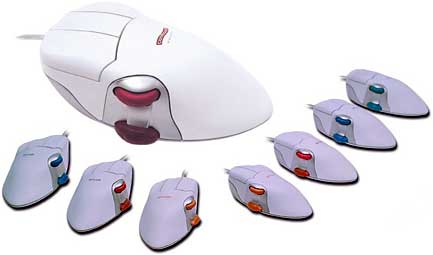
New with the Perfit Mouse Optical are:
- An 800 DPI optical sensor which provides precise control, durability, low maintenance, and tracking on virtually any surface.
- A scroll wheel activated by the thumb. This gives you the user added support, control and comfort. Allows you to move the mouse with reduced pinch force which is known to increase the risk of carpal tunnel syndrome. The scroll Wheel provides scrolling and the textured, rubber coated light touch two position rocker switch provides access to additional repetitive commands.
|
|
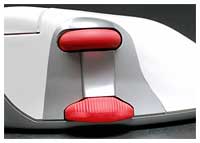
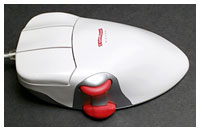
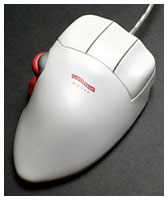
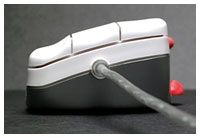
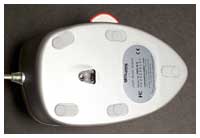
The USB and ADB Perfit mice were excellent products, but the Perfit Mouse Optical is a significant improvement across the board. No more cleaning the ball and rollers, and the optical tracking seems more precise. The scroll wheel and rocker switch are convenient additions that don't compromise the already excellent ergonomic design.
As with its ball-type predecessors, the Perfit Mouse Optical comes in three left-hand and four right-hand sizes (small, medium, and large, with an extra-large version available for right-handers only). The sizes are color-coded with the scroll wheel and rockers switch in orange on the small unit, red for medium, blue for large, and green on the extra-large model.
The appropriate size Perfit Mouse Optical for you is determined by measuring from the tip of your middle finger to the first crease on your wrist. For me, that turned out to be 8" on the nose, so I fall in the range for the large size Perfit Mouse of 7-1/2" to 8-1/4".
The Perfit Mouse is designed to minimize biomechanical load and reduce hand and arm deviations from the neutral pronation position. The shape of the original Perfit Mouse was the result of three years of testing with users complaining of mouse hand and wrist pain from their existing devices. The mouse's top surface is contoured to fit the palm of the hand to disperse pressure across the palm during use, and the thumb side of the mouse is higher than the other to minimize pronation strain. There is also a support for the thumb, which allows movement of the mouse with reduced Pinch Force which is known to increase the risk of carpal tunnel syndrome.
The elevated wrist support reduces pressure on the wrist by keeping it off the desktop, maintains a straighter wrist alignment, minimizes lateral deviation, balances the hand in a neutral, tilted posture, and prevents static grip by allowing the hand to rock freely.
This posture allows mouse clicking pressure to come mainly from the whole finger being depressed from its base joint, which, once you get used to it, begins to feel quite correct and natural, as well as less stressful on the muscles of your fingers and wrists. From this perspective, the big mouse began to make "perfit" sense.
The Perfit Mouse Optical is highly configurable and programmable in OS X using the Contour Mouse Control Panel. Additional functionality can be added to device by downloading the third party shareware driver, USB OverDrive. The mouse settings allow you to speed up your daily tasks by assigning useful actions to all the extra buttons in your USB mouse.
You can read abstracts of scientific studies confirming the Perfit Mouse's ergonomic virtues on Contour's website.
The Contour Perfit Mouse is not cheap, but it appears to be a very high quality product. My older Perfit mice have proved durable and trouble-free, and there is nothing else quite like it on the market.
System Requirements
- Mac OS 9.x and earlier
- Mac OS X
- Windows 98, 98SE, Me, 2000, and XP
Perfit Mouse Optical MSRP $109.95.
Contour MiniPro Mouse for Laptop Users
|
|
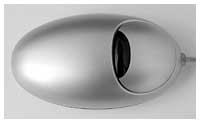
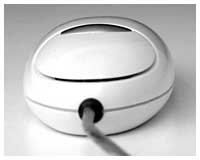
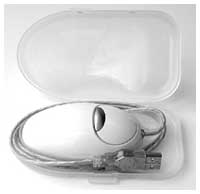
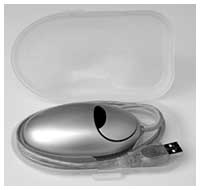
I don't mind using a trackpad, especially with the "tappable" function activated, but when I'm in "desktop substitute mode" with my iBook or PowerBooks (which is most of the time), I wouldn't want to be without an external mouse, and even on the road there are times when a trackpad really isn't ideal.
The Contour folks say that their marketing research indicates that more than 70% of users who buy the MiniPro optical mouse intend to use it on the road.
The first thing you notice about the MiniPro mouse is that it comes in a convenient "Pack n' Go" case that houses and protects the mouse while in transit - and keeps the cord from getting tangled with or snagged on other contents of your laptop case. The Contour folks say they have placed a lot of emphasis on the design of the snap-closure Pack n' Go case and that if you use it, you will minimize the risk of bending, twisting, or kicking your mouse cord in transit. Just slip the mouse into its case, coil the cord counterclockwise around the mouse body making sure that the there's no been kinking or bending, and snap the case closed. Slick.
The MiniPro is the smallest mouse I've ever used - a bit larger than the footprint of an extra-large hen's egg - and smoothly contoured. It's an optical, two-button mouse, a with the second ("right") button at the inner edge of the main "left" one. Being optical, there are no moving parts other than the click buttons, so it will never need maintenance or cleaning.
The advanced optical controller allows for precise control even in less than optimal places such as airplane trays, where other mice fall short of being practical. The MiniPro Mouse even tracks on non-flat surfaces, such as on your pant legs. However, the Contour MiniPro mouse does not work on these surfaces:
- glass, or other glossy materials,
- halftone images, such as mousepads with pictures
Because the mouse is so small, you don't really cup it in your palm like you do a conventional mouse, but rather you guide it with your thumb and finger tips. The main button action is light and short, which I prefer in any mouse. The second, inner button is somewhat stiffer, which should prevent inadvertent clicking of the "right" button function.
The mouse is also very light, and it glides smoothly effortlessly across the mousing surface. The cord is a shortish 32" long, which doesn't give you much slack when using it right-handed with an iBook's left side USB ports, although it's actually 10" longer than the 22" cord on the hockey puck Apple USB mouse.
The Contour MiniPro Mouse comes in either snow white, which matches my opaque white iBook exactly, or in titanium metallic, to harmonize with the metal skin of the titanium or aluminum PowerBooks.
As with all Contour products I've used and sampled, the MiniPro Mouse is well constructed out of first-rate materials. It carries a one year manufacturers warranty.
Key Features
- Titanium or snow color to complement your system.
- Compact design is ideal for laptop users on the go.
- Use it anywhere on almost any surface.
- Designed to be comfortable, yet compact.
- Pack N' Go carrying case provides added protection and easy cord storage.
- Two Button Mouse
- Optical Technology - No Mouse Ball
- USB Connectivity
- Simple Plug n' Play Installation
- Mac OS 9 & OS X compatible as well as Windows 98, 98SE, Me, 2000, and XP.
- Mac users: Contour Overdrive for buttons customization
- Dimensions: 3 1/2"L x 1"H x 1 7/8"W
- Cord Length: 32"
MiniPro (Ti and Snow) MSRP $34.95
Join us on Facebook, follow us on Twitter or Google+, or subscribe to our RSS news feed
Charles Moore has been a freelance journalist since 1987 and began writing for Mac websites in May 1998. His The Road Warrior column was a regular feature on MacOpinion, he is news editor at Applelinks.com and a columnist at MacPrices.net. If you find his articles helpful, please consider making a donation to his tip jar.
Links for the Day
- Mac of the Day: PowerBook 2300, introduced 1995.08.28. The only Duo equipped with a PowerPC processsor run at 100 MHz.
- Support Low End Mac

