
Miscellaneous Ramblings
Miscellaneous Ramblings Review
Macally iceKey Slim USB Keyboard
Charles Moore - 2003.07.07 - Tip Jar
Ever since I first laid hands on the G3 Series WallStreet PowerBooks back in 1998, the feather-light touch and silky, short travel of that machine's keyboard has been the gold standard of what computer keyboards should be like. Unfortunately, I've never found anything since that completely lived up to the standard of those WallStreet 'boards, even on the later PowerBooks and iBooks, - and especially not in freestanding computer keyboards.
However, one keyboard that has come a long way in the right direction is the Macally iceKey slim USB keyboard, which, unlike most freestanding units, utilizes scissor-action key switches similar to the ones used in Apple's laptop keyboards since the 2400c. Other virtues of the iceKey are that it is relatively inexpensive and stunningly attractive, having been designed especially to match the style and white theme of Apple's dual USB iBook and flat panel iMac.
I've been using an iceKey off and on for several months now, and it's a pretty decent keyboard. I love white stuff, and the iceKey's glossy white finish matches the white case of my "Opaque White" 700 MHz iBook exactly. It will also harmonize nicely with the G4 Power Macs, iMacs and the eMac, and white goes well with the aluminum and titanium PowerBooks and the new G5 Power Macs, too.
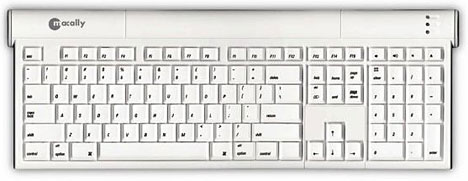
The iceKey is slim and sleek in form factor (making it easy to store inside a keyboard drawer), with an ideal near-flat orientation (there are fold-down legs to elevate the back of the keyboard if you must), and its profile is low enough to possibly make a palm rest superfluous.
The iceKey is a full 108-key Mac keyboard. There are USB ports at either end of the keyboard and a generously long main USB cable for plugging the iceKey in. Bright green LEDs in the upper right hand corner denote Power, Caps Lock, and Num Lock. Interestingly, the system requirements specify a minimum Mac OS 9.2 or OS X 10.1.5, although I found that the iceKey works just fine with my Pismo PowerBook booted into OS 9.1.
My main complaint with the iceKey is that while the scissor switches are positive and have a delightfully sharp travel, they are too stiff for my taste, unlike the WallStreet keys, which offer as close to zero touch resistance as is probably practical in a computer keyboard. The iceKey is still better than most regular computer keyboards in this regard, but I would prefer that the touch stiffness were reduced by 25-50%. Another niggle is that there is no keyboard power key.
In general, though, if you like short-travel and (relatively) light touch keyboard action, you will probably be pleased with the feel of this 'board - and the fact that it's eye-candy is icing on the cake, so to speak.
Specifications:
- Dimensions: (W) 18.19", (H) 1", (D) 6.5
- Maximum Cable Length: 5'
- Net Weight: 2 lbs
- 3 year manufacturer warranty
MSRP for the iceKey is $59.
Join us on Facebook, follow us on Twitter or Google+, or subscribe to our RSS news feed
Charles Moore has been a freelance journalist since 1987 and began writing for Mac websites in May 1998. His The Road Warrior column was a regular feature on MacOpinion, he is news editor at Applelinks.com and a columnist at MacPrices.net. If you find his articles helpful, please consider making a donation to his tip jar.
Links for the Day
- Mac of the Day: eMac, introduced 2002.04.29. 50 lb. 17" white G4 eMac replaced the iMac for the education market.
- Support Low End Mac
Recent Content
About LEM Support Usage Privacy Contact
Follow Low End Mac on Twitter
Join Low End Mac on Facebook
Favorite Sites
MacSurfer
Cult of Mac
Shrine of Apple
MacInTouch
MyAppleMenu
InfoMac
The Mac Observer
Accelerate Your Mac
RetroMacCast
The Vintage Mac Museum
Deal Brothers
DealMac
Mac2Sell
Mac Driver Museum
JAG's House
System 6 Heaven
System 7 Today
the pickle's Low-End Mac FAQ
Affiliates
Amazon.com
The iTunes Store
PC Connection Express
Macgo Blu-ray Player
Parallels Desktop for Mac
eBay

