
Miscellaneous Ramblings
Quill Gripless Ergonomic Mouse
Charles Moore - 2003.03.31 - Tip Jar
I've been using a couple of Quill mice (both right hand and left hand models) for about five months now and continue to be most favorably impressed with how comfortable this somewhat radical (but attractive) mouse design is.
Torbay Holdings Inc. calls the Quill the "world's first biomechanically engineered computer mouse." It is designed to help minimize Repetitive Strain Injury (RSI).
The Quill is a gripless mouse that allows you to move the pointer without holding it, so your hand is relaxed. For mousing with conventional computer mice, one has to grip the mouse with a certain amount of muscle pressure and exert more pressure on the mouse button or buttons for clicking. The stress may seem small, but it builds up over long computer sessions, and the on-off motion of clicking involves nerve impulses combined with repeated muscle tensing and relaxing, which is irritating to soft tissues and nerves, at least to the extent.
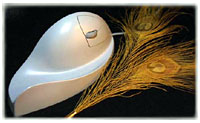 By
orienting the hand into the handshake position, the Quill not only
removes "twist" from then arm - thus "unwinding" the median nerve,
but also removes the usual "bend" of the wrist that users adopt when
the mouse is lower than the arm. The "handshake" position guides the
user into having the forearm at the same height as the mouse. The
Wrist Guide then maintains the arm/wrist/hand configuration within
biomechanically sound degrees of flex.
By
orienting the hand into the handshake position, the Quill not only
removes "twist" from then arm - thus "unwinding" the median nerve,
but also removes the usual "bend" of the wrist that users adopt when
the mouse is lower than the arm. The "handshake" position guides the
user into having the forearm at the same height as the mouse. The
Wrist Guide then maintains the arm/wrist/hand configuration within
biomechanically sound degrees of flex.
Computer mouse related RSI commonly results in pain, burning, swelling, weakness, tingling, numbness, and a loss of dexterity in the afflicted limb. People who use computers a lot are most at risk, because hours spent gripping non-biomechanically designed mice really adds up. Twisting the forearm (crossing the radius and ulna bones) and allowing the wrist to freely flex over extended periods creates the physiological changes resulting in reduced blood flow and a deviation in the path of the median nerve, which puts unnecessary load on it.
|
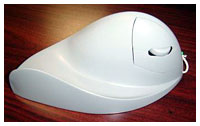
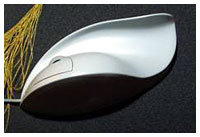
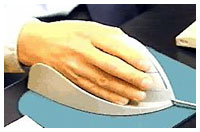
The Quill gripless mouse actively addresses all of these issues, allowing the mousing hand to be relaxed when actually mousing. The Quill gripless design maintains your mousing hand in the "neutral" or "untwisted" low biomechanical load position without requiring you to change the way you work. At the same time the Quill manages the degree of flex of the wrist and provides a support and "vehicle" for the hand when mousing.
This "vehicle," the mound and gully aspect to the design form the gondola region of the Quill. The Quill is not only visually elegant, but by placing your hand into the gondola of the Quill you make the gripless biomechanical connection between you and your computer, so you are no longer on the Web, you are in it, "surfing on a gondola."
The gondola also makes moving the Quill almost effortless, as both the hand and the wrist are supported in whatever direction you move the Quill, providing a surface to push with the bulk of your hand so there's no need to drag the mouse, requiring you to grip or use your fingers or thumbs, as it is gripless. Also, your hand is never in contact with the mousepad, which eliminates the problem of skin oil and dirt buildup.
You position your hand on the Quill with the middle finger tip towards the end of the lower button and your hand settled comfortably into the contoured rest. The tip of your index finger may extend slightly forward of the upper button, but his is quite comfortable. The design of the buttons is center hinged, so the entire switch can be actuated from any position, accommodating variance in finger lengths. Button actuation is very light and can be achieved by a slight bending of the finger. The scroll wheel can be rolled with the inside of the middle or index finger.
Most of the mouse tracking movement with the Quill is made from the elbow and shoulder rather than from the wrist or fingers. It takes some getting used to and is not as precise as fine motor movements of the hand, but it is less stressful and more comfortable once you have become acclimatized.
The Quill is larger than most other mice - certainly the largest I've ever used - but it is also amazingly light for its size. (Light weight is one reason why the Quill is corded rather than cordless - no batteries required.) The extra area is under the region normally occupied by the hand. The Quill is optical, so there's no trackball, and there is zero maintenance required other than cleaning the hand contact surface from time to time.
The Quill mouse tracks accurately and precisely, and the three buttons and scroll wheel are convenient in OS X, where they are supported. All the buttons revert to a standard click in OS 9, and the scroll wheel does not work, although it may be possible to enable it with a third party driver like USB Overdrive. I did not test this. (The Quill mouse also comes with a PS/2 adapter for use with non-USB equipped PCs)
At US$120/Can$195, the Quill isn't cheap, but you are provided with what could be a comfortable solution to a problem that torments those who work hard at their chosen profession or recreation.
Join us on Facebook, follow us on Twitter or Google+, or subscribe to our RSS news feed
Charles Moore has been a freelance journalist since 1987 and began writing for Mac websites in May 1998. His The Road Warrior column was a regular feature on MacOpinion, he is news editor at Applelinks.com and a columnist at MacPrices.net. If you find his articles helpful, please consider making a donation to his tip jar.
Links for the Day
- Mac of the Day: PowerBook 190cs, introduced 1995.08.28. The last 680x0-based PowerBook could take a PowerPC upgrade.
- Support Low End Mac
Recent Content
About LEM Support Usage Privacy Contact
Follow Low End Mac on Twitter
Join Low End Mac on Facebook
Favorite Sites
MacSurfer
Cult of Mac
Shrine of Apple
MacInTouch
MyAppleMenu
InfoMac
The Mac Observer
Accelerate Your Mac
RetroMacCast
The Vintage Mac Museum
Deal Brothers
DealMac
Mac2Sell
Mac Driver Museum
JAG's House
System 6 Heaven
System 7 Today
the pickle's Low-End Mac FAQ
Affiliates
Amazon.com
The iTunes Store
PC Connection Express
Macgo Blu-ray Player
Parallels Desktop for Mac
eBay

