
The Low End Mac Mailbag
Hacked Leopard on G3 Power Macs, Flash Memory Tips, a Smelly MacBook Pro Keyboard, and More
Dan Knight - 2008.07.09 - Tip Jar
It's been a busy time of year with my birthday, first anniversary, a long weekend away, Independence day, yard work, replacing kitchen countertops, and such. Something had to give, and that was the Mailbag. We'll try to catch up by early next week - our apologies for delays in responding. - Tip Jar
- Slow Performance with Flash Memory
- Slow Running OS X from Compact Flash
- Leopard on a Blue & White G3: Success with CoreImage
- Success: Leopard on a Beige G3
- Snow Leopard Cleanup Would Benefit PowerPC Owners, Too
- Moving Files Between a Mac and an eMate
- Hard Drive Replacement, OS Install
- Smelly MacBook Pro Keyboards?
- Using a Connectix ADB/Serial Webcam with a G4 PowerBook
- Partitioner Problems in Ubuntu 8.04 PPC
- VHS to Mac
Slow Performance with Flash Memory
From Clae:
Dear Dan,
In regards to the slow speeds in OS X experienced by your correspondent Carl Saltarelli with his Pismo running on a Compact Flash card; I have heard several times that OS X uses its swap file (virtual memory) constantly, as do most Unix-like OSes. I've also heard that write speeds to CF are substantially slower than read speeds. This may have something to do with the effects Carl is noticing. Unfortunately I can't offer a solution; perhaps another reader can.
Cheers,
Clae
Clae,
Thanks for the info. I'll post it to the Mailbag.
Dan
Slow Running OS X from Compact Flash
From Al Pawlowski:
Had the same experience running an A-Data 16 GB CF card (with IDE adapter) as the hard disk. In addition to the Pismo, I installed this card in a Duo 2300c and a ThinkPad 500 MHz P3 (XP Pro), and they ran slower (overall) than I expected as compared to with 5400 rpm hard drives. The problem seems to be the write speed of the CF. App launches are pretty good (I would say a little faster than with hard drive), but whenever you do something that involves a write, things bog down.
I think the reason OS 9 runs better than OS X is the way the system handles cache/virtual memory. OS 9 was fastest in both my Duo and Pismo with VM turned off. Turning it back on and set for 2x real memory also seemed slower than the normal "real + 1 MB" setting. Restricting the VM size in XP seemed to make the IBM system faster too.
I now use my CF card in a USB adapter as a pen drive. There seems to be a reason why the faster SS drives cost much more than normal CF/USB type drives.
Al,
Thanks for sharing your findings. I think the key is maximum RAM for OS X and disabling virtual memory in the Classic Mac OS.
Dan
Leopard on a Blue & White G3: Success with CoreImage
From James Little:
Hi Dan and LEM Readers,
After my previous couple of posts about nearly getting Leopard to load on a Beige G3/Blue & White G3 I can confirm that I have had success with it booting fully to the graphical user interface after quite a few tries of different techniques.
There are some functions which currently need attention, like FireWire and power management, but this is related to the way I've got it working:
- G3 B&W upgraded to run a 600 MHz G4 CPU
- Used the B&W to installed 10.4 and upgrade to 10.4.11.
- Used a Digital Audio G4 to install Leopard as an upgrade over existing Tiger installation
- Tried to boot this on B&W G4. Got previous error or crash with IOGraphicsFamily
- Noted that AppleCuda and AppleLynx (FireWire) kexts didn't load correctly during boot either.
- Extracted all kernel extensions from 10.5 WWDC 2006 edition, using Digital Audio - as this booted on G3 and G4 systems, and has all the missing kernel extensions not included in the Leopard final release.
- Deleted 'newer versions' of the kexts 'IOGraphicsFamily.kext', 'AppleCuda.kext', 'IOFirewireFamily.kext' and installed the relevant ones from WWDC 2006.
- Boot was then successful.
I attach a screenshot of the about this Mac and an Apple System Profiler report as proof. Currently, AppleCuda.kext doesn't load, and this results in a shutdown powering down everything, but not turning off the fans. IOFirewiewFamily.kext doesn't load, so FireWire port don't yet work.
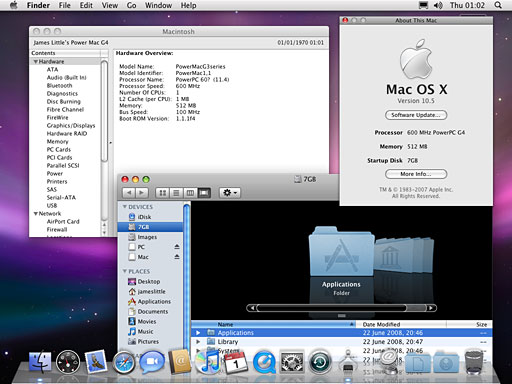
I've also flashed a Nvidia GeForce PCI 5200 card, which support CoreImage as hardware accelerated, not too slowly,
Next I'll try on my Beige G3 to see what happens!
Hope someone else finds this information useful.
James Little
James,
I admire your tenacity. Keep us posted!
Dan
Success: Leopard on a Beige G3
Hi - Just an update: have now also managed to get it to boot on a G4 upgraded Beige G3 with Radeon 9200.
- Booted into Mac OS 9, which was installed on same partition as 10.5
- Used XPostFacto to install startup item and BootX, to enable booting on Old World Macs.
- Disabled onboard video using setenv pci-probe-list fffbffff in Open Firmware (Apple-Alt-O-F at startup)
- Restarted, and bootup occurred as per the B&W G3 (G4 Upgraded) to full GUI.
Now going to experiment with updates!
Regards,
James Little
James,
Amazing! Keep up the good work!
Dan
Snow Leopard Cleanup Would Benefit PowerPC Owners, Too
From Joseph Burke:
After reading some of the preliminary reviews of Snow Leopard floating around, it seems that it is primarily a cleanup of older OS X technologies first and an introduction of new features second. A cleanup of the code to make processes run faster and leaner would work on the PowerPC just as well as on Intel. Apple should think twice about discontinuing PowerPC support with this release and leave the system requirements the same as for Leopard. There is still a lot of profit to be made selling Snow Leopard to PowerPC users. By the time 10.7 rolls around, those numbers will have declined and Intel numbers will have increased to the point where it makes more sense to make the switch, but without anything revolutionary being added, it makes no sense to drop PowerPC support at this time.
Joseph,
I suspect we're going to see Apple do something they've done a few times in the past - continue to update an old OS after releasing a new one. They did it with System 6 after introducing System 7, and they kept development work going on Mac OS 9 during the early OS X era. I have a feeling that 10.6 development will continue for some time after the release of 10.7, but that's just a guess (and maybe wishful thinking).
By only supporting Intel in Snow Leopard, Apple will be able to include technologies that simply don't exist in PowerPC Macs, and I think those with PPC Macs would be very upset with Apple if they were to buy 10.7 and discover that many of the new capabilities were not available to them.
I think Apple is doing the right thing here, improving Leopard for both platforms while preparing for Snow Leopard just for the Macs sold in the three years or so prior to its eventual release.
Dan
Moving Files Between a Mac and an eMate
From Brian Platts:
Hi Dan . . . I wonder if you can help.
I recently acquired an eMate 300 for my collection and have hooked it up to my network via a Dayna Etherprint-T that I had lying around. My Panther OS'd Macs can see the new arrival on occasion but not talk to it. I need to download some drivers so the eMate can be more useful in today's environment and don't want to go to the expense of a serial-to-USB adapter. Any suggestion for the setup via the Dayna?
Thanks
Brian
Brian,
I have an eMate, but I've never really done anything with it. Tommy Thomas, one of our writers, loves his eMac and calls it a great writing machine. I need to rebuild the battery in mine someday....
Some possibilities that come to mind are a WiFi card (assuming your network has WiFi) or using a PC Card Compact Flash reader along with a USB card reader on one of your Macs.
Dan
Hard Drive Replacement, OS Install
From Linda Croke:
Mr. Knight,
I am very new to Mac and have bought an older Mac G3 Series 350 MHz running OS 9. It did not come with discs of any kind either.
Now before you tell me it's old, I know - that's why I bought it. After reading many of your articles and discovering that this machine is capable of upgrading, I was intrigued and decided to give it my best shot. I repair computers (PCs) but am a little stumped by this little beauty.
Here's my problem: I have another drive (20 gig), but there is only one power hookup (I thought about buying a power splitter but am concerned that supporting two drives may overload the system) and the cabling doesn't support another IDE hard drive connection. Plus this cabling is very different from anything I've ever seen. I don't have access to another Mac. This version doesn't have FireWire either. I thought of using a USB flash drive to transfer the OS 9 system, since it does read it. But everyone still tells me I need FireWire support, and it wouldn't work.
I would appreciate any suggestions you might have on the subject.
Thanks
Linda Croke
Linda,
Based on your description, I'm assuming you have a 350 MHz blueberry or indigo iMac, as they were the only 350 MHz Macs ever built without FireWire - and they don't have room for a second internal hard drive without pulling the CD-ROM, which probably isn't a sensible thing to do.
I'd suggest you pick up a Mac OS 9.1 or 9.2 disc and install that on the hard drive. See our Best Classic Mac OS Deals for several options starting at about $20.
You can boot many older Macs from USB, but the G3 Macs all use USB 1.1, and that's a terribly slow way to go. It's a real shame Apple didn't include FireWire on the 350 MHz iMacs.
Dan
Smelly MacBook Pro Keyboards?
From Matthew Wright:
Heya Dan,
Wondering if anyone else has noticed an odor from their MacBook Pro keyboards- similar if not identical to the dreaded iBook G3 keyboard odor issue. I've noticed one on mine, and it's otherwise in pristine shape. Not all the time, just when it gets good and hot (ripping DVDs or charging the battery).
With the iBooks, if I remember correctly, it was the adhesive they used in the keyboard. You heard anything along those lines?
Thanks amigo,
Matthew
Matthew,
This is the first I've heard of it. We'll post this to the Mailbag and see if we get any more information.
Dan
Using a Connectix ADB/Serial Webcam with a G4 PowerBook
From Mark Arelt:
Dan,
I'm not sure which list to send this to, so I'll run it by you first.
I have gone through quite a bit of hassle modifying an older Logitech/Connectix webcam (removed the IR filter, etc.) to use to image the moon and planets through a telescope, using my trusty PB 5300 in the field.
The PB 5300 has finally croaked, and I have purchased a used Titanium G4 PowerBook on which I am running both OS 9.2.2 and OS X 10.3.9.
The webcam used to connect to the 5300 via (2) plugs at both the serial/printer port and the ADB port.
I can find ADB-USB adapters aplenty, but I haven't seen any that are both ADB/Serial-USB. Does such a gizmo exist? Is there any other way of using this webcam on my G4? Should I just bite the bullet and buy a new webcam to tear apart and make the above alluded to modifications?
Please let me know which group the List Mom can send this question to.
Thank you.
Mark Arelt
Mark,
I seriously doubt that any of the lists would have the answer to this one. I know of no device that provides both ADB and Apple Serial via USB. My suggestion would be to bite the bullet and pick up a used PowerBook with ADB and Apple Serial ports - maybe a PowerBook 1400 or a WallStreet.
BTW, I have a couple of old B&W QuickCams that I hope to try using for stereo imaging with a Quadra AV someday. One of those back burner projects that never seems to get done....
Good luck with your project.
Dan
Partitioner Problems in Ubuntu 8.04 PPC
From Claudio Miranda:
Hi Dan. Just thought I would drop a note on the continuing topic of Linux/PPC.
I noticed in your recent LEM Mailbag that you were having problems partitioning in 8.04. I've come across this myself, and there seems to be a problem in "partman" (the partition manager that launches during the installation) where it cannot overwrite existing partitions with the new ones created during the installation. It says that it finds operating system files that cannot be removed and thus cannot continue. Apparently on the x86 version of Ubuntu this problem was fixed in the beta releases, but I guess it wasn't fixed on the PPC version.
There is a workaround: initialize the partition map using another disk partitioning tool. I imagine you could possible do this with Disk Utility in OS X, especially if you're dual-booting OS X and Linux/PPC, but I can't confirm this from experience. I've reinitialized the partition map using fdisk (gparted can also be used) located on another CD-based GNU/Linux distribution. The one I've used and prefer the most is called Finnix. They have a version for PowerPC, and the ISO supports both 32-bit and 64-bit PPC processors. Mind you, this is strictly command line, so familiarity with the bash shell is required, but it's very light and comes with a lot of tools built-in. However, you can use any other preferred CD-based distribution that supports the PowerPC platform.
Once you initialize the partition map on your hard drive and write the changes (assuming this is going to be a GNU/Linux-only installation), then you can reboot from the Ubuntu installation. Partman will then be able to create the new partitions on the empty space without any problems.
While it's not the simplest of solutions and may well keep you running an older version of OS X to save the hassle, it is a working solution for 8.04. As for other distributions, I'm not quite sure if they also exhibit the same problem during the partitioning process. For the record, Debian/PPC does not suffer from this problem.
Regards,
-Claudio Miranda
Caludio,
Thanks for the information. I've been taking a break from Linux and the Mailbag to spend some time in the real world - celebrating my anniversary, taking a break for Independence day, cleaning gutters, cutting grass, assisting my brother in replacing kitchen countertops, etc. Sometimes it's nice to take a break from the tech stuff - other times it's nice to escape to it.
I'm in the process of downloading the Kubuntu 8.04 Live CD, and I've just partitioned the iMac's hard drive as "Mac OS Extended" in Disk Utility. We'll see how things go....
Dan
VHS to Mac
From Dave Stein:
Dan,
Any way to play a VHS machine into a computer. Folks are giving away the tapes these days and we don't have - or really want - a TV.
Thanks
Dave Stein
Dave,
Daystar makes a device for just that, the XLR8 ProView USB Full Screen Video Capture Package for USB 2.0, which retails for US$99.
I can tell you from personal experience that it works. I've imported a few videos and burned them to DVD, but I have to warn you that the documentation is extensive, comprehensive, and probably a bit overwhelming. There's no simple "use these settings as a starting point", so unless you really understand all of the issues involved with interlacing and so forth, you may end up frustrated.
Dan
Join us on Facebook, follow us on Twitter or Google+, or subscribe to our RSS news feed
Dan Knight has been publishing Low End Mac since April 1997. Mailbag columns come from email responses to his Mac Musings, Mac Daniel, Online Tech Journal, and other columns on the site.
Today's Links
- Mac of the Day: Performa 5200, introduced 1995.04. The first PowerPC all-in-one was also one of the worst Macs ever made.
- Support Low End Mac
Recent Content
About LEM Support Usage Privacy Contact
Follow Low End Mac on Twitter
Join Low End Mac on Facebook
Favorite Sites
MacSurfer
Cult of Mac
Shrine of Apple
MacInTouch
MyAppleMenu
InfoMac
The Mac Observer
Accelerate Your Mac
RetroMacCast
The Vintage Mac Museum
Deal Brothers
DealMac
Mac2Sell
Mac Driver Museum
JAG's House
System 6 Heaven
System 7 Today
the pickle's Low-End Mac FAQ
Affiliates
Amazon.com
The iTunes Store
PC Connection Express
Macgo Blu-ray Player
Parallels Desktop for Mac
eBay

