
A Stinky Old iBook that Smells Like Sweat
Low End Mac Reader Specials
TypeStyler For Mac OS X is Now Shipping! Download The Free Fully Functional 60 Day Tryout at www.typestyler.com
OWC: Get the Right Memory / Ram for your Mac. Top Quality, Competitive Prices, Lifetime Warranty. Expert Support and Video Installation Guidies too! 4.0GB Matched Sets from $87.99, Options up to 32GB. Click here
Don't install Parallels to play poker online! Poker Mac will show you how
to download and install a native Mac poker application such as Full
Tilt Poker Mac.
Laptop Hardware Provided by TechRestore - Overnight Mac & iPod Repairs.
Compare products like desktop computers, apple laptops, apple macs, and LCD Monitors side by side! All the information and reviews to make the best purchasing decision for new mobile phones, sat nav systems, or MP3 players. The Ciao online shopping community makes searching products easy for you.
- 2006.10.13
Last time, I discussed my purchase of a used Dual USB G3 iBook (see eBay No Longer Your Best Source for Low-end Macs).
When the iBook arrived, I unpacked it from its tight bubble wrap cocoon, pushed the latch button, and opened it. Immediately, my olfactory sense was stimulated in an astonishingly negative way.
This iBook reeked of strong, stale male sweat. It "backpacking in the same clothes for a week" reeked. It "90° in the shade, split two cords of wood, and haven't showered in three days" reeked.
You get the picture.
My first thought: Maybe you can buy novelty synthetic sweat in an aerosol can.
There was a slight chemical quality to the scent. Had this 'Book been the object of a malicious practical joke, or had someone actually wrung their perspiration-soaked T-shirt out on it?
I booted the iBook, and the smell got worse. When my wife came through the door to the living room, she exclaimed and took a step back.
"It's not me!" I barked.
Normal?
I emailed the retailer who had sold me the used 'Book and asked about the cause and projected longevity of the smell. "I am sorry, but that is normal on those older iBooks," was the brief reply.
I wondered at his use of the word "normal". This stench was anything but normal.
A search on the words "iBook" and "sweat" verified the technician's statement. Apparently an adhesive used in the labeling and construction of the keyboard would begin to out-gas about 12-18 months after the iBook was manufactured. This gas smells remarkably like ripe, testosterone-enriched perspiration, and it only gets worse with age.
Somehow my research into G3 'Books had missed this tidbit. Who would've thought to add "sweat" or "stinks" to the search terms?
The only complete cure for the stinking defect is to replace the keyboard with a brand-new one at the owner's expense.
All in all, I still felt that the iBook had been a bargain. This particular one had come with a hard drive that was three times the capacity advertised, a strong battery, and a working modem. Since my only connection option from home is dialup, that's a plus.
I also believed that the odor could be eliminated - or at least lessened - with little or no expense.
I revel in my childlike naiveté.
After a day of leaving the iBook out and open, the smell had eased a little, but it was still very present.
I was able to get close enough to install some applications and updates. I gave the iBook the network name: "Stinking Kevin", after a character in a Terry Gilliam film.
Thanks for Not iBooking
Knowing what the cause of the odor was didn't make the situation any better. Granted, this is an unpaid-for extra measure of antitheft protection, but there will come a time when I want to use this 'Book in a public place.
This conjures thoughts of Internet cafés where entering patrons are asked, "G3 iBook or non-G3 iBook?" If you reply in the affirmative, you are escorted to a special section where you won't offend the other customers.
A Partial Solution
Not being one to replace a malfunctioning part if I can fix it, I lifted the offending keyboard and closely examined the source of the problem (Imagine placing your nose in an stranger's unwashed armpit).
Removing the label on the underside of the keyboard proved to be a bad idea. The label lifted, but the adhesive remained firmly stuck in place. This would leave more of the material exposed, creating the necessity of getting it off somehow without damaging the keyboard.
I abandoned the idea after lifting one corner of the label. Working in close proximity to the fumes was also making me feel physically ill.
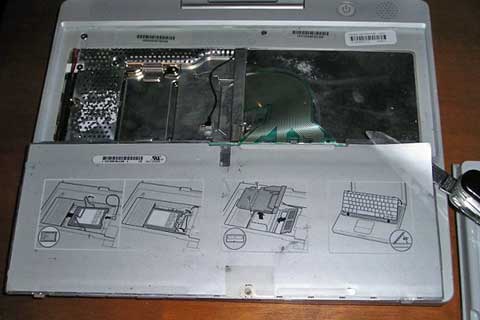
The offending, stinky label beneath the iBook's keyboard
I purchased a car air freshener and placed it under the keyboard
after carefully perforating the label in several places. The end
result is an iBook that smells like sweaty bayberry, which is
better - at least I think it is. I have read of people using
dryer sheets in a similar manner. I may also try placing a small
cloth bag of activated filter carbon in the AirPort card bay.
Be sure to read the follow-up article, Deodorizing a Stinky Old iBook that Smells Like Sweat.
Link: Apple Discussions: iBook smell thread (very lengthy)
Recent Empowered articles
- One year with my 'free' Mac mini, 11.20. "For something the size of a fruitcake, the mini is a powerful little computer."
- Add desktop Trash and a classic Apple Menu to OS X for free, 11.13. Two favorite features from the classic Mac OS have never been part of OS X, but that doesn't mean you have to do without them.
- Deodorizing a stinky old iBook that smells like sweat, 10.19. Different ways to mask and otherwise attack the problem if your G3 iBook suffers from Stinky Keyboard Syndrome.
- A stinky old iBook that smells like sweat, 10.13. You just don't expect an iBook to smell like strong perspiration, but this problem seems to afflict a number of G3 iBooks.
- More in the Empowered index.
Links for the Day
- Mac of the Day: Power Mac G5 Quad, Oct. 2005 - With two 2.5 GHz dual-core G5 CPUs, the G5 Quad was the most powerful PowerPC Mac ever and introduced PCI Express.
- Group of the Day: Mac Network deals with all aspects of Mac networking.
- November 20 in LEM history: 85: Windows 1.0 - 00: Mac dreams - 01: Stop the upgrade insanity - Good people, good software, good business - The digital lifestyle: Text - 06: To AppleCare or not? - One year with my 'free' Mac mini - 07: Why you want to avoid integrated graphics - Problem with Leopard on a MDD
- Support Low End Mac
Recent Content on Low End Mac
- Apple's Tablet an End Run Beyond Netbooks, Frank Fox, Stop the Noiz, 11.20. Whatever Apple has planned will leverage existing technologies while going beyond what its competitors can offer.
- NASA Chemical Sensor for iPhone, Smartphone Death Match, iPhone Earrings, and More, Ian R Campbell, 11.20. Also mobile phone dangers, new apps, GPS solution for iPod touch, new iPod and iPhone cases, and more.
- Apple #4 in Reliability, Apple Tablet a Gadget for All?, HP's i7 Notebook Outdoes Mac Rivals, and More, The 'Book Review, 11.20. Also Flash 10.1 improves video on Hackintosh netbooks, thin-and-light notebooks impress, Windows XP finally on the way out, and more.
- i5 iMac Benchmarked, Mac mini 'Shouldn't Be Overlooked', Twitter Client for Classic Mac OS, and More, Mac News Review, 11.20. Also why Apple leaves the low end to others, 10.6.2 fixes video playback problem in 27" iMac, 3D Leopard and Snow Leopard performance, and more.
- Replacing the Hard Drive in a Clamshell iBook, John Hatchett, Recycled Computing, 11.19. Yes, it is one of the most difficult Apple notebooks to disassemble and reassemble, but a 10 GB hard drive just will not do.
- IBM Model F: A Great Old Keyboard with an Outdated Layout, Tommy Thomas, Welcome to Macintosh, 11.19. Although it used a different technology than the revered IBM Model M keyboard, the Model F was a great keyboard in its own right.
- Soft Touch Keyboards, Wireless Mouse Options, Loving SeaMonkey 2, and More, Charles W. Moore, Miscellaneous Ramblings, 11.18. Also the future of browsing with PowerPC Macs and the multiple mouse input bug introduced with OS X 10.5.8.
- More links in our archive.
Recent Deals
- Best eMac Deals, 11.18. Used 1 GHz Combo, $100; SuperDrive, $269; 1.25 GHz Combo, $119; SD, $319; 1.42 GHz Combo, $289; SD, $498.
- Best Mac OS X 10.6 and Mac Box Set Deals, 11.18. "Snow Leopard", single user, $25; 5 users, $45; Mac Box Set, single user, $139; 5 users, $180; Server, $414. Shipping included.
- Best Xserve Deals, 11.18. Used 1 GHz dual G4, $649; 2.3 dual G5, $795; 3.0 4-core Xeon, $1,899; refurb 2.26 4-core, $2,499; new, $2,888; refurb 8-core, $2,999; new, $3,449; more.
- Best 15" MacBook Pro Deals, 11.17. Used 1.83 GHz, $750; 2.16, $800; 2.33, $900; refurb 2.4, $1,299; 2.53, $1,449; 2.66, $1,699; 2.8, $1,899; new 2.53, $1,579; 2.66, $1,799; more.
- Best Power Mac G4 and AGP Video Card Deals, 11.17. Used 400 MHz, $50; 933 MHz, $80; 500 dual, $60; 867 dual, $90; 1 GHz dual, $150; 1.25 GHz dual, $225; 1.42 GHz, $499.
- Best Mac OS X 10.5 Deals, 11.17. "Leopard" upgrade, $80; single user license, $135; 5 users, $173; Mac Box Set, 5 users, $230; Server, 10 users, $340; unlimited, $850. Shipping included.
- Best Mac mini Deals, 11.16. Used 1.42 GHz G4 mini, $379; 1.66 GHz Core Solo, $419; 2.0 Core 2, $450; new 2.26 GHz nVidia, $580; 2.53 GHz, $769; Server, $990.
- Best iBook G4 Deals, 11.16. Used 12" 1.07 GHz Combo, $210; 1.33 GHz, $298; 14" 1.33 GHz, $398; 1.42 GHz, $479; SuperDrive, $498.
- Best iPod shuffle Deals, 11.16. Used 1 GB, $35; 4 GB, $65; refurb 1 GB, $39; 2 GB, $59; new 2 GB, $55, 4 GB, $75. New and refurb prices include shipping.
- More deals in our archive.
About LEM | Support | Usage | Privacy | Contacts
Navigation
Used Mac Dealers
Apple History
Video Cards
Email Lists
Favorite Sites
MacSurfer
MacMinute
MacInTouch
MyAppleMenu
InfoMac
Macs Only!
The Mac Observer
Accelerate Your Mac
RetroMacCast
PB Central
MacWindows
The Vintage Mac
Museum
DealMac
DealsOnTheWeb
Mac2Sell
ramseeker
Mac Driver Museum
JAG's House
System
6 Heaven
System 7 Today
the pickle's Low-End
Mac FAQ
Abandonware
Petition
Mac vs. PC Info
Affiliates
The Apple
Store
Mac
Connection
B&H
MacMall
TechRestore
ExperCom
Crucial
Memory
batteries.com
Advertise
MacMinute
MacInTouch
MyAppleMenu
InfoMac
Macs Only!
The Mac Observer
Accelerate Your Mac
RetroMacCast
PB Central
MacWindows
The Vintage Mac
Museum
DealMac
DealsOnTheWeb
Mac2Sell
ramseeker
Mac Driver Museum
JAG's House
System 6 Heaven
System 7 Today
the pickle's Low-End
Mac FAQ
Abandonware
Petition
Mac vs. PC Info
Mac Connection
B&H
MacMall
TechRestore
ExperCom
Crucial Memory
batteries.com
