
The Low End Mac Mailbag
PowerPC vs. Intel, Leopard on G3s, LEM Broken in IE6, and Big Drives in Older Macs
Dan Knight - 2006.08.29
Yesterday I received my Kensington Mouse-in-a-Box ADB/USB, and I can verify that the current version of this mouse is strictly optical. It uses a dongle to connect the USB plug on the mouse to the ADB port on older Macs, and the dongle only works with this mouse. I've only used it a bit, but I much prefer this one-button mouse to Apple's. dk - Tip Jar
- Ted Hodges Article on PowerPC
- Apple Lying About Processor Speeds
- Leopard on G3 Macs
- G3 Support in Leopard
- Low End Mac Broken (Again) in Internet Explorer 6
- Question About Drive Size in Older G4s
Ted Hodges Article on PowerPC
After reading PowerPC vs. Intel: Has Apple Been Lying to Us?, Robert Steel says:
Dan
Ted addresses the problem I have had since the switch announcement. Where has the Power PC development gone? Cell technology was one IBM's promising research area which would appear to bridge anything planned by Intel. In fact, I was led to believe, like Ted, that CISC was impractical among current electronic visionaries, yet Apple has wholeheartedly adopted it. At the time of the switch announcement AMD had the fastest chip sets, and from what I read still has. So the question remains, why Intel?
Agape
Bob
Bob, I can't speak for Apple, but as Alan Zisman points out in yesterday's 'Twice as Fast': Did Apple Lie or Just Carefully Select Its Truths?, a lot has changed over the years.
PowerPC proved the promise of RISC, and there were some big leaps in performance once the developer community moved from 680x0 to PowerPC code. And then came the G3, a PowerPC chip optimized for real world software.
The AltiVec velocity engine moved away from the Reduced Instruction Set idea at the heart of the RISC philosophy, adding a dedicated math unit optimized for certain types of number crunching. (Intel did the same thing with its MMX additions.)
Intel didn't sit still while Motorola and IBM were improving PowerPC. Pentium III was a big step forward in computing power, while Pentium 4 traded efficiency for raw speed. Intel has taken everything it's learned about optimizing CISC processors and building fast CPUs to create today's Core and Core 2 chips.
Despite all of the "up to" claims (up to 5x faster - but only for a very limited range of tasks), the pair of dual-core 2.66 GHz Core 2 Xeons that power the Mac Pro easily holds its own when compared with the two dual-core 2.5 GHz G5 CPUs in the Power Mac G5 Quad - and it's sometimes quite a bit faster with universal binary programs.
But Apple has gained a lot more than raw horsepower by teaming up with Intel. We now have dual-core 'Books running at over 2 GHz. Apple never got past 1.67 GHz single-core CPUs with PowerPC chips, so there's a huge performance gain with the MacBook and MacBook Pro vs. last year's iBooks and PowerBooks.
But more than that, Apple gained access to other Intel benefits: Intel graphics (used on the Mac mini, MacBook, and education iMac) and the ability to work with Intel in designing new motherboards. Intel makes wireless hardware, USB 2.0 chips, and other things it can incorporate in new designs, not just CPUs and graphics.
While AMD make great CPUs, they aren't the world's largest CPU maker, and they didn't have their own graphics and other things to offer. (That's probably a big part of the reason AMD just bought ATI, one of the leading companies in the graphics processor field.)
Apple was unhappy with IBM's inability to deliver 3.0 GHz G5s and with the heat generated by the G5, which meant a huge cooling system in the top-end Power Mac G5s and no practical way to shoehorn a G5 and an adequate cooling system into a 1" thin PowerBook. They saw Intel's forthcoming dual-core CPUs (Core, Core 2) as a way to offer more raw horsepower, gain power efficiency, have GHz parity with Windows PCs, and - thanks to Rosetta - offer decent performance with PowerPC software.
AMD didn't have dual-core CPUs to offer when Apple went shopping for a PowerPC replacement. Intel did. For now, Apple's choice of Intel makes sense. In the future, if AMD/ATI plays its cards right, it may be able to get a piece of the action.
Dan
Apple Lying About Processor Speeds
Marin Balabanov emailed this to Alan Zisman:
Dear sir,
Thank you for your interesting article on Low End Mac. It is good to see a critical analysis of Apple speed-tests.
As you noted correctly the twofold speed increase from iMac G5 to iMac Core Duo can be attributed to the additional core. The reasons for the speed increase Powerbook G4 to MacBook Pro are mainly the increased clock-speed (1.67 GHz vs. 2.16 GHz), the increase bandwidth (167 MHz vs. 667 MHz) and of course the additional core.
The Power Mac Quad G5 actually compares rather favorably to the new Mac Pro Quad Xeon.
The Power Mac Quad G5 actually compares rather favorably to the new Mac Pro Quad Xeon. The 1.6-fold speed increase is a logical concequence of the increased clock speed of the Xeon-Mac. The bus speed of 1.33 GHz is the greatest improvement. The improved vektor-unit still has to show its advantages. Interestingly in some test the Powermac Quad G5 came astonishingly close and even bested the Quad Xeon by a slim margin inuniversal apps (e.g. compressing Quicktime) proving that this supposedly old machine can hold it's own against the newer sibling.
I believe Apple has always chosen the speed tests that show advantages over its competition. That is only natural. The new claims of speed increase due to the Intel-switch are in a way unique that they "compete" with the old architecture. There was once a similar case when Apple introduced the first iMac G5, they ran 3D-grafics-tests against the iMac G4. Of course the G5 won by a large margin. But was this due to it's greater clock-speed and sparkling new G5-processor? No, the main reason was the improved graficscard in the iMac G5 compared to the iMac G4. To make things worse no-one was capable of reproducing the test results, so Apple had to downgrade them on the website after a few weeks.
I guess, the main message of the current speed-claims is: "The processor-switch was worth it! The new hardware IS better!" I do not believe you can extrapolate the claim: "Intel chips were ALWAYS better than PowerPC-Processors!"
As you stated correctly the Pentium M and the Core-Line of Intel-Chips have a much more "honest" clock-speed than the Pentium 4-line with its highly overtuned GHz-ratios that did not lead to a proportional speed increase. My iBook G4 1.33 GHz (with a crippled busspeed) is at least comparable to Pentium 4 of double the clock-speed.
The main advantage of the processor switch and the accelerated rate of product refreshment is that Apple no longer needs to create "artificial" distinctions in its product line-up by "crippling" its lowend machines (as was the case with the iBook G4 - inferior graficscard and decreased busspeeds, so that they cannot compete against the more expensive Powerbooks).
I am only waiting for a MacBook (non-pro) with a dedicated graficscard and a clock speed exceeding 2.6 GHz and I will buy one (I always upgrade when the speed approximately doubles - I had an iBook G3 with 700 MHz before going G4 1.33 GHz).
Thank you for the thoughtful and entertaining article.
Best regards,
Marin Balabanov
Leopard on G3 Macs
After reading Save the G3s: The Case for G3 Support in OS X 10.5 'Leopard', Jason Gaines writes:
Dan,
I was reading your article about installing Leopard on G3 Macs and how the possible lack of support from might be somewhat problematic. In an optimal situation, we would be able to install upgrades for the complete life of the machine. Unfortunately, this will never be possible. While we don't completely live in a world that is dominated by Moore's Law, elements of that experience are certainly present.
I am sure you know this already, but programmers are constantly trying to discover avenues that will allow them to expand efficiency and hone processing power. When newer hardware becomes available, obstacles are lifted from programmers, and they are finally allowed to program in the manner that they wish to do so.
I am saddened that my hardware is obsolete within the first year of buying it, but I am inspired by the next generation of computing experiences that stem from that loss. I bought a Dual G5 2.3 GHz last summer, and now it is completely obsolete. My new 17 inch MacBook Pro will be obsolete come September when Merom chips are released. Sad, but true.
With all of this being said, I think the end of the G3 in regard to OS X is now (and should be) over. Who would want that computing experience?
One last thing - You would be able to run Tiger much faster if you were not running it on an external FireWire drive. The transfer speeds will never be close to that of either an internal SATA or PATA connection. I would run Tiger internally and Panther externally.
I enjoyed your article and your publication.
-Jason Gaines
Thanks for sharing your thoughts, Jason, although I have to admit that your definition of obsolete is very different from mine and that found in the dictionary. While some use it to describe something that is simply old, out of date, or not the newest thing on the market, the more widely used meaning is for a fully functional item that is no longer usable, no longer wanted, or no longer of value.
Here at Low End Mac, very few Macs are ever considered obsolete, and we have readers who prefer to use vintage Macs for their word processing even when they have newer hardware.
Your Dual G5 is in no way obsolete, as it runs the latest version of the Mac OS and remains in productive use.
The G3 is far from obsolete, and Macs using it ranged in speed from 233 MHz to 900 MHz. While I wouldn't want to run Tiger (10.4) on sub-300 MHz Macs - let alone Leopard (10.5) - with sufficient RAM it can run nicely on 400 MHz and faster Macs. With the extra demands of Leopard, I suspect that 600-700 MHz will be the minimum comfortable G3 speed.
As for my external FireWire drive, the primary reason I use it is that it's a real bear to swap drives in the eMac, and that's the computer I usually use it with. I had it connected to my 500 MHz iMac while the eMac was away, and I'm sure that FireWire will give the iMac's internal IDE bus a run for the money. (Panther is on the iMac's hard drive because I consider it the optimum OS for it.)
But the best reasons for using the external drive are that I can easily connect it to my next Mac, and that the Newer Tech miniStack also provides me with a USB 2.0 and FireWire 400 hub. As most Macs have too few ports, this is one less hub I need on the desktop.
Dan
Dan,
Thanks for getting back to me. I would have to say my definition of obsolete might be slightly drastic. I guess I am thinking of obsolete in regard to being able to run high end gaming and graphic intensive programs. I was leaning my definition more towards the area of graphics cards than processors. My G5 will definitely last me quite a long time because the processors are fast enough to hold me over for at least 3-5 years.
In regard to the G3 processors, maybe not all of them will be obsolete. Certainly the group that runs on the lower end of the spectrum will need to be abandoned if the user wants to run a more modern operating system. The 900 MHz variety would most likely run Leopard comfortably.
In the end I guess it really depends on what the user wants. If they are content running an optimal OS for their system (OS 9, early version of OS X), then the obsolescence of the G3 is only a state of mind, rather than a reality. The G3 could run until it finally dies of natural use.
I definitely hear what you're saying about swapping drives in the eMacs! I had the pleasure of opening one of those up a couple months ago.
Regardless of being obsolete or not being obsolete, one thing we can all agree on is that Macs really are great products. It is so wonderful that I have machines that rarely fail and just make computer use a joy. I am so happy that I don't have to sit on PCs all day long - and when I do need to get over there, Boot Camp allows me to step over.
I really enjoy your articles. I look forward to reading more of them. Best of luck with everything.
-Jason Gaines
G3 Support in Leopard
A reader who wishes to remain anonymous sent this:
Hey, Dan!
I thought you might find the following interesting.
Here's a screenshot from the Apple Site - http://www.apple.com/macosx/leopard/64bit.html - taken around August 8, 2006 (reduced):
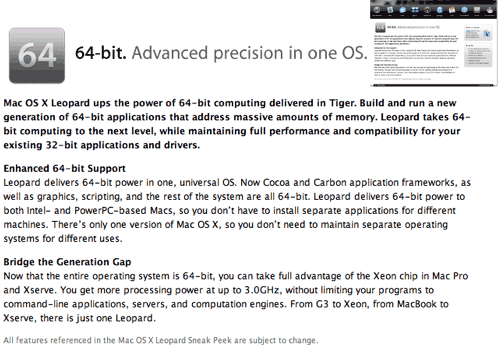
Notice that last line: "From G3 to Xeon, from MacBook to Xserve, there is just one Leopard."
Now, look at the website today (excerpt):

Notice the new last line: "And in just one great package: Leopard."
I wonder if this is an indication that Apple will be dropping Leopard support for the G3, or if they removed it so they could continue to be coy and try not giving out information on the supported configurations? Or perhaps to fail to advertise that a G3 will run Leopard in hopes of folks thinking that they must buy the latest and greatest to take advantage of the newest OS, since earlier machines aren't being touted - better buy a new machine now....
Interesting times...
Yes, interesting times indeed. There were already ludicrous rumors that Leopard (OS X 10.5) would drop PowerPC support and be exclusive to Intel.
It's a shame Apple dropped mention of the G3. My guess is that Leopard requirements are not yet cut in stone, and Apple won't make the ultimate decision about which hardware will and won't be supported until the feature set is locked and development approaches Golden Master status.
Technically, there's no reason Leopard can't support the G3, but with too little horsepower, too little RAM, too full a hard drive, or too limited a video system, performance will suffer.
I suspect that most G3 users will find Leopard overly demanding, but time will tell.
Dan
Low End Mac Broken (Again) in Internet Explorer 6
Ben Pazolli writes:
Your site seems to have become slightly incompatible with Microsoft Internet Explorer 6 on my Windows XP machine. It could be my machine but I believe the problem is on your end. The problem is that you can't scroll below the frames on the side. That is if the box of ads stops so does the page as IE sees it and thus it usually stops before the few last lines depending on the length of article. It seems to work fine in Firefox and such, but I do use Internet Explorer 6 as my main browser and would appreciate if you would look into it and get back to me.
Thank you very much,
Ben Pazolli
Thanks for bringing this to my attention, Ben. I don't use Windows for anything except debugging page design to make up for the fact that Internet Explorer - in every incarnation to date - is the most uncompliant, inconsistent, abominable browser ever foisted upon the Internet using public.
The last time I had layout problems, it required purchase of a $700 Windows laptop and several weeks to get things working "just so" in IE 5.5 and 6.0. I'll have to dig out the old Acer, boot it into XP (it defaults to Ubuntu Linux), and see what I can do to fix this. It may take days or weeks.
Until then, LEM works just fine with any modern standards compliant browser.
Dan
Question About Drive Size in Older G4s
Jen writes:
Hi Dan. I just ran across your article from last year, How Big a Hard Drive Can I Put... This was incredibly helpful. I'm so glad I found your site. I was hoping you could help me with something.
I have a 2001 model Quicksilver that I'm still very happy with. I don't have the budget to upgrade to a G5 right now, but I really do need more space. I'd like to replace my existing 60 GB drive with a much larger one. I notice you mentioned Serial ATA, but I was a little confused. My machine doesn't support Serial ATA, but I have considered purchasing the PCI adapter for it. So my question is this: If I installed a Serial ATA drive with a PCI adapter, would I still be limited to only 128 GB? Or would this combination allow me to use my hard drive's full capacity without needing additional drivers?
I'm having a hard time figuring out how to remedy this situation, so any help you can offer would be greatly appreciated!
Thanks!
Jenifer
Jen, the limitation only applies to Parallel ATA drives on the built-in controller or an older (pre-ATA6) PCI card. It doesn't apply to Serial ATA at all.
Dan
Join us on Facebook, follow us on Twitter or Google+, or subscribe to our RSS news feed
Dan Knight has been publishing Low End Mac since April 1997. Mailbag columns come from email responses to his Mac Musings, Mac Daniel, Online Tech Journal, and other columns on the site.
Today's Links
- Mac of the Day: PowerBook 1400, introduced 1996.10.01. Considered by many the best pre-G3 PowerBook with a small footprint and great keyboard.
- Support Low End Mac
Recent Content
back to the Low End Mac Mailbag index
About LEM Support Usage Privacy Contact
Follow Low End Mac on Twitter
Join Low End Mac on Facebook
Favorite Sites
MacSurfer
Cult of Mac
Shrine of Apple
MacInTouch
MyAppleMenu
InfoMac
The Mac Observer
Accelerate Your Mac
RetroMacCast
The Vintage Mac Museum
Deal Brothers
DealMac
Mac2Sell
Mac Driver Museum
JAG's House
System 6 Heaven
System 7 Today
the pickle's Low-End Mac FAQ
Affiliates
Amazon.com
The iTunes Store
PC Connection Express
Macgo Blu-ray Player
Parallels Desktop for Mac
eBay

