
Can I put a 160 GB or larger IDE hard drive in my iMac, eMac, Power Mac, iBook, or PowerBook?
The short answer: Yes, you can.
The long answer: Yes, you can, but you may not be able to use more than 128 GB without some third-party assistance.
You must also be using Mac OS X 10.2 or later, as earlier versions of the Mac OS do not support big drives on the built-in IDE bus. If you simply install a big drive in your older Mac, it’s only going to see it as a 128 GB drive.
Older IDE specifications made no provision for what have since come to be called “big drives” – those with over 128 GB of storage space. Big drives need 48-bit addressing, and almost all Macs built before 2002 don’t have built-in support for it.
This is also an issue with external FireWire and USB enclosures: Although the FireWire and USB specifications don’t limit drive size, not all of the bridge chips used in external enclosures support big drives. Be sure to double-check before buying!
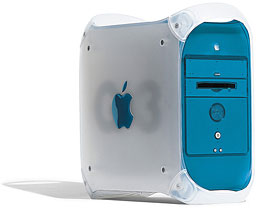
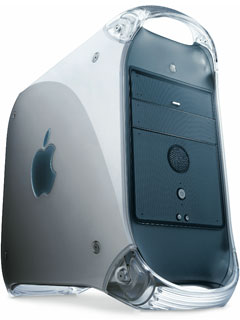 Macs that don’t include big drive support include tray-loading iMacs, slot-loading iMacs, beige G3s, blue & white G3s, Yikes! G4s, Sawtooth (a.k.a. AGP) G4s, Digital Audio G4s, and Cubes. On the notebook side, no G3 PowerBooks or iBooks support big drives. Neither do the first Titanium PowerBook G4 models (the ones with VGA output), although TiBooks with DVI output do.
Big drives are only supported under OS X 10.2 Jaguar and later in iMac G4s, eMacs, 2001 Quicksilver G4s,* 2002 Quicksilvers, and all later desktop Macs. All Titanium PowerBook G4 models with DVI video and all 15″ and 17″ Aluminum PowerBooks support big drives.
3 Options for Using Big Drives in Macs Never Designed to Support Them
There are four ways you can use a drive over 128 GB in older Macs and access their full capacity. This article examines three: Intech’s drivers, third-party IDE PCI cards, and external FireWire enclosures. For the fourth, see Is Serial ATA a Viable Alternative to Ultra ATA and FireWire?
This is only now becoming an issue for PowerBooks, as the first 160 GB laptop hard drives have only recently begun shipping [remember 2005 publication date!]. The Intech drivers are the only practical solution for older PowerBooks.
1. FireWire Enclosures
FireWire drives are not an option for tray-loading iMacs, unless you have Sonnet’s HARMONi G3 upgrade card, which provides a 600 MHz CPU and FireWire for US$300. Beige G3 Power Macs don’t have built-in FireWire support, but you can add a FireWire PCI card inexpensively.
UPDATE: The Sonnet HARMONi card was incompatible with early versions of Mac OS X 10.4 Tiger. The FireWire port would tie up 100% of CPU resources. This problem was fixed in version 10.4.7 (if not earlier). If you have a HARMONi card that’s had this issue, be aware that updating to OS X 10.4.7 or newer should fix it.
External FireWire enclosures range from cheap (under US$30) to awesome (many newer ones designed to complement the Mac mini even include USB 2.0 and FireWire 400 hubs, and prices start at about US$100). The key is buying one that has big drive support.
Almost any enclosure released in the past year or two should be just fine, but older ones may not support big drives, so be sure to check before buying something on close-out.
If you’re looking at a 7200 rpm drive, cooling might also be an issue. We’ve noticed that some drives really heat up the smaller enclosures.
In terms of flexibility, we suggest you consider an enclosure with both FireWire and USB 2.0 support. If you create a Windows partition, it’ll be that much easier to move big files between your Mac and a Windows PC.
In terms of performance, if your Mac has FireWire 800 or you may someday own a Mac with FireWire 800, consider an enclosure with FireWire 800 support. USB 2.0 and FireWire 400 are fast, but today’s 7200 rpm drives are even faster. FireWire 800 will let them run flat out, but you do a pay a higher price for FW 800 enclosures. (For more information, see Choose FireWire 800 over USB 2.0 and FireWire 400 for Best Throughput.)
2. PCI IDE Cards
Add-in cards are not an option with iMacs, and using a PC Card with an external drive kind of defeats the whole point of the PowerBook, but they can be a good choice for desktop systems.
There are two reasons for this: support for big drives and better performance.
The older the Mac, the slower the IDE bus. If you’ve got a Beige G3, the IDE bus runs at 16.7 MBps, and that’s a significant bottleneck for any modern hard drive. The Blue & White G3 and Yikes G4 have a 33 MBps IDE bus, which is twice as fast – but still slower than all but the cheapest hard drives you’ll find.
 You have to move to Ultra ATA 66 before you find a good match for today’s 7200 rpm hard drives. (Ultra ATA speeds are measured in megabytes per second, USB and FireWire are measured in megabits per second. FireWire 400 = 50 MBps, and USB 2.0 = 60 MBps total bandwidth, although in the real world throughput comes closer to 40 MBps. Both fall between ATA 33 and ATA 66 in terms of total throughput.)
Because big drive support is in hardware when you use a PCI IDE card, you can run any version of the Mac OS that your computer and the IDE card support.
Buying advice: The older your Mac, the more you’ll gain. Not only do you get 2x to 4x the throughput with a low-end ATA 66 card, but you avoid some of the ROM and motherboard problems that some G3 models have with their built-in IDE bus.
We’re not recommending any specific brands here, but if you’re looking at a 160+ GB hard drive, make sure the card you’re buying supports big drives. (Yes, we do wonder about putting a $100 drive and a $100 card in a $100 computer, but you can always take them to your next Power Mac with PCI slots.)
3. Intech SpeedTools
FireWire and PCI IDE cards offer improved performance at a price. Intech’s software solution lets you work with the IDE controller built into your Mac – for better or worse.
Intech’s Hard Disk SpeedTools for Mac OS Classic (US$60) supports everything from System 7.0 through Mac OS 9.2.2 including SCSI and IDE hard drives. If you want to be able to boot into both OS X and the Classic Mac OS from the same drive, you’ll need to use this software and partition your hard drive so that no partition is over 128 GB in size.
If you won’t ever boot into OS 9, Intech’s SpeedTools ATA Hi-Capacity Driver (US$25 – also available from Amazon.com) supports OS X 10.2 through 10.5 and is all you need. You’ll still need to partition your big drive, an each partition can be up to 128 GB in size.
In either case, be sure to read Intech’s warnings about partitions that span the 128 GB barrier before partitioning you hard drive. Also be aware that the Beige G3 can only boot OS X from the first partition of a hard drive on the internal IDE bus, and that partition must be under 8 GB in size. (I’ve sent an email to Intech support asking if this applies to their drivers as well. Their response is that it does.)
Update: There is a fair bit of negative user feedback about the ATA Hi-Cap software itself, download problems, and difficulty working with Intech. There’s no way to know whether all of the people experiencing problems were spanning the 128 GB barrier, but in many instances that appears to be the case. We recommend you pay with a credit card so you can reverse the charge if the software fails to download or fails to work. We also recommend you be careful that no partition spans the 128 GB barrier. dk
Recommendations
The newer your Mac, the more attractive the Hi-Cap driver. If you’re using a Power Mac G4 with an ATA 66 bus or faster (all but the Yikes model) and don’t need to boot into OS 9 (Classic will still boot within OS X), $25 is a bargain.
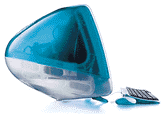 If you have a slot-loading iMac, Blue & White G3, or Yikes G4, that Ultra ATA 33 bus will limit throughput with modern hard drives – but the drive will still be faster than what came with your computer. Intech’s drivers are attractively priced options. If you’re after maximum throughput, well, you’ve probably moved to a faster computer by now.
At the low-end of the range, it’s hard to recommend putting a big drive on a slow bus. If you have a tray-loading iMac or Beige G3, our first choice would be to stick with drives 128 GB and smaller so you can simply avoid the issue.
If you do want to put a big, fast, modern hard drive in your Beige G3, PCI IDE cards aren’t much more expensive than Intech’s Hard Disk SpeedTools, and you’ll gain at least 4x the bandwidth for moving data by picking an ATA 66 or faster card that supports big drives.
I think you’d really have to like your ancient Beige G3 to do that, especially with Blue & White G3s available at US$100 and low-end G4s moving toward the US$200 mark. But it’s your computer, your budget, and your choice.
If someone does think you’re crazy for wanting to put a $100+ hard drive in your old Mac, remind them that you can always transplant the drive into your next desktop Mac or an external enclosure. It doesn’t have to stay in your old Mac forever.
* Many readers have reported that the 2001 Quicksilver supports big drives on the internal drive bus, contrary to Apple’s statements. I have also seen online reports that the 2001 Quicksilver does not support big drives. I have no way of verifying this myself, as we don’t have a 2001 Quicksilver at LEM headquarters.
Further Reading
- Macintosh: Using 128 GB or Larger ATA Hard Drives, Apple. Big drives require Mac OS X 10.2 or later and BootROM support. Mac OS 9 boot volumes must be no larger than 200 GB.
- What Macs natively support large IDE drives? (over 128 GB formatted), Accelerate Your Mac
- Are EIDE drives larger than 137 GB (128 GB binary) supported in Mac systems, Western Digital
- SpeedTools ATA Hi-Cap Support Driver, Intech Software. Requires Mac OS X 10.2 or later.
- User reviews of SpeedTools ATA Hi-Cap Support Driver, MacUpdate. Appears to work well in Cube, but lots of negative reports.
- User feedback on SpeedTools ATA Hi-Cap Support Driver, VersionTracker. Appears to work well for some, but several negative reports.
- Hard Disk SpeedTools, Intech Software. Supports System 7.0 through Mac OS 9.2.2.
- Is Serial ATA a Viable Alternative to Ultra ATA and FireWire?
Keywords: #bigharddrivesupport #largeharddrivesupport #bigdrives #powerpc #ultraata
Short link: http://goo.gl/GFsoT7
searchword: bigdrives
