
Mac Daniel's Advice
Looking for a Power Mac G4? Here's Why You Want an AGP Model
Dan Knight - 2003.03.06 - Tip Jar
This week we're looking at the value of four generations of Power Macs: the beige G3, blue & white G3, "Yikes" (PCI) G4, and early AGP G4s. Today we wrap up the series by looking at Power Mac G4s with AGP video.
When Apple introduced the G4s on August 31, 1999 - about nine months
after rolling out the
b&w G3 - they 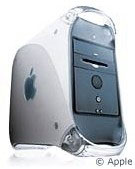 announced three
models based on two different motherboards. The G4/450 and G4/500 had a
brand new motherboard designed to support a more efficient memory
access mode not supported by the G3.
announced three
models based on two different motherboards. The G4/450 and G4/500 had a
brand new motherboard designed to support a more efficient memory
access mode not supported by the G3.
The entry-level G4/400 ("Yikes!") was based on a slightly modified Yosemite (b&w G3) motherboard. It was later released as a 350 MHz budget model. Yesterday we explained why it's way overpriced on the used market.
Today we ask whether the AGP Power Macs justify their prices on the used market. Here are a sampling of used G4 prices from last week's Power Mac G4 Price Tracker:
- G4/400, 256/10/DVD, $600
- G4/450, 256/18/DVD-RAM, SCSI, Zip 100, $700
- G4/533, 128/40/CD-RW, $800
- dual G4/450, 128/30/DVD, Zip 100, no modem, $974
- dual G4/500, 512/20/DVD-RAM, Zip 100, $1,000
The Pros
Although the Sawtooth motherboard (used in the 400-500 MHz AGP models) has a 100 MHz system bus like the b&w G3 and Yikes! G4, it supports a high speed memory access mode that those two models don't. Bare Feats tested Yikes! against Sawtooth at 400 MHz and found the AGP model offered 22% better CPU performance and 19% better number crunching - the CPU is the same; the memory bus is the difference.
The AGP 2x video slot offers twice the data throughput of the 66 MHz PCI bus in the earlier models and is especially designed for video, unlike PCI, which is a general purpose bus. The Sawtooth G4s initially shipped with an AGP version of the Rage 128 found in Yikes!, and Bare Feats found the Sawtooth model 27% faster on 2D scrolling and 34-52% faster in different 3D gaming tests.
One further benefit of AGP: Fewer PCI video cards are being made for the Mac than ever before. With AGP, you have access to the latest Mac cards from ATI and Nvidia.
The Sawtooth model includes an Ultra66 drive bus, twice as fast as the Ultra33 in the b&w G3 and Yikes! G4. Bare Feats testing found that made a minimal difference with Apple's stock drives - but with today's higher performance hard drives, Ultra66 eliminates one more performance bottleneck when comparing the AGP models with earlier Power Macs.
As we noted when looking at the b&w G3, this is a thoroughly modern Power Mac with full support for Mac OS 8.6 through the latest revision of Jaguar.
The Cons
Compared with the b&w G3 and Yikes! G4, there are no reasons not to buy an AGP G4.
Compared with newer models, at a higher price the newer hardware offers a faster system bus, AGP 4x, and Ultra100 drive controllers. Nice, but also more expensive.
The Models
I've mostly mentioned Sawtooth here, since that was the first Power Mac G4 with AGP. Here's the quick overview of older AGP models:
- Sawtooth, 350-500 MHz
- Mystic (dual processors, gigabit ethernet), 450-500 MHz
- Digital Audio (133 MHz system bus, AGP 4x, "five slots"), 466-733 MHz, two different motherboards
For a more detailed comparison, see our Power Macintosh G4 Guide.
A Good Value?
Compared to the b&w G3, the G4 is definitely a more expensive computer. But the improved memory architecture, AGP video slot, and Ultra66 drive bus help justify the cost, as does the G4 processor itself (which is a real plus under Mac OS X).
At today's prices, early AGP Power Macs are an attractive option, especially to those who want the power of a G4 or really want to dive into OS X on the kind of hardware that best supports Aqua. Prices are at a bit of a premium, and they are definitely a better value than I've ever seen on the inferior Yikes! model.
I'm not ready to label them a best buy yet. Prices are a bit steep for the average low-end Mac budget, but prices are edging downward. In the $600-800 range, they offer a big enough saving compared with refurbished models to merit consideration. Past the $1,000 mark, you're probably better off buying something newer. Between $800 and $1,000 isn't so clear cut. It depends on your needs, your budget, and the configuration you're looking at.
The dual processor models also merit consideration if you're using OS X, since the OS and most applications can take advantage of that second CPU. For instance, a dual 450 will offer performance in the same ballpark as a single processor G4/733 or G4/800 at a more attractive price.
If you really want the right hardware for OS X, the AGP Power Macs are what you should be looking at. Although a 7500, beige G3, or b&w G3 can all be upgraded with a G4 processor, they won't have the same memory bandwidth, video throughput, or drive speed as the AGP models offer.
If you need the power of a G4 and can't spend $1,500 and up for a
new one, look here. 
Join us on Facebook, follow us on Twitter or Google+, or subscribe to our RSS news feed
Not sure if you should upgrade your old Mac or replace it? Check the Mac Daniel index to see if we've already addressed your problem.
Today's Links
- Mac of the Day: PowerBook 5300, introduced 1995.08.25. The first PowerPC PowerBook was known for 'flaming' performance.
- Support Low End Mac
Recent Content
About LEM Support Usage Privacy Contact
Follow Low End Mac on Twitter
Join Low End Mac on Facebook
Favorite Sites
MacSurfer
Cult of Mac
Shrine of Apple
MacInTouch
MyAppleMenu
InfoMac
The Mac Observer
Accelerate Your Mac
RetroMacCast
The Vintage Mac Museum
Deal Brothers
DealMac
Mac2Sell
Mac Driver Museum
JAG's House
System 6 Heaven
System 7 Today
the pickle's Low-End Mac FAQ
Affiliates
Amazon.com
The iTunes Store
PC Connection Express
Macgo Blu-ray Player
Parallels Desktop for Mac
eBay

