
Mac Daniel's Advice
Why Apple's Blue & White G3 Is a Best Buy
Dan Knight - 2003.03.04 - Tip Jar
Yesterday we looked at the value of the beige G3, concluded that it was a nice old computer at a very attractive price, and concluded that the blue & white G3 was the better value.
Today we're going to look more closely at the b&w G3, introduced in January 1999, and explain why we think it justifies the extra expense compared to the beige G3.
The Pros
As surprised as I was to see used beige G3s selling for US$200
recently, imagine my surprise to see the b&w G3 selling for as
little as $100 more when compiling our Power Mac G3 Price Tracker. 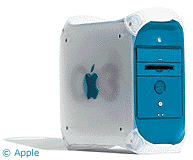 Okay, that was an exceptional deal, and $350
is more typical - but we even had a b&w G3 system with a 16"
display listed in the local newspaper classified ads for $350 over
the weekend.
Okay, that was an exceptional deal, and $350
is more typical - but we even had a b&w G3 system with a 16"
display listed in the local newspaper classified ads for $350 over
the weekend.
That's a lot of computer for the money. In comparison to the typical $200 beige G3/266 desktop with 128 or 256 MB RAM, a 4 GB hard drive, and a 24x CD-ROM, the b&w starts at 300 MHz with 64-256 MB RAM, a 6 GB hard drive, and a CD-ROM.
But is that worth $100-150 more?
I think so. The b&w G3 has a 100 MHz system bus, which means it can access memory that much faster than the beige G3 with its 66 MHz bus. This is especially useful as you upgrade to faster processors. And there are lots of G3 and G4 upgrades available for it.
The b&w G3 also has a 33 MB/sec. IDE bus, twice as fast as the one on the beige G3. The IDE bus on the beige G3 is one of its greatest drawbacks. At twice the speed, the Ultra33 bus on the b&w G3 will only occasionally be a bottleneck for today's fast drives. Unless you need really, really fast drive access, you'll probably find Ultra33 comfortable - and a huge improvement over the beige G3. To add a faster IDE card to the beige G3 costs about $60.
The b&w G3 has better video than the beige G3, although again it's not quite as nice as that on newer Power Macs. One really nice feature on the b&w G3 is a 66 MHz PCI slot for the video card; this is twice the speed of the PCI slots in the beige G3. (The ATI Rage 128 from the b&w G3 is a popular video upgrade for beige G3 owners.)
The b&w G3 has four PCI slots, one more than the beige G3, although one of them will be used by a video card. Still, if you're going to put a video card in the beige G3, this leaves the b&w with one more slot for options.
That's important, because although the b&w G3 won't need a USB and/or FireWire card (this was Apple's first model to offer both), you might want to use one for a SCSI card if you have old SCSI drives, scanners, etc. that you want to use with the b&w G3.
The b&w G3 was also the last desktop Mac to ship with an ADB port, making it easy to replace the limited iMac keyboard and abysmal round mouse that came with the computer.
Memory expansion was also improved over the beige G3, which was limited to 768 MB of RAM. The b&w G3 supports 1 GB of memory, which can be a real plus when working with video, huge Photoshop files, or OS X.
The b&w was often ordered from the factory with a Zip 100 drive installed.
The CD-ROM drive is a standard sized IDE device, making it quick and easy to swap it out for a CD-RW drive, DVD-ROM, etc. Accelerate Your Mac! maintains a huge database of reader reports on which drives are compatible.
The b&w G3 supports every Mac OS from 8.5 (we recommend the free 8.6 update) through today's 10.2.4.
And that wonderful drawbridge case design makes working inside the b&w G3 a pleasure. It's much easier to route cables inside here than it is in the beige G3 desktop. (I've never worked with a beige G3 minitower, so I can't speak to that design.)
The Cons
Compared with earlier Macs, there is no SCSI in the standard b&w G3 configuration, although Apple offered it as an option. Nor are there Apple serial ports for StyleWriters, external modems, etc.
If the Ultra33 bus isn't fast enough, you can add a third-party Ultra66 or Ultra100 card, although I think most users will be happy with performance of the standard bus on the b&w G3.
Video performance is very nice under the classic Mac OS and very adequate under Mac OS X. You can improve this by adding a third-party PCI video card (the Radeon Mac Edition is a favorite). Although it will never match Quartz Extreme on the AGP Power Macs, you can have decent video performance under Mac OS X.
Of course, there is no internal floppy. Not that most people use them any longer, but this was the first Power Mac without one.
A Best Buy?
The question: Should we rate the b&w G3 as a Low End Mac Best Buy? Put the other way, is there any reason not to?
With prices as low as $300, I can't see any reason not to. There are no significant drawbacks. In every respect the blue & white G3 is a modern Power Mac. It has USB and FireWire. It supports a gig of RAM. It has a fast enough IDE bus - and plenty of PCI slots if you need to add a faster drive controller.
From a legacy perspective, the b&w has ADB for keyboards, mice, and sketch tablets. You can add a SCSI card if you need one, and you can often find used b&w G3s with Apple's card already installed. And if you need an old fashioned Apple serial port, Griffin's $49 gPort should do the job.
In comparison to the beige G3, the b&w offers many features that would be additional expenses - USB, FireWire, better video, a faster IDE bus - and offers some things the beige G3 doesn't - a 100 MHz system bus, 4 PCI slots, and no 8 GB partition problem with OS X.
At today's prices, the b&w G3 definitely qualifies as a best
buy. 
Join us on Facebook, follow us on Twitter or Google+, or subscribe to our RSS news feed
Not sure if you should upgrade your old Mac or replace it? Check the Mac Daniel index to see if we've already addressed your problem.
Today's Links
- Mac of the Day: 15" 'TiBook' PowerBook G4, (2001.01.09. A new 1" thin PowerBook design with a titanium case and 15" widescreen display.)
- Support Low End Mac
Recent Content
About LEM Support Usage Privacy Contact
Follow Low End Mac on Twitter
Join Low End Mac on Facebook
Favorite Sites
MacSurfer
Cult of Mac
Shrine of Apple
MacInTouch
MyAppleMenu
InfoMac
The Mac Observer
Accelerate Your Mac
RetroMacCast
The Vintage Mac Museum
Deal Brothers
DealMac
Mac2Sell
Mac Driver Museum
JAG's House
System 6 Heaven
System 7 Today
the pickle's Low-End Mac FAQ
Affiliates
Amazon.com
The iTunes Store
PC Connection Express
Macgo Blu-ray Player
Parallels Desktop for Mac
eBay

