
Mac Daniel's Advice
Yikes! This Power Mac G4 Just Isn't Worth the Money
Dan Knight - 2003.03.05 - Tip Jar
This week we're looking at the value of four generations of Power Macs: the beige G3, blue & white G3, "Yikes" (PCI) G4, and early AGP G4s. Today we take a look at Apple's first budget Power Mac G4 - Yikes!
When Apple introduced the G4s on August 31, 1999 - about nine months
after rolling out the
b&w G3 - they 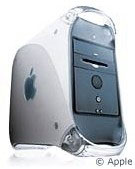 announced three
models based on two different motherboards. The G4/450 and G4/500 has a
brand new motherboard designed to support a higher speed memory access
mode supported by the G3.
announced three
models based on two different motherboards. The G4/450 and G4/500 has a
brand new motherboard designed to support a higher speed memory access
mode supported by the G3.
The entry-level G4/400 was based on a slightly modified Yosemite (b&w G3) motherboard.
Due to severe problems getting 500 MHz G4s out of Motorola, Apple bumped the speed of each model down 50 MHz in October 1999 with no reduction in price. (The 500 MHz Power Mac G4 finally shipped in February 2000.) Thus the Yikes! G4 is available in both 350 MHz and 400 MHz versions.
The Pros
The biggest benefit the Yikes! G4 has over the b&w G3 is the G4. Feature for feature, spec for spec the two models are nearly identical except for the CPU.
Except for the case color, dropping a G4 upgrade into a b&w G3 would essentially give you the same computer with the same performance.
Yes, the G4 is a wonderful CPU and all, but that's really the only advantage that Yikes! has over the G3 - and that can be solved with a CPU replacement.
The Cons
Compared to the b&w G3, the G4 has precisely one less feature: No ADB port.
As on the b&w G3, there is no SCSI in the standard G4 configuration, although Apple offered it as an option.
If the Ultra33 bus isn't fast enough, you can add a third-party Ultra66 or Ultra100 card, although I think most users will be happy with performance of the standard bus on Yikes!
Since it runs the same video card on the same 66 MHz PCI bus as the b&w G3, video performance is very nice under the classic Mac OS and very adequate under Mac OS X. You can improve this by adding a third-party PCI video card (the Radeon Mac Edition is a favorite). Although it will never match Quartz Extreme on the AGP Power Macs, you can have decent video performance under Mac OS X. And the G4 processor does help out when running Mac OS X - although you can also upgrade a b&w G3 with a G4 CPU.
Although we list the Yikes! G4 in our Power Mac G4 Price Tracker, I haven't seen any compelling prices. In fact, I've often seen the superior AGP models available for lower prices on the used market. With the typical Yikes! selling for around US$700, the b&w at half that, and G4 upgrades for the b&w G3 selling for far less than the difference, the Yikes! G4 is definitely overpriced.
A Poor Value?
When evaluating the beige G3 and b&w G3, we asked if either should be called a Low End Mac Best Buy. With the Yikes! G4, that isn't even an option. Instead, it should be put in the Road Apple category, since Apple already has a superior motherboard available.
Even with prices sometimes below $700, I can't see any reason to buy a Yikes! when a b&w G3 with a G4 upgrade costs less and will offer similar performance - or better with a faster CPU.
At today's prices, avoid this computer. It might merit a $100-150
premium over a b&w G3 at the same clock speed, but it's not worth
$300-400 more. 
Join us on Facebook, follow us on Twitter or Google+, or subscribe to our RSS news feed
Not sure if you should upgrade your old Mac or replace it? Check the Mac Daniel index to see if we've already addressed your problem.
Today's Links
- Mac of the Day: PowerBook 5300, introduced 1995.08.25. The first PowerPC PowerBook was known for 'flaming' performance.
- Support Low End Mac
Recent Content
About LEM Support Usage Privacy Contact
Follow Low End Mac on Twitter
Join Low End Mac on Facebook
Favorite Sites
MacSurfer
Cult of Mac
Shrine of Apple
MacInTouch
MyAppleMenu
InfoMac
The Mac Observer
Accelerate Your Mac
RetroMacCast
The Vintage Mac Museum
Deal Brothers
DealMac
Mac2Sell
Mac Driver Museum
JAG's House
System 6 Heaven
System 7 Today
the pickle's Low-End Mac FAQ
Affiliates
Amazon.com
The iTunes Store
PC Connection Express
Macgo Blu-ray Player
Parallels Desktop for Mac
eBay

