
Welcome to Macintosh
The Keyboard Roundup
IBM Model M and Apple Extended II Among Best Computer Keyboards Ever
- 2007.01.29
Bong! . . . :-) . . . Welcome to Macintosh!
As many of you already know after reading some of my earlier articles, I'm a big fan of good quality, old fashioned, built-to-last keyboards. I recently reviewed one of the best keyboards in the business, the Avant Prime from CVT Inc.
I had the pleasure of interviewing Brandon from clickykeyboards.com. This is the place to go to find the famed IBM Model M in its many different iterations, as well as other keyboards and accessories.
Brandon was even kind enough to provide me with a Zio extension USB cable as well as a couple of PS/2 to USB adapters guaranteed to work with the Model M.
Tommy: What was the driving force behind clickykeyboards.com?
Brandon: I have always been disappointed with the build quality and tactile feel of the keyboards that are bundled with today's computers. Over the years, I have had lots of complaints about Apple's keyboards. I've complained how the current transparent plastic base and white plastic keys on the keyboard of my Intel-based Apple Mac Pro (2006) seems to attract and permanently display accumulated debris and grime, or about the peculiar key spacing of the 13.1" MacBook keyboard (2006), or the number of times I have lost and repeatedly had to replace lost keys from my Apple 12" G4 iBook (2004), or the marks on my PowerBook G4 15" (2001) LCD screen from its poorly designed keyboard and case design, or the ridiculously small and cramped keyboard and hockey puck mouse that was bundled with the original colored CRT iMacs (1998).
As a young BBS modem-based sysop in nineteen-hundred and eighty four, I first imprinted on a particular keyboard - and I have been using it since. Among my first personal computers that I owned was the IBM PS/2 Model 50 running at 10 MHz with an Intel 80286 CPU. The original IBM PS/2 computers were built like tanks and were constructed with a thick, heavy steel chassis and were built as serious business machines. This was the IBM 101-key "Model M" enhanced keyboard, and this keyboard format was cloned by many PC manufacturers.
After creating a simple website related to these vintage keyboards in 1998, I started to receive emails from other like-minded enthusiasts who had heard stories or had faint memories of the 1980s IBM keyboard. Through postings on popular message boards like slashdot.org and other computer forums and message boards, I had known that many others of a certain vintage and technical experience also appreciated the same original IBM Model M keyboard. It was rewarding to help others share in the interest for better keyboards and to make these vintage keyboards more widely available.
Tommy: What do you feel is lacking in today's keyboards?
Brandon: The average cost of the personal computer has dropped significantly since they were first introduced in the late 1980s when entry-level personal computers were priced at $3,000 to $5,000 (about 25% the price of a new car in 1984 dollars). At that time, PC manufacturers could afford to put a certain amount of design effort and quality materials into the keyboard that was bundled with a new PC. However, 20 years later, many PC manufacturers have focused on providing value computers and offering PCs with reduced features in order to stay below the magic $400 to $600 price tag (about 2% the price of new car in 2006 dollars).
One extreme example of this disregard for the keyboard is Apple's choice to sell the low-priced Mac mini without a keyboard or mouse. Apple's expectation is that customers don't really care about keyboards and will reuse the ones they already own or buy any they choose.
With the growth of graphical based operating systems, the computer mouse is a much more primary input peripheral than the keyboard. Typing is no longer a specific and necessary requirement to use a computer. Many users can get along just fine with the "free-with-purchase" keyboard while hunting and pecking for individual keys on the keyboard while online shopping on Amazon, viewing YouTube videos, and doing online banking and other web surfing activities. The computer keyboard is treated like any modern cheap consumable, meant to be thrown out and replaced with a new unit every 3 years.
In the 1980s, IBM primarily built the IBM PS/2 line of computers for office and industrial use. The computer keyboard design shared many features with IBM's traditional electronic typewriters that they were known for, such as the IBM Selectric electronic typewriter. Now 20 years later, the average computer keyboard is treated like any other "standardized" office supply like a $10 stapler or a $3 disposable ball-point pen.
Keyboard manufacturers perfected a low-cost means to produce functional keyboards. The only way they could differentiate their product was not to improve on the basic function of the QWERTY keyboard, but to introduce "enhancements" like extra buttons for email, sleep, or other mundane tasks. Features like built-in LCD screens, built-in knobs for volume control, scroll wheels, neon backlighting, or candy-colored translucent plastics may look good in a magazine print ad or on a e-commerce web page, but these features do nothing to enhance the actual tactile experience of typing. Often times these features are added, but the standard placement of keys is disregarded and some keys are moved to irregular or nonstandard locations.
To the experienced full-time computer user, journalist, blogger, HTML coder, Web programmer, sys admin, or any other any professional typist or transcriptionist, the computer keyboard is as critical and instrumental a tool as that specialized implement used by any other expert craftsman.
Typing is a learned motor skill. Once a person learns how to touch type, they no longer need to look at the keyboard, and typing becomes as automated a task as driving a car or playing a musical instrument. The experienced typist's fingers seem to automatically "know" where the correct keys are located, how far apart individual keys are, how much force is required to actuate a key stroke. Effective typing results from overall typing speed, the accuracy in finding specific keys, and being able to apply the sufficient, but not excessive, force in order to register a key stroke.
The problem with most cheap keyboards today is the rubber-dome membrane mechanisms used inside the keyboard. In order to register a key stroke, the key on the keyboard has to be depressed so that the individual key makes contact with the bottom membrane of the keyboard. Alternately, some keyboards used in laptops are based on a shorter scissor-switch mechanism, where the key stroke distance is reduced. This allows for thinner and lighter laptops and for cheaper mass production, but in our experience, I found the older IBM mechanical keyboards to be better.
Tommy: Do you provide other services such as repair for older keyboards?
Brandon: Our primary focus has been to document the history of these vintage keyboards and to make them more widely available to today's computer users and to professional typists. We have been proud to be advocates for these keyboards and to make them widely available.
The Internet is primarily written and composed in the English language. We have always known that IBM was a global international business company and that they sold these keyboards throughout the world. IBM computers and keyboards were popular and widely sold in English-speaking countries outside of the United States, such as Canada, the United Kingdom, and Australia.
We were surprised to find that these keyboards are also popular in Japan and South Korea. A number of the Web pages have been created by Japanese keyboard enthusiasts. At first, we did not understand the phenomenon and thought it was just a passing fad similar to the preference for vintage "Made in the USA" Levi's denim jeans or vintage Nike Air Jordan sneakers or other Americana to consumers outside of the US. However, since then we have found out that our Japanese buyers prefer these keyboards for the precise feel and touch qualities of the mechanical switches and for the initial high quality that was put into their construction when IBM was still in the business of building and selling personal computers.
We have found that through the enduring popularity of these IBM keyboards and the power of Internet searches via Google and the reduced barriers to international shipping, these keyboards are popular worldwide. To date we have sold more than a thousand keyboards to other computer professionals in 26 countries, ranging from most of the European Union countries to exotic locales as South Africa, Russia, Brazil, Aruba, Bahrain, Guatemala, and even to one dedicated computer user stationed on a US military base in Kabul, Afghanistan.
Tommy: I noticed you're a fan of the IBM Model M keyboards that were so popular in the 80s and 90s. What makes the Model M special in your mind?
Brandon: The primary feature of the Model M keyboard that is preferred by users is the heavy duty construction and tactile mechanical feel of the keyboard. On the Model M keyboard, the key switch mechanism is based on a coiled spring. When pressing an individual key, the operator is physically applying increasing force (approximately 30 - 40 grams of force) against a coiled spring. The spring provides slight resistance, so that you can rest your fingers on the keyboard and not cause an accidental or inadvertent key press.
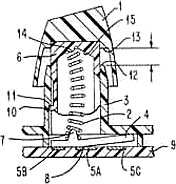 Once the spring travels a particular distance (approx.
2.5 - 3.5mm), the spring reaches the "catastrophic buckling" point
and produces an audible click at the same exact instance that the
computer records the keystroke. The buckling spring switch in the
Model M is finely tuned so that only partial pressure is required
to type, unlike a cheaper keyboard where the key has to be fully
depressed to register a signal.
Once the spring travels a particular distance (approx.
2.5 - 3.5mm), the spring reaches the "catastrophic buckling" point
and produces an audible click at the same exact instance that the
computer records the keystroke. The buckling spring switch in the
Model M is finely tuned so that only partial pressure is required
to type, unlike a cheaper keyboard where the key has to be fully
depressed to register a signal.
Buckling spring key-switch keyboards are technically superior because they provide visual, tactile, and auditory feedback. Rapid typing occurs as a result of one finger completing a key stroke, while another finger is preparing the subsequent key sequence and other fingers are preparing to convert the user's thoughts into action. Each key has an individual weight to it, and experienced typists can apply sufficient, but not extra, force to achieve their goal of easily and rapidly converting their thoughts into a digital signal in their computer.
Tommy: How many inquiries and sales do you get from Mac users?
Brandon: Our website gets about 20,000 unique visitors per month, and from our stats we know that about 8% Mac users.
There have been two developments which have made it easier for Mac users to get their older PC keyboards to work.
- Mac OS X built-in support for keyboard remapping. In Mac OS X 10.4, Apple included a nice utility located under System Preferences > Keyboard & Mouse > Keyboard > Modifier Keys. Here the Caps Lock, Control, Option, and Command keys can be remapped. On my PC based IBM 101-key keyboard, I remap the Apple command key to the leftmost Ctrl key on the PC keyboard and the Apple control key to the PC keyboard Alt key. I then assign the Apple's alt/option key to the Caps Lock key. Then, when using a standard Mac program and wanting to do a copy and paste, my trained fingers can make the correct key stroke whether I am using a PC or Mac based keyboard.
- PS/2 to USB adapter. Older PC based keyboards used a PS/2 connector to connect to the PC. Until recently, PS/2 to USB adapters were constructed so that they would simply and passively convert the 4 wires in the PS/2 connector to 4 connections in a USB connector. With some specifically built keyboards, this can be done as keyboard manufactures built in logic into the keyboard to convert from USB to PS/2 signals. However, with older IBM keyboards, there was no such thing as a design specification for a USB interface. There are significant voltage and signal differences with vintage IBM keyboards. For use on most newer PCs and Macs, a "smarter" active PS/2 to USB converter is required. After doing a lot of testing of various name brand and no-name converters, I finally found a good PS/2 to USB adapter that would work with these IBM keyboards and allowed for their use on an Apple Macintosh. At about the same time, Apple released their Mac mini (sold without keyboard), and after a few postings on Mac-friendly tech forums, I found this adapter to very popular.
Of course, with the growing popularity of such programs as Boot Camp by Apple and Parallels Desktop for Mac, I know many enlightened PC users are starting to switch to the Mac platform, and many diehard Mac users are trying out Windows. We found that the switch from Mac to PC is made even easier when users can attach their favorite two button mouse and their familiar PC-based 101-key keyboard.
Tommy: Are you a Mac user, PC user, or both?
Brandon: Working in the computer industry for the past 20 years with universities and other higher education institutions, I have had hands on experience with every Mac since the Mac IIs, Quadras, beige G3 Power Mac, and color iMacs to the latest Intel-based Mac Pros, MacBook Pros, and MacBooks.
As a full time computer professional, I am certified as a Microsoft Certified Systems Engineer (MCSE) and a Microsoft Certified Systems Administrator (MCSA). I am qualified to design, operate, and maintain Microsoft-based corporate networks running Windows NT Server, Windows Server 2000, and Windows Server 2003. In addition, Apple has recently introduced formal qualification programs, and I am certified as an Apple Certified Technical Coordinator (ACTC) for Mac OS X servers.
With the release of Parallels for the Mac and Boot Camp by Apple, I was happy to get rid of my two separate computers (Dell Optiplex GX series and an Apple Power Mac G5) and to consolidate and run all the necessary day-to-day monitoring utilities, administrative console software, and remote desktop software on my Intel-based dual-Xeon Apple Mac Pro with dual 30" monitors.
Tommy: What's your opinion of both Microsoft and Apple past and present?
Brandon: For home use, I have always had two computers and have always been fluent in Mac OS 9/X and Windows 98/XP. I have always had an Apple Macintosh portable for day-to-day computing tasks like email, Web surfing, Word documents, image editing, MP3 files.
However, as an avid computer gamer, I always had to have and constantly maintain and upgrade a Microsoft Windows PC for computer gaming. As many Macintosh gamers know, the development cycle for Windows games is much more robust than the slower release cycle for Macs.
The Microsoft platform is the de facto standard in corporate offices and small businesses because it allows for interoperability when working on documents, presentations, schedules, calendars, projects, and other office-related tasks. But for the home user, I think that if it were not for such specialized applications like PC gaming, many users would rather have a Mac than a PC.
With the adoption of Intel chips by Apple in 2006 and the development of programs such as Boot Camp and Parallels virtualization software, many users can finally make the switch and become primarily Mac users while still having the ability to run those one or two specialized programs that will only run on a Windows PC.
...just make the switch and get a Mac.
The popularity of the Mac OS X platform is growing, and it is good to see that as Microsoft has developed and offered certification programs for its products, Apple has also introduced similar certifications for Macintosh professionals. We think that in the coming years, Apple will continue to gain a much, much wider acceptance in corporate environments and grow beyond the existing base of Mac users. Since the release of Intel Macs, as a computer professional my official recommendations to every virus-infected, spyware-infected, and Windows blue-screen-of-death user has been to just make the switch and get a Mac.
Tommy: What is your keyboard of choice?
Brandon: The keyboard that I use on a day-to-day basis on both my Mac and PC is the IBM Model M keyboard.
However, another preferred keyboard is Apple's original ADB-based Apple Extended II keyboard (part number M3501) from 1990 that I think was first bundled with the Macintosh IIsi and Mac LC computers (16-20 MHz 68030 processor, 40 MB hard drive, running System 6.0.7). This Apple keyboard is based on a mechanical switch mechanism that was originally developed by the Alps corporation (some modern keyboards such as the Avant Stellar use a similar key switch). The tactile feel is firm, but not as clicky as the Model M buckling-spring key switch. The placement of the keys mimics the IBM keyboard in terms of key size, spacing between keys, and overall keyboard size. With the proper ADB to USB adapter, these vintage Apple keyboards can still be used on the modern Mac or PC.
Unfortunately, as many Low End Mac readers and many other vintage Mac users know, many of these early Apple Macintosh computers were built with plastics that tended to unevenly fade and discolor with time. I have heard that this plastic discoloration is due to exposure to UV light from office lights or from other environmental oxidation. If it were not for the cosmetic problem, perhaps the focus of our website would have been these original Apple Extended II ADB keyboards.
Tommy: Brandon, I have to say that you provide a
wonderful service to all true quality keyboard aficionados out.
Keep up the good work! :-) 
Join us on Facebook, follow us on Twitter or Google+, or subscribe to our RSS news feed
Today's Links
- Mac of the Day: Kanga PowerBook G3, introduced 1997.11.10. The first G3 PowerBook ran at 250 MHz, was limited to 160 MB RAM.
- Support Low End Mac
Recent Content
About LEM Support Usage Privacy Contact
Follow Low End Mac on Twitter
Join Low End Mac on Facebook
Favorite Sites
MacSurfer
Cult of Mac
Shrine of Apple
MacInTouch
MyAppleMenu
InfoMac
The Mac Observer
Accelerate Your Mac
RetroMacCast
The Vintage Mac Museum
Deal Brothers
DealMac
Mac2Sell
Mac Driver Museum
JAG's House
System 6 Heaven
System 7 Today
the pickle's Low-End Mac FAQ
Affiliates
Amazon.com
The iTunes Store
PC Connection Express
Macgo Blu-ray Player
Parallels Desktop for Mac
eBay

