
There was a time when every part of a computer was manufactured to the highest possible quality standard. Some called it good quality control. Some called it over-engineering. I call it being good, old fashioned, and built to last.
Apple was a company that knew what good quality was on the hardware front as well as on the software front. Many PC companies also understood this – at least from a hardware standpoint. Computers and their parts from the 70s, 80s, and even into the 90s could easily last 7-10 years, and many would go on to reach 15-20 years of life.
Those days seem like a distant memory.
One part of computers that is especially important is the keyboard. There’s something to be said in having a good quality mouse, but the keyboard is still the input device of choice. Think of how many emails and how many messages you send and receive every day. Think of how much time you spend at the keyboard.
Wouldn’t you want to have a good quality keyboard you could be more productive and efficient with?
Part of the whole Mac experience and a strong reason for being a Mac user is productivity and efficiency. Having a good quality keyboard should be no exception.
In the Keyboard Roundup, I’ve already looked at the Apple Extended and Extended II keyboards in detail because of the wonderful tactile feel they have due to the Alps mechanical key switches. These keyboards are a joy to type on despite the noise they produce. You can type on a keyboard like this all day, and you’ll spend more time getting things done while spending less time wondering whether or not you hit the right key on the “mushmelon” keyboards of today.
The Legendary Northgate OmniKey
Back in the 80s, a company called Northgate made PCs (like many other clone companies). While their reputation for PCs was average, one thing they made stood out as a legend in the computer industry: the Northgate OmniKey line of keyboards. They had the same stellar reputation as IBM Model M keyboards.
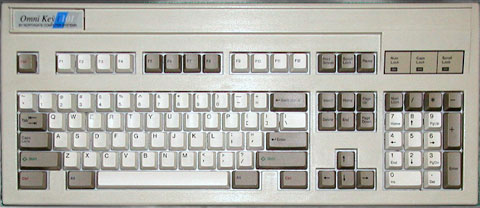
Northgate continued putting out this awesome keyboard for years, long after they got out of the business of making computers. Sadly, one day in the late 90s, Northgate went out of business.
Not long after that, a company known as CVT Inc. (Creative Vision Technologies, Inc.) picked up where Northgate left off. Today, instead of being called the Northgate OmniKey Ultra and Ultra-T, these keyboards are known as the Avant Prime and Avant Stellar. [Update: CVT has since gone out of business.]
I’m always on the lookout for good quality keyboards, so I looked into the Avant Prime and ordered one. This is my review of the Avant Prime. (The Avant Stellar sports an extra 12 function keys on the left side of the keyboard in addition to the ones you’ll normally find at the top on any keyboard. The Avant Prime doesn’t sport the extra function keys on the left.)
The Avant Stellar costs US$189 and the Avant Prime is US$149.
Is it worth the price of admission?
One thing you should keep in mind is that the Avant Prime and Stellar are PC keyboards that use a PS/2 connection.
“Why is he doing a review of a PC keyboard?” you ask.
In a word, quality. The computer industry as a whole has gotten sloppy with quality, mainly because computer equipment becomes obsolete so quickly, so the companies feel (at least on the consumer level) that someone won’t keep a computer long enough to need long-term reliability.
 The Avant Prime
CVT did a great job with the shipping of the keyboard itself. As you’ll see in the pictures, they made sure everything was packaged carefully.
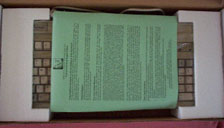 The first thing I saw once the box was opened was a green sheet of paper that gives the warranty information and information about how to send the keyboard back if you’re not satisfied or for repair purposes.
 The white box with the Avant Prime logo was pretty catchy, and in a small sense it gives you the feeling that there’s a solid piece of machinery awaiting you on the inside. The box art itself isn’t “out there” – just simple enough to get your attention.
The keyboard itself was secured well on the inside.
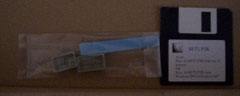 At this point you’ll notice the following is included with the keyboard itself: a keycap puller and with an extra Caps Lock and Control key for those who want to switch the Caps Lock and Control to where “God and IBM intended”, along with a floppy disk that includes drivers for Windows XP and 2000.
What one will find missing is an owner’s manual. You can find a manual available for download at cvtinc.com. Here you’ll also find Windows 3.1/95/98 drivers and software, as these versions are not included on the floppy disk.
 When I took the keyboard out of the plastic covering, I was amazed at how solid this keyboard looks and feels. This is definitely not your average “mushmelon” keyboard.
The first thing you’ll notice is the weight, which is heavy enough to be substantial and solid, but not too heavy. The bottom is a solid plate of metal.
When was the last time you saw a keyboard with a solid steel base? I’ll bet it’s been awhile! This is a major plus in my book!
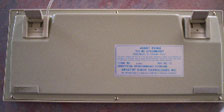 Other nice touches include the rubber feet, along with the flip legs towards the top, which also have rubber covers on them. This keyboard will not move around your desk. Plus a long cord, which is definitely a plus if you want to use the keyboard at a distance!
This is a PS/2 keyboard, not USB, so you’ll need a PS/2-to-USB adapter. (If you decide you’d like to order an Avant Prime or Avant Stellar keyboard by either going to cvtinc.com or by calling toll free 1-888-770-0500, and if you mention that you read my review on Low End Mac, you’ll receive a free PS/2-to-USB adapter with your purchase.)
Programming the Avant Keyboard
This keyboard is not just a great keyboard for typing on; it’s also a programmable keyboard. Through hitting certain key combinations, you can create your own macros, and you can remap any key you wish except for the right Control key, which is the first key pressed along with others to enter macro and remap mode.
For example, say you’d like to remap the keys manually. Here’s the key combination to enter remap mode:
- Press the right Control key 4 times.
- Press and hold down the left Shift key.
- While holding the left Shift key down, press the number 1 near the Escape key.
- Then release both keys and press the R key.
At this point, you’ll see fast blinking green LEDs to let you know you’ve successfully entered remap mode. Say you’d like to remap the left Control key and Caps Lock key. Here’s how you’d do it once you enter remap mode:
- Press the Caps Lock key.
- Press the left Control key.
- Press the right Control key once to exit remap mode.
By now, they should be switched. If you ever want to go back to the keyboard’s default mode, which will clear all macros you’ve made and put the keys back where they were from the factory, here’s what you’d do:
- Press the right Control key 4 times.
- Press and hold down the left Shift key.
- While holding the left Shift key down, press the number 1 near the Escape key.
- Then release both keys and press the X key.
The LEDs will flash to let you know that the keyboard has been reset to factory settings.
Computer Controlled Remapping
Although the Avant Prime and Avant Stellar have no Mac support, if you have a PC that runs Windows you can do all your programming and remapping through the software provided, and all changes will be saved in the keyboard’s memory.
When you plug it back into your Mac or if you’re using Virtual PC, Parallels, or Boot Camp, you can go back to the Mac OS, and the changes will hold. This should be ideal for those who use Windows on their Macs.
I did get a chance to use the software on various Windows versions. The software itself is pretty straightforward. It has loads of options to choose from – you just have to get in there and play around with it.
The online manual will help you along whether you use the keyboard to create macros or remap keys, or if you use the software. Macro mode can be used in conjunction with other macro programs. I don’t personally use macros or remap keys, but I tried both features, and they worked whether you use the keyboard or the software.
This keyboard was reviewed on the Mac side using an iMac running Mac OS 9.2.2, and on the OS X side, it was tested some on my new Mac mini in OS X 10.4 Tiger. At some point, I may revisit this review and do a more thorough review with the Avant Prime in OS X.
Quality
You can truly feel the quality that was put into this keyboard. This keyboard does not creak, crack, or bend. It’s just a solid piece of kit!
To back up the quality of this keyboard, CVT has a two-year limited warranty as well as a 30 day money back guarantee. You can extend the warranty to five years for $19.95, and you can order a dust cover that will protect the Avant Prime or Avant Stellar from the rigors of everyday use for $19.95 as well.
Aesthetically speaking, it’s just your basic PC keyboard. This will probably offend the most aesthetically minded Mac users. Although I am a fan of aesthetics, I’ll take substance over style any day of the week.
I honestly could not find anything wrong with this keyboard. CVT has done a fine job with this keyboard. This is one of the few times that a product far exceeded my expectations. Kudos CVT!
Whether you use a Mac or Windows, this is a great keyboard. It will no doubt stand the test of time, as computer hardware was meant to.
If you were a fan of keyboards like the Northgate OmniKey and the IBM Model M, the Avant Prime and Avant Stellar are the keyboards you’ve been missing.
Go to the Keyboard Roundup index.
Keywords: #avantprime #omnikey
Short link: http://goo.gl/NA0KZM
searchword: avantprime
