
In my previous Welcome to Macintosh column, I looked at the legendary Apple Extended Keyboard as the beginning of my Keyboard Roundup series. Just as some movies follow up on the original with a sequel, Apple came out with a sequel to the Apple Extended Keyboard. It was named, appropriately, the Apple Extended Keyboard II.
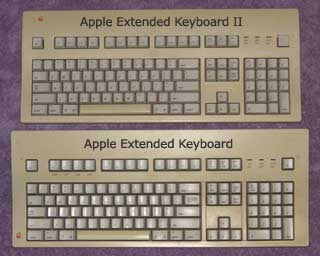 Not a whole lot changed from the Extended to the Extended II (M3501), but there were some changes.
First, here’s what didn’t change: The size and weight remained pretty much unchanged. The wide space at the top for putting keyboard shortcuts is still there. In the picture below, you can tell where a slip over cover (more than likely containing keyboard shortcuts) once was. The lock down Caps Lock key is still the same.
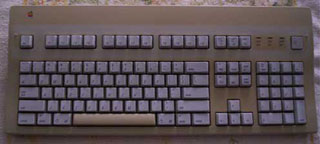 You’re saying at this point, “What about the feel of the keys? Did that change?”
On that note, let’s move on to what did change. The feel of the keys changed only a slight bit. The tactile feel is still there, but it’s different from the original Extended in the sense of it being a softer feel when a key is pressed down.
It’s difficult to put into words the difference between the two as far as the feel. The sound is different as well. It still has a clickity sound, but it’s not a click-clock sound like the original. The benefit is that the Extended II doesn’t sound quite as loud as the original Extended.
Don’t get me wrong, the Extended II, even with these changes, is still plenty satisfying to type on. Some even argue the Extended II is better than the original.
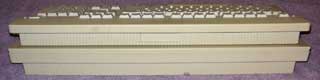 What else changed? The biggest thing is the addition of a height adjustment. The original Extended (top in photo) was taller in height and did not include a height adjustment. The Extended II isn’t as high, but if one wants the angle of the original Extended, it’s there with the height adjustment.
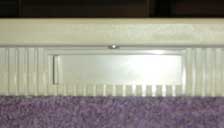 I have to say though, the adjustment is rather crude. Maybe it’s just the two I have, but the height adjustment leaves something to be desired. If you want a higher angle, you slide the bar over. But getting this bar slid over is a task in and of itself. You’ll more likely end up not even messing with the adjustment. Apple really missed the mark here.
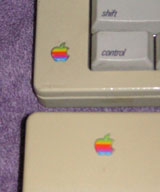 Other changes are mostly cosmetic. The Apple logo was moved from the lower left corner of the keyboard to the upper left corner. The Extended II has more of a sloping curve in the top part of the plastic casing instead of the slight curve on the original Extended.
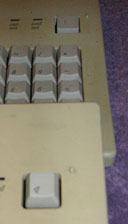 On the original Extended, the power key looked just like the other keys. The Extended II’s Power key is flatter and wider (rear in photo). This may have been changed to help typists better avoid hitting it by mistake.
The original Extended had little grooves located above the Help, Home, and Page Up keys, below the arrow keys, and between the Delete, End, and Page Down keys and the top arrow key. The Extended II doesn’t have these grooves.
On the original Extended you would find Undo under F1, Cut under F2, Copy under F3, and Paste under F4. These are gone from the Extended II.
Cleaning the Extended II
One other difference that’s noticeable is in the disassembly of the Extended II. The original Extended had four screws on the bottom of the casing. The Extended II only has one screw on the bottom and relies on plastic clips around the keyboard to hold the rest together.
One other thing that didn’t change: the key caps are not easily removed, so my recommendation doesn’t change. Don’t attempt to remove the key caps.
Like with our look at the original Extended in last week’s column, I’ll show you how to disassemble the Extended II to get all the crud, dust, and other junk out of it. Here’s how to get to the guts of the Extended II:
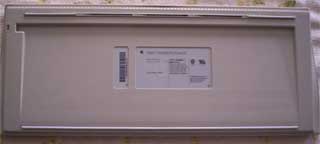
- Turn the Extended II over with the bottom facing up.
 Looking at the picture to the right. you’ll notice the lone screw on the bottom towards the top of the keyboard. Using any kind of regular Philips screwdriver, unscrew this screw and place it wherever you place screws.
- Turn the Extended II back over so the keys are facing upward, but place it toward the edge of whatever you’ve got it set on. You can either use your fingernails or a thin flat-head screwdriver to pry the top part of the plastic casing upward toward you. I’m sorry for the lack of a picture here. There wasn’t really a sure way to get a picture of how to do this. This can be tricky, but it can be done. If you’re stuck, shoot me an email at thomas (at) lowendmac (dot) com and I’ll walk you through it.
- Lift the front part of the plastic casing up and off.
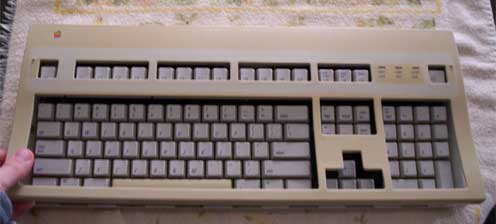
- You should now be looking at the main part of the keyboard like is shown in the picture below.
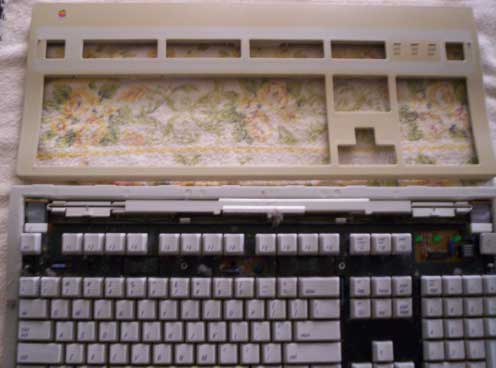
At this point, you’ll see all the dirty stuff in the keyboard. Unlike the original Extended, I was unable to find a way to get the main part of the keyboard out of the bottom of the casing (although there probably is a way). Because of this, I recommend just cleaning it with the main keyboard still in place. If anyone knows how to get the keyboard out of the bottom part of the casing, please email me and let me know.
Now you’re ready to put it all back together. Here’s how:
- With the keys facing upward, put the front cover back on by lining it up at the top and lowering it down. Press down on the bottom and all the way around until you hear everything snap back into place.
- With both hands, turn it over so the bottom is facing up.
- Find the screw you took out earlier and put it back in.
That’s all she wrote. A nice, clean Extended II keyboard awaits you.
From the Mailbag
I’ve received a lot of emails from people about their original Extended keyboards or ones like it. I want to thank everyone for the emails and stories you sent. I want to share two of them to wrap up this column.
And I want to hear from you. If you have any stories to share about your Extended or the Extended II keyboard, email me at thomas (at) lowendmac (dot) com and tell me your story! I also want to mention that I reply to every email I receive, whether it’s a question or a comment.
Steve’s Story
The first story comes from Steve. His Extended was a trooper through all the years he used it:
When I bought my Mac IIci back in 1990, I bought the Extended Keyboard with it. It took me awhile to really appreciate how good a keyboard it actually was. Is. I used that keyboard daily throughout six solid years on my IIci, and it never failed me. When I upgraded from a IIci to a PowerTower Pro 225, Power Computing’s keyboard never left the original plastic; the Extended Keyboard came along for the ride. Six years later I ditched the PowerTower Pro for a mirrorred door G4 where, with the help of an ADB-to-USB adapter, I got another two years out of it before replacing it with a Matias Tactile Pro, which I still use today.
So let’s summarize: I got about 14 years of heavy, daily use out of that keyboard without a single operational problem, and it bears mentioning that I touch type at an average of 90 words per minute, so I’m hardly a slouch on the keyboard. The keyboard outlasted four mice, three computers, four apartments (well, my childhood home plus three apartments), several girlfriends, and two cars.
The only reason why I got rid of it was because, after twelve years of service, I had actually worn holes into several of the keys. The space bar, left command key, left shift key, and Return keys actually had holes in them. The keys themselves still worked, but the increasingly-larger holes made typing difficult. (I even tried filling the holes with epoxy, but it wasn’t the same.)
I actually still have the keyboard in my mother’s basement; I keep it as a sort of memento of times past, when building a keyboard actually meant building something that you could, in an emergency, reliably use as a blunt weapon.
That’s what I call heavy duty typing!
Chris’ Story
The last story comes from Chris Tucker. Along with his story, he has great cleaning advice for these old battleboards. There’s even a picture with this one:
In the space of less than a year, I collected six Extended keyboards (and three Extended II keyboards). All for between 1 and 2 dollars each at the local GoodWill thrift store. One of the Extended boards was in its original box. All that was lacking was the keyboard cable. The Extended I’m using now on my Rev. 2 [Blue & White Power Mac G3] was the first Extended I bought. It was filthy beyond belief. So much so that I had to pull all the keycaps off to clean them.
Cleaning was easy. A bucket of hot water, a generous dollop of Spic & Span mixed in, and just dumping all the keys in the bucket and leaving them overnight. Brownian motion is your friend.
Cleaning the top and bottom was done in a similar manner, save that I soaked them in the bathtub with hot water and Spic & Span for a few hours. The diverse crud on the actual keyboard was easily removed via an old toothbrush and shaking and some canned air. The next day, the keycaps only required some rubbing with a towel to clean them right up.
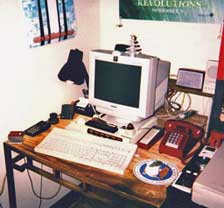 Once reassembled, it really did look brand new.
As for the keyboard itself. It is, perhaps, the best keyboard I have every used. And as I am a 55 year old hacker, I have used a lot of keyboards in my life. After using this Extended keyboard, just about any other contemporary keyboard feels like I’m poking at a slab of Silly Putty.
The Extended II boards feel just as good. I find that the angle of the Extended is just fine for my typing needs, so the Extended IIs are safely stashed away with the extra Extendeds. Just in case.
I’ve a few AppleDesign ADB boards. I’d been using one for some years on the diverse Macs I’ve owned over the years – until I read about the Extended keyboard some years ago. Shortly thereafter, I found the first of my Extended keyboards in the thrift store.
What a difference between the two of them! Despite that the Extended was obviously a very used, 20-year-old keyboard, it hasn’t given me a moment’s trouble. Indeed, the deciding factor in my buying the B&W was the ADB port.
I was not giving up my Extended keyboard just to use OS X. I think that’s pretty much the giveaway that I am indeed a Macintosh fanatic. Choosing a keyboard compatible computer.
There’s no doubt about it – ya gotta love the old Extendeds!
In the spirit of all Extended lovers out there, click on!
Further Reading
Go to the Keyboard Roundup index.
Keywords: #extendedkeyboardii #appleextendedkeyboardii
Short link: http://goo.gl/NnLkcU
searchword: extemdedkeyboardii
