

The Compact Mac Trio
Introduction and Hardware Overview
Dan Knight - 2001.07.30 - Tip Jar
The first Mac I ever used was a Mac Plus. A few years later, a Mac Plus became the first Mac I ever owned. Despite its age, the Mac Plus, SE, and Classic still have a few tricks up their sleeves and make decent word processing and even email machines. We'll cover all of that in this series.
Like the first Macintosh, the Plus, SE, and Classic shared the same design: a built-in 9" b&w display, a floppy drive, an 8 MHz 68000 processor, two serial ports, and a port for an external floppy drive. Unlike the first Macintosh, these three models shipped with 1 MB of memory, could be expanded to 4 MB, supported 800K floppies, and had SCSI for adding hard drives, scanners, and other peripherals.
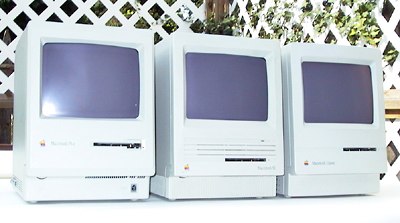
Each model has something that sets it apart from the other two, so each has its own following, despite the fact that they are very similar machines.
The Mac Plus
I consider this the first really successful Mac. It was Apple's third model, released two years after the original. The Plus was the first designed for memory expansion, the first with a SCSI interface (which allowed much faster drives than the floppy port), and the first to use double-sided floppies. Compared with the SE and Classic, the Plus runs a little bit slower.
What makes the Plus attractive today is silence. Like the first Macs and like slot-loading iMacs, there's no fan. If you're not using a hard drive, the only sound is the clacking of keys as you type, the click of the mouse button, and reading & writing to the floppy drive.
When buying a Mac Plus, make sure it has a good mouse and keyboard. Because the Plus doesn't use an ADB connector like newer Macs, it can be difficult to find a replacement mouse or keyboard these days.
The Mac Plus shipped in beige from January 1986 through April 1987, when Apple switched its entire product line to platinum - Apple's name for Macintosh gray.
The Mac SE
About 14 months after Apple introduced the Plus, it released the SE and Mac II, the first Macs to use ADB peripherals, support internal hard drives, have room for two internal floppies, and have expansion slots. Because it supports an internal hard drive, the SE has a cooling fan - even in the dual-floppy version.
The Plus remained in the Apple line as a less costly alternative to the SE for those who didn't need two internal floppies or an internal hard drive, but the convenience of an internal hard drive made the SE very attractive.
The only significant change to the SE came in August 1989, when Apple replaced the 800K floppy with a SuperDrive, also known as the FDHD 1.4 MB floppy. This version could read and write PC formatted floppies using Apple File Exchange - along with several third-party programs, such as DOS Mounter.
The SE's unique feature compared to the Plus and Classic is an expansion slot, which supports ethernet cards, accelerators, external video, and even an 8086 DOS card made by AST.
The Classic
It's incredible by today's standards, but the 1990 Classic ran at exactly the same speed and with exactly the same CPU as the 1984 Macintosh. (For comparison, the fastest Mac six years ago, the 9500, ran at 132 MHz. Today's lowest MHz Mac is the 400 MHz PowerBook G4.) According to Apple, the Classic was discontinued in September 1992, over 8-1/2 years after the first 8 MHz Mac was announced.
Okay, we've beat that dead horse. And if you ask why Apple did it, there's a very simple answer: price. The single-floppy, no hard drive Classic was the first $999 Macintosh - and you could get it with 2 MB of memory and a 40 MB hard drive for just $500 more.
The Classic has two unique features compared with the Plus and SE. First, you can boot from ROM, no floppy or hard drive necessary, by holding down command-option-x-o at startup. This gives you a custom version of System 6.0.3 that can access an AppleTalk network. You can't modify this system, since it's burned into ROM, but it is kinda neat.
The second unique Classic feature is the way you expand memory. Where the Plus and SE have four SIMM sockets on the system board, the Classic has 1 MB of memory on the system board and a memory expansion slot. The card that plugs into this slot adds a second MB of memory and has two additional SIMM sockets, allowing you to add a pair of 256 KB or 1 MB SIMMs and bring the Classic to 2.5 or 4 MB total RAM.
That means you should never buy a 1 MB Classic unless you have access to the memory card or know you'll never want to go past the 1 MB mark.
Hardware Overview
Similarities
- 1 MB RAM, expandable to 4 MB
- 8 MHz 68000 CPU
- 9" b&w 512 x 342 pixel display
- supports external floppy
- 25-pin SCSI port on back
- two RS-422 serial ports
- size (HxWxD): 13.2-13.6" x 9.6-9.7" x 10.9-11.2"
- weight: 16-17 lb.
Differences
- Plus 10-15% slower due to older design
- Plus SCSI about one-third slower
- Plus mouse and keyboard are not ADB; replacements hard to find
- Plus and early SE use 800K floppy; later SE and Classic use 1.4M floppy
- Only SE supports two internal floppy drives; some have hacked the SE to use two floppies and an internal hard drive
- Only SE has an expansion slot, although cards may be hard to find
- Classic can boot from ROM
- Classic requires special card to boost RAM beyond 1 MB
Performance
We've benchmarked each of these models - click the name of each in the table below to read the entire benchmark report.
model            CPU  graphics  disk    math     processor
Plus            0.87    0.91    0.67     0.99    8 MHz 68000

SE              0.98    0.98    1.12     0.99    8 MHz 68000

Classic         0.99    0.99    1.51     1.00    8 MHz 68000
Note that the Classic has a much newer, more efficient hard drive than the SE. Using the same drive, these two models would have virtually identical benchmark results.
That's the quick hardware overview and introduction to the compact Mac trio. The next chapter looks at upgrading your hardware: adding RAM, installing a hard drive, replacing the battery, etc.
Other Links
- What can I do with a Mac Plus, SE, or Classic?, Manuel Mejia Jr, Mac Daniel
The Compact Mac Trio
Recent Content on Low End Mac
- World Book Encyclopedia 2012 DVD, Tommy Thomas, Reviews, 2013.03.05. "You may be asking yourself, in an age of Wikipedia and instant information, is World Book still relevant?"
- Vintage Computer Festival SouthEast, April 20-21, 2013, Simon Royal, Mac Spectrum, 2013.02.25. Old Apple gear and old PCs.
Latest Deals on Low End Mac
About LEM Support Usage Privacy Contact
Follow Low End Mac on Twitter
Join Low End Mac on Facebook
Favorite Sites
MacSurfer
Cult of Mac
Shrine of Apple
MacInTouch
MyAppleMenu
InfoMac
The Mac Observer
Accelerate Your Mac
RetroMacCast
The Vintage Mac Museum
Deal Brothers
DealMac
Mac2Sell
Mac Driver Museum
JAG's House
System 6 Heaven
System 7 Today
the pickle's Low-End Mac FAQ
Affiliates
Amazon.com
The iTunes Store
PC Connection Express
Macgo Blu-ray Player
Parallels Desktop for Mac
eBay

