

How Low Can You Go? Looking at the Low End of Mac, Linux, and Windows Computing
- 2007.04.23
My Turn is Low End Mac's column for reader-submitted articles. It's your turn to share your thoughts on all things Mac (or iPhone, iPod, etc.) and write for the Mac web. Email your submission to Dan Knight .
Hi, my name's Ryan, and I'm a computer lover. Being in middle school, economics dictate low-endness, so I have a few things I'd like to talk about.
How Low Can You Go?
In my opinion, the lowest end possible computers in the Mac lineup for everyday Internet, email, word processing, etc., is a Power Mac G3 B&W or a PowerBook "Pismo", with a "TiBook" or Power Mac G4 AGP (a.k.a. "Sawtooth") a more practical minimum for graphics, audio, and such work.
With upgrades, a Beige G3 may be able to work modern style (USB ports, G3/G4 of at least 450 MHz, hard drive, RAM) - but just barely.
For graphics, audio, video, and iLife type tasks, I'd say you'd need a Power Mac G4 AGP with a Radeon or GeForce 3 or better, Mac OS X 10.3.x, a 700 MHz G4 (upgrade or built in), 256 MB RAM, and a 20 GB hard drive. It's really quite demanding.
I'm surprised at how demanding modern day tasks are; I suspect with more optimized code you could really just use a Power Mac 6500 for minimal graphics tasks. For word processing, probably the best types of machines are the old ones; I like the Power Mac 7200 or 7500. The Performa 6400 also works okay.
That would be running under your choice of Mac OS 7.6, 8.1 (my choice), OS 8.6, or OS 9.1. Mac OS 8.1 is like a speed demon on a Performa 6400! Of course, for note jotting and bedside tasks, an SE/30 or Mac Classic running System 6 or 7.1 is ideal.
Linux on Low-end Macs
Linux: For a bedside Internet terminal, a Power Mac 7600, 6500, a beige G3, or PowerBook 3400 running Fluxbox on Linux (a window manager) and OS 9 would be great, IMHO. I wish it were easier to set this up (if only Apple had adapted Open Firmware earlier!)
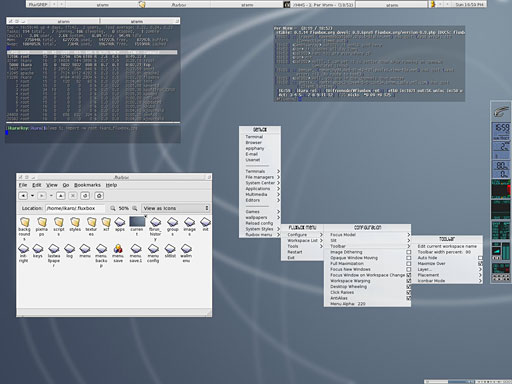
A Fluxbox screen shot - looks quite a bit like Mac OS X!

Is High Low?
I consider my 1.25 GHz Mac mini to be fairly low end. The ATI Radeon graphics processor is pathetic - and the CPU's not much better. By way of comparison, Vista is demanding 2 GB RAM and the G4 Mac mini tops out at 1 GB; there's no support for the 30" display, FireWire 800, or SATA. Although my mini came with a SuperDrive, the default Combo drive is fast becoming obsolete.
My old broken 900 MHz iBook was substantially worse. 1024 x 768 is the minimum acceptable screen size for a new computer, and the 900 MHz G3 processor is quite slow and may not be able to run "Leopard" (Mac OS X 10.5). It only had 640 MB RAM and could not be expanded beyond that; somehow that is considered low today.
Rant over, but my point is that it seems like computers just 2 or 3 years old are out-of-date by a substantial margin. Why? Why can't all computers have a useful lifespan of 5-6 years before we have to start using old software, tricks, and such to keep them working okay - or even working at all?
Low End PCs
I think some PC users do care about low-end PCs; I know I do. In some ways the PC is more flexible at certain parts of the low-end scale - at least I think so.
PCs running Pentium IIIs at 400 MHz with just 192 MB RAM can run Windows 2000 fairly well and Linux superbly. PCs with a PII at 233 MHz still have lots of hope left in them with Puppy Linux or Damn Small Linux (DSL). They can be VNC clients, MP3 players, word processors, Internet browsers, bedside email checkers, and more.
A Pentium 150 is gonna have more trouble. Damn Small will allow fairly well functioning word processing, money management, and a little bit of Web browsing. Both a P150 and a 486DX2-100 can run Win 95 and Win 98SE and word process, spreadsheet, etc. with Word 95 or Word 97 superbly. Granted, Web browsing is limited - you're pretty much stuck with Internet Explorer 5.5.
RAM upgrades do so much to a PC - Damn Small needs at least 64 MB for efficient running, and so does Puppy, which runs best with 128 MB. 192 MB is a minimum to use GNOME and XFce - and thus Xubuntu and Ubuntu.
A Pentium III motherboard is incredibly cheap with a 750 MHz or faster chip and can be used to upgrade a PII or slow PIII computer. An Athlon 2000+ motherboard is about $70 with some RAM - a great upgrade for a Pentium III, Athlon, or K6-2 computer.
Other upgrades are also cheap. Finally, parallel port printers can still be found, and USB port cards are supported in DSL, so no problem there.
Living at the Low End
Overall, I agree the low-end way is very cool. Our household has three semi-low-end computers, one of which is an Apple:
- An Athlon 1 GHz with 512 MB RAM, DVD burner, and such running Windows XP.
- A Pentium III 750 MHz with DVD, 256 MB RAM, and 40 GB hard drive running Ubuntu.
- A blue iBook 366 MHz G3 non-FireWire running Mac OS X 10.3.
Share your perspective on the Mac by emailing with "My Turn" as your subject.
Join us on Facebook, follow us on Twitter or Google+, or subscribe to our RSS news feed
Today's Links
- Mac of the Day: Performa 5200, introduced 1995.04. The first PowerPC all-in-one was also one of the worst Macs ever made.
- Support Low End Mac
Recent Content
About LEM Support Usage Privacy Contact
Follow Low End Mac on Twitter
Join Low End Mac on Facebook
Favorite Sites
MacSurfer
Cult of Mac
Shrine of Apple
MacInTouch
MyAppleMenu
InfoMac
The Mac Observer
Accelerate Your Mac
RetroMacCast
The Vintage Mac Museum
Deal Brothers
DealMac
Mac2Sell
Mac Driver Museum
JAG's House
System 6 Heaven
System 7 Today
the pickle's Low-End Mac FAQ
Affiliates
Amazon.com
The iTunes Store
PC Connection Express
Macgo Blu-ray Player
Parallels Desktop for Mac
eBay

