
The PowerBook 3400c, running a PowerPC 603e processor at 180 to -240 MHz, was designed as a no compromise laptop and was billed as the world’s fastest notebook computer when it was introduced in early 1997. It was also the basis for the first PowerBook G3.
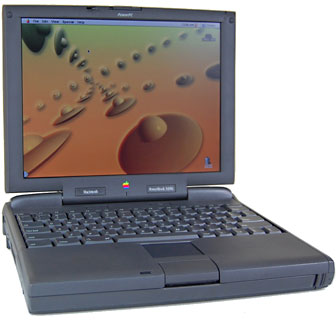 The 3400c was the first PowerBook based on Intel’s PCI architecture, although it obviously doesn’t include PCI expansion slots. This made it the first PowerBook to support 33 MHz CardBus devices, although that requires a special software driver.
Memory is expandable to 144 MB. Using a hard drive larger than 3 GB precludes the use of SCSI Disk Mode, according to PowerBook Hard Drives: The Essential Upgrade.
Warning: According to the Road Warrior and Other World Computing, the drive controller in pre-G4 PowerBooks is incompatible with some ATA-6/Ultra ATA-100 hard drives.
Details
- Code name: Hooper
- introduced 1997.02.17 at US$4,499 (180 MHz, no ethernet, modem, or CD-ROM), $4,999 (180 MHz with ethernet, modem, and 6x CD-ROM), and US$6,499 (240 MHz with 12x CD-ROM); discontinued
- requires System 7.6.1 (with PowerBook 3400 Enabler) through 9.1
- CPU: 180, 200, or 240 MHz PPC 603e
- Bus: 40 MHz
- Performance: 293/308/334 (180/200/240 MHz), MacBench 4
- 72,993 (180 MHz), 97,087 (240 MHz) Whetstones
- ROM: 4 MB
- RAM: 16 MB, expandable to 144 MB
- Level 2 cache: 256 KB
- VRAM: 1 MB
- display: 12.1″ 16-bit 800 x 600 83 ppi color active matrix
- Video out: VGA port
- Hard drive: 1.3, 2, or 3 GB EIDE
- expansion bay: same as PowerBook 190 and 5300
- CD-ROM: 6x or 12x, removable, optional on 180 MHz model
- ADB: 1 port for keyboard and mouse
- serial: 1 DIN-8 RS-422 port on back of computer
- SCSI: HDI30 connector on back of computer
- infrared: supports IrDA and Apple’s IRtalk protocol
- ethernet and modem standard on most configurations
- PC Card slots: 2, CardBus compliant with USB Card Support patch (see CardBus for Your PowerBook 3400c or Kanga G3! for details and links
- size: 2.4″ H x 11.5″ W x 9.5″ D
- Weight: 6.9-7.4 pounds with battery
- power supply: M4896 or M4895
Online Resources
- Best Classic Mac OS Deals. Best online prices for System 6, 7.1, 7.5.x, Mac OS 7.6, 8.0, 8.1, 8.5, 9.0, 9.2.2, and other versions.
- Low End Mac’s Compleat Guide to Mac OS 9, Charles W Moore, Miscellaneous Ramblings, 2008.05.12. Mac OS 9 remains fast and stable, but Classic software hasn’t kept up with the changing internet. Which Macs support OS 9, where to buy it, and how to update to 9.2.2.
- WiFi cards for PowerBooks with PC Card slots, Simon Royal, Tech Spectrum, 2008.08.12. PC Card and CardBus 802.11b and 802.11g cards known to be compatible with Apple’s PowerBooks.
- Environmentally Responsible Retirement for Old Macs, Rick Lawson, Pioneers in Mac Development, 2008.06.13. After you’ve scavenged what useful parts you can from your old Mac, what’s the most environmentally friendly way to dispose of the rest?
- What’s the best Mac OS for your iBook, PowerBook, or MacBook?, Charles W Moore, ‘Book Value, 2008.08.19. Tips on choosing the best OS for your PowerBook 500 Series or newer Mac notebook.
- WiFi PC Cards for PowerBooks running Mac OS 9, MetaPhyzx, Mac Daniel, 2009.03.10. PCMCIA cards and drivers reported to be compatible with the Classic Mac OS.
- Mac ‘Book Power Management Adventures, Charles W Moore, ‘Book Value, 2009.05.19. If your ‘Book won’t power up, shuts down while your working, or has other power issues, resetting its internal power manager may clear things up.
- 500 MHz iBook keeps going, iBook video repair, a WiFi card that costs less than AirPort, and more, Charles W Moore, Miscellaneous Ramblings, 2009.05.13. Also Dell’s alternative to the 12″ PowerBook, WiFi hotspot insecurity, and feedback from a Eudora fan.
- Why You Should Partition Your Mac’s Hard Drive, Dan Knight, Mac Musings, 2008.12.11. “At the very least, it makes sense to have a second partition with a bootable version of the Mac OS, so if you have problems with your work partition, you can boot from the ’emergency’ partition to run Disk Utility and other diagnostics.”
- Every working computer is useful to someone, Allison Payne, The Budget Mac, 2008.11.19. Whether it’s a PowerBook 1400, G3 iMac, or Power Mac G4, it could be all the computer someone needs.
- TruePower AC adapter for iBooks and PowerBooks is rugged, reliable, and affordable, Charles W Moore, ‘Book Value, 2008.08.14. Apple’s track record with AC adapters is spotty, but the TruePower adapter is tough enough to survive being run over by a truck.
- The Compressed Air Keyboard Repair, Charles W Moore, Miscellaneous Ramblings, 2008.07.24. If your keyboard isn’t working as well as it once did, blasting under the keys with compressed air may be the cure.
- Praise for Opera, low cost iBook mobo replacement, IrDA and IRtalk, WaMCom recommended, and more, Charles W Moore, Miscellaneous Ramblings, 2008.06.18. Also the use of ‘compleat’, booting from CD, new Toshiba 1.8″ drives too thick for MBA, and PowerPC support and Snow Leopard.
- CardBus for your PowerBook 3400c or Kanga G3, Rob Frohne. Kanga and the 3400 electronically support CardBus, but the card cage is slightly smaller than required by the CardBus specification and there is no groundplane. Cards that fit seem to work.
- Wireless FAQ for Older Apple PowerBook Computers. Resources to help you to install and maintain 802.11b/g wireless PC Cards on older PowerBook computers.
- The Complete and Utter Guide to PC Cards and Expansion Bays on the PowerBook, Insanely Great. All about the PCMCIA, PC Card, or CardBus slots used in various PowerBooks.
- PowerBook 3400c and Pismo: Two of Apple’s best notebooks ever, Charles W Moore, Miscellaneous Ramblings, 2008.02.11. Two PowerBooks celebrate birthdays this week, and each was the fastest laptop on the plant when it was introduced.
- Solving Mac Startup Problems, Adam Rosen, Adam’s Apple, 2007.12.12. When your old Mac won’t boot, the most likely culprits are a dead PRAM battery or a failed (or failing) hard drive.
- Better and Safer Surfing with Internet Explorer and the Classic Mac OS, Max Wallgren, Mac Daniel, 2007.11.06. Tips on which browsers work best with different Mac OS versions plus extra software to clean cookies and caches, detect viruses, handle downloads, etc.
- eMac virtual screen solution, PowerBook 3400 problem, IBM Model M and the Mac, and more, Dan Knight, Low End Mac Mailbag, 2007.10.26. Also G4 iMacs inspire lust, TrueType fonts and vintage Macs, deinterlacing DVDs, and Allegro USB sleep issues.
- Silence is golden: Running your existing notebook using flash memory, Dan Knight, Low End Mac Reviews, 2007.05.23. With a new adapter from Addonics, you can replace your laptop’s IDE hard drive inexpensively and boot silently from a Compact Flash card.
- Appearance Manager Allows Internet Explorer 5.1.7 to Work with Mac OS 7.6.1, Max Wallgren, Mac Daniel, 2007.05.23. Want a fairly modern browser with an old, fast operating system? Mac OS 7.6.1 plus the Appearance Manager and Internet Explorer may be just what you want.
- Format Any Drive for Older Macs with Patched Apple Tools, Tyler Sable, Classic Restorations, 2007.04.25. Apple HD SC Setup and Drive Setup only work with Apple branded hard drives – until you apply the patches linked to this article.
- First Blu-ray drive for Apple’s ‘Books, replace notebook hard drive with Compact Flash, and more, The ‘Book Review, 2007.04.13. Also 160 GB 7200 rpm hard drives, upgrading from a MacBook Pro to a MacBook, Waterfield’s flexible new Sling bag, bargain ‘Books from $170 to $1,699, and more.
- PC Card WiFi for OS X PowerBooks, installing Classic for OS X, Gmail problem with Shiira, and more, Charles W Moore, Miscellaneous Ramblings, 2007.01.15. A low-cost WiFi PC Card for PowerBooks running OS X, tips on installing Classic under Tiger, Gmail broken with Shiira 1.2.2 browser, and stimulating a flashd rive on pre-USB PowerBooks.
- Watch out! Getting notebook design wrong, Andrew J Fishkin, The Mobile Mac, 2006.12.07. Some notebooks have just the right mix of design, quality, and features, but others fall seriously short of the ideal.
- System 7 Today, advocates of Apple’s ‘orphan’ Mac OS 7.6.1, Tommy Thomas, Welcome to Macintosh, 2006.10.26. Why Mac OS 7.6.1 is far better for 68040 and PowerPC Macs than System 7.5.x.
- 30 days of old school computing: Increasing battery life with a RAM disk, Ted Hodges, Vintage Mac Living, 2006.09.14. When using the hard drive, the old battery ran out of juice within 30 minutes, but running from a RAM disk it still has a 50% charge after half an hour.
- Mac OS 8 and 8.1: Maximum Size, Maximum Convenience, Tyler Sable, Classic Restorations, 2006.09.11. Mac OS 8 and 8.1 add some useful new features and tools, and it can even be practical on 68030-based Macs.
- Inside your notebook’s battery: Ordinary AA Li-Ion cells, Dan Knight, Mac Musings, 2006.09.08. That expensive battery in your notebook computer probably holds less than $30 worth of off-the-shelf AA Li-Ion batteries.
- Customizing Mac OS 9, Nathan Thompson, Embracing Obsolescence, 2006.08.01. Fiddling with themes, picking a browser, and making the Classic Mac OS work just the way you want it to.
- Maximizing the PowerBook 3400c, Jason Schrader, Maximize Your Mac, 2006.07.26. Once you’ve acquied a PowerBook 3400c, which OS should you use, what software should you install, and how should you upgrade the hardware?
- The PowerBook 3400: Surprisingly useful and spry with the Classic Mac OS, Charles Webb, PowerBook Beat, 2006.05.16. The last PowerBook before the G3, the PB 3400 actually outperforms the “MainStreet” PowerBook G3 – and it’s generally available for under US$100.
- System 7.6.1 is perfect for many older Macs, John Martorana, That Old Mac Magic, 2006.03.24. Want the best speed from your old Mac? System 7.6.1 can give you that with a fairly small memory footprint – also helpful on older Macs.
- Web browser tips for the classic Mac OS, Nathan Thompson, Embracing Obsolescence, 2006.01.03. Tips on getting the most out of WaMCom, Mozilla, Internet Explorer, iCab, Opera, and WannaBe using the classic Mac OS.
- The best browsers for PowerPC Macs and the classic Mac OS, Nathan Thompson, Embracing Obsolescence, 2005.12.16. Two browsers stand out from the pack: iCab 3 is modern and remains under development, and WaMCom brings Mozilla to older Macs.
- Why you should use Mac OS 7.6 to get the most out of vintage Macs, Thomas Ahart, The Productive Mac, 2005.12.12. Although you may be able to run OS 8 or 9 on your old Mac, you’ll generally find better performance using Mac OS 7.6.
- Cardbus for your PowerBook 3400c or Kanga G3!, Rob Frohne. “…the 3400c is already cardbus compliant as far as I can tell!”
- Wirelessly Networking a PowerBook 1400 or Other Old Apple Laptop: Step By Step, Derek K Miller, Penmachine.com, 2003.04.12, updated 2004.05.17. You can put one of these older ‘Books on an AirPort (802.11b) network for under US$50.
- Supersize your PowerBook 3400, Richard Shields, 2003.03.15. Everything you could want to know about hacking the PowerBook 3400.
- Flash memory improves PowerBook, Dan Knight, Mac Daniel, 2002.11.14. Using Compact Flash to boot, save files, run silently, extend battery life, and as virtual memory on a PowerBook.
- Hotrodding the PowerBook 3400, Charles W Moore, MacOpinion, 2001.04.17. “The first element of any 3400 hotrodding project should be to upgrade the RAM….”
- SCSI and FireWire Disk Modes, Paulo Rodrigues, Tangerine Fusion, 2000.11.29. How to use SCSI Disk Mode and FireWire Target Disk Mode for ultrafast file transfers.
- Recovering a stolen PowerBook, The ‘Book Page. One user’s experience.
- PowerBook 3400c, a potentially great ‘Book with unfortunate timing, Charles W Moore, Road Warrior, 10/28/1999.
- Best Used PowerBook, Mac Daniel
- Technical specifications for 3400/180, 3400/200, 3400/240, Apple Knowledge Base Archive
Cautions
- From PowerBook 2400, 3400: Password Security and Mac OS 8.0: On PowerBook 2400 and 3400 systems, Password Security software is not compatible with Mac OS 8.0. Other PowerBook systems are not affected.
- From Mac OS 8.1: Late Breaking Tips: Mac OS 8.1 will not install the Password Security control panel on a PowerBook 2400 or 3400 unless an earlier version already exists in the Control Panels folder. As noted above, Password Security is not compatible with these models under OS 8.0 or later and should not be used.
- From Apple Knowledge Base Archive Article #24014: Do not under any circumstances enable the PowerBook 3400 password security if you have At Ease 4.0.x installed on the PowerBook and you have enabled the “Prevent users from bypassing security by starting up from a floppy disk” option in the At Ease administration program. The hard disk driver becomes corrupted in such a way that the PowerBook is unable to start up. Additionally, the computer will not start up from a floppy disk, CD, or in SCSI disk mode.
Keywords: #powerbook3400c #powerbook3400
Short link: http://goo.gl/YLkoKf
searchword: powerbook3400c
