
Miscellaneous Ramblings
Miscellaneous Ramblings Review
Free Mailsmith Is the BBEdit of Email Clients
Charles Moore - 2009.10.20 - Tip Jar
Rating: 
I have to admit that I never paid much attention to the Mailsmith email client in the past. I've been aware of it for years as an extra-strength and very expensive application designed for Macintosh users by BareBones Software - developers of the formidable BBEdit professional-grade text editor and its excellent TextWrangler freeware companion program.
I had no doubt that Mailsmith would be a good email client, but selling for $100 - more than twice what other commercial software email clients - such as classic Eudora - sold for, and $100 more than Mozilla.org's Thunderbird, could it be that much better? I couldn't imagine so.
However, BareBones Software recently announced it had transferred ownership of Mailsmith to Stickshift Software LLC, which is releasing Mailsmith 2.2 as freeware. Stickshift Software is distributing the program and providing online support.
The BBEdit of Email Clients
The philosophy behind Mailsmith isn't likely to change much, since Stickshift Software's owner and principal, Rich Siegel, is founder and CEO of BareBones Software. He says that henceforth Mailsmith will be strictly a labor of love, noting that he's in the unique position of being able to support the program for others who use and rely on it, and that his new company's sole purpose is to provide a home for Mailsmith, allowing him to continue to focus on his work at BareBones Software, which remains his first and highest priority.
Anyway, now that it's free, I was intrigued enough to download a copy of Mailsmith, and I have been trying it out.
Things didn't begin auspiciously. I tried importing my several hundred megabytes of archived emails from Eudora, which seemed to go okay, although it took a very long time. But when I tried to open the archives, I was presented with messages containing indecipherable text. Not sure what that's about - obviously not a success.
Trying again, I went with a clean install and no imported data, and then I configured account info from scratch.
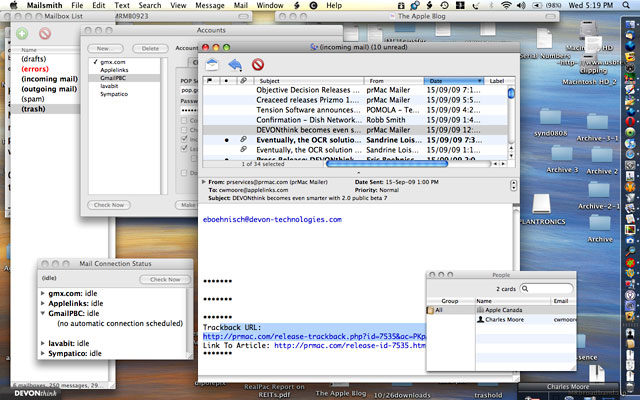
One of the things I liked about classic Eudora was its multi-window user interface, and I discovered that Mailsmith has even more windows than Eudora. Indeed, perhaps too much of a good thing, to a degree that I find it a bit much.
Like BBEdit, Mailsmith is more than a bit geeky. If you like monitoring and micromanaging every aspect of your email, this is the POP3 client for you (Mailsmith doesn't support IMAP). I suppose I could get used to it, but I've become a foot-dragging convert to the Thunderbird/Eudora 8.x interface philosophy since switching to them last winter.
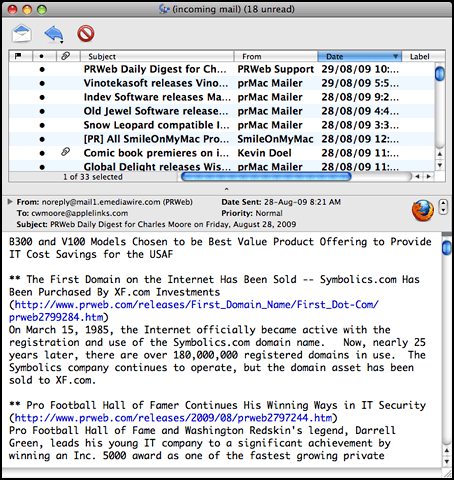
Mailsmith is powerful and feature-loaded - unlimited filter terms and actions, stationery, spell check as you type, a spell-checking dialog window, a powerful search engine, and text editing tools. Speaking of which, Mailsmith is a plain text program. It doesn't support rich HTML formatted email - even incoming email is displayed as plain text.
 Mailsmith also doesn't support S/MIME encryption and signing,
but it does integrate with SpamSieve for Bayesian spam
filtering.
Mailsmith also doesn't support S/MIME encryption and signing,
but it does integrate with SpamSieve for Bayesian spam
filtering.
AppleScript Power
Not only is Mailsmith a scriptable mail client - giving you scripting access to checking mail, sending messages, and moving messages between mailboxes - it's also a fully scriptable text editor. Most AppleScripts written for BBEdit work in Mailsmith.
Plus, because Mailsmith is recordable, you don't have to know how to program in AppleScript to create scripts of your own. To start recording a new script, just choose Start Recording from Mailsmith's Script menu.
Messages are stored in a single database, which I don't like as well as the multiple mbox archive format used by Thunderbird and Eudora. It can (theoretically - see above) import message archives and contact data from Mail, Eudora, Claris Emailer, Pegasus Mail, and other mbox files.
Mailsmith integrates with PGP 8 to offer secure messaging, and it supports TLS/SSL connections.
Direct integration with SpamSieve provides easy to use Bayesian spam filtering in Mailsmith.
Mailsmith Feature Highlights
- Powerful filtering system to organize and process email
- Stationery and Glossary support
- Pervasive AppleScript support
- Integrated support for SpamSieve
- BBEdit-powered text editing and transformation
- Integrated support for PGP 8.0
- Text-only email
- Integrated support for the Apple Address Book
Fir a complete features list, go here.
Mailsmith can perhaps best be described as BBEdit for email. If that concept appeals, you'll probably like it a lot. Personally, I'll stick with Thunderbird/Eudora 8 - for now at least.
Personally, I'll give it a rating of 2.5 out of 4.
Supported operating systems are Mac OS X 10.4 "Tiger" through OS 10.6 "Snow Leopard".
Further Reading
- Mailsmith a Simple, Powerful, Spam Fighting Alternative to Apple Mail, Steve Watkins, 2007. Calls Mailsmith an incredibly efficient plain-Jane email client.
Join us on Facebook, follow us on Twitter or Google+, or subscribe to our RSS news feed
Charles Moore has been a freelance journalist since 1987 and began writing for Mac websites in May 1998. His The Road Warrior column was a regular feature on MacOpinion, he is news editor at Applelinks.com and a columnist at MacPrices.net. If you find his articles helpful, please consider making a donation to his tip jar.
Links for the Day
- Mac of the Day: PowerBook 1400, introduced 1996.10.01. Considered by many the best pre-G3 PowerBook with a small footprint and great keyboard.
- Support Low End Mac
Recent Content
About LEM Support Usage Privacy Contact
Follow Low End Mac on Twitter
Join Low End Mac on Facebook
Favorite Sites
MacSurfer
Cult of Mac
Shrine of Apple
MacInTouch
MyAppleMenu
InfoMac
The Mac Observer
Accelerate Your Mac
RetroMacCast
The Vintage Mac Museum
Deal Brothers
DealMac
Mac2Sell
Mac Driver Museum
JAG's House
System 6 Heaven
System 7 Today
the pickle's Low-End Mac FAQ
Affiliates
Amazon.com
The iTunes Store
PC Connection Express
Macgo Blu-ray Player
Parallels Desktop for Mac
eBay

