
The Practical Mac
Can Your Spam with SpamSieve
- 2007.02.02 - Tip Jar
In a recent article, I wrote that one of the things I hoped to see unveiled at Macworld (but was not likely) was much-improved spam filtering in Mail. I was disappointed, but not surprised, when Apple failed to deliver.
However, LEM publisher Dan Knight wrote back to me and recommended I try SpamSieve, a product he has used for a while with very good results. I was familiar with SpamSieve - a number of articles having been written about it on this site alone - but had never tried it.
With a hearty recommendation from Dan, I downloaded a trial version and gave it a try. (You can download SpamSieve and use it for free for 30 days.)
SpamSieve is a program that helps reduce spam by filtering your email as it is received.
One of the upfront advantages of SpamSieve is that it works in conjunction with most popular email clients, rather than being integrated into one particular program. Not having the accuracy of the spam filter dictate which email program I used earned SpamSieve a mark in the "plus" column right off the bat.
SpamSieve evaluates each incoming message and delivers those it considers spam to a separate "spam" mailbox while delivering the legitimate email to your regular inbox(es). This a simplified summary of what happens, as SpamSieve is extremely configureable.
Not 100% Accurate
The problem with SpamSieve, as with any spam filter, is that it is not 100% accurate. Spam filters err in one of two ways: they either incorrectly mark spam as legitimate email (false negative) or they wrongly classify legitimate email as spam (false positive). It is the latter situation that is the most problematic with any spam filter.
The goal of email filtering is to get to a point where you can safely empty the "spam" inbox without sifting through it, confident that no legitimate email has been identified as spam. After all, if you have to go through your "spam" mailbox every day to look for misdirected email, is there really any benefit to having a spam filter in the first place?
No program I had used in the past even approached this level of confidence. Enter SpamSieve.
Right out of the box, SpamSieve exceeded the accuracy of the Apple Mail filter I've been training for over a year.
When a filter errs, it should be on the side of caution, that is, marking any "close calls" as legitimate mail and letting you sort things out in your inbox. To paraphrase a maxim of our justice system, "It is better that 10 spam messages be allowed into your inbox than for one legitimate email to be discarded as spam."
Right out of the box, SpamSieve exceeded the accuracy of the Apple Mail filter I've been training for over a year. With this initial success, I decided to undertake the task of seriously training SpamSieve to see what it was truly capable of.
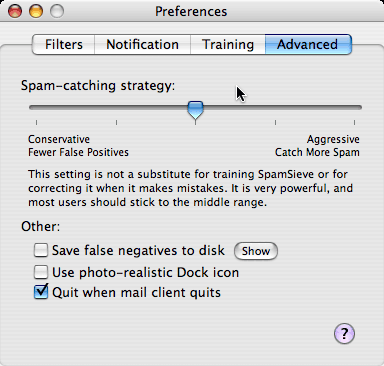 With the level of technology where it is today, no spam
filter will achieve an acceptable level of accuracy unless the end
user dedicates some time to training it. Although you can adjust
SpamSieve's "aggressiveness", the program makes it clear that this
is no substitute for proper training.
With the level of technology where it is today, no spam
filter will achieve an acceptable level of accuracy unless the end
user dedicates some time to training it. Although you can adjust
SpamSieve's "aggressiveness", the program makes it clear that this
is no substitute for proper training.
For the first week or so, I meticulously combed through the spam inbox and marked legitimate messages as "not spam," and did the reverse on the regular inbox. This noticeably improved the accuracy.
Then one day SpamSieve flashed a notice that the corpus (essentially the spam database the program maintains) contained far more spam messages than good ones and that the accuracy could be improved even further by giving it more legitimate messages and less spam.
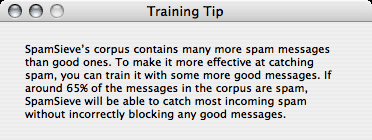 I found
this humorous - if I could give SpamSieve more good than bad
messages, I wouldn't need SpamSieve! But I understood its reasoning
and set about figuring out how to make this happen.
I found
this humorous - if I could give SpamSieve more good than bad
messages, I wouldn't need SpamSieve! But I understood its reasoning
and set about figuring out how to make this happen.
Training with Good Email
Webmail turned out to be the answer. Each day, I receive over 400 messages on the account that caused me to need a spam filter in the first place. Of these messages, fewer than 50 are legitimate, and the rest spam. I generally only check my email from this account at home in the evenings when I have use of my Mac.
During the day I have to use a Dell PC running Windows XP. So each evening, before opening my email program, I first logged onto the webmail service my hosting company provides. I manually deleted all the spam, then fired up my Mac to download the rest. This was a bit time-consuming, but after about a week of doing this, the offending SpamSieve notice went away - and the accuracy improved to a level which quite frankly astonished me.
For seven straight days now, there have been zero false positives. Zero out of over 2,800 messages. As an added bonus, the number of false negatives has decreased to fewer than 10 on a typical day, a number I can happily live with. I can foresee a time when I am sufficiently confident with SpamSieve to start emptying my spam box without poring through it.
I can't wait.
One reason I believe SpamSieve is so accurate is the fact that it doesn't rely on a single technology to identify spam, but rather uses a combination of methods. Discussion of exactly how SpamSieve works would take up several articles, but you can find detailed information on their home page.
If you're willing to devote just a short time each day for a few weeks to SpamSieve's training, I predict you will see astounding accuracy. How much time and frustration would you save each day if you no longer had to concern yourself with spam?
This just may the best $30 I ever spent. 
Further Reading
- Making Mac Mail Work for You, Ed Eubanks Jr, The Efficient Mac User, 2005.12.09. "If you use email, you will want SpamSieve. It's simple to set up, it works very well with Mail (and Entourage, and just about every mail client I've heard of), and it's pretty close to foolproof."
- Simple Strategies to Minimize and Filter Spam, Michel Munger, iBasics, 2005.10.28. "You may also think about buying SpamSieve (US$25), a product that works hand in hand with most Mac email software. It intervenes to filter out the spam. I have used it for a short while so far and I am impressed by its filtering capabilities, without having done any effort to configure it."
- Sp@mX: Fighting Back Against the Spammers, Dan Knight, Low End Mac Reviews, 2005.02.15. "Some time ago I downloaded SpamSieve, installed it, configured it with Emailer and Mail, and turned off Apple's junk mail filter. Within a week it was filtering spam more effectively than Apple's filter had after months of use. Registering this $25 shareware app was a no-brainer."
Join us on Facebook, follow us on Twitter or Google+, or subscribe to our RSS news feed
Steve Watkins is the Vice President for Information Technology for a mid-sized bank, an attorney, and an Army Reserve JAG on extended active duty. He has been a Mac user for about 12 years. He has owned some PCs along the way - but always came back to the Mac. If you find his articles helpful, please consider making a donation to his tip jar.
Today's Links
- Mac of the Day: Motorola StarMax 3000, introduced 1999.09.07. This inexpensive clone used lots of off-the-shelf parts.
- Support Low End Mac
Recent Content
About LEM Support Usage Privacy Contact
Follow Low End Mac on Twitter
Join Low End Mac on Facebook
Favorite Sites
MacSurfer
Cult of Mac
Shrine of Apple
MacInTouch
MyAppleMenu
InfoMac
The Mac Observer
Accelerate Your Mac
RetroMacCast
The Vintage Mac Museum
Deal Brothers
DealMac
Mac2Sell
Mac Driver Museum
JAG's House
System 6 Heaven
System 7 Today
the pickle's Low-End Mac FAQ
Affiliates
Amazon.com
The iTunes Store
PC Connection Express
Macgo Blu-ray Player
Parallels Desktop for Mac
eBay

