
The Practical Mac
Mailsmith a Simple, Powerful, Spam Fighting Alternative to Apple Mail
- 2007.04.23 - Tip Jar
Rating: 
This week we've asked Low End Mac's writers to share some of the software tools they use that aren't as well known as the standard set of Mac apps - Safari, Mail, Photoshop, Microsoft Word, etc. dk
I came across Mailsmith purely by accident.
Several months back, I was searching for a way to control what had become a crippling load of spam in my inbox each day. I finally settled on SpamSieve, an outstanding spam solution that has been written about on this website extensively, with universally positive reviews.
While doing my research, I determined that I could get a full version of SpamSieve (US$30 by itself) as well as a full version of Mailsmith for $75 from the Bare Bones Software website. Having become disgruntled with Apple's own Mail.app for a variety of reasons, and having already learned the hard way to avoid Microsoft Entourage (which I already owned, owing to the fact I have a full version of Microsoft Office 2004 for Mac), I felt the time was right take the double plunge.
I had nothing to lose, really, other than the few extra bucks the combination of Mailsmith and SpamSieve cost me over what a copy of SpamSieve alone would have cost. If I was dissatisfied with Mailsmith, SpamSieve integrates with almost all known Mac email clients, so I could just go back to Mail.app and continue to use SpamSieve.
Undaunted, I plunged in.
Simple Elegance
In the interest of full disclosure, I must say that the first time I launched Mailsmith, it didn't exactly inspire shock and awe. It is a bit plain-looking. However, I would shortly come to appreciate the incredible efficiency with which this plain-Jane email client would go about its work. You might call it "simple elegance".
What Mailsmith lacks in eye candy it makes up for in functionality. Mailsmith has extensive abilities in the area of filters. It features a simple filter interface for basic needs, an advanced filter interface to configure complex filtering tasks, and allows an unlimited number filter terms per filter and an unlimited number of filter actions per filter. In addition, you can use AppleScript to extend Mailsmith's filtering ability.
I have not tried using AppleScript, as the built-in filter functionality was more than sufficient for my needs, and I expect it would be for most people. However, the ability to use AppleScript in a variety of ways - not just for filtering - is there for the power users who need it.
The filters work flawlessly and were a breeze to set up.
Superior Features
Mailsmith features what Bare Bones refers to as "superior message composition tools" - and superior they are indeed.
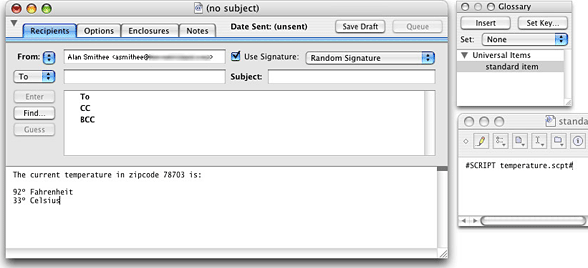
Mailsmith's Glossary lets you use scripts to insert data, such as
the temperature.
Mailsmith has a feature called the Glossary, which provides an easy way to store and access frequently used text of any sort. Its placeholder substitution capability, combined with options that insert the results of OSA scripts and Unix commands, further extends its flexibility. The above graphic shows the use of an OSA script to fetch the current temperature and insert it into a message. I was able to compose a simple email, similar to the one in the graphic, that emailed the current local temperature to a group in my address book.
As I live in Fairbanks, Alaska, this is a nifty trick I will use from time to time. We have some astounding temperatures here during the winter, and my friends are always asking about the weather. On those winter days when it reaches -50°F or lower, I can notify them with the click of a button!
I can't even begin to comprehend the number of ways this feature might be utilized by businesses, but suffice to say they are numerous.
Mailsmith is produced by the same folks who make BBEdit, and most of the text editing capability of BBEdit is also built into Mailsmith. Mailsmith also integrates with PGP 8 to allow you to handle encrypted and cryptographically signed email.
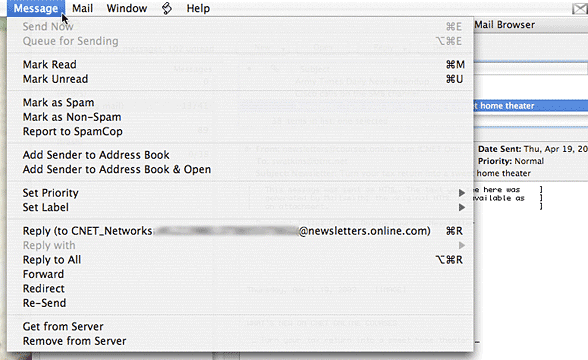
Mailsmith integrates seamlessly with Apple's Address Book.
For the icing on the cake, Mailsmith seamlessly integrates with Apple's Address Book. This is where I store all my contact information, so any email client that couldn't utilize Address Book was out of the running before I even started.
Graphics and HTML
Finally, the feature that won me over to Mailsmith is the way it handles graphics and HTML in messages. Unless you don't have enough spam in your inbox and are looking to get more, displaying inline images and/or HTML in incoming messages is to be avoided. When the HTML or graphic loads, a remote server is notified that your email address is valid, resulting in a deluge of spam.

Mailsmith renders HTML email as plain text - and tells you it has
done so.
A number of email clients allow you to block HTML or images, but the resulting message can be incomprehensible. Mailsmith essentially re-renders the message, strips out the images and/or HTML, displays the message in a way that is easy to read, and inserts a header to tell you what it has done.
If you want to view the HTML version, simply click on the Safari icon at the top of the message window to open the HTML message in a browser window.
One Drawback
The only drawback I have found with Mailsmith is that it does not support IMAP. This could be problematic for anyone who needs to leave their email on a server so they can access it from multiple locations. You can achieve almost the same effect by some creative configuring of POP3, but it's not exactly the same.
Because I don't use IMAP, this wasn't an issue for me, but if
you use IMAP, it is something you should consider when evaluating
Mailsmith for your use. 
Join us on Facebook, follow us on Twitter or Google+, or subscribe to our RSS news feed
Steve Watkins is the Vice President for Information Technology for a mid-sized bank, an attorney, and an Army Reserve JAG on extended active duty. He has been a Mac user for about 12 years. He has owned some PCs along the way - but always came back to the Mac. If you find his articles helpful, please consider making a donation to his tip jar.
Today's Links
- Mac of the Day: PowerBook 2300, introduced 1995.08.28. The only Duo equipped with a PowerPC processsor run at 100 MHz.
- Support Low End Mac
Recent Content
About LEM Support Usage Privacy Contact
Follow Low End Mac on Twitter
Join Low End Mac on Facebook
Favorite Sites
MacSurfer
Cult of Mac
Shrine of Apple
MacInTouch
MyAppleMenu
InfoMac
The Mac Observer
Accelerate Your Mac
RetroMacCast
The Vintage Mac Museum
Deal Brothers
DealMac
Mac2Sell
Mac Driver Museum
JAG's House
System 6 Heaven
System 7 Today
the pickle's Low-End Mac FAQ
Affiliates
Amazon.com
The iTunes Store
PC Connection Express
Macgo Blu-ray Player
Parallels Desktop for Mac
eBay

