
Charles Moore's Mailbag
OS X 10.2 Best for Classic?, Tiger on a Blue & White G3, Salvaging an iBook Hard Drive, and More
Charles Moore - 2007.02.12 - Tip Jar
- Sometimes OS X 10.2 Is Better than a Newer Version
- Installing Tiger on a B&W Power Mac with No DVD Drive
- Salvaging an iBook G4's Hard Drive
- Mac Service in Bogotá, Colombia
Sometimes OS X 10.2 Is Better than a Newer Version
From Jeffrey Kafer
Hello Charles,
I've been reading with great interest the various articles regarding how much Mac is recommended in order to run the various versions of the Mac OS. I appreciate the value of different opinions on the subject.
With regard to that, I thought that I'd share some of my experience with Mac OS X on older hardware. Of particular interest is a Power Mac 7300 that has run several versions of OS X via XPostFacto (10.1.5 then 10.2.8 then 10.3.9, then back to 10.2.8).
Why did I go backwards, you may ask. Well, the 7300 is currently doing children's duty and is primarily tasked with Classic applications. Since I want it to be easy on the youngsters, I really don't want to deal with dual-boot issues. Since the machine has sufficient RAM (544 MB) and processing power (500 MHz G3) to run Classic under OS X, that's my preferred approach. But numerous Classic applications, especially animation-rich educational software, do not run acceptably under Classic in 10.3.9 - but run just fine in Classic under 10.2.8.
That change characteristic alone forced me to back up one version. If it weren't for Classic software, perhaps 10.3.9 would have been acceptable or even preferred. So when folks ask me about what version to use, my first question is how they use Classic.
I am curious if you have heard anything similar.
Regards,
Jeffrey Kafer
Hi Jeffrey,
I have now. ;-)
It's a point I hadn't previously considered, and what you say makes perfect sense.
I still use Classic, and haven't run into any compatibility issues with the applications I need - even using Classic Mode in OS X 10.4.8, but if that becomes an issue, it makes sense to run OS X 10.2.
Thanks for the information.
Charles
Installing Tiger on a B&W Power Mac with No DVD Drive
From John Morris
Hi,
I read your two articles on the Low End Mac site about installing Tiger on Macs that lack a DVD drive and decided to try it (Using FireWire Target Disk Mode to Install OS X on Macs without DVD Drives and Installing OS X 10.4 'Tiger' on DVD-challenged Macs Using FireWire Target Disk Mode). I'm in the process of upgrading my family to Tiger and knew that this would be an issue, because we currently use a MacBook Pro (came with Tiger), a Power Mac G5 (running Panther), an iMac FPD (running OS 9 with just a CD drive), and a Power Mac G3 B&W (running Panther with just a CD drive).
So I picked up a Family Pack and a 15' FireWire cable on eBay. Of course, the test install on the G5 went smoothly. I have test booted the iMac FPD from the install DVD using the G5 in Target Disk Mode, and that seems to work fine. (That's my wife's main work machine, so I'll work the kinks out on the other machines before I install Tiger on it.)
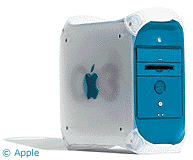 However, the
B&W refuses to boot from the G5's DVD drive even though the
drive shows up on the desktop through the Target Disk Mode. It just
skips right over the DVD and boots from the next device when I set
the DVD as the startup device. Of course, the B&W does not boot
to Target Disk Mode, so I can't go the other way to run the
install.
However, the
B&W refuses to boot from the G5's DVD drive even though the
drive shows up on the desktop through the Target Disk Mode. It just
skips right over the DVD and boots from the next device when I set
the DVD as the startup device. Of course, the B&W does not boot
to Target Disk Mode, so I can't go the other way to run the
install.
That left me wondering how I would get Tiger on the B&W. I tried imaging the CD and restoring it to an appropriately sized partition, but it refused to boot from that as well; no surprise there. I was able to select the drive as the startup device, but it covered the screen with low-level messages and then hung during the boot. I did find that I could image the test install from the G5 and restore that to a partition on the B&W. That seems to have worked perfectly, but I wonder if I'm missing some subtle but important components since the two machines are not exactly close cousins.
The other option I'm considering is to temporarily install a DVD drive in the B&W. Of course, as I'm doing this on a shoestring budget, I can't go out and buy a drive, but it occurred to me that I've got a perfectly good one here in my G5. That got me to wondering if that would be safe. Do you know if the optical drive from the G5 (2.0 GHz from late 2003) will work in, not harm, and not be harmed by the B&W?
Thanks,
John
Hi John,
Thanks for the interesting empirical report.
Your technical question is outside my range of experience and expertise.
Generally speaking, if your DVD drive is of a type that is compatible with the B&W's internal bus (was the B&W still SCSI based?), it seems unlikely (but I can't say for sure) that it would be either damaged or cause damage simply from attempting to hook it up. However, proceed at your own risk.
Perhaps someone in readerland will be able to help shed more light on this.
Charles
From John Morris
Hi Charles,
Thanks for your note. Much to my chagrin when I first looked at buying it, the base B&W did not sport a SCSI bus. The CD and Zip were attached to one IDE bus, and the hard drive was attached to a second. I think it may have been the first machine without a SCSI bus; the Beige G3 had one, although it and a few earlier machines had IDE for the hard drive and SCSI for the CD drive. My Power Mac G5 has an SATA bus for the hard drive, but the the optical drive is on a regular ATA bus. I've confirmed that, because I attached an older 40 GB drive to it for a while.
Anyway, that suggests that I would be able to do a proper install using the G5's optical drive on the B&W. However, with a working Tiger install on the machine, the project has fallen way down on my list of things to do.
Thanks,
John
Hi John,
Thanks for the follow-up.
Where there's a will there's a way. My daughter's iMac died (just wore out), and she has resurrected her old Umax SuperMac S900 with a Sonnet 500 MHz G3 processor. She has succeeded in getting Tiger to install and with the cache enabled and is finding it a decent performer. Even got it to boot from her iPod via FireWire,
Charles
Salvaging an iBook G4's Hard Drive
From Ruffin Bailey
Charles,
I just read the latest Mailbag (1/29), and if you put two of the letters together, you've got my predicament. As Jon, I've dropped my iBook G4, but now mine won't completely boot. Any attempt to boot from DVD gives me the infamous "press the power off button" error.
Unfortunately, my last complete backup was in November, and I'd like to get to the contents of my iBook's drive - and David's letter got me thinking about a transplant.
Any easy ways to do this? What are the chances I can transplant the iBook 10.4 drive directly into a Lombard? Access it by tossing it into a less expensive G3 PowerBook and booting from DVD/CD?
I do want a new host that has a relatively easy to access hard drive bay. I found replacing a hard drive on an earlier iBook to be a real bear of a task.
Thanks a million!
Ruffin Bailey
Hi Ruffin,
The drive from the deceased iBook should work fine in a Pismo or Lombard, and the biggest challenge is getting the drive out of the iBook, although that is rendered a lot less troublesome if you have no plans of putting the iBook back together.
As for booting from the system on the iBook drive, I can't say for sure. I know that the OS X 10.3.9 install I have on my external FireWire drive happily boots all three of my current OS X 'Books - the 17" PowerBook G4, the G4 upgraded Pismo, and the G3 iBook. A Lombard may be pickier about this than a Pismo.
Dropping the drive into a PowerBook G3 is pretty easy, as I outlined in the reply you referenced.
Charles
Mac Service in Bogotá, Colombia
From Daniel Prieto
Hi Charles
Although I think that it would be better for our dropped iBook friend to buy one, it might be helpful to know that in Bogotá, Colombia, there are several authorised retailers and some authorised repair shops as well. I will mention some repair shops which are my personal favourites:
dp
Hi Daniel,
Thanks so much for the helpful information, which I have forwarded.
Charles
Join us on Facebook, follow us on Twitter or Google+, or subscribe to our RSS news feed
Charles Moore has been a freelance journalist since 1987 and began writing for Mac websites in May 1998. His The Road Warrior column was a regular feature on MacOpinion, he is news editor at Applelinks.com and a columnist at MacPrices.net. If you find his articles helpful, please consider making a donation to his tip jar.
Links for the Day
- Mac of the Day: PowerBook 500 Series, introduced 1994.05.16. 'Blackbird' includes a 25 to 33 MHz 68040 along with smart batteries and grayscale or color displays.
- Support Low End Mac
Recent Content
About LEM Support Usage Privacy Contact
Follow Low End Mac on Twitter
Join Low End Mac on Facebook
Favorite Sites
MacSurfer
Cult of Mac
Shrine of Apple
MacInTouch
MyAppleMenu
InfoMac
The Mac Observer
Accelerate Your Mac
RetroMacCast
The Vintage Mac Museum
Deal Brothers
DealMac
Mac2Sell
Mac Driver Museum
JAG's House
System 6 Heaven
System 7 Today
the pickle's Low-End Mac FAQ
Affiliates
Amazon.com
The iTunes Store
PC Connection Express
Macgo Blu-ray Player
Parallels Desktop for Mac
eBay

