
Power Macintosh
Power Macintosh G5 Overview
- Got a Power Mac G5? Join our G-List email list.
Models
- G5/1.6-2.0 GHz (2003)
- G5/1.8-2.5 GHz (2004)
- G5/1.8 Single
- G5/2.0-2.7 GHz (2005)
- G5/2.0-2.3 GHz Dual
- G5/2.5 GHz Quad
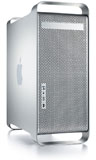 Apple made a big shift when it moved from the G4
to the G5 processor. Based on IBM's POWER architecture, the newer G5
CPU cried out for a fast, wide system bus - and Apple provided it. Most
G5 Power Macs ran their memory bus at half of CPU speed, although some
models ran memory at one-third of CPU speed (in contrast, G4 Power Macs
ran their CPUs anywhere from 3.5 to 8.5 times bus speed, which ranged
from 100 MHz to 133 MHz).
Apple made a big shift when it moved from the G4
to the G5 processor. Based on IBM's POWER architecture, the newer G5
CPU cried out for a fast, wide system bus - and Apple provided it. Most
G5 Power Macs ran their memory bus at half of CPU speed, although some
models ran memory at one-third of CPU speed (in contrast, G4 Power Macs
ran their CPUs anywhere from 3.5 to 8.5 times bus speed, which ranged
from 100 MHz to 133 MHz).
Cooling
The G5 CPU runs hot, and Apple addressed this problem with multiple "thermal zones" inside the G5's tower enclosure. For slower models, air cooling was adequate, controlled by 9 cooling fans, but in faster models, Apple adopted a liquid cooling system.
All of the 2.5 GHz and 2.7 GHz Power Mac G5 models use liquid cooling, and the June 2004 2.5 GHz and April 2005 2.7 GHz G5s sometimes have problems with their cooling systems, particularly coolant leaks. In its reader survey on Power Mac G5 Reliability, MacInTouch notes that 3-4% of these models had cooling-related repairs when the survey was taken in June 2006. There were far fewer reports of cooling system problems with the 2.5 GHz G5 Quad at that time.
Power Mac G5 Reliability
Reliability ratings are based on statistics compiled by MacInTouch in June 2006, at which time the dual-core Power Mac G5 models had only been on the market for 8 months. Letter grades are based on failure rate: A = 0-6%, B = 7-12%, C = 13-18%, D = 19-24%, and F = 25% or higher. We also note the two components that failed most often.
- G5/1.6 single (June 2003), D- (24%, logicboard, hard drive)
- G5/1.8 single (June 2003), D+ (19%, logicboard, video card)
- G5/2.0 dual (June 2003), F (32%, video card, logicboard)
- G5/1.8 dual (Nov. 2003), F (27%, logicboard, optical drive)
- G5/1.8 dual (June 2004), D+ (19%, logicboard, optical drive)
- G5/2.0 dual (June 2004), C- (17%, logicboard, hard or optical drive)
- G5/2.5 dual (June 2004), F (26%, logicboard, hard drive)
- G5/1.8 single (Oct. 2004), D+ (19%, hard drive, logicboard)
- G5/2.3 dual (April 2005), B- (11%, logicboard, power supply)
- G5/2.7 dual (April 2005), D (22%, logicboard, power supply)
- G5/2.0 dual-core (Oct. 2005), C- (18%, power supply, logicboard)
- G5/2.3 dual-core (Oct. 2005), C- (18%, power supply, logicboard or optical drive)
- G5/2.5 quad-core (Oct. 2005), C- (17%, logicboard, power supply)
In each generation, except for the final dual-core one, the fastest model is the least reliable, while the second-fastest is the most reliable. Logicboards are the most expensive component to repair, followed by the power supply. Hard drives, optical drives, video cards, and RAM can be replaced inexpensively using third-party components.
The Original G5
Billed as "the world's fastest computer" at release, the June 2003 Power Mac G5 was available in 1.6, 1.8. and 2.0 GHz speeds, and the top-end model had two CPUs. The memory bus ran at half this speed - 800, 900, and 1000 MHz respectively - and put the 167 MHz memory bus of top-end G4 Macs to shame.
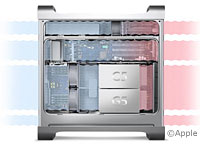 The G5s has a
whole new hardware design with multiple thermal zones and multiple fans
to cool each of them. With up to nine fans running only when they
needed to and only as fast as they had to, the G5s tended to run very
quietly.
The G5s has a
whole new hardware design with multiple thermal zones and multiple fans
to cool each of them. With up to nine fans running only when they
needed to and only as fast as they had to, the G5s tended to run very
quietly.
In other changes, these were the first Macs to use Serial ATA (SATA) hard drives, which supports transfer rates up to 150 MBps (50% faster than FireWire), although Apple retained the established Ultra ATA/100 bus for SuperDrives throughout the Power Mac G5 range. These were also the first Power Macs with USB 2.0 ports, which had long been standard in the Windows world. One very nice feature of these G5s: Apple placed a headphone jack, USB port, and FireWire port on the front of the computer where they were much easier to access.
The 1.6 GHz entry-level G5 used the same PCI slots Apple had used for years, but the faster models supported the newer PCI-X bus. The faster models supported up to 8 GB of RAM, but the entry-level G5 was limited to 4 GB. And to the great joy of power users, Steve Jobs predicted that we'd have 3.0 GHz G5s within a year - a promise IBM never fulfulled.
Apple added a dual 1.8 GHz model to the line in November 2003.
Faster
A year later, the G5 made it to 2.5 GHz - a 25% increase in speed, but not quite the 50% boost to 3.0 GHz everyone had anticipated. (Many believe that IBM's inabiity to deliver on its 3 GHz promise was the final straw that pushed Steve Jobs toward Intel.) Video cards were somewhat improved, and Apple moved from a 4x SuperDrive to 8x.
The June 2004 Power Macs all had dual processors (1.8, 2.0, and 2.5 GHz). As before, the entry-level Power Mac had a 4 GB memory ceiling and PCI slots while the faster ones supported up to 8 GB of RAM and had PCI-X slots.
Slower
In October 2004, Apple introduced a less costly Power Mac G5 with a single 1.8 GHz CPU. This was the first G5 to run the memory bus as one-third of CPU speed instead of one-half, yet it used the same 400 MHz PC3200 RAM as the other models. This model had PCI slots and a 4 GB memory ceiling.
Buyers should pay attention when buying a 1.8 GHz single processor Power Mac G5. The 2003 model has the faster half-speed memory bus, an Nvidia GeForce FX5200 video card, and a 4x SuperDrive. The 2004 model has the slower one-third speed memory bus, the newer Nvidia GeForce FX5200 Ultra video card, and an 8x SuperDrive.
Maximum Speed
In April 2005, Apple pushed the PowerPC G5 processor to 2.7 GHz - the highest clock speed of any pre-Intel Mac. These dual-processor models had 2.0, 2.3, and 2.7 GHz CPUs and were the last Macs to use PCI or PCI-X expansion slots.
These were the first Macs to include 16x SuperDrives.
Dual-Core G5s
Apple introduced the ultimate G5s in October 2005. These were built around IBM's new dual-core G5 CPU, which put two cores on a single chip. Speeds were 2.0, 2.3, and 2.5 GHz, but the dual-core CPUs with their bigger caches held their own against the older models.
The top-end Power Mac G5 Quad actually had two dual-core CPUs, giving it the most power of any PowerPC computer Apple ever shipped. And the Power Mac G5 Dual models outperformed earlier models at the same clock speed.
In terms of hardware, Apple adopted PCI Express (PCIe) for its expansion slots - no more PCI, PCI-X, or AGP. The video card came installed in a 16-lane PCIe slot, which left three available slots for other cards.
Maximum memory increased to 16 GB of 533 MHz PC2-4200 RAM, and these were the first Macs with dual-layer SuperDrives.
The Power Mac G5 line was replaced by the Mac Pro in August 2006.
About LEM Support Usage Privacy Contact
Follow Low End Mac on Twitter
Join Low End Mac on Facebook
Favorite Sites
MacSurfer
Cult of Mac
Shrine of Apple
MacInTouch
MyAppleMenu
InfoMac
The Mac Observer
Accelerate Your Mac
RetroMacCast
The Vintage Mac Museum
Deal Brothers
DealMac
Mac2Sell
Mac Driver Museum
JAG's House
System 6 Heaven
System 7 Today
the pickle's Low-End Mac FAQ
Affiliates
Amazon.com
The iTunes Store
PC Connection Express
Macgo Blu-ray Player
Parallels Desktop for Mac
eBay

