
The Low End Mac Mailbag
Weak AirPort Extreme, Open Firmware Hack, Deleting Old Systems, and Spacing Problems in Pages
Dan Knight - 2007.12.07
- Fixing Weak AirPort Extreme
- Dylan McDermond's Open Firmware Hack
- Possible Error in Open Firmware Code
- Safe to Delete Previous Systems?
- Problems with Line Spacing in Pages
Fixing Weak AirPort Extreme
From John Muir:
Hello there,
I'm not sure whether this counts as a laptop problem or an AirPort one so I'm hedging my bets in sending it to both of you [Dan Knight and Charles W. Moore]!
A friend recently bought an 800 MHz 12" iBook G4 from eBay as a Christmas present for his wife, and as the local Mac guy he came to me to set it up. It's a nice little machine with a decent battery after four years, upgraded RAM to 640 MB, and came with an AirPort Extreme card already fitted, much to his surprise, as he'd already bought another one.
I did a clean install of Tiger for him, ran all the updates, and have the machine up and running nicely, ready for a new convert to the Mac. But there is one issue:
Compared to my 12" PowerBook G4 and the other Macs in the house, the iBook gets a very weak signal on WiFi. I found it would fall off my 2007 AirPort Extreme network for no apparent reason, while my own computer would still be connected just fine sitting by its side. Wanting to investigate, I booted the iBook from a FireWire caddy I happen to have 10.5.1 already installed on and used the Leopard-only trick where you hold down option before clicking on the AirPort menu in order to see detailed stats. Sure enough, my network was showing up with an RSSI (a measure of signal strength) of -78 or so, compared to my PowerBook's -58. For comparison my Mac mini, which lives sitting on top of the base station, has a signal of -33.
Since my friend had a second AirPort Extreme card to try, I duly swapped them around and found exactly the same weak reception. To test the laptop's internal antenna I even tried leaving it disconnected from the card to see if it would make a difference: it does, no networks at all would show up that way. So the antenna is working, and it is connected properly. Same can be said for both cards . . . but the end result is not great.
Also, since the signal strength is weak, the data transfer speed is quite choppy. I copied three gigs of files to the laptop just fine when sitting on the same desk as my base station, but just downstairs it's a different story, and single megabyte files can be tricky.
I've heard that the new Airport Extreme base station I have is among the strongest WiFi hotspots on the consumer market, so I'm concerned that the laptop will be less than useable on my friend's non-Apple (and likely budget priced) base station. I took the laptop to another friend's house to try out his network and found (to my surprise) that it wouldn't show up at all unless his WiFi router was set to channel 9. I've never had anything as strange go on with the handful of Apple laptops I've used before . . . very odd.
Do you have any ideas?
Thanks for listening,
John Muir
John,
I did a bit of Googling and made an interesting discovery: the AirPort Extreme antenna can be connected but not plugged in all the way, resulting in weak performance. Someone names Phil posted the solution to the Apple Mailing Lists: The antenna has to be plugged in so it clicks twice, although it may look firmly connected with only a single click. He says this solves the weak signal problem with every G4 iBook he's run across that had weak WiFi.
In reading other forum postings, this doesn't seem to always solve the problem, but it's a good place to start.
One of our readers suggests the Edimax EW-7718Un 802.11n USB Adapter for Macs that don't support Apple's AirPort Cards; I'm sure it would work as well with this G4 iBook if double-clicking the antenna doesn't solve the problem. Currently $67.99 from Other World Computing.
Dan
I've just tried out the double click and the trick works perfectly. It's not at all obvious that the antenna cable needs it, but when I pushed, the connector did indeed slot deeper in. Not only is my own network now showing up at a much more respectable -45 RSSI, but the iBook can finally see the other networks on the street too. Brilliant stuff. Definitely ready to go to its new home, just in time for a Christmas surprise!
Big thanks Dan.
John
Dylan McDermond's Open Firmware Hack
From James Little:
Hi Dan,
Wanted to comment on Dylan McDermond's OF Hack. As he's changed the reported OF value for the CPU speed, I was wondering if the same could be applied to the value reported by OF as the machine/hardware ID. For example, a PM 9500 is reported as AAPL,9500. If the machine ID could be changed to that of an AGP G4, such as PowerMac3,1 whether Leopard would continue to boot. Additional Kernel Extensions could then be setup to load after the main OS has booted.
This logic follows after digging around in the PlatformExpert file in HD/System/Library/IOKit/ - I've found references to set a variable for all Old World Macs to zero, and in particular it lists the Powersurge and Gossamer architectures to return this value. I've tried booting Leopard on a Beige G3, upgraded to G4, but it kernel panics with a "no driver for this platform". I understand this is the same for the B&W G3 and Yikes G4.
The "proper solution" to this would be to patch XPostFacto to install the correct PlatformExpert drivers and kernel extensions, as it currently does in Tiger - but a quick hack might be (assuming you have a G4 upgrade) to change this value in OF. Any chance you could contact him with a request to see if this is possible in OF?
Secondly, I'd be interesting in continuing XPostFacto for Leopard, as I believe that the platform driver issue could be fixed reasonably easily. However, the source code is not available. Any chance anyone has downloaded it before the access to opendarwin.org cvs was shut down?
Thanks,
James Little
James,
I suspect that XPostFacto is dead. Ryan Rempel hasn't been heard from in a couple of years now, and the source code seems to have vanished. Perhaps it's time for someone to spearhead a new project that specifically supports "unsupported" Leopard. Feel free to discuss this on our Unsupported OS X group on Google Groups.
I've forwarded your email to McDermond, as he'll have a far better idea of what's feasible with Open Firmware than either of us. I suspect that getting Leopard to work on pre-Pismo PowerBooks and non-AGP Power Macs won't be easy, even with a G4 upgrade, if it can be done at all. But then XPostFacto jumped similar hurdles....
Dan
Hi,
I also found the OF hack information at the MacElite website, which has additional notes on how to write the commands in a text file and load it from the hard drive.
Regards,
James
James,
Thanks for that information. I'll add a link to McDermond's article.
Dan
Possible Error in Open Firmware Code
From Chris Kilner:
In the article on faking out the Leopard installer, the OF boot command has "//" in the single CPU version and "\\" in the dual CPU version. Is this a mistake?
Chris Kilner
Chris,
I've forwarded your question to Dylan McDermond.
Dan
Safe to Delete Previous Systems?
From Dylan:
Dan,
I appreciate the help on my Disk Utility problem. However, I did both thing you suggested (Reinstall the program, and clear out the preferences), however neither worked after restart.
It's not just Disk Utility that's broken. Fire crashes all the time, Real Player says it my OS is 10.4.9, and need Jaguar or better. Oh and, Classic Mode will not work anymore. It says I have less than the required RAM (my iMac is maxed out at 1 GB). I have to boot into Os 9 natively if I want to use it. And while I don't use Safari (I use Camino), I opened that the other day and it crashed on the spot.
I think I might know what the problem is. I was performing the software update to 10.4.11 the other day, and a couple of my friends demanded I turn my computer off. I said no as I was doing the update. I left the room for a minute or two, then come back and notice my computer is on Sleep mode! I turn it back on and see the installer basically frozen, so I perform a system restart, afraid I just lost my computer. Everything booted fine, but now everything is broken. Camino works fine, and iTunes works fine, but most of the other apps I use are crippled and unstable.
Any idea what I can do Dan? I appreciate any help you can give me.
Thanks,
Dylan
Dylan,
First off, you can shoot your friends. :-) Nothing will mess up an operating system - any OS - more than stopping partway through a system update. Really your only solution is to reinstall Tiger from your original install disc, then perform the updates when nobody is around to mess it up again.
Dan
Dan,
I want to give you a huge thank you for all the help you've given me the last few days. I reinstalled Tiger using the Archive option (I had no idea there was such an installation option. Huge kudos to Apple), and everything's back to normal. Real Player's working, as is Fire, and most importantly, Disk Utility.
Now I noticed the "Previous Systems" folder on my Master drive. Obviously this is what was used for the new installation. However, I'm curious if it is safe to delete it?
Again, thanks so much for everything. I appreciate it very much.
Take care,
Dylan
Dylan,
The Previous Systems folder holds a copy of your old, broken System. It's there so if you had some System additions that you no longer have installers for, you can move them to the newly installed System. Other than that, there's no reason to keep it around once you know everything is working.
Dan
Problems with Line Spacing in Pages
From Kendall Lister:
Hello Dan,
I found your posts about line spacing problems in Pages when searching for answers to my own problems with spacing. In trying to reproduce some typesetting from a newspaper, I had selected 0.95 multiple line spacing and was frustrated that every second line seemed to have a taller gap after it. After reading your page with proposed solutions, I couldn't reproduce their success - no matter how 'exact' I made the line spacing setting I would still see uneven spacing.
I magnified the view a few times and, although I suppose it's possible that this is an optical illusion, some lines definitely look further apart than others - for instance, in the attached screen captures, the line "companies. They came to brush up" seems a lot further from the next line than than do the other surrounding lines.
I also found that when changing the exact spacing amount by small degrees, the actual spacing between lines changes unevenly, as though the spacing values are being rounded to a nearest pixel or some other quantum. In case you're curious, I've attached a video clip showing what I mean.
Kendall
Kendall,
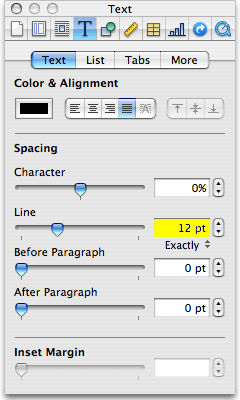 The only solution that will give you exact line
spacing in Pages is to specify line spacing in points, not as a
multiple of the text's point size, as discussed in Line Spacing Problem with
Apple's Pages Software Solved.
The only solution that will give you exact line
spacing in Pages is to specify line spacing in points, not as a
multiple of the text's point size, as discussed in Line Spacing Problem with
Apple's Pages Software Solved.
Part of the reason for your problem using 0.95 line spacing is that Pages is messed up in this area, but another part is that it's trying to display 12 point type set with a line spacing of 11.4 points, which simply isn't going to display well, as monitors don't have fractional pixels.
To verify this, I used Pages, specified 12 point text with 11.4 point spacing (12 x 0.95). The lines are irregularly spaced on my monitor, but I've had exactly the same issue using Quark Xpress and FrameMaker, yet the printed pages are just fine. I can't verify that pages prints correctly when set to 11.4 point line spacing, though, as I chose not to buy the software after the 30 day trial period.
Dan
Hi Dan,
I appreciate your response. I've printed the document that exhibits uneven line spacing and although it's not very precise, I believe I can measure differences in the gaps between lines. The same document printed through Microsoft Word doesn't have the same uneven line spacing, which is disappointing
Kendall
Kendall,
Yes, it's disappointing that Apple can't get something as simple as consistent line spacing right. This should be the default behavior (unless a paragraph contains multiple type sizes), but the engineers behind Pages seem to have missed the boat.
Dan
Join us on Facebook, follow us on Twitter or Google+, or subscribe to our RSS news feed
Dan Knight has been publishing Low End Mac since April 1997. Mailbag columns come from email responses to his Mac Musings, Mac Daniel, Online Tech Journal, and other columns on the site.
Today's Links
- Mac of the Day: PowerBook 1400, introduced 1996.10.01. Considered by many the best pre-G3 PowerBook with a small footprint and great keyboard.
- Support Low End Mac
Recent Content
About LEM Support Usage Privacy Contact
Follow Low End Mac on Twitter
Join Low End Mac on Facebook
Favorite Sites
MacSurfer
Cult of Mac
Shrine of Apple
MacInTouch
MyAppleMenu
InfoMac
The Mac Observer
Accelerate Your Mac
RetroMacCast
The Vintage Mac Museum
Deal Brothers
DealMac
Mac2Sell
Mac Driver Museum
JAG's House
System 6 Heaven
System 7 Today
the pickle's Low-End Mac FAQ
Affiliates
Amazon.com
The iTunes Store
PC Connection Express
Macgo Blu-ray Player
Parallels Desktop for Mac
eBay

