Mac Musings
Typography Problem Makes Pages Unsuitable for Serious Printing
Daniel Knight - 2007.10.01
The good news is that Pages does have a solution to the problem detailed in this article. We have a link to the follow-up article in the Low End Mac Mailbag at the end of this article. The bad news is that must users are never going to find that solution and will either live with horrid line spacing or give up on Pages. dk
I finally downloaded the trial version of iWork from Apple about three weeks ago. I was working on a project for church, a newsletter for our annual week-long celebration of the arts and faith. I'd begun the project in AppleWorks, but our music and arts director had some clipart he wanted me to use.
I figured this would be a perfect opportunity to try out Apple's newest word processor. I'd used MacWrite and MacWrite Pro in the past, have used AppleWorks ever since ClarisWorks 1.0 came out, and had a lot of experience with Word 5.1a, which I consider the best version of Word for writers.
I really enjoyed working on the newsletter in Pages. I imported the document I'd started in AppleWorks, created styles for body text, headlines, etc., and had fun placing and resizing images. Our music and arts director, a Windows user, was stunned by what I could do - and how easily I could do it. Needless to say, I was very impressed with my first Pages project.
My previous project had also begun in AppleWorks, but I'd exported it to Word so they could finish it on the computer in the music office at church. Even that impressed them, because I'd created a design that mixed single- and double-column text in AppleWorks, and it exported perfectly to Word. (I also have to say that I'm impressed with AppleWorks' export capabilities!)
About 10 days ago I began another project, a program for our musical. After having so much luck with Pages, I decided it was the tool I'd use for the project. Most of the source material came to me as Word documents, which were readily opened in Pages. As before, I created and applied styles for body text, headings, cast lists, and so forth. (Pages sometimes unexpectedly turned all italic type to Roman when applying a style. Weird.)
I created a horizontal template with two columns and about 1" between them, which would make it easy to fold the pages into a booklet. It looked great on the computer.
Remember that I'm a first-time Pages user, so there may be capabilities I simply couldn't find. What I'd really hoped to be able to do was create a document with 5.5" x 8.5" pages and have the software output the pages in proper spreads for printing. This would also have allowed me to use a two-column format for the Who's Who section of the program. If Pages can do this, I can't find it.
Anyhow, I managed to put together a very attractive program using Pages, but when I looked at the printed pages, something was wrong. There was more space between some lines than others. And when I looked more closely at the screen, it was there as well. Here's what I saw:
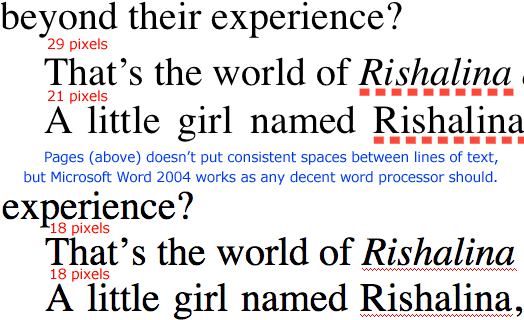
I've worked with several different word processing programs. I've worked with three different desktop publishing programs: Aldus PageMaker (that was about 20 years ago), Quark XPress, and Adobe FrameMaker. Until Pages, I'd never run into this problem, and I couldn't find anywhere in the program to fix the styles and eliminate the problem.
In most programs, you can specify line spacing in at least two ways: by points and as a percentage of text size. Pages doesn't seem to have a points option, at least in my week of using it and looking for ways to resolve this problem.
Odd thing is, I never ran into this when working with a document imported from AppleWorks, and when I exported my document to Word, the weird spacing vanished. I'd had high hopes for Pages, but this demolished them.
Another oddity is that the text flowed very differently in Pages and Word. I somehow had more lines of text on the page when I worked on the file in Word 2004. Again, something I never ran into when moving from AppleWorks to Word or Pages, only from Pages to Word. I suppose I could import the Word file into Pages, but that seems a rather silly way to fix a problem that shouldn't exist in the first place.
This really destroys the credibility of Pages as a tool for importing, editing, and exporting Word documents. A shame, as Word is considerably more expensive and far less user friendly.
I loathe Word 2004. It feels totally alien. My wife has similar feelings about it, and she's a Windows convert and has used Word on Windows for years. Pages felt pretty comfortable, although I have to admit to not being a fan of Apple's standard font panel, but as someone who has worked with type for a living and sometimes has to produce documents for printing, Pages' behavior here absolutely rules it out.
Apple may consider AppleWorks yesterday's news, but it looks like I'll be sticking with that discontinued program a bit longer.
Further Reading
- Line Spacing Problem with Apple's Pages Software Solved, Dan Knight, Low End Mac Mailbag, 2007.10.02. Pages does have a way to fix line spacing, but it's not something you're going to find easily.