
Mac Daniel's Advice
Is the Original PowerBook G3 Too Limited Today?
Dan Knight - 2003.03.17
Ever since the return of Steve Jobs, Apple has vastly simplified both its product line and its product names. This, of course, makes things more complicated. Witness four generations of G3 PowerBooks all bearing strikingly similar names.
- In November 1997 came the PowerBook G3, a 250 MHz model with a 12" 800 x 600 display. This was the fastest laptop computer in the world. This model was based on the earlier PowerBook 3400 and is sometimes known by the code names 3400 and Kanga.
- In May 1998, Kanga gave way to the PowerBook G3 Series, a family of models available at three CPU speeds (233, 250, and 292 MHz) and display sizes (12", 13", and 14"). The code name for this series was WallStreet. The entry-level model lacked a level 2 cache, earning it the Road Apple title and the MainStreet nickname. The 13" display was also problematic.
- In August 1998, Apple updated the PowerBook G3 Series to what some of us call Series II. Also commonly known as WallStreet, these normally had a 14" display. CPU speeds were 233, 266, and 300 MHz, and this time the entry-level model had a level 2 cache. There was also a limited edition produced with a 12" display.
- In May 199, the PowerBook G3 Series gave way to yet another PowerBook G3, this one identified by Apple as "Bronze Keyboard" and commonly known as Lombard among users. Lombard was thinner, lighter, and faster then WallStreet, offering 333 and 400 MHz speeds. It was also the first PowerBook with USB.
- In February 2000, Apple further simplified the name by introducing the PowerBook - no "G3" or other designation. Running at 400 and 500 MHz, the PowerBook (FireWire) is commonly known as Pismo.
Over the coming days, we'll be looking at each of these models in turn. As with all Macs, each has strengths and weaknesses. To simplify things, we'll typically use the street names Kanga, WallStreet, Lombard, and Pismo for these 'Books.
For a quick overview of the four lines, see our Guide to G3 PowerBooks.
Kanga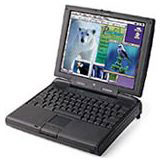
As noted above, the original PowerBook G3 was the world's fastest laptop when it shipped in late 1997. It was introduced at the same time as the beige Power Mac G3, and Kanga's 250 MHz speed straddled the difference between the 233 MHz and 266 MHz desktops.
Kanga's 5 GB hard drive was only a bit smaller than the 6 GB drive found on the G3 desktops, and memory could be expanded to 160 MB (vs. an official maximum of 192 MB on the beige G3). With an 800 x 600 display and 16-bit color, this 'Book really could be a desktop replacement.
Kanga was a fairly rare beast, since it was only in production for six months and very, very expensive. I've been trying to track down current values online, but there simply aren't enough being bought and sold online.
Value
This is the only G3 PowerBook that I have no hands on experience with. It's heavy (nearly 8 pounds), has decent battery life (with a fresh battery - used ones may be another story), moderately fast under the classic Mac OS, and has a decent screen size for a lot of users.
The hard drive can be replaced with a standard 2.5" IDE hard drive, so it should be no problem to upgrade from 5 GB to 60 GB if you so desire. Today's 5400 rpm drives with 2 MB and 8 MB caches should really boost hard drive performance.
Kanga's biggest drawback is probably the 160 MB memory ceiling. Unlike some models, where Apple was conservative in specifying maximum RAM and users later discovered higher capacity modules worked, that doesn't seem to be the case with Kanga. (If you know otherwise, please email me.)
I have never heard of a processor upgrade for Kanga.
You can address this shortcoming by using Virtual Memory, which also lets the Mac use physical RAM more efficiently, but at the price of increased hard drive access and reduced battery life. Or you can find a copy of RAM Doubler 8, which would allow you to create a virtual 256 MB of memory without using the hard drive.
The Mac OS
All things considered, Mac OS 8.1 and 8.6 are probably your best bets on Kanga. Mac OS 8.1 is less demanding of drive space and system resources, and it supports HFS+, which lets you use the hard drive more efficiently than Mac OS 8.0 and earlier. Mac OS 8.6 drops support for pre-PPC processors and may be a bit more efficient yet.
Kanga is the only PowerBook G3 not officially supported under Mac OS X, although XPostFacto provides "limited support" for X on this model. Regardless, I really wouldn't recommend this as an OS X machine. The limited memory, relatively small screen (800 x 600 is small when using Aqua), and slow stock hard drive make this a fairly impractical X-box.
Worth It?
It's hard to know what a Kanga is really worth. but given the choice between this and a WallStreet, I'd lean toward the newer model. It's officially supported with OS X, can handle 512 MB of RAM, uses the better ATI video chip, and can handle two batteries for long-term field use.
On the other hand, as a field machine to supplement a desktop, some of these limitations become less important. With the classic Mac OS and ClarisWorks, MS Word 5.1a, or something similar, it would be a great writing machine. It has plenty of power for email and graphical browsing. You could even put an 802.11b card in one of the PC Card slots to access an AirPort network.
As a primary computer, I think there are better 'Books to own, but
if the price is right, Kanga could be a very competent field machine.

Join us on Facebook, follow us on Twitter or Google+, or subscribe to our RSS news feed
Not sure if you should upgrade your old Mac or replace it? Check the Mac Daniel index to see if we've already addressed your problem.
Today's Links
- Mac of the Day: Performa 630, (1994.07.01. The first desktop Mac with an IDE hard drive could accept a TV or radio tuner.)
- Support Low End Mac
Recent Content
About LEM Support Usage Privacy Contact
Follow Low End Mac on Twitter
Join Low End Mac on Facebook
Favorite Sites
MacSurfer
Cult of Mac
Shrine of Apple
MacInTouch
MyAppleMenu
InfoMac
The Mac Observer
Accelerate Your Mac
RetroMacCast
The Vintage Mac Museum
Deal Brothers
DealMac
Mac2Sell
Mac Driver Museum
JAG's House
System 6 Heaven
System 7 Today
the pickle's Low-End Mac FAQ
Affiliates
Amazon.com
The iTunes Store
PC Connection Express
Macgo Blu-ray Player
Parallels Desktop for Mac
eBay

