Low End Mac Reader Specials
TypeStyler For Mac OS X is Now Shipping! Download The Free Fully Functional 60 Day Tryout at www.typestyler.com
OWC: We Make DIY Upgrading Easy! Maximize your Apple MacBook / MacBook Pro. Up to 8.0GB Memory, up to 1.0TB HD & More. Easy Guide + Free, Detailed Installation Videos. Click here
Don't install Parallels to play poker online! Poker Mac will show you how
to download and install a native Mac poker application such as Full
Tilt Poker Mac.
Laptop Hardware Provided by TechRestore - Overnight Mac & iPod Repairs.
Compare products like desktop computers, apple laptops, apple macs, and LCD Monitors side by side! All the information and reviews to make the best purchasing decision for new mobile phones, sat nav systems, or MP3 players. The Ciao online shopping community makes searching products easy for you.
Digital Fossils
In Praise of the Refreshingly Different Clamshell iBook
- 2008.04.29 - Tip Jar
Popularity: ![]()
![]()
![]()
![]()
![]()
The recent columns on clamshell iBooks here on Low End Mac (Mother of the MacBook Air, Graphite Clamshell iMac Still a Real Eye Catcher and Useful Tool, Clamshell iBooks Reconsidered) hit a real soft spot for me.
Back in the Fall of 2001, I was living in Knoxville and roadtripping to Atlanta twice a month with my roommate, dragging our big Wintel boxes for weekend-long LAN parties. I thought it would be neat to have a portable DVD player to amuse myself during the ride down and during the occasional long breaks when the network was being updated with patches or whatnot.
At the time, portable DVD players from any company you'd trust to make anything more complex than a hat were running about a thousand dollars a pop. My roommate saw me paging through screens of Sonys one evening and suggested that, since the "Ice Books" had just debuted, I wander over to Mac Of All Trades and see what they had in the way of clamshell iBooks. The last ones did have DVD players, after all....
Sure enough, they were running a deal on refurbished iBook SE FireWire machines in the "Key Lime" color scheme for right at a grand. Neat! Not only could I watch movies on the thing, but maybe I could use it to . . . surf the 'net or something. I mean, sure, it was obsolete....

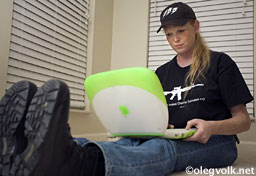
Seven years down the road, that "obsolete" machine is sitting on my lap as I type this, relaxing on the front porch on a cool springtime evening. For seven years that obsolete iBook has been my trusty road warrior, letting me moderate web forums from WiFi hotspots thanks to its AirPort card. It's let me update my blog from a friend's house in Nashville, surf the 'net from my neighbor's hot tub, and check my email in out-of-state hotel rooms. This little 466 MHz G3, with its 192 megs of RAM that are so meager by today's standards, runs OS X 10.3.9 "Panther" without a hiccup and has uncomplainingly done whatever I needed it to do for the better part of a decade.
So, yes, it is safe to say I have a soft spot for the clamshell iBooks. The styling remains refreshingly different. If anything, it looks more modern now than it did when it was released. The keyboard, while not garnering the euphoric praise of a WallStreet or PowerBook 1400, is roomy and sports a full suite of function keys. It was the first Mac laptop to dispense with flimsy port doors, yet all its ports are protected from damage by being recessed at the end of tunnels in the housing. There's no fragile lid latch to break, either.
Sure, it has its faults. It's pretty limited in its expandability, and even what little can be done needs doing by someone who is a dab hand with tools and not panicked by complex instructions. It only has the one built-in speaker, and the sounds emanating from it are tinny and flat when compared to even the old '040 Blackbirds. But these are all quibbles. The original iBook wasn't meant to be a massively upgradeable power user's machine. It was a reasonably priced entry-level laptop, and it does what it was meant to do - and does it well.
The little touches it has - those little touches that are taken for granted now - were so science-fiction when they debuted on the iBook. Touches like the gently snoring sleep light under the skin that replaced the harshly blinking surface-mounted LED on earlier 'Books. Or the glow around the power port, changing from the amber of charging to the green of a full charge. And, of course, there is the piece de resistance, the gimmick that makes you wonder why Apple didn't make it a permanent feature of every laptop ever after: A built-in folding carry handle. Genius.
So is the clamshell iBook the machine for you? That depends. For starters, it's about as cheap a modern Mac laptop as you can buy. (By "modern", I mean a machine that supports USB, can run OS X without beating your head against a wall, and has provision for an internal wireless card.) With its good keyboard, rugged build, and that nifty built-in carry handle, it's still a fantastic utility infielder of a laptop.
If you need the ultimate in compactness, or the ability to edit
video or play World of Warcraft at the local WiFi hotspot, then you
probably need to look elsewhere. For me, though? For me I just hope
that the next seven years of uncomplaining service are as drama-free
and lacking in hiccups as the first seven years have been.
If you find Tamara's articles helpful, please consider making a donation to her tip jar.
Recent Digital Fossils Columns
- Slot Loading iMacs: The SE/30 for a New Generation, 02.02. They're relatively small, pretty quiet, reliable, can run Tiger, and are very affordable nowadays.
- The Old Mac blues, 07.23. Intel Macs are tempting, but the Power Mac 7100 will be not one more iota obsolete tomorrow than it is today.
- Macs: Better by design, 07.11. From the beginning, Macs have stood apart from other computers with their attractive and intelligent design.
- Master of Orion on the Mac, 07.01. The DOS version of this vintage game broke with Pentium or Windows 95, but the Mac version still runs very nicely in the Classic Mac OS.
- More in the Digital Fossils index.
Links for the Day
- Mac of the Day: iMac Core Duo, Jan. 2006 - The first Intel-based iMacs ran at 1.83-2.0 GHz, came with 17" and 20" displays.
- Group of the Day: Mac Pro List is for those using a Mac Pro.
- November 23 in LEM history: 99: Should I buy a USB card? - 01: Can a low-end Mac be an only Mac? - Palm Desktop without a PDA - CyberDog saves the day - 05: How Consumer Reports could compare Macs fairly - Speakers for your Mac - Living with the hi-res 15" PowerBook - Birth of the PowerBook - Daystar 1.9 GHz iMac G4 upgrade - 1.92 GHz PowerBook upgrade
- Support Low End Mac
Recent Content on Low End Mac
- Apple's Tablet an End Run Beyond Netbooks, Frank Fox, Stop the Noiz, 11.20. Whatever Apple has planned will leverage existing technologies while going beyond what its competitors can offer.
- i5 iMac Benchmarked, Mac mini 'Shouldn't Be Overlooked', Twitter Client for Classic Mac OS, and More, Mac News Review, 11.20. Also why Apple leaves the low end to others, 10.6.2 fixes video playback problem in 27" iMac, 3D Leopard and Snow Leopard performance, and more.
- Apple #4 in Reliability, Apple Tablet a Gadget for All?, HP's i7 Notebook Outdoes Mac Rivals, and More, The 'Book Review, 11.20. Also Flash 10.1 improves video on Hackintosh netbooks, thin-and-light notebooks impress, Windows XP finally on the way out, and more.
- NASA Chemical Sensor for iPhone, Smartphone Death Match, iPhone Earrings, and More, Ian R Campbell, 11.20. Also mobile phone dangers, new apps, GPS solution for iPod touch, new iPod and iPhone cases, and more.
- Replacing the Hard Drive in a Clamshell iBook, John Hatchett, Recycled Computing, 11.19. Yes, it is one of the most difficult Apple notebooks to disassemble and reassemble, but a 10 GB hard drive just will not do.
- IBM Model F: A Great Old Keyboard with an Outdated Layout, Tommy Thomas, Welcome to Macintosh, 11.19. Although it used a different technology than the revered IBM Model M keyboard, the Model F was a great keyboard in its own right.
- Soft Touch Keyboards, Wireless Mouse Options, Loving SeaMonkey 2, and More, Charles W. Moore, Miscellaneous Ramblings, 11.18. Also the future of browsing with PowerPC Macs and the multiple mouse input bug introduced with OS X 10.5.8.
- More links in our archive.
Recent Deals
- Best eMac Deals, 11.18. Used 1 GHz Combo, $100; SuperDrive, $269; 1.25 GHz Combo, $119; SD, $319; 1.42 GHz Combo, $289; SD, $498.
- Best Mac OS X 10.6 and Mac Box Set Deals, 11.18. "Snow Leopard", single user, $25; 5 users, $45; Mac Box Set, single user, $139; 5 users, $180; Server, $414. Shipping included.
- Best Xserve Deals, 11.18. Used 1 GHz dual G4, $649; 2.3 dual G5, $795; 3.0 4-core Xeon, $1,899; refurb 2.26 4-core, $2,499; new, $2,888; refurb 8-core, $2,999; new, $3,449; more.
- Best 15" MacBook Pro Deals, 11.17. Used 1.83 GHz, $750; 2.16, $800; 2.33, $900; refurb 2.4, $1,299; 2.53, $1,449; 2.66, $1,699; 2.8, $1,899; new 2.53, $1,579; 2.66, $1,799; more.
- Best Power Mac G4 and AGP Video Card Deals, 11.17. Used 400 MHz, $50; 933 MHz, $80; 500 dual, $60; 867 dual, $90; 1 GHz dual, $150; 1.25 GHz dual, $225; 1.42 GHz, $499.
- Best Mac OS X 10.5 Deals, 11.17. "Leopard" upgrade, $80; single user license, $135; 5 users, $173; Mac Box Set, 5 users, $230; Server, 10 users, $340; unlimited, $850. Shipping included.
- Best Mac mini Deals, 11.16. Used 1.42 GHz G4 mini, $379; 1.66 GHz Core Solo, $419; 2.0 Core 2, $450; new 2.26 GHz nVidia, $580; 2.53 GHz, $769; Server, $990.
- Best iBook G4 Deals, 11.16. Used 12" 1.07 GHz Combo, $210; 1.33 GHz, $298; 14" 1.33 GHz, $398; 1.42 GHz, $479; SuperDrive, $498.
- Best iPod shuffle Deals, 11.16. Used 1 GB, $35; 4 GB, $65; refurb 1 GB, $39; 2 GB, $59; new 2 GB, $55, 4 GB, $75. New and refurb prices include shipping.
- More deals in our archive.
About LEM | Support | Usage | Privacy | Contacts
Navigation
Used Mac Dealers
Apple History
Video Cards
Email Lists
Favorite Sites
MacSurfer
MacMinute
MacInTouch
MyAppleMenu
InfoMac
Macs Only!
The Mac Observer
Accelerate Your Mac
RetroMacCast
PB Central
MacWindows
The Vintage Mac
Museum
DealMac
DealsOnTheWeb
Mac2Sell
ramseeker
Mac Driver Museum
JAG's House
System
6 Heaven
System 7 Today
the pickle's Low-End
Mac FAQ
Abandonware
Petition
Mac vs. PC Info
Affiliates
The Apple
Store
Mac
Connection
B&H
MacMall
TechRestore
ExperCom
Crucial
Memory
batteries.com
Advertise
MacMinute
MacInTouch
MyAppleMenu
InfoMac
Macs Only!
The Mac Observer
Accelerate Your Mac
RetroMacCast
PB Central
MacWindows
The Vintage Mac
Museum
DealMac
DealsOnTheWeb
Mac2Sell
ramseeker
Mac Driver Museum
JAG's House
System 6 Heaven
System 7 Today
the pickle's Low-End
Mac FAQ
Abandonware
Petition
Mac vs. PC Info
Mac Connection
B&H
MacMall
TechRestore
ExperCom
Crucial Memory
batteries.com