
The PowerBook 1400, the first CD-ROM equipped notebook computer, was available in several different configurations over its lifespan, including two screen types (dual-scan and active matrix) and three processor speeds (117, 133, and 166 MHz). The 1400c has an active matrix display, while the 1400cs model uses the less expensive dual-scan passive matrix technology. (That said, the 1400cs has a pretty nice screen.)
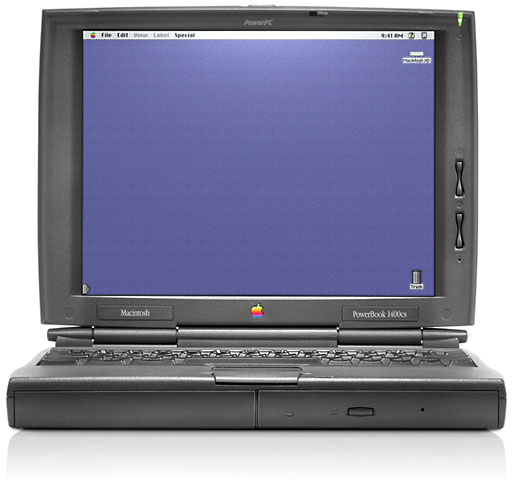
The 1400 is about the same size as a 12″ dual-USB iBook, but it’s 2″ thick so it can accommodate an expansion bay, which can hold a floppy drive, CD-ROM, etc.
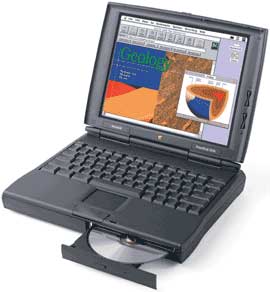
The biggest drawback of the 1400 is the lack of a built-in ethernet port and a modem. To add this capability, you must add one or two PC Cards or locate an add-in card specifically designed for the 1400.
The 64 MB memory ceiling can also be a drawback, although using virtual memory or a program such as RAM Doubler can help. Using a Compact Flash memory card in a PCMCIA adapter for virtual memory is another way to increase available RAM without spinning up the hard drive.
With a big enough memory card, you can even install the Mac OS and enable virtual memory, booting and running the computer almost silently. With a 512 MB card, you should have plenty of room for Mac OS 9.x, virtual memory, your favorite applications, and file storage.
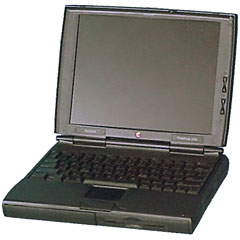
With the addition of a G3 upgrade, it was possible to configure a G3 setup for a very attractive price, especially if you could find a nice 1400/117 with an active matrix screen and 40 MB or more memory to begin with. (Because the 1400/117 has no cache, it’s somewhat slower than the other models, and it should be priced accordingly. The minute you install an upgrade with a cache, it loses its Road Apple status.)
PowerBook Hard Drives: The Essential Upgrade notes that there may be compatibility issues with EIDE drives larger than 8.2 GB, although this may be resolved by partitioning or using Mac OS 8.6 or later.
Warning
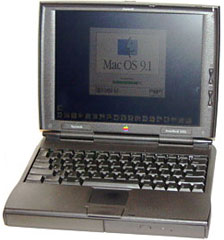
Unlike later ‘Books, the 1400 will not boot from a CD by holding down the C key at startup. You have to either select it in the Startup Disk control panel or press ctrl-opt-shift-del to boot from a CD.
According to the Road Warrior and Other World Computing, the drive controller in pre-G4 PowerBooks is incompatible with ATA-6/Ultra ATA-100 hard drives.
- Got a PowerBook? Join our PowerBooks Group.
- Our Mac OS 9 Group is for anyone using Mac OS 9, either natively or in Classic Mode.
- The PB 1400/117 is a Compromised Mac
Details
- 1400/117 and 1400cs/133 introduced 1996.10.01; discontinued 1997.07.14
1400cs/133 introduced 1997.05.19; discontinued
1400c/166 introduced 1997.07.14; discontinued
1400cs/166 introduced 1997.10.15; discontinued - requires System 7.5.3 (with PowerBook 1400 Enabler) through 9.1, but not 7.5.5; Mac OS 8.1 and 8.6 recommended
- CPU: 117, 133, or 166 MHz PPC 603e
- Bus: 33 MHz
- Performance: 114/137/152 (117/133/166 MHz), MacBench 4
- 42,076 (117 MHz) Whetstones
- ROM: 4 MB
- RAM: 12 MB or 16 MB soldered, expandable to 64 MB total by adding one or two memory modules (second module piggybacks on the first). There are some single card memory upgrades that cannot be piggybacked.
- Level 2 cache: 128 KB on 133 and 166 only
- VRAM: 1 MB
- display: 11.3″ 16-bit 800 x 600 88 ppi dual-scan or active matrix color screen
- Video out: VGA port
- Hard drive: 750 MB, 1 GB, or 2 GB EIDE
- CD-ROM: 6x, 8x, or 12x (removable)
- ADB: 1 port for keyboard and mouse
- serial: 1 DIN-8 RS-422 port on back of computer
- SCSI: HDI30 connector on back of computer
- infrared: only supports Apple’s IRtalk
- PC Card slots: 2
- size: 11.5 x 9.0 x 2.0″
- Weight: 6.6-7.0 pounds with battery
- Gestalt ID: 310
- power supply: M4895 or M4896
Accelerators & Upgrades
- You can install a 133 MHz CPU with cache in a 117 MHz 1400, but you cannot install a 166 MHz module in either of the slower models.
- Sonnet Crescendo/PB G3 at 333, 400, and 466 MHz
- Vimage Vpower G3/233 and G3/266
- Newer Technology NUpower 1400 G3, discontinued
Online Resources
- Best Classic Mac OS Deals. Best online prices for System 6, 7.1, 7.5.x, Mac OS 7.6, 8.0, 8.1, 8.5, 9.0, 9.2.2, and other versions.
- Low End Mac’s Compleat Guide to Mac OS 9, Charles W Moore, Miscellaneous Ramblings, 2008.05.12. Mac OS 9 remains fast and stable, but Classic software hasn’t kept up with the changing internet. Which Macs support OS 9, where to buy it, and how to update to 9.2.2.
- WiFi cards for PowerBooks with PC Card slots, Simon Royal, Tech Spectrum, 2008.08.12. PC Card and CardBus 802.11b and 802.11g cards known to be compatible with Apple’s PowerBooks.
- Environmentally Responsible Retirement for Old Macs, Rick Lawson, Pioneers in Mac Development, 2008.06.13. After you’ve scavenged what useful parts you can from your old Mac, what’s the most environmentally friendly way to dispose of the rest?
- What’s the best Mac OS for your iBook, PowerBook, or MacBook?, Charles W Moore, ‘Book Value, 2008.08.19. Tips on choosing the best OS for your PowerBook 500 Series or newer Mac notebook.
- WiFi PC Cards for PowerBooks running Mac OS 9, MetaPhyzx, Mac Daniel, 2009.03.10. PCMCIA cards and drivers reported to be compatible with the Classic Mac OS.
- Mac ‘Book Power Management Adventures, Charles W Moore, ‘Book Value, 2009.05.19. If your ‘Book won’t power up, shuts down while your working, or has other power issues, resetting its internal power manager may clear things up.
- 500 MHz iBook keeps going, iBook video repair, a WiFi card that costs less than AirPort, and more, Charles W Moore, Miscellaneous Ramblings, 2009.05.13. Also Dell’s alternative to the 12″ PowerBook, WiFi hotspot insecurity, and feedback from a Eudora fan.
- Notebooks and blackouts, Charles W Moore, ‘Book Value, 2008.12.23. When the power goes out, a notebook computer with long-lasting batteries lets you keep working for hours and hours.
- Why You Should Partition Your Mac’s Hard Drive, Dan Knight, Mac Musings, 2008.12.11. “At the very least, it makes sense to have a second partition with a bootable version of the Mac OS, so if you have problems with your work partition, you can boot from the ’emergency’ partition to run Disk Utility and other diagnostics.”
- Every working computer is useful to someone, Allison Payne, The Budget Mac, 2008.11.19. Whether it’s a PowerBook 1400, G3 iMac, or Power Mac G4, it could be all the computer someone needs.
- TruePower AC adapter for iBooks and PowerBooks is rugged, reliable, and affordable, Charles W Moore, ‘Book Value, 2008.08.14. Apple’s track record with AC adapters is spotty, but the TruePower adapter is tough enough to survive being run over by a truck.
- Creating Classic Mac Boot Floppies in OS X, Paul Brierley, The ‘Book Beat, 2008.08.07. Yes, it is possible to create a boot floppy for the Classic Mac OS using an OS X Mac that doesn’t have Classic. Here’s how.
- The Compressed Air Keyboard Repair, Charles W Moore, Miscellaneous Ramblings, 2008.07.24. If your keyboard isn’t working as well as it once did, blasting under the keys with compressed air may be the cure.
- Linux still not friendly enough, widescreen and pivoting monitors, Mac 512K restoration, and more, Dan Knight, Low End Mac Mailbag, 2008.06.23. Also the utility of Apple’s old Studio Displays, questions about ViewPowr video card for PowerBook 1400, and 9-year-old predictions that came true.
- Praise for Opera, low cost iBook mobo replacement, IrDA and IRtalk, WaMCom recommended, and more, Charles W Moore, Miscellaneous Ramblings, 2008.06.18. Also the use of ‘compleat’, booting from CD, new Toshiba 1.8″ drives too thick for MBA, and PowerPC support and Snow Leopard.
- Netscape 7 for OS 9, Compact Flash faster than hard drive in PB 1400, MacSpeech Dictate, and more, Charles W Moore, Miscellaneous Ramblings, 2008.05.28. Also using VNC over a network so two Macs can share one monitor and the VTBook graphics upgrade for Pismo.
- 1 display with 2 Macs, flash memory for file transfer, Quicksilver or TigerLaunch?, and more, Charles W Moore, Miscellaneous Ramblings, 2008.05.21. Also running a PowerBook 1400 from Compact Flash, format=flowed for email, and OS 9 nice for browsing without Flash.
- Mac OS 9 still nice, anticipating Odysseus, PowerBook 1400 upgrades, and more, Charles W Moore, Miscellaneous Ramblings, 2008.05.14. Also rebuilding PowerBook batteries, FastMac vs. NuPower replacement batteries, and only one G4 upgrade left for WallStreet PowerBooks.
- EmpowerBook, Tamara Keel, Digital Fossils, 2008.04.22. The goal: distraction-free writing on the go. But which PowerBook or iBook is best for the job?
- Wireless FAQ for Older Apple PowerBook Computers. Resources to help you to install and maintain 802.11b/g wireless PC Cards on older PowerBook computers.
- The Complete and Utter Guide to PC Cards and Expansion Bays on the PowerBook, Insanely Great. All about the PCMCIA, PC Card, or CardBus slots used in various PowerBooks.
- Unpartitioned FireWire iBook, Mac IIfx SIMMs, Compact Flash in a PowerBook 1400, and more, Dan Knight, Low End Mac Mailbag, 2008.01.04. Also another unsupported Leopard field reports and details on the iPhone Terms of Service with AT&T.
- Solving Mac Startup Problems, Adam Rosen, Adam’s Apple, 2007.12.12. When your old Mac won’t boot, the most likely culprits are a dead PRAM battery or a failed (or failing) hard drive.
- The incredible transforming PowerBook 1400, Leo Titus LeBron V, Collection Spotlight, 2007.11.07. You can change the look of the PB 1400 with its BookCover, upgrade RAM to 64 MB, add a video card, upgrade to G3, boot from flash memory, and more.
- Better and Safer Surfing with Internet Explorer and the Classic Mac OS, Max Wallgren, Mac Daniel, 2007.11.06. Tips on which browsers work best with different Mac OS versions plus extra software to clean cookies and caches, detect viruses, handle downloads, etc.
- My PowerBook pilgrimage, 1996 to present, Charles W Moore, Miscellaneous Ramblings, 2007.09.24. Starting with a grayscale PowerBook 5300 bought end-of-life in late 1996, the author has used six different ‘Book models over the past 11 years
- iPhone profits, dead ethernet, PowerBook 1400 software, and more on the Mac mini, Dan Knight, Low End Mac Mailbag, 2007.08.01. How to work around a dead ethernet port in an eMac, finding older software for an old PowerBook, and more suggestions on improving or replacing the Mac mini.
- Mac Networking Using AppleTalk, Alex Paterson. How to mount a PowerBook’s hard drive on another Mac using AppleTalk so you can install software or Mac OS from a CD.
- Silence is golden: Running your existing notebook using flash memory, Dan Knight, Low End Mac Reviews, 2007.05.23. With a new adapter from Addonics, you can replace your laptop’s IDE hard drive inexpensively and boot silently from a Compact Flash card.
- Appearance Manager Allows Internet Explorer 5.1.7 to Work with Mac OS 7.6.1, Max Wallgren, Mac Daniel, 2007.05.23. Want a fairly modern browser with an old, fast operating system? Mac OS 7.6.1 plus the Appearance Manager and Internet Explorer may be just what you want.
- PowerBook 1400 Madness, Tom and Lisa’s Weird Web Page. Lots of useful info on overclocking, repairing floppy and CD-ROM, and more.
- Format Any Drive for Older Macs with Patched Apple Tools, Tyler Sable, Classic Restorations, 2007.04.25. Apple HD SC Setup and Drive Setup only work with Apple branded hard drives – until you apply the patches linked to this article.
- First Blu-ray drive for Apple’s ‘Books, replace notebook hard drive with Compact Flash, and more, The ‘Book Review, 2007.04.13. Also 160 GB 7200 rpm hard drives, upgrading from a MacBook Pro to a MacBook, Waterfield’s flexible new Sling bag, bargain ‘Books from $170 to $1,699, and more.
- PC Card WiFi for OS X PowerBooks, installing Classic for OS X, Gmail problem with Shiira, and more, Charles W Moore, Miscellaneous Ramblings, 2007.01.15. A low-cost WiFi PC Card for PowerBooks running OS X, tips on installing Classic under Tiger, Gmail broken with Shiira 1.2.2 browser, and stimulating a flashd rive on pre-USB PowerBooks.
- System 7 Today, advocates of Apple’s ‘orphan’ Mac OS 7.6.1, Tommy Thomas, Welcome to Macintosh, 2006.10.26. Why Mac OS 7.6.1 is far better for 68040 and PowerPC Macs than System 7.5.x.
- 30 days of old school computing: Increasing battery life with a RAM disk, Ted Hodges, Vintage Mac Living, 2006.09.14. When using the hard drive, the old battery ran out of juice within 30 minutes, but running from a RAM disk it still has a 50% charge after half an hour.
- Mac OS 8 and 8.1: Maximum Size, Maximum Convenience, Tyler Sable, Classic Restorations, 2006.09.11. Mac OS 8 and 8.1 add some useful new features and tools, and it can even be practical on 68030-based Macs.
- Inside your notebook’s battery: Ordinary AA Li-Ion cells, Dan Knight, Mac Musings, 2006.09.08. That expensive battery in your notebook computer probably holds less than $30 worth of off-the-shelf AA Li-Ion batteries.
- Productive at the low end: 3 Mac users share their tales, Tommy Thomas, Welcome to Macintosh, 2006.08.29. Whether it’s using WordPerfect 3.5ep on a PowerBook 1400, writing and surfing on a clamshell iBook, orplaying around on a Power Mac 9500, these users find old Macs the right solution.
- Customizing Mac OS 9, Nathan Thompson, Embracing Obsolescence, 2006.08.01. Fiddling with themes, picking a browser, and making the Classic Mac OS work just the way you want it to.
- PowerBook 1400 one of the best PowerBooks ever, Nathan Thompson, Embracing Obsolescence, 2006.07.21. “How embarrassing for me to be so taken my a computer, but I am greatly impressed.”
- Need for a midrange Mac, Internet café needs, internal or external 7200 rpm drive?, LEM broken with IE 4.5, and more, Dan Knight, Low End Mac Mailbag, 2006.06.27. Suggested ways to use Compact Flash with vintage Macs and PowerBooks, problems getting CD-RW to work with a PowerBook 1400, and more thoughts on website incompatibilities.
- Compact Flash with SCSI Macs, PB 1400 CD-RW upgrade problems, and Web incompatibilities, Dan Knight, Low End Mac Mailbag, 2006.06.16. Suggested ways to use Compact Flash with vintage Macs and PowerBooks, problems getting CD-RW to work with a PowerBook 1400, and more thoughts on website incompatibilities.
- Compact Flash with SCSI Macs, PB 1400 CD-RW upgrade problems, and Web incompatibilities, Dan Knight, Low End Mac Mailbag, 2006.15.06. Suggested ways to use Compact Flash with vintage Macs and PowerBooks, problems getting CD-RW to work with a PowerBook 1400, and more thoughts on website incompatibilities.
- PowerBook 1400 still a favorite nearly 10 years on, Heather Anne Hurd, My Turn, 2006.06.07. “Even as I type this, I am amazed by this old PowerBook. It’s keyboard feels great, and I love the 1400’s small form factor.”
- The Volvo of Laptops, Marko Kloos, The Munchkin Wrangler, 2006.06.01. “When you type a lot, your choice of keyboard becomes a deciding factor when it comes to hardware decisions, so it’s no surprise to me that the PB 1400 is a sought-after machine among writers.”
- System 7.6.1 is perfect for many older Macs, John Martorana, That Old Mac Magic, 2006.03.24. Want the best speed from your old Mac? System 7.6.1 can give you that with a fairly small memory footprint – also helpful on older Macs.
- System 7.5 and Mac OS 7.6: The beginning and end of an era, Tyler Sable, Classic Restorations, 2006.02.15. System 7.5 and Mac OS 7.6 introduced many new features and greater modernity while staying within reach of most early Macintosh models.
- What’s a good, inexpensive, useful, older Mac? The PowerBook 1400, Thomas Ahart, The Productive Mac, 2006.02.01. Relatively compact and not especially heavy, the PowerBook 1400 is a great low-cost way to run the classic Mac OS – and it’s portable.
- Replacing or upgrading the optical drive in your PowerBook G3 or 1400, Joe Rivera, Mac Fallout Shelter, 2006.01.24. If your CD-ROM or DVD-ROM has died or you want to upgrade to a CD or DVD burner, here’s how to do it yourself.
- PowerBook 1400: Dated and a bit slow, it’s still very usable, Dan Knight, Mac Musings, 2006.01.06. Apple’s PowerBook 1400 was considered small and quick in 1997. Today it can still be a great little field computer.
- Web browser tips for the classic Mac OS, Nathan Thompson, Embracing Obsolescence, 2006.01.03. Tips on getting the most out of WaMCom, Mozilla, Internet Explorer, iCab, Opera, and WannaBe using the classic Mac OS.
- The best browsers for PowerPC Macs and the classic Mac OS, Nathan Thompson, Embracing Obsolescence, 2005.12.16. Two browsers stand out from the pack: iCab 3 is modern and remains under development, and WaMCom brings Mozilla to older Macs.
- Why you should use Mac OS 7.6 to get the most out of vintage Macs, Thomas Ahart, The Productive Mac, 2005.12.12. Although you may be able to run OS 8 or 9 on your old Mac, you’ll generally find better performance using Mac OS 7.6.
- The Ultimate PowerBook 1400 Upgrade Guide, Keith Benicek, Tech-Edge, 2004.01.29. Pretty much everything you could want to know about upgrading a 1400.
- The PowerBook 1400 Resource Page, Dave Izdum. “I’ve tried to make this page the definitive source for info on the PowerBook 1400.”
- The Penny-Pinching PowerBook 1400 Goes Wireless, Michael J Norton, MacDevCenter, 2003.09.05. Upgrading RAM, moving to OS 9, and getting an Orinoco wireless card working.
- The Penny-Pinching PowerBook, Michael J Norton, MacDevCenter, 2003.07.22. Diehard Mac user Michael Norton describes his penny-pinching Odyssey that explored the PowerBook 280c and the 1400.
- Wirelessly Networking a PowerBook 1400 or Other Old Apple Laptop: Step By Step, Derek K Miller, Penmachine.com, 2003.04.12, updated 2004.05.17. You can put one of these older ‘Books on an AirPort (802.11b) network for under US$50.
- PowerBook 1400 revisited, Charles W Moore, Road Warrior, Mac Opinion, 2003.03.18. “I’m impressed by how robust (and heavy!) these old PowerBooks are.”
- PowerBook 1400 FAQ, Hewligan, last updated 2004.09
- Flash memory improves PowerBook, Dan Knight, Mac Daniel, 2002.11.14. Using Compact Flash to boot, save files, run silently, extend battery life, and as virtual memory on a PowerBook.
- PowerBook 1400 Adventures, Charles W Moore, Road Warrior, Mac Opinion, 2002.05.21. “I’ve been a longtime admirer of the PowerBook 1400, but we have never had one in the family until now.”
- PowerBook 1400: A very likable legacy ‘Book, Charles W Moore, Miscellaneous Ramblings, 2002.05.20. The PB 1400 is a solid machine, a decent performer, and a practical value.
- Does a 466 MHz PowerBook 1400 make sense?, Charles W. Moore, Road Warrior, Mac Opinion, 2002.03.19. Low RAM ceiling, cost of used WallStreets probably best argument against it.
- SCSI and FireWire Disk Modes, Paulo Rodrigues, Tangerine Fusion, 2000.11.29. How to use SCSI Disk Mode and FireWire Target Disk Mode for ultrafast file transfers.
- Outfitting your G3-powered PowerBook 1400, PowerBook Central, 2000.08.28.
- How to get a G3 PowerBook for under US$1,000, PowerBook Central, 2000.08.24. Start with a PB 1400 (still one of my favorites) and add a G3 upgrade. Improved battery life and impressive performance at bargain basement prices.
- PowerBook 1400 battery price guide, Martin Trautmann.
- Sonnet Crescendo G3/PB-333/1M, Joost van de Griek. Upgrade boosts PowerBook 1400 to 333 MHz.
- Recovering a stolen PowerBook, The ‘Book Page. One user’s experience.
- Sonnet PB 1400 G3/333 upgrade, PowerBook Source (dead site), 2000.02.10. Tests confirm lots more speed, improved battery life.
- PowerBooks email list
- What’s the Best Used PowerBook?, Mac Daniel, 1998.12.30
- Ode to the 1400, MacinThoughts, PowerBook Source (dead site)
Profiles
- Technical specs for 1400cs/117, 1400c/117, 1400cs/133, 1400c/133, 1400cs/166, 1400c/166, Apple Knowledge Base Archive
- PowerBook 1400cs/117, PowerBook 1400c/117, PowerBook 1400cs/133, PowerBook 1400c/133, PowerBook 1400cs/166, PowerBook 1400c/166, EveryMac
- Apple History
Cautions
- The PowerBook 1400 supports the PCMCIA and PC Card standards, but it does not support the later 32-bit CardBus standard. CardBus cards will not work in the 1400, so be sure you only buy cards that support the PCMCIA or PC Card standard.
- Due to ROM differences, the 166 MHz CPU will not work with 117 MHz and 133 MHz 1400s.
- PowerBooks with EDI hard drives do not provide SCSI termination power, depending on external SCSI devices to provide it. For more details, see SCSI Termination Power.
Keyword: #powerbook1400
Short link: http://goo.gl/BN5oqo
searchword: powerbook1400
