

Mother of the MacBook Air
- 2008.04.03
My Turn is Low End Mac's column for reader-submitted articles. It's your turn to share your thoughts on all things Mac (or iPhone, iPod, etc.) and write for the Mac web. Email your submission to Dan Knight .
The recent debate over the viability of the MacBook Air as someone's primary portable machine reminded me of another Mac 'Book that underwent similar scrutiny - the original iBook. The list of things that the original iBook didn't have seems to far outstrip what it did. Here's an excellent rundown from Charles' Miscellaneous Ramblings from August 2006:
- No PC Card slots
- No video out
- No expansion bay
- No SCSI or FireWire ports
- Only one USB port
- No microphone or sound-in port
- No IrDA
- No stereo speakers
- No DVD support
Sounds familiar, doesn't it? The Air includes two on the list (mike/sound-in port and video out), but misses another huge one: Any sort of optical drive, as we're all aware.
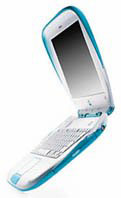 Yet the iBook
clamshell remains one of my favorite portable Macs. The great battery
life, AirPort, rugged feel, and, yep, even the handle are all reasons
it still often makes the WiFi coffee house run though I have an iBook
G4 and Vostro 1400 sitting in the stable. Even with only 192 megs of
RAM, it does pretty well with OS X 10.2, where I usually edit RTF
with TextEdit and run the latest version of Firefox without too much
lag.
Yet the iBook
clamshell remains one of my favorite portable Macs. The great battery
life, AirPort, rugged feel, and, yep, even the handle are all reasons
it still often makes the WiFi coffee house run though I have an iBook
G4 and Vostro 1400 sitting in the stable. Even with only 192 megs of
RAM, it does pretty well with OS X 10.2, where I usually edit RTF
with TextEdit and run the latest version of Firefox without too much
lag.
The clam also does a great job as a print server when it's stuck, immobile, at home. Not bad at all for $100 off of eBay about a year and a half ago. On paper, the machine feels limited. Once you have one to use yourself, the feeling evaporates.
Apple is the best at figuring out when it's time for hardware to start carrying the "legacy" adjective before its name. They pushed USB onto the market in lieu of serial ports, PS/2, and ADB years earlier than it would have been adopted otherwise. They completely eighty-sixed the floppy well before any other consumer hardware producer. The iBook also introduced a little something we call AirPort to the interior of its portables, with a wonderful built-in antennae.
On all counts, Apple was ahead of the game. And heck, let's face it, the clamshell iBook still turns heads. I was working on some writing while eating lunch out last year and had a fellow drop by and ask, "Is that the new Apple laptop?" He acted a little embarrassed when I said that no, it was about eight years old. Clearly, Apple has become more popular since the 'Book's release, and the clamshell's clean design, possibly not as well-known as it could have been (and if we ignore those that insist on reminding us of its resemblance to a toilet seat!), was as far ahead of its time as its feature list.
If I could put my finger exactly on why Apple is so successful in removing technologies before what seems to be their due time, I suspect I'd be sitting in a nice office in Cupertino, but my uncontroversial guess is that Apple gets streamlined functional flow. Their hardware isn't a Swiss army knife; they're more like Gerber's single-blade folding knives that concentrate on doing their primary purpose without compromise.
In 1999, basing the iBook on wireless and USB were two bets that both won big. Eliminating the floppy was overdue. In a strange yin-yang, USB was not only the new serial port but the new and superior floppy drive port to boot. Ethernet and a modem are nice, but AirPort is what I use over 90% of the time today, even with machines that have the first two as options.
USB and 802.11 are the two technologies of 2008. Apple had them in the bag nearly a decade prior, and nobody's complaining too loudly about their clamshells' longevity these days.
The same is true of optical drives now as it was floppies at the turn of the century. How often do you really use an optical drive? Installing new games and operating systems, perhaps? Ripping audio CDs? Watching DVDs?
Consider how often your typical consumer does the first two and, more importantly, where. Installing software is often an online venture today. Even Microsoft is selling Office as a download. When does one install from optical media? Not too often, and usually at home. Welcome to Remote Disc.
What about watching DVDs? Well, let me invite you to the iTunes Movie Store, says our host Mr. Jobs. It's not that movies from the Store are necessarily a better solution than DVDs (and soon Blu-ray), it's that Apple needs to be able to argue that iTunes movies are an equal or better solution.
The Air puts their design money where their mouth is. With today's home Internet speeds, movies are following music online. End result? Good-bye optical drive. Hello, skinny as sin computer. The Air is the practical proof of concept that wireless networking will dethrone physical digital media. (Cue Yael Naim here.)
Initially, I thought the Air was an overpriced joke, a means of exploiting Mac users that are more interested in sexy and cool than practical tech specs. I've changed my mind. The Air sports some impressive hardware for $1,800. As Rob Griffiths of Macworld remarked, "If . . . you value performance over size and features, then the MacBook Air is a bargain." With a fast Core Duo, 1280 x 800 resolution, and a full-sized keyboard, I suspect that we'll be seeing Charles writing an article titled, "Getting the Most Out of the MacBook Air" in eight or ten years for an audience as big &endash; and likely bigger &endash; than the one he had for iBooks just a short time ago.
If my experience with the iBook 300 is any indication, it and the Air are both cleverly designed, single-purpose road warriors whose limitations will be much more obvious to those who don't buy them than for those who do.
Share your perspective on the Mac by emailing with "My Turn" as your subject.
Join us on Facebook, follow us on Twitter or Google+, or subscribe to our RSS news feed
Today's Links
- Mac of the Day: PowerBook 1400, introduced 1996.10.01. Considered by many the best pre-G3 PowerBook with a small footprint and great keyboard.
- Support Low End Mac
Recent Content
About LEM Support Usage Privacy Contact
Follow Low End Mac on Twitter
Join Low End Mac on Facebook
Favorite Sites
MacSurfer
Cult of Mac
Shrine of Apple
MacInTouch
MyAppleMenu
InfoMac
The Mac Observer
Accelerate Your Mac
RetroMacCast
The Vintage Mac Museum
Deal Brothers
DealMac
Mac2Sell
Mac Driver Museum
JAG's House
System 6 Heaven
System 7 Today
the pickle's Low-End Mac FAQ
Affiliates
Amazon.com
The iTunes Store
PC Connection Express
Macgo Blu-ray Player
Parallels Desktop for Mac
eBay

