
Mac USB & FireWire
Aiwa TD-UM8000 USB Tape Drive
Donovan Watts - 1999.09.24
For years I've used and wrestled with backup units of all varieties: internal tape drives, parallel port tape backups, SCSI tape drives, and good old backing up to floppy.
Having climbed the Mac chain over the years, I consider myself a
newcomer when it comes to USB - but ever since I got my Blue G3 I've wholeheartedly embraced the port. As
such, I was excited to hear about the U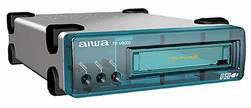 SB tape backup unit recently introduced by
Aiwa. My Mac desperately needed backing up so I quickly ordered one
from Onsale for $228.05. The unit
does not come with a tape cartridge so I picked one up at the local
Office Depot for $32 (after a ten dollar rebate).
SB tape backup unit recently introduced by
Aiwa. My Mac desperately needed backing up so I quickly ordered one
from Onsale for $228.05. The unit
does not come with a tape cartridge so I picked one up at the local
Office Depot for $32 (after a ten dollar rebate).
A week later, the package arrived at my door. As I ripped open the box in anticipation, I was impressed by the attention to detail Aiwa has placed into the packaging and design of this product. The box boldly claims that the tape drive is for Mac owners to "Save Big, Save Different." Included in the box are the tape drive, a USB cable, and Retrospect - topnotch backup application on CD-ROM.
Installation is a two step process. First, I installed Retrospect. After a restart, I was ready to connect the tape drive. To their credit, Aiwa included a generous length of AC power cord; simply plug it in, turn on the power switch, and connect the unit to your Mac with the supplied USB cable.
Retrospect's EasyScript wizard builds a complete backup schedule for you. For my particular situation, it created a daily backup routine, alternating weekly between two StorageSets, and backing up every three weeks to new media.
Each tape can hold up to 8 GB compressed, or 4 GB uncompressed. Most iMacs and G3s have 4 to 6 GB hard drives, and they all have USB ports, so this unit is perfectly suited for owners of these machines. This unit does not have hardware compression. Instead, it depends on software compression to achieve a possible maximum compression of 8 GB. Retrospect handles the software compression, but the amount of information you can fit on each tape will depend on the type of files you are backing up. If your hard drive is full of files which are already compressed, like mine (which is stuffed with MP3 files) don't expect to get the full 8 GB.
Like clockwork, at exactly 2 a.m. every morning, Retrospect starts up, retensions the tape, and backs up all files which have changed since the last backup. Here's an excerpt from the log:
      Retrospect version USB Travan Edition 4.1Ai
	autolaunch at 9/8/1999 2:00 AM
+       Retrospect Driver Update, version 1.7A

+       Normal Backup using EasyScript Backup at 9/8/1999 2:00 AM
	To StorageSet Daily Backup BÉ

-       9/8/1999 2:00:41 AM: Copying HD
	9/8/1999 2.10.35 AM: Comparing HD
	       File ÒDesktop Pictures PrefsÓ: different resource size (set: 1152, vol: 1142)
	9/8/1999 2:14:49 AM: 1 execution errors
	       Completed: 265 files, 153.2 MB, with 29% compression
	       Performance: 42.9 MB/minute (40.6 copy, 45.5 compare)
	       Duration: 00:14:08 (00.07.00 idle/loading/preparing)

	9/8/1999 2:14:50 AM: 1 execution errors
	Total performance: 42.9 MB/minute with 29% compression
	Total duration: 00:14:09 (00.07.01 idle/loading/preparing)
	Quit at 9/8/1999 2:14 AM
To be sure that Retrospect was truly backing up my files, I tested the Aiwa unit by restoring a folder I call "Mission Critical." This folder contains all the applications that are essential to my business. I've included the log below. Basically, restoring files took much longer than backing them up, but I don't plan on restoring too often, so that's all right with me. After the operation I launched a few of the restored files to verify that they did, indeed, work.
Æ      Retrospect version USB Travan Edition 4.1Ai
	launch at 9/20/1999 9:39 PM
+       Retrospect Driver Update, version 1.7A

+       Executing Restore from Backup at 9/20/1999 9:41 PM
	To Volume HDÉ

-       9/20/1999 9:41:21 PM: Restoring from Daily Backup B
	9/20/1999 10.25:48 PM: Execution completed successfully
	       Completed: 1875 files, 208.4 MB
	       Performance: 8.0 MB/minute
	       Duration: 00:44:27 (00:18:39 idle/loading/preparing)
Things I like about the tape backup unit include the durable silver case with a translucent blue front cover and the four rubber feet - which makes for an easy landing. You can place the unit horizontally or vertically (NOTE: the manual cautions against placing the unit with its bottom or the LED side facing upward). There are three status lights on the front to let you know the unit is working.
The TD-UM8000 isn't the fastest backup unit on the market, nor is it the quietest. Since I'm usually asleep while Retrospect is dutifully backing up my files, I don't even notice the speed factor. The sound that emanates from this device is the biggest drawback. It is the loudest piece of hardware in my office, so I usually keep it turned off during the day while I'm working.
If you have a Mac with a USB port and are looking for a good backup solution, I highly recommend the Aiwa TD-UM8000 External Tape Drive.
Hardware Requirements
Apple Power Mac G3 or iMac equipped with the following:
- a USB Port
- a CD-ROM drive or DVD-ROM drive to install the backup software
- at least 4 MB of actual memory space and a minimum 4 MB free space on a hard disk
Operating System Requirements
- Mac OS 8.1 or later
Note, if you are using an iMac with Mac OS 8.1, you will need to download the iMac Update 1.0 software from the Apple Web Site and install it in your iMac.
Comments from the Publisher
First, a hearty thanks to Donovan for writing this review. I've been looking forward to it since we first discussed his results on the Retro-Talk email list. Backup is something very important - and usually very cumbersome. With today's multi-gigabyte hard drives, solutions such as Zip, CD-R, CD-RW, and even DVD-RAM don't cut it. The best solution is one that can back up your entire drive or network to a single tape.
As a Macintosh information systems manager, I have overseen network backup using Retrospect for years. Over our 10Base-T ethernet network, we sometimes break 60 MB/min. backing up our fastest computers to our Blue G3 backup server equipped with a $2,000 AIT Wide-SCSI tape drive. (Backup of the server's internal hard drive can exceed 170 MB/min.)
The backup speeds Donovan achieved over USB using data compression are impressive: 40.6 MB/min. writing data to tape. That means you could backup 4 GB of data in just over an hour and a half - plus another 80 minutes or so to verify the data on the tape.
His 29% compression is typical of the hardware compression we see on our network, so the 4 GB cartridge should be able to store about 5.2 GB of data. (The 8 GB "compressed capacity" of the tape is a very optimistic rating.)
In terms of USB bandwidth, data comparison ran at 45.5 MB/min. Since this data was compressed by 29%, that means the compressed data was moving at about 35 MB/min., which is the highest USB throughput I've seen reported to date. Doing the required math, we have a measured throughput of 4.7 Mbps - 39% of the rated bandwidth of USB. (See The Truth About USB Speed for more on USB throughput.)
- Dan Knight, publisher, Low End Mac
NOTE: Aiwa has discontinued this tape drive. Tech support is handled by a company called TLSI. Their phone number is 888-297-3004.
Manufacturers and distributors: Interested in having your product reviewed? Please read our review policy.
About LEM Support Usage Privacy Contact
Follow Low End Mac on Twitter
Join Low End Mac on Facebook
Favorite Sites
MacSurfer
Cult of Mac
Shrine of Apple
MacInTouch
MyAppleMenu
InfoMac
The Mac Observer
Accelerate Your Mac
RetroMacCast
The Vintage Mac Museum
Deal Brothers
DealMac
Mac2Sell
Mac Driver Museum
JAG's House
System 6 Heaven
System 7 Today
the pickle's Low-End Mac FAQ
Affiliates
Amazon.com
The iTunes Store
PC Connection Express
Macgo Blu-ray Player
Parallels Desktop for Mac
eBay

