
Until May 1998, the Mac world was pretty much oblivious regarding the Universal Serial Bus (USB) found on many Windows computers.
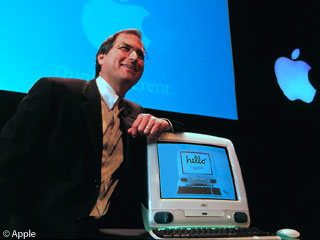 When Steve Jobs announced the iMac in mid-May, he told the world it would have no ADB ports for the mouse and keyboard; no Mac serial ports for printers, modems, and LocalTalk; and no SCSI port for connecting external drives.
Where the first Mac had two serial ports, the iMac would have two Universal Serial Bus (USB)* ports.
 Apple was going USB, and we Mac users didn’t know what to think.
Although Microsoft, Intel, and their partners had created USB and were seeing it built into many Wintel computers, the simple fact was that USB was a bust. Nobody seemed to have any printers, modems, scanners, disk drives, game controllers, mice, keyboards, joysticks, or other devices that actually plugged into the USB ports built into so many contemporary PCs.
Steve Jobs threw down the gauntlet. If you wanted to sell to the iMac market, you had three months to create USB devices.
The USB Specification
USB is like ADB on steroids. Both were designed as inexpensive extensible buses, although at approximately 154 bytes-per-second (Bps), ADB is excruciatingly slow compared to USB. Still, ADB could support up to seven devices, as long as they didn’t require too much power (500 mA maximum on the bus, with a keyboard typically using 85-100 mA). There were even ADB modems, although the were only 2400 bps.
Like ADB, USB supplies power to devices (also 500 mA maximum, with 100 mA typical for a mouse or keyboard), although some devices need more power than USB provides. USB also goes beyond ADB: it can manage 127 devices (vs. 16 with a practical limit of 3), allows powered hubs, and lets you hot-plug and unplug peripherals without shutting down the computer.
Then there’s speed. ADB throughput is about 12 kbps. Apple’s standard RS-422 serial ports support 230.4 kbps for LocalTalk. “Full speed” USB has 12,000 kbps (12 Mbps) of bandwidth.
That compares favorably with almost all serial protocols, including 10 Mbps ethernet.
The Real World
The USB promise is 12 Mbps throughput, but does anything actually deliver it?
Thus far, the answer appears to be no.
In an article about Macworld Expo last year, Henry Norr writes:
“…the sustained transfer rate for the Mac (USB) version [of the SparQ drive] will be 0.7 MB/sec. That’s even slower than the parallel port version, which has a sustained rate of 0.9 MB/sec and a burst rate of 2 MB/sec.”
Converted to megabits per second, that put the USB SparQ drive at 5.6 Mbps – about half the rated bandwidth of USB. But then again, that’s the manufacturer’s specification, not a benchmark result.
Things have scarcely improved since then.
- A member of the Retro-Talk email list reported 31 MB/min. backing up to the USB Aiwa tape drive. That’s just 4.2 Mbps. (Update: See Donovan Watts’ review of the Aiwa TD-UM8000 USB tape drive, which shows a 10% higher throughput of 4.7 Mbps.)
- A review on The iMac.com of the McPower case for turning an IDE drive into an external USB drive reported a throughput of 0.64 MBps (megabytes per second) or 5.1 Mbps.
- Iomega rates its USB Zip with a sustained transfer rate of 1.2 MBps or 9.6 Mbps, but no review reports nearly that throughput. A benchmark on Microtech’s site shows USB performance of 163 KBps (1.3 Mbps) for the Iomega USB Zip drive and 198 KBps (1.6 Mbps) for Microtech’s drive.
- A review of the Imation SuperDisk 2x shows sustained rates of 0.7 MBps (5.6 Mpbs), among the best speeds yet seen on USB.
Over time, it’s been found that the maximum throughput rate of a USB device is approximately 70% of total bandwidth, so 12 Mbps bandwidth translates to a real world maximum of roughly 8.4 Mbps or 1.05 MBps. (For the historically minded, that’s about half as fast as SCSI on the 1986 Mac Plus and about one-fifth of the speed SCSI-1 allows.)
This also explains why reviews of USB CD-R warn against burning CDs at more than 2x speed. Going to 4x is 600 Kbps – more bandwidth than may be available on the Universal Serial Bus when other devices – such as mice and keyboards – are present! (The CD-Recordable FAQ says, “USB recorders work fine at 4x when connected directly to the computer. You may need to reduce speed to 2x if you use a hub.”
- Update 1999.12.01: One reader has written to confirm this. Using a Power Mac G3 and Sony Spressa USB CD-RW drive, he can burn reliably at 2x, but every attempt at 4x fails – whether connected to a hub or directly to the computer. CharisMac (which makes Discribe) says it is a bandwidth problem with USB.
In reviewing the Que! CD-Rewritable, MacCentral notes, “Data and audio CDs can be recorded from your Mac’s internal CD-ROM or DVD-ROM drive to the QUE! drive at 1x or 2x speeds only. This is due to the slow nature of the USB interface.” Other reviews, linked on Que’s Press Room page, note the same thing – you can’t record CD-R or CD-RW reliably at 4x.
Note that this is a limitation of USB, not of the Que! drive in particular.
You’ll probably never see a USB DVD player. USB is only providing about 4-6 Mbps, but DVD needs over 10 Mbps, which it simply cannot provide.
Conclusion
Different benchmarks will yield slightly different numbers, but it’s quite clear that the expected 12 Mbps performance of USB remains an unfilled promise. In mid 1999, no real world test showed even half that throughput, whether the item being tested was a hard drive, Zip drive, SuperDisk drive, or tape drive.
In the real world, consider USB a 5-6 Mbps standard for now. Perhaps future drivers will improve throughput (Apple has version 1.3 in prerelease), but for moving large quantities of data, USB is slow.
The original SCSI protocol was a lot faster. The Macintosh SE can support throughput of 5.2 Mbps, about the same as USB provides today. The Mac II, introduced at the same time as the SE, supports throughput to 11 Mbps – but that was really possible.
And since then, various SCSI standards and implementations have become even faster.
There has been some talk of USB 2, an even faster USB protocol that would be backward compatible with older USB hardware, but I don’t think that’s a good idea.
Why not? First, because USB doesn’t seem to provide promised bandwidth. Why should we expect a faster version to do any better?
Second, because Apple has a better idea.
FireWire currently supports bandwidths of 100, 200, and 400 Mbps – eight to 32 times as fast as USB’s theoretical maximum. The Blue & White G3 already has FireWire ports; rumors are the next iMac will have it, too.
Instead of revising USB, which is adequate for many things, the computer industry should stick with USB as a low speed bus for input devices, floppy drives, etc., but promote FireWire for hard drives, removable media drives, tape drives, and other devices that can outpace the bandwidth of USB.
Now that we know USB’s limitations, we should learn to live with them – and move forward with FireWire as our high speed bus.
* Throughout this article, we are discussing USB 1.1, which was the first widely used version of the protocol. USB 2.0 arrived in April 2002 with 480 Mbps of bandwidth, USB 3.o came in November 2008 offering 5 Gbps of bandwidth, and USB 3.1 raised the bar to 10 Gbps bandwidth in January 2013.
Further Reading
- How fast is fast?, Dan Knight, Online Tech Journal, 1999.07.19. Compares theoretical bandwidth of USB, SCSI, FireWire, and more.
- USB users may face bandwidth problems, InfoWorld, 12998.06.08.
- USB compared to other ports, MacSpeedZone
- SCSI throughput, Mac Online Tech Journal. Historical overview of SCSI, including real world and theoretical throughput rates.
- Introduction to FireWire, Online Tech Journal.
- FireWire a form of SCSI, Alex Timbol, Online Tech Journal. Explains how FireWire grew out of the SCSI standard.
Keywords: #usbbandwidth #usbspeed
Short link: http://goo.gl/TiD6vy
searchword: usbtruth
