
Welcome to Macintosh
Classic Macintosh Veterans
Hooked on Classics (Classic Macs, That Is)
- 2009.02.02
Many moments in life aren't eventful in terms of eureka moments, but there are those few moments when something happens in your life that becomes a game changer. For many of us, in terms of computing, the first Macintosh (along with its many successors) changed our lives.
In this series, I'll be interviewing . . . well . . . you.
Behind every Macintosh user, there's a story. The story tells when they first saw a Macintosh, how they felt when they first used one, their first ever Macintosh, and what about it changed their lives. Macintosh users are a unique breed. It's a huge melting pot of different cultures, attitudes, and viewpoints on life. But there's one common thread that brings us all together, if only in spirit: We are Macintosh users. This is especially true of the old guard, the ones who early on saw the enormous potential in what would eventually be the way we all use computers today.
This spirit is especially prevalent within the 68k Macintosh Liberation Army. This is a forum where people from all around the world congregate to talk about their love of these Classic Macs.* I consider these people more like a second family. It's a very tight-knit group of people who are dedicated and united in the cause of saving Classic Macs from untimely doom. This series will be centered mostly around interviewing people from 68kMLA, but it will also include anyone and everyone who has a story to tell about their Classic Macs.
This series will be called Classic Macintosh Veterans. These are the people who made the Macintosh and helped it grow. Without them, the Macintosh wouldn't have gotten where it is today. To you all, I salute you!
To kick off this new series, the first person I'll be interviewing is John Meshelany Jr. otherwise known as gobabushka on 68kMLA.
Tommy: Tell me, John, what was your first experience with a Macintosh?
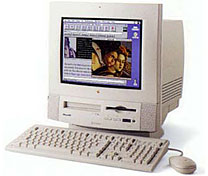 John: My first experience
with a Macintosh was in kindergarten, and they were Power Mac 5200 series machines.
John: My first experience
with a Macintosh was in kindergarten, and they were Power Mac 5200 series machines.
Tommy: What was that moment like for you?
John: They were brand new, and I thought that they were so cool, because before that I had never really seen computers. (I couldn't play with them at the time, because I was in time out, as I remember!)
Tommy: When did you get the feeling, "I need to have a Macintosh"?
John: Probably when I was able to get such a good deal on my beloved PowerBook from a teacher. I got that machine, and it was my main computer for over two years!
 Tommy: What was the first
Macintosh you ever owned, new or used?
Tommy: What was the first
Macintosh you ever owned, new or used?
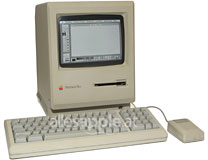
John: The first Mac that I ever owned was a Mac Plus; I loved that machine. Unfortunately, my father made me throw it out, because he has never seen the value of old computers. I did finally get another Mac Plus, this one complete with a box and packaging!
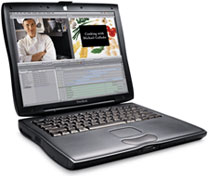
Seeing as I don't own my first Mac anymore, I do have a favorite Mac that has been extensively upgraded though, it's my PowerBook Pismo.
 Tommy: How have you upgraded this Macintosh over the
years?
Tommy: How have you upgraded this Macintosh over the
years?
John: That poor thing has gone through two screens, a complete rebuild, along with your standard upgrades like 1 GB of RAM and a 40 GB hard drive.
Tommy: How does Macintosh fit in with your life work and personally?
John: Right now, I am trying to install OSXx86 on my current PC laptop, so I can make the experience just a tad more bearable.
Tommy: What do you do for a living, and how does Macintosh help you?
John: I work at a computer shop in Rockledge, Florida, called Ingenious Technology. I am the administrative assistant. I am also one of the more knowledgeable people in the shop when it comes to Macs.
Tommy: Have you managed to get others to try Macintosh based on your experiences?
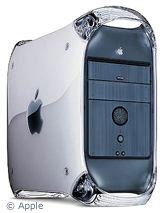 John: I have managed to show a couple of my friends
about Macs, and when they sit down to it, they realize that. I also
sold a couple a Power Mac
G4 Sawtooth a couple of years ago, and they love it!
John: I have managed to show a couple of my friends
about Macs, and when they sit down to it, they realize that. I also
sold a couple a Power Mac
G4 Sawtooth a couple of years ago, and they love it!
Tommy: What Macintoshes' are in your personal collection?
John: Let's see, I've got a Mac Plus, my PowerBook Pismo, a PowerBook 1400, and some PowerBook 100 series machines that don't want to play nice! :P
Tommy: Has there been a Macintosh that has eluded you in your collector's quest?
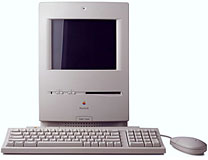 John: By far that would have
to be the Color
Classic. I saw one once, but alas, it had a broken screen. (I
almost cried!)
John: By far that would have
to be the Color
Classic. I saw one once, but alas, it had a broken screen. (I
almost cried!)
Tommy: What advice would you give those who are on the fence about Macintosh?
John: I would suggest that those on the fence go to an Apple Store and just try one! My opinion is that if they see the beauty of the Mac OS, they will definitely want to switch. I would also suggest that they read sites like the 68kMLA and Low End Mac.
Tommy: Thanks, John. I really appreciate you taking the time to talk with us.
John: Thanks for giving me an opportunity like this!
If you'd like to be interviewed as part of the Classic Macintosh
Veterans series, drop me a line at thomas (at) lowendmac (dot) com.

* At Low End Mac, we define Classic Macs as those that can run the Classic Mac OS natively, whether by booting into it directly or using the Mac OS X Classic environment. ed
Join us on Facebook, follow us on Twitter or Google+, or subscribe to our RSS news feed
Today's Links
- Mac of the Day: Performa 5200, introduced 1995.04. The first PowerPC all-in-one was also one of the worst Macs ever made.
- Support Low End Mac

