

Low End Mac Reader Specials
TypeStyler 11 is now in the Mac App Store!! -- Special Introductory Price of $59.95!! -- To Buy From The Mac App Store Click Here Now!! Or buy direct
from Strider Software.
Don't install Parallels to play poker online! Poker Mac will show you how to download and install a native Mac poker and Mac Casino applications in minutes.
Low End Mac on the Palm
![]() |
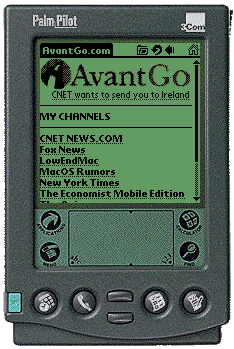
Jonathan Ploudre ran a Palm emulator on his Mac so he could send me these screen shots. Now I know what AvantGo and Low End Mac look like on the Palm - keep reading and you will, too. Click on AvantGo from your main menu and here's the homepage you'll see. (At the top right you can see the home button that brings you back to AvantGo, as well as the back button.) Note how Jonathan has Low End Mac as his third channel, even ahead of MacOS Rumors and the New York Times. (Oh, alright, they are listed alphabetically!) |
![]() |
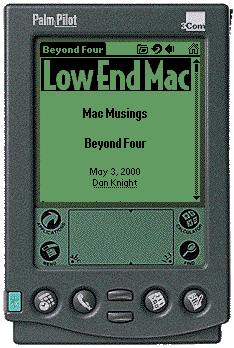
Tap once to open up Low End Mac, then choose your article. Here's the top of an article. You can see the narrow scroll bar on the right - and how comfortably the Low End Mac logo fits the screen. Just scroll down to read the text. The typeface looks very legible. (Did you know the Palm OS team was inspired by the Macintosh?) It's a good thing I try to edit for short paragraphs. You can easily see why our regular layout would not work at all on the Palm. |
![]() |
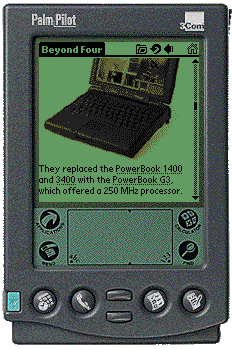
Here's what graphics look like on the PalmPilot. Not bad for dropping a photograph to four shades of gray! |
Join us on Facebook. Follow us on Twitter.
Recent Online Tech Journal Columns
- Optimized Software Builds Bring Out the Best in Your Mac, 2009.06.30. Applications compiled for your Mac's CPU can load more quickly and run faster than ones compiled for universal use.
- Low End Mac's Safe Sleep FAQ, 2009.06.15. What is Safe Sleep mode? Which Macs support it? How can you enable or disable it? And more.
- The Original Macintosh, 2009.01.12. An in-depth look at the original Macintosh and how it shaped future Macs.
- More in the Online Tech Journal index.
Links for the Day
- Mac of the Day: Macintosh Portable, introduced 1989.09.20. The nearly 16 lb. behemoth was innovative but not a smashing success.
- February 13 in LEM history: 01: Layoffs may hurt Mac market - 02: Unix for the Mac - Rage against the Macintosh - 03: Options to move data from PCs to Macs - 04: Low cost RAM for older 'Books - 06: Apple, IBM, and Intel - 07: Picking the right cheap computer, new or used - 08: I needed to find an older Mac
- Support Low End Mac
Recent Content on Low End Mac
- Fix Home Button Delay, Tablet the Ultimate Mobile PC, iPad Notebook a Possibility, and More, iOS News Review, 2012.02.10. Also using your iPad at work, two photo editors, a new iPad text editor, Macally's magnetic iPad 2 stand, and more.
- White MacBook Goes End-of-Life, Logitech Touch Mouse Supports Gestures, Firmware Updates, and More, The 'Book Review, 2012.02.10. Also MacBook Air better than any Ultrabook, docks for MacBook Pro models, Intel offers improved SSDs, and more.
- Mac and iOS Browsers: Options Galore, Freeware Forum, 2012.02.10. Safari is adequate on Mac and great on iOS, but the range of good alternatives is stunning. LEM writers share their favorites.
- Apple's Support Lead Shipping, Smartphones Outsell PCs, OS X Ported to ARM by Intern, and More, Mac News Review, 2012.02.10. Also the power of Tex-Edit Plus, Google and Twitter are already censoring the Web, Snow Leopard Security Update, and more.
- LogMeIn: Remote Screen Sharing for the Rest of Us, Alan Zisman, Zis Mac, 2012.02.09. Configuring the Mac's built-in screen sharing to work over the Internet can be difficult or impossible. LogMeIn makes it easy.
- 15 Years Ago Motorola Unveiled the PowerPC G3, Low End Mac Round Table, 2012.02.06. The G3 processor was optimized for real world Mac software and made a big leap forward in efficiency.
- Don't Kill Caps Lock, Learning to Love the iOS Keyboard, and an Adaptive iPad Keyboard, Charles W. Moore, Miscellaneous Ramblings, 2012.02.06. The Caps Lock key has a useful function, the iPad's keyboard really is useful, and checking out an adaptive keyboard for the iPad.
- More links in our archive.


