
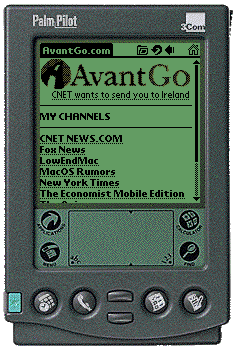
2000 – I received an interesting request from a regular site visitor last week: Jonathan Ploudre wrote me on May 3, wondered if I could adapt the new content on Low End Mac for AvantGo. For those, like me, who don’t own a Palm or Windows CE device, the first question is: What’s AvantGo?
AvantGo is a company that works with sites that wish to make their content available to users of Palm, Windows CE, and web-enabled phones. AvantGo channels require a subset of HTML: no frames, for instance. Also, no support for animated graphics.
Update: AvantGo ended its service on June 30, 2009. Low End Mac no longer has printer-friendly or portable-friendly pages; now that we use WordPress, we have a mobile-friendly version of the site that should automatically display on smartphones.
No problem here – Low End Mac has always tried to design for the lowest common denominator, or very close to it. There are some compromises if you’re viewing the site with 1-bit video, as on the SE/30 and Classic II, but as long as you’ve got a 640 x 480 or larger screen that can display at least 256 colors, you’re set. And if you’ve got a text browser, you don’t miss out on much, since most of our graphics are not essential.

I wanted to create a subset of Low End Mac that would work nicely on the Palm, which has a 160 x 160 pixel display. I designed a simple graphic with just four shades of gray, since that’s all the b&w Palm can display. The GIF is a whopping 657 bytes!
Then I created a stripped version of the home page, which sits at <http://lowendmac.com/home.htm>. It is very simple and contains only links to portable-friendly pages on Low End Mac. As I write this, that’s already 10 articles, covering topics as diverse as SETIonMac: Team 6100, LoveLetter Virus Spreading Like Wildfire, and Virtuality: The Natives Are Growing Restless.
Because Low End Mac makes heavy use of include files, creating these new versions of new pages isn’t too difficult. I already have the main text in a separate file that’s used by both the regular and printer-friendly versions of the page. For the portable user, I simply created a new template that includes:
- the Low End Mac (LEM) graphic displayed above
- the name of the section of LEM (Virtuality, SETIonMac, etc.)
- a call to include the text of the article
- an icon to return the user to the LEM home page
- a note reminding users that LEM derives its income from ads and asking them to be sure to visit the regular version of the site
 That’s pretty much it. We already use minimal graphics. The only new article I haven’t adapted was the weekly SETI@home overview, which makes heavy use of tables and would not adapt well to such a small screen.
Jonathan Ploudre has been very helpful through this process, since I don’t have a Palm to test pages with. As of Friday, he reported the site weighed in at a minuscule 28 KB. Best of all, over the weekend he emailed me several screen shots using a Palm emulator on his Mac.
Just how does he access Low End Mac, since his Palm doesn’t have an internet connection?
- I hook my PalmPilot to my Mac’s serial port through an adaptor cable that has a cradle for holding the Palm. PalmPilots come with a “HotSync” application that keeps the desktop software and Palm information synchronized. This is part of what makes PalmPilots so cool: You can enter data on your Mac or your Palm, and when you press the hotsync button on your cradle, everything gets intelligently updated in both directions.
The HotSync software has conduits that exchange information for specific programs. AvantGo has a conduit that hotsyncs its minibrowser on the PalmPilot with the Web, so you can take it with you to read at a later time. When you sign up with AvantGo, you set up an account that has official channels. You can also enter web addresses (like Low End Mac) to get other pages. Unfortunately, most sites work horribly with AvantGo, since they have so many graphics, extraneous links, and huge tables. AvantGo can still work, but it ceases to be elegant.
So now all I do to get Low End Mac is press my hotsync button once, and the AvantGo and HotSync software does the rest. That’s convenience!
I’ve done the hard part: I’ve learned how to create pages that are portable-friendly without having to overhaul Low End Mac. In fact, I’ve managed to leverage techniques I was already using for printer-friendly content, which greatly simplified the process.
I’ve written AvantGo to get signed on as an official channel, which means that they will adapt the content more specifically to the various platforms they support – and actively promote it.
It’s a step I hope other Mac websites will take, since it will give our loyal fans the opportunity to download and read our content on the go.
Next: Reading Your Web Log
Our Web Design Series
- Using Include Files
- Site Organization
- Cascading Style Sheets
- Site Graphics
- Web Content To Go
- Reading Your Web Log
- Redirects, Naming Files, and Some Rants
Keywords: #avantgo #webdesign #mobileedition
Short link: https://goo.gl/ncaEgU
