
The Practical Mac
OtterBox Defender: Don't Let Your iPhone 4 Leave Home Without It
- 2010.10.12 - Tip Jar
Rating: 
Oh, the humanity. In my travels over the last few months, I have witnessed firsthand dozens of nearly-new iPhone 4s in various states of destruction.
Every one of them had one thing in common: It either had no case or only had one of those minimalist cases designed solely for appearance. In most instances, the damage was a cracked screen, cracked back glass, or both - all easily preventable with the right case.
For the life of me, I can't figure out why someone would make a $600 or $700 investment and then fail to protect it with $49 worth of insurance? In case you are scratching your head wondering exactly what I am referring to when I mention a "$600 or $700 investment," I reference that new iPhone 4 in your mitts.
"What?" you say, "I only paid $199 (or $299) for this iPhone!"
Did you really? Although you may have only parted with $199 at the time of the transaction, your iPhone did not come with no strings attached. You had to either enter into a two-year contract (if you were not already an AT&T Wireless customer) or, if you were an existing customer, extend your current contract for two more years.
If you are an existing customer, you are only eligible for the subsidized (lower) pricing if you are eligible for an early upgrade. If you are only a few months into your contract, you will have to pay the unsubsidized (higher) price.
For instance, if you buy your new iPhone 4, stick it in your pocket without a proper case, and then sit on it or bang your car door on it and break it, then go to AT&T or Apple to replace it, they will gladly sell you a new iPhone without any additional contract - for $599 or $699.
Protect Your Investment
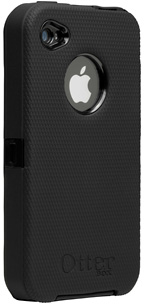 That $599/$699 expense could have been prevented with a $49
investment: the OtterBox Defender.
That $599/$699 expense could have been prevented with a $49
investment: the OtterBox Defender.
Those of you who follow Low End Mac regularly are well aware of my feelings toward this line of cases. I don't feel comfortable using my iPhone or iPod without one of these cases, much less taking either out of the house.
The Defender case for the iPhone 4 improves on the previous model in several areas.
The Defender offers 3 layers of protection:
- Layer 1: Clear protective membrane on screen
- Layer 2: Hi-impact polycarbonate shell
- Layer 3: Durable silicone skin
The first improvement I noticed right away was the new, redesigned protective screen membrane. It goes on much easier than the ones OtterBox (or any company for that matter) has produced in the past. The new design virtually eliminates static and air bubbles. Even now, after two months of use, the screen membrane has not developed that "oil slick" appearance that is so common on screen protectors. It also resists fingerprints much better than other models, with no noticeable degradation of touch sensitivity.
The next step in installation is to place the iPhone into the heart of the protective case system, the two-part high-impact polycarbonate shell. The phone slides into the front half of the case, and then the back snaps on. The inside of the shell is lined with felt, so no need to worry about it scratching the iPhone.
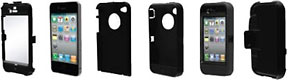 Once the two pieces are together, they don't come apart easily.
Depending on the length of your fingernails and the dexterity of your
fingers, a small screwdriver may be required to assist in lifting the
interlocking tabs if you ever desire to remove the iPhone from the case
(but why would you want to do that?). Finally, the polycarbonate shell
slips into the outer silicone skin for an added degree of "bounce"
protection.
Once the two pieces are together, they don't come apart easily.
Depending on the length of your fingernails and the dexterity of your
fingers, a small screwdriver may be required to assist in lifting the
interlocking tabs if you ever desire to remove the iPhone from the case
(but why would you want to do that?). Finally, the polycarbonate shell
slips into the outer silicone skin for an added degree of "bounce"
protection.
This outer silicone skin is ingeniously designed. There are multiple small silicon tabs that slip into corresponding slots on the polycarbonate shell, requiring a bit of time to install but ensuring a secure fit and making the polycarbonate shell and silicone skin seem as one after installation.
Keeps Dust Out
The best part is that all iPhone features are fully functional with the case installed. Most of the ports are covered with flaps to keep out dust and dirt when they are not in use. Clear protective layers cover the Apple logo on the back of the iPhone, as well as the camera (both front and back), flash, and proximity sensor. I have noticed no degradation in camera image or flash quality with this case.
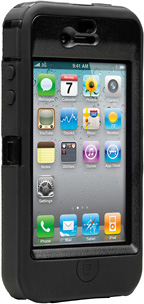 I have also noticed that the Defender 4 does not seem to allow
dust into the case the way most other cases, including the Defender 3,
tend to. OtterBox has clearly invested a lot of time and research into
improving this next generation of the Defender series, with no detail
overlooked.
I have also noticed that the Defender 4 does not seem to allow
dust into the case the way most other cases, including the Defender 3,
tend to. OtterBox has clearly invested a lot of time and research into
improving this next generation of the Defender series, with no detail
overlooked.
Another area that received a complete makeover is the holster. The holster was the Achilles' heel of the Defender case for iPhone 3G/3GS, at least in the beginning. The phone was more likely to fall out than not. Later redesigns improved the reliability greatly, but the case for the Defender 4 takes security to a whole new level. I typically have to use both hands to remove the iPhone from the holster, which is exactly the type of secure grip a holster should have when protecting $600+ cargo. I no longer have any qualms about popping my phone in the holster and going out and about. I know it will still be there when I come home.
Unless your iPhone is permanently mounted to your desk and never leaves the house or office, you will need this case someday. Better to buy it now, before you regret waiting. By my calculation, you will have saved at least $549.
The Defender for iPhone 4 is available in Black, Red, or Zircon Blue
with a MSRP of $49.95. Though it can be easy to forget with this sturdy
case in your hand, remember: the case is not waterproof!

Purchase Link
- Currently available from Amazon.com in black for $29.99 with free shipping.
Join us on Facebook, follow us on Twitter or Google+, or subscribe to our RSS news feed
Steve Watkins is the Vice President for Information Technology for a mid-sized bank, an attorney, and an Army Reserve JAG on extended active duty. He has been a Mac user for about 12 years. He has owned some PCs along the way - but always came back to the Mac. If you find his articles helpful, please consider making a donation to his tip jar.
Today's Links
- Mac of the Day: PowerBook 1400, introduced 1996.10.01. Considered by many the best pre-G3 PowerBook with a small footprint and great keyboard.
- Support Low End Mac
Recent Content
About LEM Support Usage Privacy Contact
Follow Low End Mac on Twitter
Join Low End Mac on Facebook
Favorite Sites
MacSurfer
Cult of Mac
Shrine of Apple
MacInTouch
MyAppleMenu
InfoMac
The Mac Observer
Accelerate Your Mac
RetroMacCast
The Vintage Mac Museum
Deal Brothers
DealMac
Mac2Sell
Mac Driver Museum
JAG's House
System 6 Heaven
System 7 Today
the pickle's Low-End Mac FAQ
Affiliates
Amazon.com
The iTunes Store
PC Connection Express
Macgo Blu-ray Player
Parallels Desktop for Mac
eBay

