
The Practical Mac
Some Mindless Entertainment
- 2001.09.11
It is 7:30 p.m., and I am an hour out of Raleigh, bound for San Jose. It has been a crazy day. I got to work this morning at 7:00 a.m. and worked almost a full day before heading to the airport in Atlanta to catch my flight. I reached Raleigh just in time to get through the door of my San Jose flight.
The craziest part is that in little more than 24 hours I will be leaving San Jose, bound for Raleigh again. San Jose is still over five hours away. Midway is my favorite airline, but the only drawback is that they don't have an in-flight movie - and I sure could use some mindless entertainment right about now.
It is 8:00, and I may have found my entertainment. Seated on the row with me are two hospital IT Directors returning from a conference in Raleigh. They have their trusty Dell notebook computers loaded with Windows 2000. The one seated by me has a DVD player in his notebook, and they brought along their own entertainment: a DVD movie. However, they seem to be having a bit of difficulty making it go.
They have now been trying to start their movie for 30 minutes without success. They have tried rebooting several times. Having to deal with more than my share of PCs loaded with the Redmond OS, I am a little surprised. Generally, one encounters very few problems with Windows PCs that rebooting several times a day won't cure.
As entertaining as this is, it is time for me to get a little work
done if I want to get in that long nap before reaching San Jose.
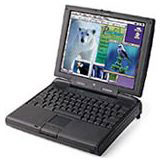 I have pulled out my PowerBook 3400c and started working.
For a brief moment, I am a little embarrassed. Their Dell has a huge
screen; it must be close to 15 inches. This feeling quickly passes. The
3400c's screen is not quite as impressive, but it is working.
I have pulled out my PowerBook 3400c and started working.
For a brief moment, I am a little embarrassed. Their Dell has a huge
screen; it must be close to 15 inches. This feeling quickly passes. The
3400c's screen is not quite as impressive, but it is working.
As my seat mates continue attempting to diagnose the problem with their sick notebook, they periodically shoot glances at me. Or at my PowerBook? I can't be sure. I contemplate volunteering, "Sorry, but the 3400c does not have a DVD drive, otherwise I would be glad to swap with you for the duration of the flight."
I usually take my 3400c on flights instead of my iBook 466, mainly 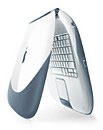 because the 3400c has a smaller footprint and will
easily fit on the tray table. Right now, however, I would love to have
the iBook and be able to offer it to these guys, "Here, why don't you
watch the movie on my Apple computer. Let me try to fix your
Microsoft problem while you enjoy yourselves with my Apple
computer."
because the 3400c has a smaller footprint and will
easily fit on the tray table. Right now, however, I would love to have
the iBook and be able to offer it to these guys, "Here, why don't you
watch the movie on my Apple computer. Let me try to fix your
Microsoft problem while you enjoy yourselves with my Apple
computer."
I decide to keep quiet. This is getting to be quite a hilarious show.
These guys are obviously, to some degree, "hands-on" IT Directors. They are going through the logical troubleshooting steps. They have rebooted the PC, then completely powered it down and turned it back on. The drive spins up and will access a CD placed in it, so it is probably not a hardware issue. They have reinstalled the driver and then the DVD software, but still no movie. After more than 90 minutes of intense work, they decide that the solution must lie in manually editing the registry. How exciting! I am going to see, for free, a show that I would gladly pay good money for!
Well, almost two hours have passed. The registry has been edited. The DVD still doesn't work, and now there is also some sort of "DLL error." To be honest, I am a little disappointed. Most manual registry edits end in a much more exciting manner. Usually, the PC won't even reboot and gives all kinds of cryptic error messages. I am now feeling guilty for so badly wanting to gloat.
After a little over two hours, they have given up. More accurately, the notebook has given up. The battery is dead. My PowerBook has been running only 10 minutes less than their Dell, and my battery indicator is only slightly below 50%. I might also point out that this is the original battery. I am not nearly as jealous of the 15" screen as I was an hour ago.
As I have been sitting here taking all this in, I can't help but think that I could not have scripted a better example to illustrate why I use a Mac at home and why I use a Mac as my primary computer at work [as does my staff] when 95% of the employees my department supports use Windows PCs. For one thing, we can't afford to spend our time fixing our own computers, so we have to use computer that, for lack of a more eloquent term, "Don't need fixin'."
As for home use, after spending all day sending my staff from one fire to the next and usually dispensing the advice, "Just do 'Start>Shut Down>Restart the Computer' and it will be OK," numerous times, the last thing I want to do at home is work on my computer. I have the radical belief that my computer should work for me.
With the exception of installing new software or updating Norton AntiVirus, I honestly can't remember the last time I had to reboot any of my Macs. And I don't use OS X except on a test Mac at work. My PowerBook runs Mac OS 8.6; my Power Mac 7500 and my wife's iMac both run OS 9.1.
There are some who would say that a Mac has no place in the office. These same people, by their statements, must also say that productivity and efficiency have no place in the office.
Why do I use Macs in the office? Because they just work - and they
always play my DVDs. 
About LEM Support Usage Privacy Contact
Follow Low End Mac on Twitter
Join Low End Mac on Facebook
Favorite Sites
MacSurfer
Cult of Mac
Shrine of Apple
MacInTouch
MyAppleMenu
InfoMac
The Mac Observer
Accelerate Your Mac
RetroMacCast
The Vintage Mac Museum
Deal Brothers
DealMac
Mac2Sell
Mac Driver Museum
JAG's House
System 6 Heaven
System 7 Today
the pickle's Low-End Mac FAQ
Affiliates
Amazon.com
The iTunes Store
PC Connection Express
Macgo Blu-ray Player
Parallels Desktop for Mac
eBay

