
Making haste slowly, Apple has moved the fastest Power Mac G5 from 2.0 GHz CPUs in 2003 to 2.5 GHz in 2004, and now to 2.7 GHz in 2005. It’s nice to see Apple squeeze nearly 10% more speed from the G5 – and sad that Apple still can’t deliver the 3.0 GHz G5 that it promised “within a year” when the first Power Mac G5 was introduced.
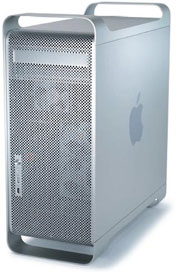 Improvements for 2005 include a 16x SuperDrive (vs. 8x in last year’s model), larger hard drives, improved graphics cards, twice as much video memory, and Mac OS X 10.4 Tiger preinstalled. The once-standard internal modem is now a build-to-order option.
As before, the entry level model uses 64-bit PCI slots and only supports up to 4 GB of RAM vs. PCI-X slots and an 8 GB RAM ceiling in the faster G5s.
The motherboard architecture uses HyperTransport technology. System memory is so fast (400 MHz RAM on a 1.0 to 1.35 GHz bus) that Apple doesn’t bother with a level 3 cache.
A headphone jack, a USB 2.0 port, and a FireWire 400 port are located on the front of the G5 for easy access.
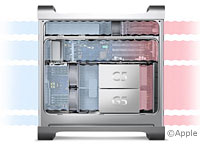 The G5 uses an aluminum enclosure that’s vented in the front and back. The case includes four thermal zones and nine fans to handle cooling, each independently controlled for speed. The 2.7 GHz model uses a liquid cooling system to keep the CPU from overheating.
Note that the 2.0 GHz model is one of Apple’s entry-level G5s, which means it uses 33 MHz PCI slots instead of 133 MHz PCI-X and has 4 memory slots instead of 8.
Power Mac G5 Reliability
Reliability ratings are based on statistics compiled by MacInTouch in June 2006, at which time the dual-core Power Mac G5 models had only been on the market for 8 months. Letter grades are based on failure rate: A = 0-6%, B = 7-12%, C = 13-18%, D = 19-24%, and F = 25% or higher. We also note the two components that failed most often.
- G5/2.3 dual (April 2005), B- (11%, logicboard, power supply)
- G5/2.7 dual (April 2005), D (22%, logicboard, power supply)
In each generation, except for the final dual-core one, the fastest model is the least reliable, while the second-fastest is the most reliable. Logicboards are the most expensive component to repair, followed by the power supply. Hard drives, optical drives, video cards, and RAM can be replaced inexpensively using third-party components.
- Got a G3, G4, or G5 Power Mac? Join G-List.
- Our Mac OS 9 Group is for those using Mac OS 9, either natively or in Classic Mode.
- Our Tiger Group is for those using Mac OS X 10.4.
- Our Leopard Group is for those using Mac OS X 10.5 and 10.6.
Details
- introduced 2005.04.27 with 2.0 GHz dual 256 MB/80 GB at $1,999; 2.3 GHz dual 512 MB/160 GB at $2,499; and 2.7 GHz dual 512 MB/160 GB at $2,999,; scheduled for August shipment; replaced 2005.10.19 by Power Mac G5 Dual and G5 Quad
- Supported Mac OS Versions
- CPU: 2.0/2.3/2.7 GHz PowerPC 970
- Bus: 1.0 GHz/1.15/1.35 GHz (half CPU speed)
- Performance:
- Geekbench 2 (Leoapard): 2251 (2.7 GHz), 1906 (2.3 GHz), 1704 (2.0 GHz)
- Geekbench 2 (Tiger): 2269 (2.7 GHz), 2066 (2.3 GHz), 1828 (2.0 GHz)
- L2 cache: 512 KB on-chip L2 cache
- L3 cache: none
- RAM: 512 MB, expandable to 4 GB or 8 GB using pairs of 400 MHz PC3200 DDR RAM (4 RAM slots in 2.0 GHz model, 8 slots in faster ones)
- Video: AGP 8x
- 2.0/2.3 GHz: ATI Radeon 9600
- 2.7 GHz: ATI Radeon 9650
- ATI Radeon 9800 XT with 256 MB optional
- VRAM: 128 MB (9600) or 256 MB (Radeon 9650)
- Hard drive bus: 1.5 Gbps SATA Rev. 1
- Hard drive: 160/250 Serial ATA (SATA) 7200 rpm
- Optical drive bus: ATA/100 bus
- optical drive: 16x SuperDrive on Ultra ATA/100 bus
- 3 33 MHz 64-bit PCI slots on 2.0 GHz model
3 64-bit PCI-X slots on faster models (two 100 MHz, one 133 MHz) - internal 56k v.92 modem, optional
- Microphone: standard 3.5mm minijack, compatible with line-level input, not compatible with Apple’s PlainTalk microphone
- FireWire: 2 FW400 ports (1 on front), 1 FW800 port
- USB: 3 USB 2.0 ports (1 on front)
- Ethernet: 10/100/gigabit
- WiFi: antenna and connector for 802.11g AirPort Extreme card
- Bluetooth: built in, optional antenna
- PRAM battery: 3V CR2032 lithium
- power supply: 450W 661-2903 for 2.0 and 2.3 GHz, 600W 661-2904 for 2.7 GHz
- size (HxWxD): 20.1″ x 8.1″ x 18.7″ (51.1 x 20.6 x 47.5 cm)
- Weight: 39.2 lb. (17.8 kg)
- Gestalt ID: n/a
- PRAM battery: 3.6V half-AA
- Part no.: M9747 (2.0 GHz), M9748 (2.3 GHz), M9749 (2.7 GHz)
Accelerators & Upgrades
- none likely
Online Resources
Keywords: #powermacg5
Short link: http://goo.gl/OZQCDv
searchword: early2005powermacg5




