

Why Text Browsers? MacLynx vs. WannaBe
D. W. Owens - 2003.06.13
My Turn is Low End Mac's column for reader-submitted articles. It's your turn to share your thoughts on all things Mac (or iPhone, iPod, etc.) and write for the Mac web. Email your submission to Dan Knight .
Why use text browsers at all?
They're fast. That's why.
Most of the information flowing over the Internet consists of eye candy the only purpose of which is to make websites more visually attractive. There's nothing wrong with that in itself, but all that eye candy can really slow you down when you're using a graphical browser. Text browsers load faster, have a much smaller RAM footprint, and are often far more stable.
A fringe benefit is that text browsers don't use Java, which eliminates 99% of the advertising encountered on the Net. When you're just interested in text and don't need graphics, or if you have to cope with a 28.8 modem and limited processing power, a text browser may suit your needs splendidly.
When it comes to text browsers, Classic Mac OS users have two choices: David Pierson's WannaBe and Olivier Gutknecht's MacLynx. Both are freeware. Both are fast compared to graphics browsers, especially on older machines, and each has advantages and drawbacks.
WannaBe
In his Miscellaneous Ramblings column of June 2, Charles W. Moore made the case for WannaBe. This browser is definitely worth considering for several reasons.
First, WannaBe is still in development. The MacLynx site hasn't been updated for nearly six years.
Second, WannaBe is fairly easy to learn and use, major points for any user.
Third, unlike MacLynx, WannaBe can open a page in iCab, Internet Explorer, or Netscape Navigator, as well as other browsers. This can be nifty if you're browsing a site and decide the graphics may be worth a peek.
And fourth, it's attractive. That last point may seem frivolous, but utility doesn't necessarily outweigh esthetics. You're probably going to be staring at your browser for hours on end. The mule that pulls your plow may be very useful, but sooner or later you're going to get tired of staring at its backside.
Even so, WannaBe has serious disadvantages compared to MacLynx. Links can't be saved easily, plug-ins are needed for search engines and forms, it can't render tables, and it won't accept cookies. The last can be a serious inconvenience if websites you frequently visit make extensive use of cookies.
MacLynx
Those who want a more complete introduction to WannaBe are referred to Moore's column. Others, however, may want to consider what MacLynx has to offer. While MacLynx is slower than WannaBe, it's still much faster than any graphical browser, and it's a good deal more flexible than WannaBe.
Because MacLynx is a Mac port of a Unix application, it's possible to use your keyboard exclusively, which means you can completely dispense with your mouse and give your carpal tunnel problems a rest.
Tables are no problem. FTP transfers require only a touch of the return key or a click of the mouse.
MacLynx doesn't need any tinkering to work with search engines, such as Google and Yahoo, or to create a bookmark file.
You can download MacLynx and use all its features right away without hassling with plug-ins or modifications.
Links, which are bolded, can be saved with a couple of key strokes, and the bookmark file can be opened with a single key stroke.
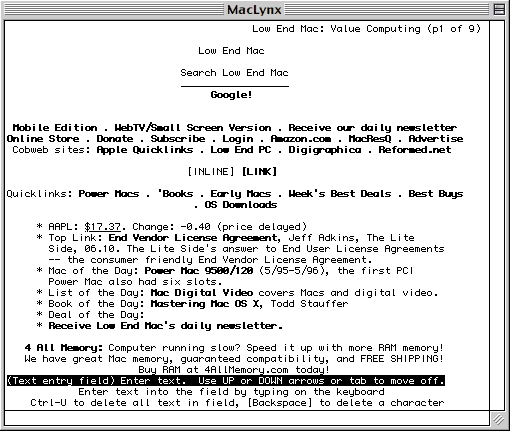
MacLynx even runs in Classic Mode on Mac OS X
Unlike WannaBe, the arrow keys don't need to be used in conjunction with the command and option keys. In fact, MacLynx often requires only one or two keystrokes where WannaBe may require several.
MacLynx runs on a slighter wider range of operating systems. WannaBe requires at least 7.5, though its author speculates that it might run with 7.1 if the Drag Manager and Thread Manager are installed. MacLynx can run with 7.0 (though some features require at least 7.5), which makes MacLynx more useful for older machines.
Unlike WannaBe, plenty of support can be found on the Web. The Lynx help page alone provides lots of basic information and tips any MacLynx user will find useful.
While there are versions for both PPC and 680x0 machines, the 680x0
version has not been thoroughly tested, and Gutknecht warns that it may
be unstable. However, I never had any trouble with it 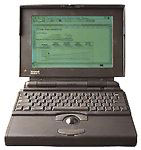 on any of my 680x0 Macs. I've run MacLynx very happily
on machines ranging from a IIcx
and a Powerbook 165 to a 7500 with a G3 processor, using
system software ranging from 7.1 to 8.6.
on any of my 680x0 Macs. I've run MacLynx very happily
on machines ranging from a IIcx
and a Powerbook 165 to a 7500 with a G3 processor, using
system software ranging from 7.1 to 8.6.
MacLynx Drawbacks
This is not to say that MacLynx is without its woes.
Though much faster than any graphical browser, bar none, it's still visibly slower than WannaBe.
MacLynx is no longer being developed or updated, and development halted before support for secure forms was added. The 2.7.1. beta1 version was released in 1997 and is the last one available. Olivier Gutknecht spoke about a future release that might use color, but he apparently went out for coffee and never came back.
Though MacLynx is at least as easy to use as WannaBe once you've gotten used to it, those who aren't familiar with a command line interface will find MacLynx harder to learn. I had to futz around quite a bit before I finally felt comfortable using it.
And no matter how you look at it, the interface is not pretty. The window is basic black-and-white with no options for formatting or customization other than resizing the window. MacLynx is as ugly as the aforementioned mule's behind - but the Volkswagen beetle was ugly, too, and it still got the job done.
Text browsers remain a viable alternative two graphical browsers, especially if you have a slow connection and/or an older machine. Despite a development lapse of almost six years, MacLynx is still a robust application even when competing with much more modern applications. Download it and try it. It just might give your online experience new juice.
Share your perspective on the Mac by emailing with "My Turn" as your subject.
Join us on Facebook, follow us on Twitter or Google+, or subscribe to our RSS news feed
Today's Links
- Mac of the Day: Power Mac G4 Cube, introduced 2000.07.19. Compact, powerful, and attractive with limited expansion and a high initial price doomed the Cube.
- Support Low End Mac
Recent Content
About LEM Support Usage Privacy Contact
Follow Low End Mac on Twitter
Join Low End Mac on Facebook
Favorite Sites
MacSurfer
Cult of Mac
Shrine of Apple
MacInTouch
MyAppleMenu
InfoMac
The Mac Observer
Accelerate Your Mac
RetroMacCast
The Vintage Mac Museum
Deal Brothers
DealMac
Mac2Sell
Mac Driver Museum
JAG's House
System 6 Heaven
System 7 Today
the pickle's Low-End Mac FAQ
Affiliates
Amazon.com
The iTunes Store
PC Connection Express
Macgo Blu-ray Player
Parallels Desktop for Mac
eBay

