
Miscellaneous Ramblings
WannaBe 1.0b14, a Fast, Low-End Web Browser for Almost Any Mac
Charles Moore - 2003.06.02 - Tip Jar
Safari, iCab, Camino, and Mozilla are the Web browsers I use most often these days - at least if we're talking full-featured browsers. However, I probably do about one quarter of my Web-surfing with WannaBe, David T. Pierson's little text-only Web browser for PowerPC or 68k MacOS computers.
I live in a rural area and rarely connect at more than 26,400 kbps. There are no cable or DSL alternatives, so Web-surfing speed here leaves a lot to be desired.
WannaBe is a wanna-have for anyone on a dialup Internet connection who values their time. There are a few other text-only browsers available - Lynx and Links for OS X notably, but they're Unixy and not especially user-friendly. WannaBe is a more Mac-like solution that downloads the text from Web pages in a fraction of the time it takes with even the fastest regular browsers, running in either the classic Mac OS or in Classic Mode under OS X.
David Pierson says that his aim in writing WannaBe was not to create a full-featured browser. He wanted a minimal browser that allowed him to read his favorite web pages each morning without gobbling up several megabytes of RAM (WannaBe requires about 2 MB) and without wasting time waiting for tables to render. WannaBe is quite limited in that it doesn't support images, tables, forms, bookmarks, cookies, and several other standard browser features.
WannaBe's user interface is even more minimalist than, say, SimpleText's, "to keep it lean and fast," says Pierson. Just a plain, white browser window with scroll bars and a URL field. However, it has a surprisingly comprehensive set of features and keyboard shortcuts for serious Web work. WannaBe also downloads page content into text files nicely.
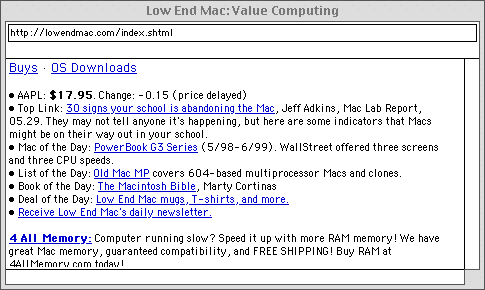
Low End Mac's home page in WannaBe
Using WannaBe is similar to other Web browsers. Blue text represents a hyperlink, which can be accessed by single-clicking. Green text represents a link to embedded images, which can be clicked to download and open in a graphics program.
No pictures, of course, but a lot of the time what I'm after is text content anyway. Pictures are represented as place keeper "/2012/charles-moore-picks-up-a-new-low-end-truck/.lnk" tags You can download images to view in Image Viewer, Preview, or a graphics application by just clicking on the tags. If you need to view of the full page content or hit a page with frames (you can usually also get to the text in frames with WannaBe) or graphics navigation, just select "Open this Page in" from WannaBe's Go menu, and it will open in your choice of seven regular browsers listed (including Netscape, Mozilla, iCab, and IE, but not Safari, alas).
You can also save Web pages as plain text or HTML Source. A Find command allows searching for text strings within a page. Web searches can be done only through plug-in files based on Apple's Internet Search Interface Language (the same plug-ins used by Apple's Sherlock application). WannaBe can handle standard downloads from Web Pages itself. All FTP links are passed to Internet Config. Simply change Internet Config's settings for FTP to your favorite file transfer program or any other web browser ("Helpers"). WannaBe can open ordinary plain text documents as well.
A Find command allows searching for text strings within a page. A Search command allows customizable access to search engines or other web form-enabled pages. (Forms are otherwise not supported - choose the WannaBe help command under the Help menu for more info).
WannaBe's user interface is very spartan to keep it lean and fast, so some features are not readily apparent. They include:
- command-. will cancel any connection associated with the frontmost window. (Canceling is necessary in order to close the window or quit.)
- tab will switch the selection between the URL box at the top of the window and the main text view below.
- command-L will select all the text in the URL box at the top of the window.
- return or enter when the URL box at the top of the window is active will open the URL contained there.
- command-clicking a link will open it in a new window.
- shift-clicking a link will copy its URL to the clipboard.
- option-click will save a linked-to file to disk.
- command-left arrow will go "back".
- command-right arrow will go "forward".
- option-command-left arrow will go "full back".
- option-command-right arrow will go "full forward".
- proxy support is enabled via Internet Config.
WannaBe doesn't have a Bookmarks function of its own, but there are several potential workarounds. The one I use is to keep an alias of my iCab Hotlist file (in the iCab preferences folder) on the Desktop. When you drag the alias to WannaBe, it opens as a column of links, which when Command-clicked take you to the respective bookmarked Web pages.
I've been using WannaBe for several years, through many alpha builds and all 14 of the betas so far. I've found it extremely stable and trouble-free throughout, and recommended it without reservation. The only minor complaint I have is that WannaBe doesn't support the F-key Cut, Copy, Paste shortcuts, from the URL line for instance.
The latest release of WannaBe is 1.0b14
David T. Pierson says, "Since I haven't heard of any problems with WannaBe 1.0b14, I've made it the designated stable version.
"I recommend all WannaBe users upgrade to this version if you haven't already done so. Also, since emails I receive indicate that not everyone is aware of it, please note that you can use WannaBe to search the web and utilize other web forms by using search plug-ins.
"I had a major drive failure recently, so WannaBe development may be stalled until I get more disk space."
Since WannaBe doesn't cost anything and is a pretty small download, there is really little impediment to trying it out. If you're a big formatting and graphics fan, WannaBe is probably not your cup of tea, but if you ever find yourself frustrated waiting for pictures to load so you can view some text, give WannaBe a try. You'll be glad you did.
System Requirements: System 7.5 through Mac OS 9.2.2 (Works well in OS X Classic Mode, too). WannaBe may also run under System 7.1 if the Drag Manager and Thread Manager are installed. It also requires Color QuickDraw, which is available on all PowerPC and 68k Macs except those with the original Motorola 68000 processor. WannaBe requires Internet Config 2.0 or later, which is available thru the WannaBe download page at .
WannaBe is freeware.
The latest version and information regarding WannaBe can be found at the WannaBe home page.
Join us on Facebook, follow us on Twitter or Google+, or subscribe to our RSS news feed
Charles Moore has been a freelance journalist since 1987 and began writing for Mac websites in May 1998. His The Road Warrior column was a regular feature on MacOpinion, he is news editor at Applelinks.com and a columnist at MacPrices.net. If you find his articles helpful, please consider making a donation to his tip jar.
Links for the Day
- Mac of the Day: Power Mac G5 (Early 2005), (2005.04.27. At 2.7 GHz, the fastest G5 CPU Apple ever used, also 16x SuperDrive and it shipped with OS X 10.4 Tiger.)
- Support Low End Mac
Recent Content
About LEM Support Usage Privacy Contact
Follow Low End Mac on Twitter
Join Low End Mac on Facebook
Favorite Sites
MacSurfer
Cult of Mac
Shrine of Apple
MacInTouch
MyAppleMenu
InfoMac
The Mac Observer
Accelerate Your Mac
RetroMacCast
The Vintage Mac Museum
Deal Brothers
DealMac
Mac2Sell
Mac Driver Museum
JAG's House
System 6 Heaven
System 7 Today
the pickle's Low-End Mac FAQ
Affiliates
Amazon.com
The iTunes Store
PC Connection Express
Macgo Blu-ray Player
Parallels Desktop for Mac
eBay

