

The Underrated PowerBook 190
- 2002.07.01
My Turn is Low End Mac's column for reader-submitted articles. It's your turn to share your thoughts on all things Mac (or iPhone, iPod, etc.) and write for the Mac web. Email your submission to Dan Knight .
As I so often like to do on my days off, here I am at the University of Texas, composing on one of my six PowerBooks. This one is one of my two newly acquired PowerBook 190s, both of which cost me about $70 total at my favorite used computer store here in Austin, and a veritable Macintosh heaven, Goodwill Computerworks. I have literally spent a small fortune at this wonderful store since it opened in 1997.
Anyway, the two 190s I picked up are a bit different. They are both the base grayscale models, but they differ in a couple of ways. This one (my fave of the two) has a rather small 4 MB of RAM, a 500 MB hard drive, and is running Mac OS 7.5.3, which I installed, as there was no OS installed when I bought it.
The really interesting difference with this 190 is that it must be a
European market model, as the # key has the 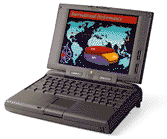 British pound symbol, £. I have also noticed that
while both 190s are black, the case for this one is a bit darker than
my other 190. Also, the battery holds about a three hour charge on this
'Book, whereas the other 190's battery will not hold any charge.
British pound symbol, £. I have also noticed that
while both 190s are black, the case for this one is a bit darker than
my other 190. Also, the battery holds about a three hour charge on this
'Book, whereas the other 190's battery will not hold any charge.
My other PowerBook 190 has 8 MB of RAM, a 500 MB hard drive, and is also running OS 7.5.3, which I installed, as again, there was no OS installed when I got it. It's also missing the port door on the back, which is no biggie, as those kind of get in the way anyway.
Now, after setting up both PowerBooks and playing with them for a bit, I must say I really like the 5300/190 form factor a lot. My other PowerBooks include a 1400, a 145B, a 170, and a 100.
I used a non-PPC, stock 540c for two years, from early 2000 to early 2002, until I gave it to an artist friend who really wanted a PowerBook. The 540c was, and still is, a great PowerBook. In fact, I'd rank it among the best PowerBooks ever made. I really enjoyed mine and used it a lot, and it has a good home - plus if I get lonely, I can still visit it!
This may be getting off the point, but these are, in my opinion, the
best PowerBooks: the 100 (groundbreaking in 1991, way 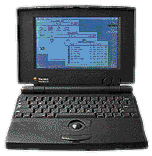 cooler looking than the rest of the 100-series - except
for the 190, that is!), the Duos (all, but especially the 2300), the 500-series (all - I'd
love a 550c, as I'm sure
many of us would), the 5300/190-series (okay, it's not really a
"series", but they do share the same case design and other features),
the 1400 (hands down, my favorite PowerBook to date), the 2400c (gotta love the size!), and
the PowerBook G3 (2000),
the "Pismo" (on my Mac "wish list").
cooler looking than the rest of the 100-series - except
for the 190, that is!), the Duos (all, but especially the 2300), the 500-series (all - I'd
love a 550c, as I'm sure
many of us would), the 5300/190-series (okay, it's not really a
"series", but they do share the same case design and other features),
the 1400 (hands down, my favorite PowerBook to date), the 2400c (gotta love the size!), and
the PowerBook G3 (2000),
the "Pismo" (on my Mac "wish list").
I know I should have mentioned the Titanium PowerBook G4, but there's something about the look of it I just don't like. I know it's the best PowerBook Apple has made, but I just like the older designs I have mentioned better.
Anyway, returning to the PowerBook 190. Wow, this is a cool Mac! I know it was viewed as something of a disappointment at the time of its release in late August 1995, coming on the heels of the feature-laden 500-series and also being equated with the problematic 5300-series, but it is a PowerBook that holds up well. It has a cool black case, a nice grayscale screen (I've never seen the 190cs in person, yet), a nice small footprint, and light weight.
My other PowerBooks (save for my way cool 100) seem to weigh significantly more then these 190s. The other cool thing is the IR ports on the 5300/190 PBs. I hope to soon use my 190s together via this feature, sort of a "mini 190 wireless network"!
The PowerBook 190 may not be the most "cutting edge" laptop that Apple has made, and it has been nearly seven years since it was introduced (and nearly six since it was discontinued), but it seems to me that it was (and is) a very underrated PowerBook. (This also goes for the much-maligned and beleaguered 5300-series.)
For basic portable computing tasks, the PowerBook 190 is a more than capable Mac, even in 2002. It also still looks cool, whereas some of the older PowerBooks are showing their age, especially the 140-180 models and, I hate to say this, the 520-540c models (the all-black 550c seems to escape that, somehow).
Of course, all PowerBooks are inherently much cooler than their PC laptop equivalents, so I still enjoy using my 100, 145B, and 170, as well. For a total cash outlay of $70 for these two 190s, I cannot complain! My advice: if you find a clean, working PB 190 for relatively cheap, snap it up; you won't be disappointed!
Share your perspective on the Mac by emailing with "My Turn" as your subject.
Join us on Facebook, follow us on Twitter or Google+, or subscribe to our RSS news feed
Today's Links
- Mac of the Day: Power Mac G5 (Early 2005), (2005.04.27. At 2.7 GHz, the fastest G5 CPU Apple ever used, also 16x SuperDrive and it shipped with OS X 10.4 Tiger.)
- Support Low End Mac
Recent Content
About LEM Support Usage Privacy Contact
Follow Low End Mac on Twitter
Join Low End Mac on Facebook
Favorite Sites
MacSurfer
Cult of Mac
Shrine of Apple
MacInTouch
MyAppleMenu
InfoMac
The Mac Observer
Accelerate Your Mac
RetroMacCast
The Vintage Mac Museum
Deal Brothers
DealMac
Mac2Sell
Mac Driver Museum
JAG's House
System 6 Heaven
System 7 Today
the pickle's Low-End Mac FAQ
Affiliates
Amazon.com
The iTunes Store
PC Connection Express
Macgo Blu-ray Player
Parallels Desktop for Mac
eBay

