
Charles Moore's Mailbag
Routine Maintenance Tasks Still Run Inconsistently in Leopard
Charles Moore - 2008.09.10 - Tip Jar
Last week we reported that Apple seemed to have fixed issues with routine maintenance tasks not running consistently with the release of Mac OS X 10.5 "Leopard". This is an issue that Apple tried to address in OS X 10.4, improved significantly in 10.4.3, but still hasn't fully resolved according to our latest reader reports.
Console Logs Found in /var/log, not /Library/Logs
Maintenance Tasks May Not Run Automatically in Leopard
Routine Maintenance Tasks Supposedly Fixed in 10.4.3
Console Logs Found in /var/log, not /Library/Logs
From Carl:
Thanks to feedback from several readers, we now know that Mac OS X 10.5 "Leopard" will run the routine maintenance cron jobs after startup or waking up if the computer was off or asleep when they were scheduled. Earlier versions of Mac OS X do not do this.
From Jeff:
It's easily verified that the daily, weekly, and monthly cron scripts will run at the first available time slot if they miss their overnight executing times by opening "Console.app" from /Applications/Utilities and looking at the entries for "daily.out," "weekly.out," and "monthly.out" under "/Library/Logs."
Hmmm? I opened my Console.app and found no such files named daily.out, weekly.out, etc. under ~/Library/Logs or /Library/Logs
However, I did find them listed under /var/log
- My daily log shows a last run on June 28th at 06:32:16 AST 2008
- Weekly logs show: June 28th at the same time. Previous runs were May 18th, Feb 23rd, Jan 26th
- Monthly on: May 18th at 08:15:48 AST 2008. Previously, May 1st, Feb 23rd, Jan 18th,
This I would guess is because I use Cocktail to run the scripts? I see a Cocktail log in ~/Library/Logs/Cocktail.log - has Cocktail somehow disabled the Apple mtce scripts?
Carl
- OS X 10.5.4
- Dual 2 GHz PowerPC G5
- 4 GB DDR SDRAM
Hi Carl,
It seems that even with Leopard, it's a sometimes it works and sometimes it doesn't dynamic.
I'm doubtful (although I can't say with 100 percent certainty) that Cocktail has disabled the automatic routine. My suspicion would be that it's still buggy in OS X 10.5.
I find that running the cron tasks with OnyX from time to time isn't much of a hardship.
Charles
Maintenance Tasks May Not Run Automatically in Leopard
From Arno:
Dear Charles,
In your Only Leopard Runs Routine Maintenance Tasks after Startup or Waking from Sleep, you write:
Thanks to feedback from several readers, we now know that Mac OS X 10.5 "Leopard" will run the routine maintenance cron jobs after startup or waking up if the computer was off or asleep when they were scheduled.
Unfortunately this is not true. My iMac with Leopard is down during the night and part of the day, and a study of the log files shows that the scripts are executed only in the rare cases that I leave my computer running during the night. My guess is that the maintenance routines will run after waking up, but not after a startup.
Those who are not in for the console can use the dashboard widget Maintidget to monitor the maintenance scripts.
Best wishes,
Arno
Hi Arno,
Yes, based on your note and further input from other readers, it's evident that one shouldn't count on the maintenance scripts being run automatically outside of the prescribed overnight hours even with Leopard.
Thanks for the tip about Maintiget - of which I was not previously aware.
Charles
Maintiget 1.4 - The OS X Maintenance Scripts Widget
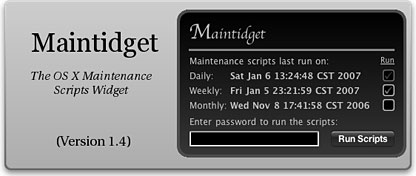
Maintidget (Maintenance Scripts Widget) is a Dashboard Widget which provides the following functions:
- Display the last time the daily, weekly, and monthly OS X Maintenance Scripts (a.k.a. Cron Tasks) were run.
- Run the OS X Maintenance Scripts on demand. Just enter your administrator password and click the Run Scripts button. Maintidget is the first Dashboard Widget to provide this feature.
Now you can keep track of when your Mac runs the scripts, and force them to run in case you need to. These maintenance scripts perform the following tasks:
Daily:
- Removes old logs
- Removes scratch and junk files (temporary files)
- Removes scratch fax files
- Backs up NetInfo data
- Checks subsystem status
- Cleans mail queue
- Gathers account statistics
- Cleans up asl.log
- Rotates logs: system
Weekly:
- Rebuilds locate database
- Rebuilds whatis database
- Rotates logs: ftp, lpr, mail, netinfo, ipfw, ppp, secure
Monthly:
- Runs login accounting
- Rotates logs: wtmp, install, fax
New in version 1.1:
- Select which scripts you want to run (the daily script must be run at all times).
New in version 1.2:
- Now works with admin accounts that don't have a password assigned.
New in version 1.3:
- Click Daily/Weekly/Monthly labels to open logs in the Console. Check for updates using a link in the widget. Slick redesign by Jason Jacques that includes multiple skins!
New in version 1.4:
- New authentication logic should reduce false-negatives when running scripts and should also help those with blank passwords.
Known Issues:
Refreshing the widget while the scripts are running will remove the "Scripts Running..." message.
The utility Cocktail does not write to the log files when the scripts are run, so this widget cannot detect when Cocktail ran the scripts.
Maintidget must be run from an administrator account to run the scripts. However the last run display works on all accounts.
Note that the weekly script can take a long time to run (up to 10 minutes depending on the speed of the computer). During this time the "Running Scripts" message will show in Maintidget. Please do not refresh the widget during this time, as this will remove the "Running Scripts" message which will automatically remove itself when the scripts are finished running.
System Requirements: Mac OS X 10.4.3 or later
System support: PPC or Intel
Freeware
Routine Maintenance Tasks Supposedly Fixed in 10.4.3
From Andrew Main
Charles,
See Randy Singer's Macintosh OS X Routine Maintenance page for a discussion of this.
The maintenance scripts were supposedly automated in 10.4, but it turned out there were bugs in the implementation, and it didn't work reliably. So then the bugs were supposedly fixed in 10.4.3, but careful observers noted it still didn't work right. So a utility like Macaroni (which until recently I've been installing on every Mac I set up) or Anacron (thanks for the reminder) is necessary for complete certainty pre-10.5.
Apparently the system was finally fixed in 10.5, wherein, despite the linked Apple article's listing 10.5 as one of the "Products Affected", it really, finally does seem to work. So far as anyone has been able to tell. As usual, Apple has neither confirmed nor denied, so far as I've heard.
The real treasure of the Macintosh world is the Mac user community, who stay on top of stuff like this that Apple doesn't see fit to let us in on.
Andrew
Hi Andrew,
So true. Thanks for the info and link.
It seems the jury is still out on whether cron job reliability has been fixed in Leopard.
Charles
Join us on Facebook, follow us on Twitter or Google+, or subscribe to our RSS news feed
Charles Moore has been a freelance journalist since 1987 and began writing for Mac websites in May 1998. His The Road Warrior column was a regular feature on MacOpinion, he is news editor at Applelinks.com and a columnist at MacPrices.net. If you find his articles helpful, please consider making a donation to his tip jar.
Links for the Day
- Mac of the Day: Performa 5200, introduced 1995.04. The first PowerPC all-in-one was also one of the worst Macs ever made.
- Support Low End Mac
Recent Content
About LEM Support Usage Privacy Contact
Follow Low End Mac on Twitter
Join Low End Mac on Facebook
Favorite Sites
MacSurfer
Cult of Mac
Shrine of Apple
MacInTouch
MyAppleMenu
InfoMac
The Mac Observer
Accelerate Your Mac
RetroMacCast
The Vintage Mac Museum
Deal Brothers
DealMac
Mac2Sell
Mac Driver Museum
JAG's House
System 6 Heaven
System 7 Today
the pickle's Low-End Mac FAQ
Affiliates
Amazon.com
The iTunes Store
PC Connection Express
Macgo Blu-ray Player
Parallels Desktop for Mac
eBay

