
Empowered
Add Desktop Trash and a Classic Apple Menu to OS X for Free
- 2006.11.13
My first experience with OS X was running Jaguar (OS X 10.2.x) on a beige G3 desktop. I skipped right over Panther (10.3.x), and I've been using Tiger (10.4.x) on a Mac mini for the past year.
Like some, I've tried to remain optimistic that Apple would eventually get around to reviving the two things I miss most from the classic Mac interface: the Apple Menu and a desktop trash can. But with Leopard poised to pounce, these two features appear to only be slipping farther into obscurity.
I've never gotten on board with the OS X Dock. Yes, you can add your drives to the Dock and have hierarchical access to all of your files, but it doesn't work as quickly and effortlessly as the Apple Menu did. If you choose to show the Dock all of the time, it wastes valuable screen real estate. If you hide it, it springs up and gets in the way every time you mouse to the bottom or side of the screen. When you want to discard something, why should you have to drag it to the bottom of the screen and wait for the Dock to appear?
The Dock has always struck me as a remarkably clumsy and ill conceived feature for Apple to incorporate into an otherwise elegant OS.
XMenu: The Apple Menu for OS X
Recently, I was perusing the list of third-party OS X software offerings published on Apple's website and found a freeware app from Devon Technologies called XMenu.
Unlike most other menu add-ons, XMenu is free. The best thing about it is that it works beautifully. It provides exactly the same hierarchical access that the old Apple Menu did. There's even an equivalent to the Apple Menu Items folder where you can put aliases to your drives, apps, folders, and files.
 Unlike the original Apple Menu, XMenu is activated from
the right side of the menu bar, and you can choose to place either
before or after the Menu Extras.
Unlike the original Apple Menu, XMenu is activated from
the right side of the menu bar, and you can choose to place either
before or after the Menu Extras.
XMenu surpasses the old Apple Menu, by allowing you to choose from five "global" menus to display. The default is "Applications". You may also choose "Developer", "Home", "Documents", or "User-Defined", alone or in combinations. A separate icon for each menu will show in the Menu Bar. You also have control over the order items are sorted by, whether to show custom or generic icons and their size and appearance.
To install XMenu, you drag it from a disk image to a location of your choice on your disk. You can have it activate on startup by opening your Accounts preferences and adding it to your Login Items, or you launch it manually as needed.
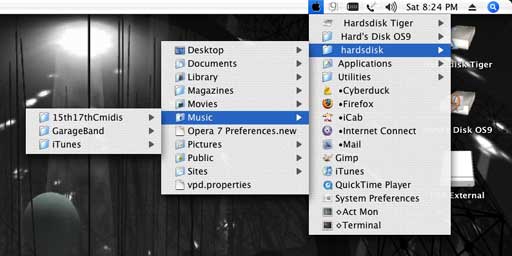
To make XMenu behave just like the Classic Apple menu, I chose "User-Defined" from the preferences and added my aliases to the XMenu folder in my User Library (for more details see the directions). Since I wanted XMenu's icon to be something reminiscent of the old Apple menu, I opened the Resources of the application and exchanged the Userdefined.icns file for a more Apple-like one of my own creation (which you can download from my server).
Desktop Trash
I've tried a few script tricks and shareware applications that are meant to replicate the classic desktop trash can, including Bin-it and Trash X. Each of these had it's own bugs or peculiarities, so I didn't feel inclined to continue using any of them.
The best free solution I've found doesn't require installing anything or writing any scripts. This simple option has been posted on Mac OS X Hints for OS X versions prior to Tiger, but it required some minor work in the Terminal.
With OS X 10.4.8, I found that a workaround was necessary. Tiger users will need one of several utilities that can make your invisible System files visible. In my case, I used TinkerTool.
When all of your files are visible, go into your User folder and find the directory called ".Trash". Make an alias of this folder and move the alias to the Desktop. Unless you like the clutter of seeing all of your invisible files, make them invisible again after you've done this. Don't move or delete any invisible items unless you are sure you have a really good reason for doing it.
 You can now
rename the .Trash alias "Trash" (or anything you want). You can
also change the folder icon to one of your choice. There are many
to choose from, available with a web search or browse the
selections at the Icon
Factory and InterfaceLIFT.
You can now
rename the .Trash alias "Trash" (or anything you want). You can
also change the folder icon to one of your choice. There are many
to choose from, available with a web search or browse the
selections at the Icon
Factory and InterfaceLIFT.
Drawbacks
This quick and easy Trash substitute has two drawbacks. First, the alias won't accept files from disks other than the one the invisible .Trash folder resides on. If you move a file from another disk to this alias, it will be copied to the Trash, leaving the original right where it was.
Second, you can't eject a disk by dragging it to the alias. It will just put an alias of the disk in the Trash. If you usually use cmd-E to eject disks anyway, this won't bother you much.
These problems are also shared by the folder-action script hack, mentioned in Mac mini Hacks & Mods for Dummies.
Since this alias method doesn't involve using a separate folder that is scripted to move items to the Trash, it has the advantage of working much faster. You also won't ever have to open the folder to move a file that got deposited there when the script failed to work as expected.
Neither of these methods allows for separate full and empty Trash icons.
Uses
 Besides
using the .Trash alias for deleting files and folders from the
desktop, It really shines as a Finder window Trash shortcut. Just
drag the alias to the sidebar in any window. You will lose the
custom name and icon but gain a nice convenience. This provides a
single click and drag operation, compared to the click to highlight
the file, then click on "Delete" option.
Besides
using the .Trash alias for deleting files and folders from the
desktop, It really shines as a Finder window Trash shortcut. Just
drag the alias to the sidebar in any window. You will lose the
custom name and icon but gain a nice convenience. This provides a
single click and drag operation, compared to the click to highlight
the file, then click on "Delete" option.
Now that you have restored an Apple Menu and Desktop Trash to your OS X Mac, you can strip your Dock down to a bare minimum. Even if you could get rid of it, you will still need to use the System Trash occasionally.
The only other items you may need to include are the
applications that you typically drop files on to launch. For me,
these include image and sound editors, text editors, and browsers.
This has reduced the width of the Dock on my screen from full width
to just half that size. If you're willing to keep some aliases on
the Desktop, you can reduce the Dock to just the size of the Finder
and Trash icons. 
Further Reading
About LEM Support Usage Privacy Contact
Follow Low End Mac on Twitter
Join Low End Mac on Facebook
Favorite Sites
MacSurfer
Cult of Mac
Shrine of Apple
MacInTouch
MyAppleMenu
InfoMac
The Mac Observer
Accelerate Your Mac
RetroMacCast
The Vintage Mac Museum
Deal Brothers
DealMac
Mac2Sell
Mac Driver Museum
JAG's House
System 6 Heaven
System 7 Today
the pickle's Low-End Mac FAQ
Affiliates
Amazon.com
The iTunes Store
PC Connection Express
Macgo Blu-ray Player
Parallels Desktop for Mac
eBay

